Posts tagged with "camera"

tap tap tap Releases Voices 2, Camera+ Is Coming Back

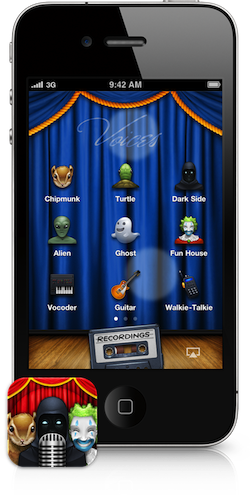
After months of silence following the removal of Camera+ from the App Store, the folks at well-known development team tap tap tap announced the released of a brand new version of Voices for iPhone, a popular app we reviewed last year that allows you apply cool effect to your voice using the device’s mic.

Together with the release of Voices 2, tap tap tap has confirmed Camera+ isn’t dead, they have a new version “in review” at Apple’s App Review Team and it should go live in the App Store any day now. They call the new Camera+ “their biggest update yet”. I’m kind of intrigued.

As for Voices 2, the developers have added Retina graphics for the iPhone 4 and iPod touch 4th gen, the possibility to edit recordings by choosing different effects, 9 new effects, AirPlay support. The new effects include stuff like “computer” (nice Macintosh in there!), “walkie-talkie” and “underwater”. I’m pretty sure the app will turn out to be the perfect prank maker this holiday season, especially with AirPlay support that will let me record creepy messages and send them through the house on Christmas day.

Voices 2 is a free update for existing users and you can check out the new effect by visiting this link, where the devs have set up a demo section to test the new features. You can buy Voices 2 for $0.99 in the App Store.

That said, while Voices 2 “sounds” like a great update, I’m looking forward to seeing the new Camera+ now. I loved the app, one day it was there and then it was gone. I used it on a daily basis, then the iOS updates Apple release made it unusable. Hopefully, Camera+ will be released before Thursday.

Access Extra Content and Perks

Founded in 2015, Club MacStories has delivered exclusive content every week for nearly a decade.

What started with weekly and monthly email newsletters has blossomed into a family of memberships designed for every MacStories fan.

Learn more here and from our Club FAQs.

Club MacStories: Weekly and monthly newsletters via email and the web that are brimming with apps, tips, automation workflows, longform writing, early access to the MacStories Unwind podcast, periodic giveaways, and more;

Club MacStories+: Everything that Club MacStories offers, plus an active Discord community, advanced search and custom RSS features for exploring the Club’s entire back catalog, bonus columns, and dozens of app discounts;

Club Premier: All of the above and AppStories+, an extended version of our flagship podcast that’s delivered early, ad-free, and in high-bitrate audio.

Learn more here and from our Club FAQs.


iPhone 3G Still The Top Camera On Flickr

iPhone 3G Still The Top Camera On Flickr

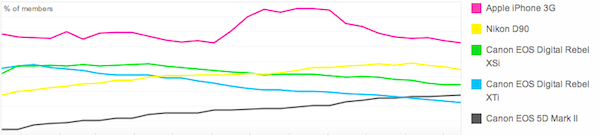
Slightly updated charts from Flickr, which show Apple’s iPhone 3G (released in 2008) is still the most popular camera amongst Flickr users. The iPhone 4 had a rapid increase in the Popular Cameraphones category, with the 3GS stable right below it.

Also, notice the perfect symmetry in the iPhone 4 and 3GS charts.

Permalink

MacStories’ 2010 Roundup: Top 10 iPhone Camera Apps

Welcome to MacStories’ 2010 Roundup! In this new series, we collect the best apps released in 2010 for the Mac, iPhone and iPad — apps we have probably already featured here on MacStories. Only the best apps, both free and paid. Apps you shouldn’t miss.

For me, 2010 has been the year of the iPhone camera. Since I bought my French iPhone 4 in June for a whoppin’ 800 Euros (don’t even ask), I’ve been shooting photos like never before. Sure, I know the iPhone 4 is still a cellphone and true photos don’t come from a phone. I’m OK with that. But I’m no professional photographer, nor am I willing to spend money on a DSLR. Not because I disdain quality – I just wouldn’t know how to fully enjoy it. Leave the pro tools to the pros. For me, the iPhone 4’s camera is good enough to provide photos I like, that I can share with my friends.

Which leads me to apps. The iPhone’s camera is great, but apps are there to enrich its functionalities. Apps with built-in sharing features, apps with filters, apps that rely on their own social network, apps aimed at completely replacing the stock camera…the selection is huge. Photography is, indeed, one of the best selling categories in the App Store right behind Games and Productivity.

In this second MacStories’ 2010 Roundup we have collected the top 10 camera apps for the iPhone. We could have included more, but these are the ones that in our opinion really stood out this year. So head past the break, and check out the Top 10 iPhone Camera Apps of 2010. Read more

Access Extra Content and Perks

Founded in 2015, Club MacStories has delivered exclusive content every week for nearly a decade.

What started with weekly and monthly email newsletters has blossomed into a family of memberships designed for every MacStories fan.

Learn more here and from our Club FAQs.

Club MacStories: Weekly and monthly newsletters via email and the web that are brimming with apps, tips, automation workflows, longform writing, early access to the MacStories Unwind podcast, periodic giveaways, and more;

Club MacStories+: Everything that Club MacStories offers, plus an active Discord community, advanced search and custom RSS features for exploring the Club’s entire back catalog, bonus columns, and dozens of app discounts;

Club Premier: All of the above and AppStories+, an extended version of our flagship podcast that’s delivered early, ad-free, and in high-bitrate audio.

Learn more here and from our Club FAQs.


DailyBooth Launches Brand New iPhone App

DailyBooth, the popular service that allows you to communicate with your friends by sharing pictures of yourself, launched a completely new version of their official iPhone app. The app reaches version 2.0 and it’s been redesigned from the group up to accomodate new features, an improved UI and Facebook / Twitter sharing.

It’s available now as a free download here. Read more

Access Extra Content and Perks

Founded in 2015, Club MacStories has delivered exclusive content every week for nearly a decade.

What started with weekly and monthly email newsletters has blossomed into a family of memberships designed for every MacStories fan.

Learn more here and from our Club FAQs.

Club MacStories: Weekly and monthly newsletters via email and the web that are brimming with apps, tips, automation workflows, longform writing, early access to the MacStories Unwind podcast, periodic giveaways, and more;

Club MacStories+: Everything that Club MacStories offers, plus an active Discord community, advanced search and custom RSS features for exploring the Club’s entire back catalog, bonus columns, and dozens of app discounts;

Club Premier: All of the above and AppStories+, an extended version of our flagship podcast that’s delivered early, ad-free, and in high-bitrate audio.

Learn more here and from our Club FAQs.


Lab For iPhone Gives You Detailed Information About Your Photos

They say the best camera is the one that’s always with you, and there’s no question the iPhone has become the best camera for many. The iPhone is with us all the time, whether we’re on the go checking in venues with Foursquare or at home, playing some Infinity Blade. Most of all, the iPhone 4 provides a very good picture quality thanks to its 5MP lens, flash and shiny Retina Display.

If the iPhone is our best camera, there must be an app for that, right? I’m not talking about the stock camera app, or the hundreds of popular alternatives such as CameraBag, Instagram or Camera+. I’m talking about an app to manage photos shot with the best camera.

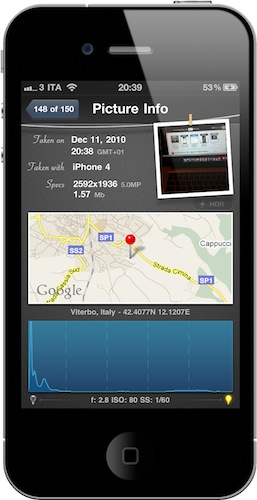
We have talked about Cydia tweaks that enable photo management on-device through some Camera Roll hacks. Lab by LateNiteSoft is a $0.99 app available here that, with a beautiful user interface, provides a quick and elegant way to scroll through your photos and get detailed information about them. Read more

Access Extra Content and Perks

Founded in 2015, Club MacStories has delivered exclusive content every week for nearly a decade.

What started with weekly and monthly email newsletters has blossomed into a family of memberships designed for every MacStories fan.

Learn more here and from our Club FAQs.

Club MacStories: Weekly and monthly newsletters via email and the web that are brimming with apps, tips, automation workflows, longform writing, early access to the MacStories Unwind podcast, periodic giveaways, and more;

Club MacStories+: Everything that Club MacStories offers, plus an active Discord community, advanced search and custom RSS features for exploring the Club’s entire back catalog, bonus columns, and dozens of app discounts;

Club Premier: All of the above and AppStories+, an extended version of our flagship podcast that’s delivered early, ad-free, and in high-bitrate audio.

Learn more here and from our Club FAQs.


An iPad Rear Camera: Practical or Impractical?

Earlier today we learned some Chinese accessory makers are already producing cases for an alleged “iPad 2”. Those cases clearly show a hole in the upper left corner for a rear-facing camera in the next iteration of Apple’s tablet.

“A rear-facing camera? On the iPad? How are you supposed to take pictures holding the iPad like a camera?” These are the questions going around today, the same we heard when the iPad was first unveiled and, well, lacked a camera.

iLounge posted a follow-up to their iPad 2 case story, with some predictions / hope about a possible rear camera in the iPad 2:

One thing that Apple really enjoys doing, particularly when adding a new feature to an established product, is rethinking things that competitors have attempted and gotten wrong.
[…]
Picture the iPad in an advertisement looking out at a landscape, snapping a picture, and having the landscape appear on the iPad’s screen looking just like what your eyes were seeing. Or taking a picture of a group of people, then becoming the picture frame for the family photo. It sounds so simple, but with the lens on the back of the Galaxy Tab (or, say, the iPod touch) right now, that’s not happening.

Read more

Access Extra Content and Perks

Founded in 2015, Club MacStories has delivered exclusive content every week for nearly a decade.

What started with weekly and monthly email newsletters has blossomed into a family of memberships designed for every MacStories fan.

Learn more here and from our Club FAQs.

Club MacStories: Weekly and monthly newsletters via email and the web that are brimming with apps, tips, automation workflows, longform writing, early access to the MacStories Unwind podcast, periodic giveaways, and more;

Club MacStories+: Everything that Club MacStories offers, plus an active Discord community, advanced search and custom RSS features for exploring the Club’s entire back catalog, bonus columns, and dozens of app discounts;

Club Premier: All of the above and AppStories+, an extended version of our flagship podcast that’s delivered early, ad-free, and in high-bitrate audio.

Learn more here and from our Club FAQs.


Is This The First iPad 2 Case? With A Rear Camera?

Just in time for today’s iPad 2 rumors, iLounge is reporting of what appears to be the first case the second-generation iPad. Produced by Chinese manufacturer Shenzhen MacTop Electronics, the case shows a slightly more curved design and a hole in the upper left corner for a rear camera. Just like on the iPhone 4 and iPod Touch 4th generation.

The Crystal Case for iPad 2nd Generation also sports a much bigger speaker opening. There have been rumors recently about the “iPad 2” coming out in less than 100 days, and there also have been rumors about Apple willing to implement features such as FaceTime camera, Retina Display and a USB port on it. But a rear camera? That’d be new to the rumor mill. Read more

Access Extra Content and Perks

Founded in 2015, Club MacStories has delivered exclusive content every week for nearly a decade.

What started with weekly and monthly email newsletters has blossomed into a family of memberships designed for every MacStories fan.

Learn more here and from our Club FAQs.

Club MacStories: Weekly and monthly newsletters via email and the web that are brimming with apps, tips, automation workflows, longform writing, early access to the MacStories Unwind podcast, periodic giveaways, and more;

Club MacStories+: Everything that Club MacStories offers, plus an active Discord community, advanced search and custom RSS features for exploring the Club’s entire back catalog, bonus columns, and dozens of app discounts;

Club Premier: All of the above and AppStories+, an extended version of our flagship podcast that’s delivered early, ad-free, and in high-bitrate audio.

Learn more here and from our Club FAQs.


Color Splash Gives A “Dramatic Look” To Your Photos

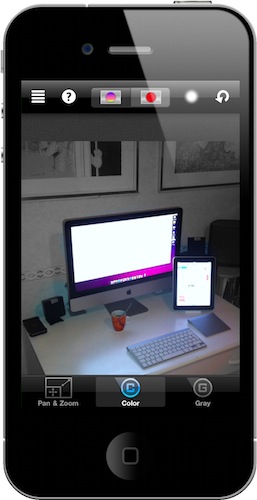
I downloaded this app last week, but it turns out it’s been around for quite some months in the App Store. Color Splash by Pocket Pixels is a simple iPhone app (iPad version is available, too) that allows you to highlight areas of a photo to make them black & white, or make the entire photo black & white and only set certain areas to be colored.

It’s a very cool effect that it’s made easy by iOS multi-touch technology and would otherwise be a rather difficult task for the average user on Adobe’s Photoshop. Read more

Access Extra Content and Perks

Founded in 2015, Club MacStories has delivered exclusive content every week for nearly a decade.

What started with weekly and monthly email newsletters has blossomed into a family of memberships designed for every MacStories fan.

Learn more here and from our Club FAQs.

Club MacStories: Weekly and monthly newsletters via email and the web that are brimming with apps, tips, automation workflows, longform writing, early access to the MacStories Unwind podcast, periodic giveaways, and more;

Club MacStories+: Everything that Club MacStories offers, plus an active Discord community, advanced search and custom RSS features for exploring the Club’s entire back catalog, bonus columns, and dozens of app discounts;

Club Premier: All of the above and AppStories+, an extended version of our flagship podcast that’s delivered early, ad-free, and in high-bitrate audio.

Learn more here and from our Club FAQs.


360 Panorama: Simple Real-Time Panoramic Photos for iPhone

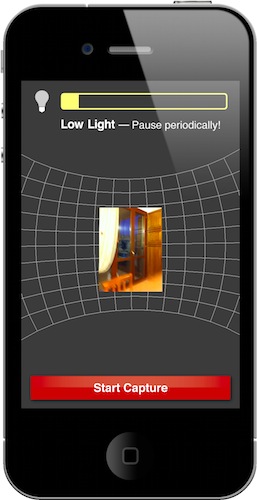
One of the apps I was really looking forward to just showed up in the App Store: Occipital’s 360 Panorama 3.0 for iPhone has been released, and it rocks. This app allows you to take panoramic photos using your iPhone or iPod Touch camera, but unlike many other similar apps available, 360 Panorama doesn’t force you to take multiple shots, stop, take another shot, stop again and then merge all the photos you took.

Occipital’s app does all that in the background and adds an Augmented Reality layer to the iPhone’s camera, meaning that you’ll see a 360° grid on screen and you’ll just have to slowly move the camera around you to build your panorama. It’s almost magical. Read more

Access Extra Content and Perks

Founded in 2015, Club MacStories has delivered exclusive content every week for nearly a decade.

What started with weekly and monthly email newsletters has blossomed into a family of memberships designed for every MacStories fan.

Learn more here and from our Club FAQs.

Club MacStories: Weekly and monthly newsletters via email and the web that are brimming with apps, tips, automation workflows, longform writing, early access to the MacStories Unwind podcast, periodic giveaways, and more;

Club MacStories+: Everything that Club MacStories offers, plus an active Discord community, advanced search and custom RSS features for exploring the Club’s entire back catalog, bonus columns, and dozens of app discounts;

Club Premier: All of the above and AppStories+, an extended version of our flagship podcast that’s delivered early, ad-free, and in high-bitrate audio.

Learn more here and from our Club FAQs.