Posts tagged with "browser"

Prevent Accidental Quit In Google Chrome

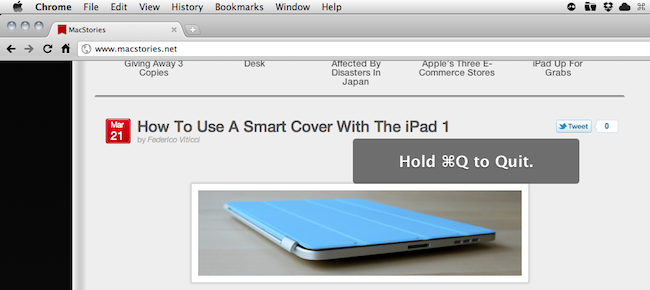
In my typical work day, I keep a lot of browser tabs open in the background. MacStories articles, links from Google Reader, Twitter, Reddit and many others are always sitting there in the browser, which is an essential tool in my workflow. Perhaps the most important one. So when I accidentally hit CMD+Q instead of CMD+W and I lose the contents of an article I’m writing in my online visual editor, I usually would like to smash my computer’s keyboard. It actually never happened (otherwise I wouldn’t be here typing on this keyboard), and luckily for me it looks like such a situation won’t ever take place thanks to a subtle, yet life-saving feature implemented in the Dev version of Google Chrome: quit warning.

Enabled by default in the early dev versions (latest one is 11.0.696.14) and now available as an option in Chrome’s settings, the quit warning works a little bit different from what you’d expect: instead of putting a dialogue box up on the screen that asks you “if you really want to quit”, Google thought that it’d be best to implement a system that would prevent accidental clicking of CMD+Q. So instead of just hitting the shortcut to quit Chrome, you have to click & hold CMD+Q for a few seconds. Pure genius: this way, if I accidentally hit “Q” instead of “W”, my browser won’t quit.

To enable the feature, type “about:flags” (without quotes) in the Chrome Omnibox and activate “Confirm to Quit. Enjoy. [Mac OS X Hints]
Access Extra Content and Perks

Founded in 2015, Club MacStories has delivered exclusive content every week for nearly a decade.

What started with weekly and monthly email newsletters has blossomed into a family of memberships designed for every MacStories fan.

Learn more here and from our Club FAQs.

Club MacStories: Weekly and monthly newsletters via email and the web that are brimming with apps, tips, automation workflows, longform writing, early access to the MacStories Unwind podcast, periodic giveaways, and more;

Club MacStories+: Everything that Club MacStories offers, plus an active Discord community, advanced search and custom RSS features for exploring the Club’s entire back catalog, bonus columns, and dozens of app discounts;

Club Premier: All of the above and AppStories+, an extended version of our flagship podcast that’s delivered early, ad-free, and in high-bitrate audio.

Learn more here and from our Club FAQs.


Scribd To Switch Millions of Old Embeds Over to HTML5, iOS Devices Rejoice

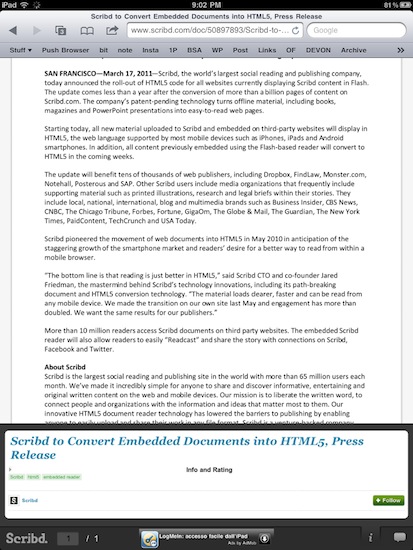
Social document sharing service Scribd has made a major announcement today: they’re in the process of switching millions of old Flash-based embeds scattered around the web over to the new HTML5 layout they started implementing last year. The conversion process will be automatic, shouldn’t break anything for publishers and website owners and, most of all, will dramatically increase the quality and speed of Scribd embeds.

As Scribd swaps Flash with HTML5 on old document embeds, iOS devices like the iPhone and iPad will benefit from the change: the HTML5 tool developed by Scribd is fully compatible with iOS’ Mobile Safari and now every webpage containing a new or old Scribd document will be perfectly viewable on Apple’s phones and tablets.

When Scribd launched its HTML5 reading platform last summer, they said user engagement with the Scribd experience “surged”. The conversion of 20 million embeds to HTML5 should definitely make things even better for Scribd.

Access Extra Content and Perks

Founded in 2015, Club MacStories has delivered exclusive content every week for nearly a decade.

What started with weekly and monthly email newsletters has blossomed into a family of memberships designed for every MacStories fan.

Learn more here and from our Club FAQs.

Club MacStories: Weekly and monthly newsletters via email and the web that are brimming with apps, tips, automation workflows, longform writing, early access to the MacStories Unwind podcast, periodic giveaways, and more;

Club MacStories+: Everything that Club MacStories offers, plus an active Discord community, advanced search and custom RSS features for exploring the Club’s entire back catalog, bonus columns, and dozens of app discounts;

Club Premier: All of the above and AppStories+, an extended version of our flagship podcast that’s delivered early, ad-free, and in high-bitrate audio.

Learn more here and from our Club FAQs.


Flickr Improves Slideshows for iPad

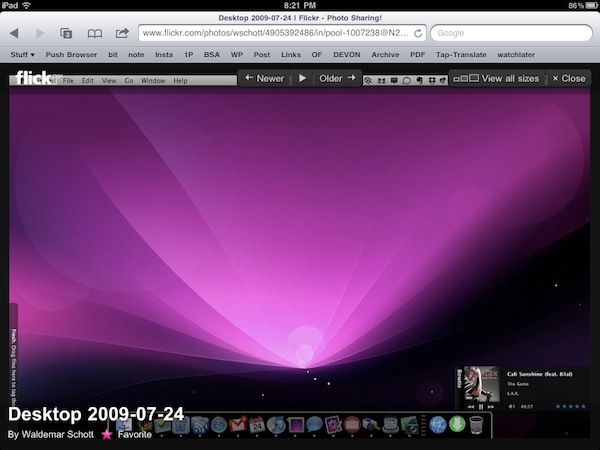
With a note on the official company blog posted earlier today, photo sharing Flickr has announced improved compatibility of slideshows for the iPad’s Mobile Safari browser. By taking advantage of the device’s touch interface, you can now tap on a photo to view at a larger size in the lightbox, and browse through photos with a single swipe. The lightbox displays photos on a clean, dark background and you also have options to mark an item as favorite or quickly go back to the standard photostream.

Flickr also offers a native app for the iPhone, available for free in the App Store, which was recently updated with Retina Display support and sharing to Twitter through the flic.kr shortener. [via Daring Fireball]

Access Extra Content and Perks

Founded in 2015, Club MacStories has delivered exclusive content every week for nearly a decade.

What started with weekly and monthly email newsletters has blossomed into a family of memberships designed for every MacStories fan.

Learn more here and from our Club FAQs.

Club MacStories: Weekly and monthly newsletters via email and the web that are brimming with apps, tips, automation workflows, longform writing, early access to the MacStories Unwind podcast, periodic giveaways, and more;

Club MacStories+: Everything that Club MacStories offers, plus an active Discord community, advanced search and custom RSS features for exploring the Club’s entire back catalog, bonus columns, and dozens of app discounts;

Club Premier: All of the above and AppStories+, an extended version of our flagship podcast that’s delivered early, ad-free, and in high-bitrate audio.

Learn more here and from our Club FAQs.


Video Comparison Shows Safari on iPad 2 Is Incredibly Fast

When Apple announced the iPad 2 would get a new dual-core processor with improved performances, we all guessed that the device would also get at least double the RAM for much better app management and fast switching. In the days following the announcement and after the plethora of hands-on videos that were uploaded from San Francisco, it was still unclear whether or not the iPad 2’s Safari browser (undoubtedly one of the most-used apps by iPad owners) would be faster and snappier than its iPad 1 counterpart. Many had the feeling that, combining the improved iOS 4.3 with a new processor and more RAM, Safari would highly benefit to reach great performances and stability. This, however, remained a theory even after the reviews posted last week that failed at really showcasing the capabilities of the new Safari.

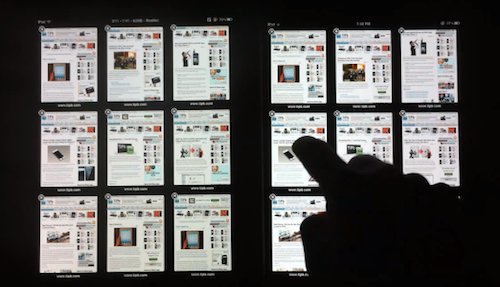
With the iPad 2 now out and available for everyone, the guys at TiPB posted a video last night a few hours after they got their iPad 2 to (finally) compare Safari on the iPad 2 with Safari on the original iPad. The results are impressive: with 9 tabs loaded and open on each browser, not only does the iPad 2 keep every tab loaded in memory, it also doesn’t display any “checkerboard effect” when scrolling. A major annoyance on Safari for iPad 1, in fact, was that with multiple tabs open the browser was usually forced to reload a tab when you switched to it because it didn’t have enough memory to keep it in a live, fully loaded state. This changes with the iPad 2 as you can see in the video below.

Scrolling in Safari is smooth as butter, and gone are the days when switching between tabs meant loading the entire page from scratch.

The difference in performance is quite clear, and browsing on the iPad 2 is definitely a step up from the original iPad in every way.

We’ll follow up later today with other videos showing the improved performances of the iPad 2 over the original iPad. Check out the video below. Read more

Access Extra Content and Perks

Founded in 2015, Club MacStories has delivered exclusive content every week for nearly a decade.

What started with weekly and monthly email newsletters has blossomed into a family of memberships designed for every MacStories fan.

Learn more here and from our Club FAQs.

Club MacStories: Weekly and monthly newsletters via email and the web that are brimming with apps, tips, automation workflows, longform writing, early access to the MacStories Unwind podcast, periodic giveaways, and more;

Club MacStories+: Everything that Club MacStories offers, plus an active Discord community, advanced search and custom RSS features for exploring the Club’s entire back catalog, bonus columns, and dozens of app discounts;

Club Premier: All of the above and AppStories+, an extended version of our flagship podcast that’s delivered early, ad-free, and in high-bitrate audio.

Learn more here and from our Club FAQs.


Browse Dribbble in Style with Courtside for iPad

Dribbble is a playground for seemingly endless pixel shenanigans, including first looks at new iPhone apps, sneak peeks at soon to launch web services, and beautiful icons that evolve into final products. A website that exemplifies an artist’s best work needs an app that’s as gorgeous and classy as the gems you might come across, in which case you’ll want Courtside for the iPad.

Read more

Access Extra Content and Perks

Founded in 2015, Club MacStories has delivered exclusive content every week for nearly a decade.

What started with weekly and monthly email newsletters has blossomed into a family of memberships designed for every MacStories fan.

Learn more here and from our Club FAQs.

Club MacStories: Weekly and monthly newsletters via email and the web that are brimming with apps, tips, automation workflows, longform writing, early access to the MacStories Unwind podcast, periodic giveaways, and more;

Club MacStories+: Everything that Club MacStories offers, plus an active Discord community, advanced search and custom RSS features for exploring the Club’s entire back catalog, bonus columns, and dozens of app discounts;

Club Premier: All of the above and AppStories+, an extended version of our flagship podcast that’s delivered early, ad-free, and in high-bitrate audio.

Learn more here and from our Club FAQs.


Google Chrome 10 Release Brings Tabbed Settings, Flash Sandboxing

Google Chrome

Google Chrome

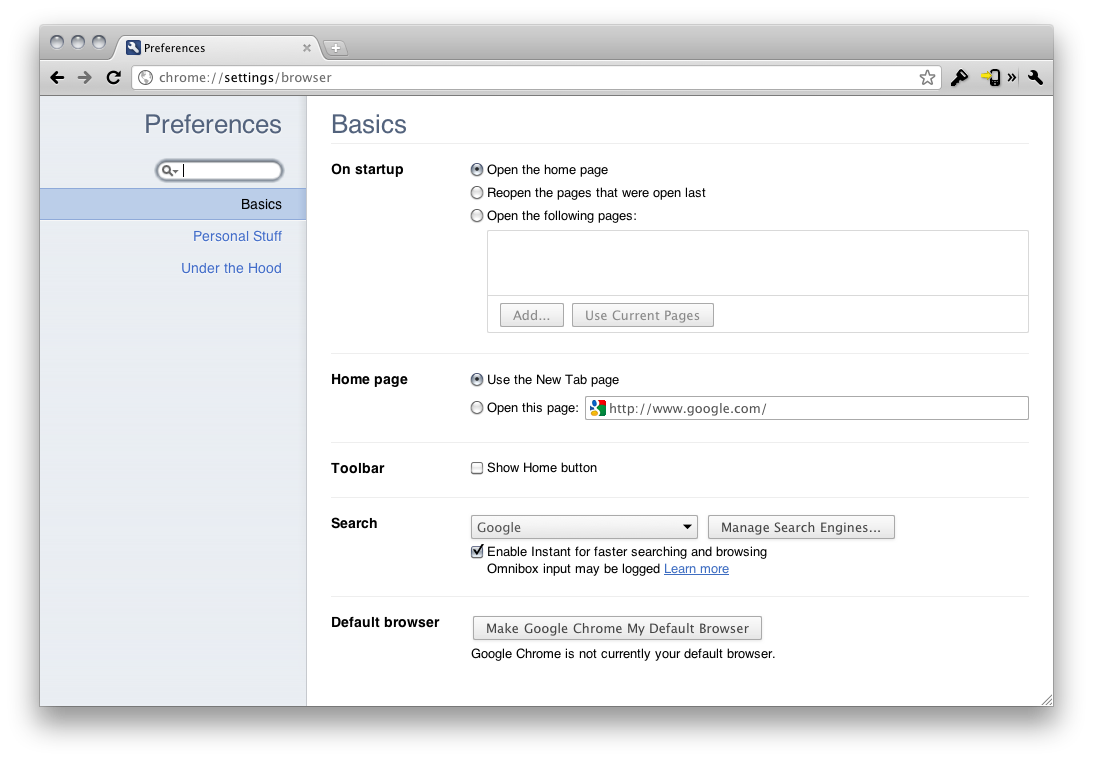
Google Chrome has a new stable release you can download today (which should arrive automatically or manually via the ‘About Google Chrome’ pane), which offers a couple new features for faster & more secure Internet browsing, and a significant update to Google Chrome settings. Google Chrome’s new settings interface has been overhauled, placing your settings in a new open tab while enabling a new search box so you can find settings (like bookmarks) quickly and easily. Settings have also been extended to the Omnibox, where you can share direct URLs to jump to a specific settings page so you can quickly help mom & dad enable or disable browser options. You can preview the new features via a video after the break.

Read more

Access Extra Content and Perks

Founded in 2015, Club MacStories has delivered exclusive content every week for nearly a decade.

What started with weekly and monthly email newsletters has blossomed into a family of memberships designed for every MacStories fan.

Learn more here and from our Club FAQs.

Club MacStories: Weekly and monthly newsletters via email and the web that are brimming with apps, tips, automation workflows, longform writing, early access to the MacStories Unwind podcast, periodic giveaways, and more;

Club MacStories+: Everything that Club MacStories offers, plus an active Discord community, advanced search and custom RSS features for exploring the Club’s entire back catalog, bonus columns, and dozens of app discounts;

Club Premier: All of the above and AppStories+, an extended version of our flagship podcast that’s delivered early, ad-free, and in high-bitrate audio.

Learn more here and from our Club FAQs.


Test Shows iPad 2 with iOS 4.3 Is Incredibly Faster Than iPad 1

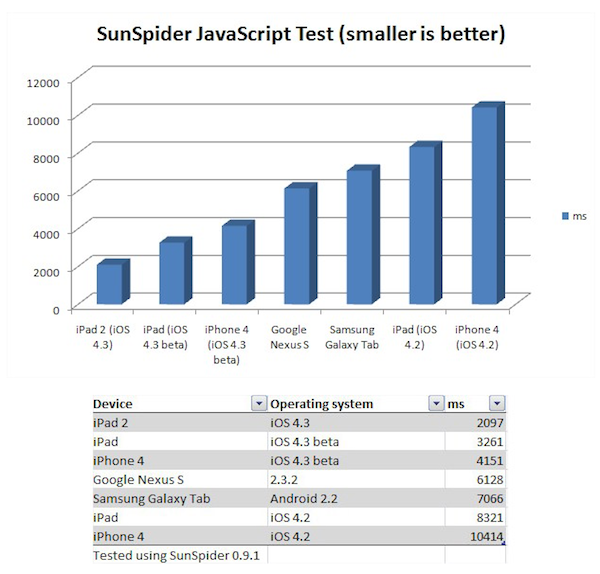
Surprise: the iPad 2 running iOS 4.3 is faster than the original iPad running iOS 4.2. According to CNET UK, which had the chance to run a JavaScript SunSpider benchmark test on the iPad 2 during a brief demo at San Francisco, the iPad 2 will outperform the competition and even other Apple’s devices when it comes to web browsing experience and overall snappiness of the browser application. The SunSpider test is usually a good test of how a browser will perform with “heavy” webpages with lots of content and functionalities such as Facebook.

Indeed, Apple itself promotes the new Nitro JavaScript engine that powers Safari on iOS 4.3 as “twice as fast” than its predecessor on iOS 4.2. The original iPad, however, also comes with a slower and non-dual core processor (Apple A4), whilst the iPad 2 will get a dual-core A5 and likely more RAM. These hardware features, together with the iOS 4.3, should make the device a lot faster than iPad 1, iPhone 4 and several Android tablets out in the market or coming soon.

Back to the SunSpider JavaScript test, CNET writes:

Incidentally, when you compare the iPad to the other devices we tested, Android phones and tablets don’t come out particularly well. The Galaxy Tab is more than 3x slower than the iPad 2 in this test, and about 2x slower than the original iPad with the new software. The Google Nexus S smart phone doesn’t fare too well either, at nearly 3x slower than the iPad 2. There’s really good news for iPhone 4 owners out there: when it arrives, iOS 4.3 will deliver a 2.5x speed increase in this test.

The one device we’d like to test, but can’t, is the Motorola Xoom. This tablet has a dual-core processor and runs the latest version of Android, 3.0 Honeycomb.

We will get our iPad 2’s next week and we’ll make sure to run some tests as well to see how the new tablet is really faster than other devices with iOS 4.3 and the iPad 1.

Access Extra Content and Perks

Founded in 2015, Club MacStories has delivered exclusive content every week for nearly a decade.

What started with weekly and monthly email newsletters has blossomed into a family of memberships designed for every MacStories fan.

Learn more here and from our Club FAQs.

Club MacStories: Weekly and monthly newsletters via email and the web that are brimming with apps, tips, automation workflows, longform writing, early access to the MacStories Unwind podcast, periodic giveaways, and more;

Club MacStories+: Everything that Club MacStories offers, plus an active Discord community, advanced search and custom RSS features for exploring the Club’s entire back catalog, bonus columns, and dozens of app discounts;

Club Premier: All of the above and AppStories+, an extended version of our flagship podcast that’s delivered early, ad-free, and in high-bitrate audio.

Learn more here and from our Club FAQs.


Push Browser: An App That Sends Webpages from iOS to OS X

Two weeks ago I realized I needed a way to send a webpage not only from my Mac browser to an iOS device, but from the iPhone or iPad to my Mac browser as well. The reason is simple: I find an interesting link on my iPhone I don’t want to bookmark or Instapaper, yet I want to simply check out later on the desktop. There’s no easy way to do it. So with the help from a friend and support from my Twitter followers, I created a folder action script for OS X that receives links shared from iOS through Dropbox and opens them in a new tab in the system’s browser. The method still works for me and it’s a really easy (yet powerful) way to save just about any link for later desktop usage, but I saw many had trouble trying to make the script work or integrate it with Dropbox. So here comes an app for that. Read more

Access Extra Content and Perks

Founded in 2015, Club MacStories has delivered exclusive content every week for nearly a decade.

What started with weekly and monthly email newsletters has blossomed into a family of memberships designed for every MacStories fan.

Learn more here and from our Club FAQs.

Club MacStories: Weekly and monthly newsletters via email and the web that are brimming with apps, tips, automation workflows, longform writing, early access to the MacStories Unwind podcast, periodic giveaways, and more;

Club MacStories+: Everything that Club MacStories offers, plus an active Discord community, advanced search and custom RSS features for exploring the Club’s entire back catalog, bonus columns, and dozens of app discounts;

Club Premier: All of the above and AppStories+, an extended version of our flagship podcast that’s delivered early, ad-free, and in high-bitrate audio.

Learn more here and from our Club FAQs.


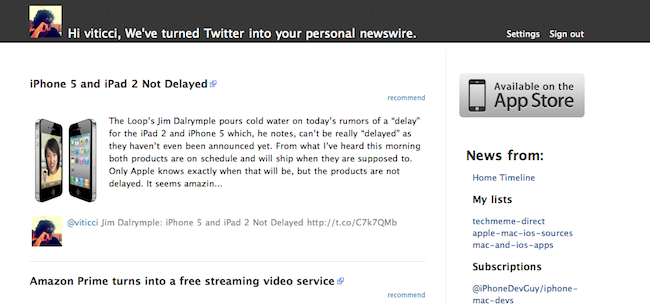
Smartr Launches Web App to “Read Twitter” From Your Browser

I am a huge fan of the Smartr Twitter app. Smartr, in case you missed my review, is an elegant Twitter client that, instead of focusing just on your timeline and letting you tweet like other apps do, provides a neat way to strip away tweets that don’t have http:// links, and formats articles coming from Twitter in an uncluttered view. Sort of like Flipboard, but meant for Twitter on the iPhone.

The concept is simple: you log in with your Twitter account, and the app only displays messages that contain links to webpages. These status updates, however, don’t appear in the app’s timeline as the original tweets — rather, they’re formatted to be visualized with the article’s title, a thumbnail preview of the first image and a short excerpt. Just like in Flipboard, Twitter becomes a “news aggregator” of links shared by people you follow, with the app excluding unrelated material like Foursquare check-ins, pictures and tweets that don’t come with links. Smartr is a Twitter client that uses the platform to fetch content available on the web. Because of that, it also makes sure content is formatted for the iPhone’s screen with the possibility to display the original, unformatted webpage.

Smartr is launching a web version of their Twitter utility today, allowing users to log in with their account from the browser and read news aggregated from the service without using the mobile app. The web app doesn’t come with all the features seen in Smartr for iPhone, as it’s a simple, continually updating list of links found in your timeline. These links are given a visual preview with an image thumbnail and an excerpt, together with the original tweet and author displayed inline.

Speaking to The Next Web, Smartr developer Temo Chalasani says:

We built this web application because a lot of our mobile users were demanding a desktop Smartr client. The webapp is still in its infancy, but we hope to bring the Smartr experience to the web through this release.

Indeed the web app is very straightforward right now and doesn’t let you do much besides opening articles in new browser tabs, but I like the fact that there’s a real-time update at the top for news posted while you were reading. Check out the web app here, and go download Smartr from the App Store.

Access Extra Content and Perks

Founded in 2015, Club MacStories has delivered exclusive content every week for nearly a decade.

What started with weekly and monthly email newsletters has blossomed into a family of memberships designed for every MacStories fan.

Learn more here and from our Club FAQs.

Club MacStories: Weekly and monthly newsletters via email and the web that are brimming with apps, tips, automation workflows, longform writing, early access to the MacStories Unwind podcast, periodic giveaways, and more;

Club MacStories+: Everything that Club MacStories offers, plus an active Discord community, advanced search and custom RSS features for exploring the Club’s entire back catalog, bonus columns, and dozens of app discounts;

Club Premier: All of the above and AppStories+, an extended version of our flagship podcast that’s delivered early, ad-free, and in high-bitrate audio.

Learn more here and from our Club FAQs.