Posts tagged with "browser"

iTunes To Become Part Of Safari? We Don’t Believe It

According to website Three Guys and a Podcast, Apple has been working on a major redesign of its iTunes software that will see the music manager / app organizer / media hub become part of Safari. The new system is rumored to be announced at Apple’s music event that should take place (as every year) in September and will be the evolution of Apple’s original plans during the lala acquisition.

Apple may be preparing a massive move that will propel Safari from niche browser to market leader. The move to merge Safari and iTunes into one software solution appears long in the works, which may arrive this fall at Apple’s usual iPod special event.

It is believed that Safari will be the only browser able to access iTunes, as iTunes is built into the browser itself. “Moving iTunes organizational side-bar into Safari isn’t a monumental task” claimed a source, adding “Safari would skyrocket in use as a result of integrating the software titles together.

Read more

Access Extra Content and Perks

Founded in 2015, Club MacStories has delivered exclusive content every week for nearly a decade.

What started with weekly and monthly email newsletters has blossomed into a family of memberships designed for every MacStories fan.

Learn more here and from our Club FAQs.

Club MacStories: Weekly and monthly newsletters via email and the web that are brimming with apps, tips, automation workflows, longform writing, early access to the MacStories Unwind podcast, periodic giveaways, and more;

Club MacStories+: Everything that Club MacStories offers, plus an active Discord community, advanced search and custom RSS features for exploring the Club’s entire back catalog, bonus columns, and dozens of app discounts;

Club Premier: All of the above and AppStories+, an extended version of our flagship podcast that’s delivered early, ad-free, and in high-bitrate audio.

Learn more here and from our Club FAQs.


Browser+ for iPad Aims To Reinvent Safari

I have been trying a lot of alternative browsers for the iPad over the past months. Since my good friend @kenyarmosh suggested me to give a spin to iCab Mobile (for iPhone and iPad), my interest for well-crafted, feature rich and innovative third-party browsers reached a new level. And while I’m still digging into all the features offered by iCab (which is, without a doubt, the most powerful alternative to Apple’s default browser), I have also been testing other simpler, minimal browsers that aim at offering a different take on browsing the Internet on the tablet.

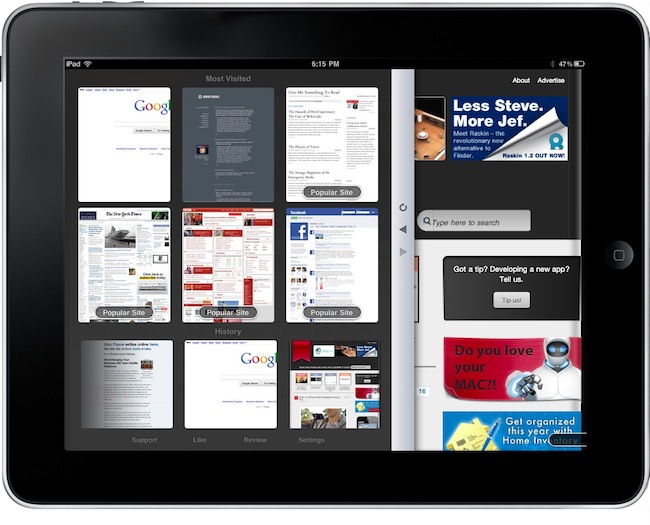
Browser+ HD for iPad, in spite of its not-so-appealing name, is the freshest and simplest browser I have found in the App Store so far. What Browser+ does is simple: it takes standard elements of web browsing such as tabs, address bar and history and completely re-imagines them as if they were built from scratch for the iPad. Pretty much like Flipboard did for web content that has to be consumed on a tablet’s screen. Browser+, sold at $0.99 in the App Store, doesn’t come with all the functionalities found in Apple’s Safari or iCab Mobile, but what’s there has been recreated to fit better on the iPad. Read more

Access Extra Content and Perks

Founded in 2015, Club MacStories has delivered exclusive content every week for nearly a decade.

What started with weekly and monthly email newsletters has blossomed into a family of memberships designed for every MacStories fan.

Learn more here and from our Club FAQs.

Club MacStories: Weekly and monthly newsletters via email and the web that are brimming with apps, tips, automation workflows, longform writing, early access to the MacStories Unwind podcast, periodic giveaways, and more;

Club MacStories+: Everything that Club MacStories offers, plus an active Discord community, advanced search and custom RSS features for exploring the Club’s entire back catalog, bonus columns, and dozens of app discounts;

Club Premier: All of the above and AppStories+, an extended version of our flagship podcast that’s delivered early, ad-free, and in high-bitrate audio.

Learn more here and from our Club FAQs.


Handoff Pushes Web Pages From Your Computer to Any iOS Device

One of the features many users wish Apple implemented by default on OS X is the possibility to easily and quickly send any kind of content to iOS over the air. Through the Internet, in seconds, from a computer to the iPhone or iPad. We’re not talking “sync” here: I’m talking about web links, images, maps, phone numbers, Youtube videos “pushed” instantly to an iOS device. The other way around, from iOS to the Mac, would be welcome as well: instead of relying on third-party apps, one could save content and information to consume later on a Mac. Like a video you don’t want to watch while you’re out because, honestly, Instapaper wasn’t meant for video.

Luckily for us, a number of apps that enable OS X to iOS communication over the air have surfaced in the past years, and today we’re taking a look at a new one. The app / service is called Handoff, and it’s probably the simplest I’ve stumbled upon so far. It allows you send web links from your browser to the iPhone or iPad (the iOS app is universal) through a bookmarklet or extension. Read more

Access Extra Content and Perks

Founded in 2015, Club MacStories has delivered exclusive content every week for nearly a decade.

What started with weekly and monthly email newsletters has blossomed into a family of memberships designed for every MacStories fan.

Learn more here and from our Club FAQs.

Club MacStories: Weekly and monthly newsletters via email and the web that are brimming with apps, tips, automation workflows, longform writing, early access to the MacStories Unwind podcast, periodic giveaways, and more;

Club MacStories+: Everything that Club MacStories offers, plus an active Discord community, advanced search and custom RSS features for exploring the Club’s entire back catalog, bonus columns, and dozens of app discounts;

Club Premier: All of the above and AppStories+, an extended version of our flagship podcast that’s delivered early, ad-free, and in high-bitrate audio.

Learn more here and from our Club FAQs.


Twitter for Mac Bookmarklet

Twitter for Mac Bookmarklet

This one’s a useful bookmarklet you can use in your default browser to send the current webpage title and link to Twitter for Mac. Works great – too bad Twitter for Mac doesn’t offer a way to wrap links in your own shortener instead of the not-so-popular t.co.

Install here.

Permalink

iPod touch and Arduino Create Remote Etch a Sketch

Engineer Saeki Yoshiyasu created a system that allows him to connect to a server with his iPod touch and draw a design on the web browser using nothing but a Graphics LCD, an Arduino, and a WebSocket server (that he wrote using Python / Tornado). The result: his movements on the iPod touch’s screen are recreated on the LCD. If you want to see his code, or try it yourself, visit his site link below. It’s very nerdy but at the same time very simple and cool!

Video after the break.

Read more

Access Extra Content and Perks

Founded in 2015, Club MacStories has delivered exclusive content every week for nearly a decade.

What started with weekly and monthly email newsletters has blossomed into a family of memberships designed for every MacStories fan.

Learn more here and from our Club FAQs.

Club MacStories: Weekly and monthly newsletters via email and the web that are brimming with apps, tips, automation workflows, longform writing, early access to the MacStories Unwind podcast, periodic giveaways, and more;

Club MacStories+: Everything that Club MacStories offers, plus an active Discord community, advanced search and custom RSS features for exploring the Club’s entire back catalog, bonus columns, and dozens of app discounts;

Club Premier: All of the above and AppStories+, an extended version of our flagship podcast that’s delivered early, ad-free, and in high-bitrate audio.

Learn more here and from our Club FAQs.


Sleipnir: Free, Innovative Browser for iPhone

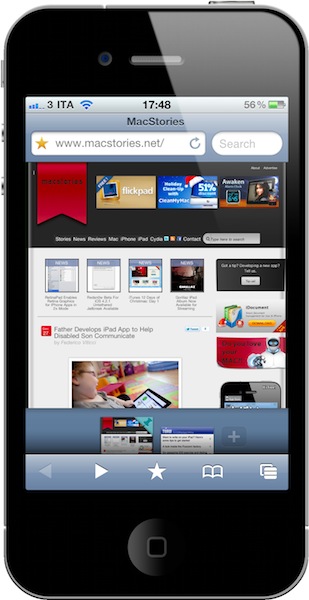
From the same developers of Inkiness for iPad comes Sleipnir, a new app for the iPhone that’s without a doubt one of the most innovative, stable and fast alternative browsers released in the recent months. My problem with alternatives to Mobile Safari is that they don’t provide anything better than Apple’s implementation, aside from a different visualization of tabs. Many apps sold through the App Store simply gained popularity because they brought “desktop-class tabs” to the iPhone or iPad, with the trade-off of adding ugly UIs and navigation controls to an already-powerful WebKit engine. I’m all for alternatives and different solutions to built-in software (especially when the third-party version is available for free, like Sleipnir), but I’m looking for something that really takes advantage of iOS. Not just a port of desktop functionalities.

Sleipnir offers just that. From the first first launch, you’ll immediately notice it’s an app developed with the iPhone (and iPhone users) in mind. It doesn’t come with “desktop tabs” yet it allows you to organize open pages in an innovative and useful “tabbed view” I haven’t seen in any other app. Sleipnir might just be the most innovative iPhone browser to date, powered by a nice interface design and a seriously great engine. Read more

Access Extra Content and Perks

Founded in 2015, Club MacStories has delivered exclusive content every week for nearly a decade.

What started with weekly and monthly email newsletters has blossomed into a family of memberships designed for every MacStories fan.

Learn more here and from our Club FAQs.

Club MacStories: Weekly and monthly newsletters via email and the web that are brimming with apps, tips, automation workflows, longform writing, early access to the MacStories Unwind podcast, periodic giveaways, and more;

Club MacStories+: Everything that Club MacStories offers, plus an active Discord community, advanced search and custom RSS features for exploring the Club’s entire back catalog, bonus columns, and dozens of app discounts;

Club Premier: All of the above and AppStories+, an extended version of our flagship podcast that’s delivered early, ad-free, and in high-bitrate audio.

Learn more here and from our Club FAQs.


Skyfire for iPad Now Available

As noted by 9to5mac, Skyfire for iPad is now available. As previously reported, Skyfire takes advantage of the iPad’s larger screen to integrate more social features in the app and allow users to constantly share items on Twitter, Facebook and Google Reader (or send over to Pinboard, Instapaper and Read It Later) with the app of a button. Most notably, Skyfire for iPad comes with a series of buttons in the bottom toolbar that let you check on your Reader feeds, Twitter timeline and Facebook wall, together with the possibility to like every page with a universal Like button and see only updates from friends who shared links.

Social features aside, Skyfire for iPad has the same on-the-fly Flash video conversion technology seen on the iPhone version. If the iPhone app is to be trusted, Skyfire Flash-to-HTML5 conversion tool is pretty awesome, and it converts video to an iOS-compatible format in seconds. One could ask why Flash videos are needed on iOS when most of web video has iOS-optimized fallbacks now, but still. Skyfire for iPad also comes with additional functionalities such as a new tab design, desktop option to avoid loading websites in mobile versions, private browsing a.k.a. “porn mode”. Also, guess what kind of websites still doesn’t provide iOS-compatible video. I think I know why Skyfire is selling all those copies.

Skyfire for iPhone made $1 million in its weekend in the App Store. With the App Store charts freezing tomorrow until the 28th, I wouldn’t be surprised to see the app having a tremendous success on the tablet as well. Go download it here at $4.99, and check out the demo video and feature list below. Read more

Access Extra Content and Perks

Founded in 2015, Club MacStories has delivered exclusive content every week for nearly a decade.

What started with weekly and monthly email newsletters has blossomed into a family of memberships designed for every MacStories fan.

Learn more here and from our Club FAQs.

Club MacStories: Weekly and monthly newsletters via email and the web that are brimming with apps, tips, automation workflows, longform writing, early access to the MacStories Unwind podcast, periodic giveaways, and more;

Club MacStories+: Everything that Club MacStories offers, plus an active Discord community, advanced search and custom RSS features for exploring the Club’s entire back catalog, bonus columns, and dozens of app discounts;

Club Premier: All of the above and AppStories+, an extended version of our flagship podcast that’s delivered early, ad-free, and in high-bitrate audio.

Learn more here and from our Club FAQs.


Occipital Showcases Gyroscope Support In MobileSafari

360 Panorama is a neat iPhone app by Occipital which, thanks to some cool augmented reality features such as a real-time on screen grid view, allows you to take panoramic photos on your iPhone. We reviewed the app here, and you can go grab it here.

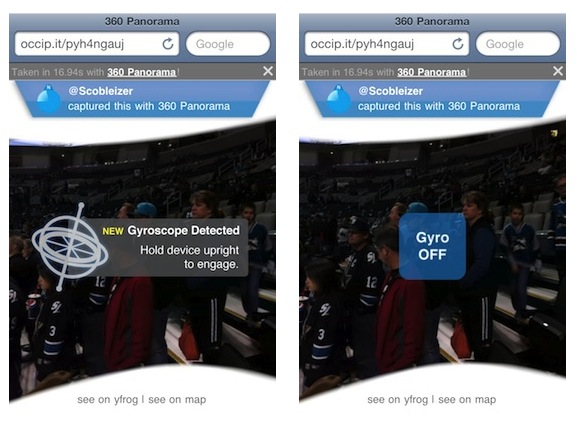
Today the Occipital developers are launching a brand new version of their panoramic browser for pictures shared online. The new browser, when used on MobileSafari for iPhone running on iOS 4.2, takes advantage of Apple’s gyroscope to let you move panoramas around by just holding your device upright. Once you load a link like this one, Occipital’s browser will detect the device running iOS 4.2 and will ask you to hold your iPhone upright if you want to use gyroscope. Otherwise, you’ll just be able to swipe to view the entire panorama.

Gyroscope support enables you to move the iPhone around to view the entire content of a webpage, and it works really well. When iOS 4.2 came out in November, developers noted that MobileSafari received new features such as improved HTML5 support and “accelerometer integration”. The benefits of augmented reality apps using the gyroscope instead of a compass were also showcased in July.

Access Extra Content and Perks

Founded in 2015, Club MacStories has delivered exclusive content every week for nearly a decade.

What started with weekly and monthly email newsletters has blossomed into a family of memberships designed for every MacStories fan.

Learn more here and from our Club FAQs.

Club MacStories: Weekly and monthly newsletters via email and the web that are brimming with apps, tips, automation workflows, longform writing, early access to the MacStories Unwind podcast, periodic giveaways, and more;

Club MacStories+: Everything that Club MacStories offers, plus an active Discord community, advanced search and custom RSS features for exploring the Club’s entire back catalog, bonus columns, and dozens of app discounts;

Club Premier: All of the above and AppStories+, an extended version of our flagship podcast that’s delivered early, ad-free, and in high-bitrate audio.

Learn more here and from our Club FAQs.


iLunascape iPad Browser Adds Firefox Sync

iLunascape is a third-party browser for the iPad which is available for free in the App Store and we mentioned several times in the past. It’s not exactly a “full-featured” alternative browser like the excellent iCab or Atomic, yet it comes with a neat tabbed interface that makes it simple to switch between multiple websites open at once.

iLunascape doesn’t overwhelm you with functionalities, but it’s OK for most people looking for a sweet alternative to Safari.

The latest 1.3 version, released last week, adds the possibility to sync bookmarks back to the desktop thanks to Firefox Sync, which apparently opened up its API to allow other browsers to access a user’s sync settings. The new version also lets you save images and use bookmarklets. Firefox Sync is one of the best ways to keep tabs synchronized and accessible between computers and devices.

iLunascape for iPad is free and available here.

Access Extra Content and Perks

Founded in 2015, Club MacStories has delivered exclusive content every week for nearly a decade.

What started with weekly and monthly email newsletters has blossomed into a family of memberships designed for every MacStories fan.

Learn more here and from our Club FAQs.

Club MacStories: Weekly and monthly newsletters via email and the web that are brimming with apps, tips, automation workflows, longform writing, early access to the MacStories Unwind podcast, periodic giveaways, and more;

Club MacStories+: Everything that Club MacStories offers, plus an active Discord community, advanced search and custom RSS features for exploring the Club’s entire back catalog, bonus columns, and dozens of app discounts;

Club Premier: All of the above and AppStories+, an extended version of our flagship podcast that’s delivered early, ad-free, and in high-bitrate audio.

Learn more here and from our Club FAQs.