This Week's Sponsor:

HomeSnap

A Private, Read-Only Window Into Your HomeKit Home


Posts tagged with "apple"

“Okay, I’ll Remind You”

A few minutes ago Apple uploaded two new iPhone 4S commercials on its website and official YouTube channel. The ads, as with previous iPhone 4S promotional videos, focus on Siri, and they might just be the best ones about the voice-based assistant yet.

The ads, called “Rock God” and “Road Trip”, share a common theme: people talking to their assistant using natural language and a friendly tone, not simply asking a piece of software to execute commands.

In Road Trip, a guy and his girlfriend are organizing a road trip to California. Look at the initial setting: it’s cold outside, they’re about the get in the car, and they want to get from the cold of East Coast in February to the sunny Santa Cruz in California. The guy asks Siri, and they’re on the road. Camera cuts to the guy’s face in the car. He’s looking for a barbecue in Kansas City. Camera cuts to girl’s face in the car. She’s looking for a rodeo. Camera changes again, this time the couple doesn’t know where they are, and the girl asks “Where are we?”, with the look of someone who knows Siri will have an answer. They’re in Santa Rosa. Change again. How big is the Grand Canyon? Sure enough, Siri can look that up on Wolfram Alpha or Wikipedia. But then the gas runs out: how about finding a station the guys can walk to? Finally, the ad reaches its climax when our two characters have seemingly reached their destination, or are fairly close, and are looking at the stars. She asks: “What does Orion look like?”. Siri displays sky data inline. The video closes with the opposite setting of how it began: sunny California, he’s wearing a t-shirt, looking at the horizon, and she’s telling Siri like you would do with an old friend – Remind me to do this again. Siri, with its human-like voice, replies: Okay, I’ll remind you.

The second commercial, Rock God, has a more “fun” approach. There’s this kid that “has to get a guitar”, and he’s so excited about it he needs to ask Siri now. Why is he so excited about getting a guitar? What’s the story here? Perhaps, I imagine, he has just decided with his friends that it’s time to put a band together and start playing. So, Siri gives him location info about stores selling musical instruments, and in the next scene our kid is learning how to play. How do I play London Calling? Whole Lotta Love? How about that chord? Siri displays information on screen. Fairly regular stuff for now. Then the ad changes – our character is sending a message to Julie and Kate about playing at the garage tonight. Apple’s music stops. The kids are playing – they’re doing rock ‘n’ roll! – and finish their song. “Call me Rock God”, the kid tells Siri, softly.

You see, these aren’t just ads. In 30 seconds, we’re told stories. In 30 seconds, we are not shown technical features and RAM specifications, we’re given real examples of real people we can relate to. We’re shown two young people in love with each other that just want to get to California and see the sunset together. We’re shown a young boy with a simple dream, playing guitar, yet a dream that’s important to him – something that makes his life worth living and enjoying even for those 30 minutes when he gets his band mates together and nothing else matters. Just music. Call me Rock God.

In 30 seconds, we’re shown how technology can make people’s lives better. We’re reminded, once again, that this industry, this love for the latest gadget, doesn’t necessarily have to be about tech specs – it’s the technology married with the liberal arts. It’s about playing London Calling with your friends. It’s about driving to California with the woman you love and watch the stars just for one night.

He would be proud.

Read more

The Magic Money That Apple Made From Thin Air

The Magic Money That Apple Made From Thin Air

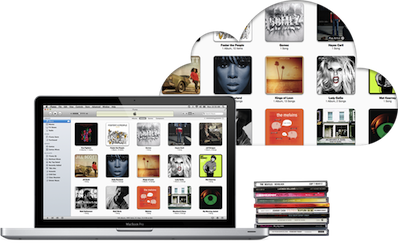
Jeff Price of TuneCore is happy and a little surprised, finding out their first royalty payments from the new iTunes Match came in at $10,000. He writes in a blog post that “this is magic money that Apple made exist out of thin air for copyright holders”. The service has effectively monetized the existing behaviour of consumers, giving more money to artists and copyright holders whilst the consumer just continues to listen to their music, not doing anything “new”.

A person has a song on her computer hard drive.  She clicks on the song and plays it.  No one is getting paid.  The same person pays iTunes $25 for iMatch.  She now clicks on the same song and plays it through her iMatch service.  Copyright holders get paid. Same action, same song, one makes money for the copyright holder, and one does not. This is found money that the copyright holders would never have gotten otherwise.

It may not be a complete windfall as Jeff points out, but it has something - something that if iTunes Match didn’t exist, you wouldn’t get at all. Something is better than nothing.

The music industry needs innovation. Services like iMatch, Spotify, Simfy, Deezer and others are bringing that innovation—it will take some time to learn which are the ones consumers want.  But in the interim, seeing an additional $10,000+ appear out of the thin air for TuneCore Artists by people just listening to songs they already own is amazing!

Permalink

Apple’s White MacBook Reaches “End Of Life”, Educational Sales To Stop

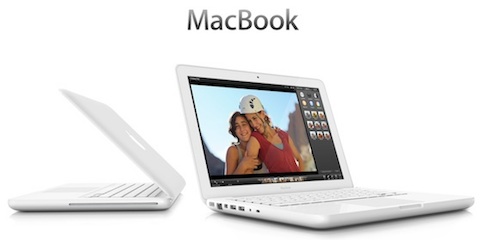
Several months after halting sales of the white MacBook to consumers, Apple is now completely stopping sales of the MacBook. When it stopped selling the entry-level MacBook to consumers back in July of last year, Apple continued to offer it to educational institutions, but it has now notified resellers that it has now classified the MacBook as “End of Life”.

With that MacBook now discontinued entirely, Apple’s laptop lines include just the  MacBook Pro and MacBook Air models. It isn’t known when Apple stopped manufacturing of the MacBook, but it was likely a few weeks ago, with Apple just waiting for final supplies to dwindle down.

[via MacRumors]


Evernote For iOS Gets Some Nice Improvements In 4.1.8 Update

The Evernote iOS app today got a little bit better with 4.1.8 update, bringing some nice additions and improvements. We’re big fans of Evernote here at MacStories, but their iOS app isn’t as good as it could or should be. Thankfully today’s update (although minor) directly addresses some of my complaints which makes me optimistic that the team is hard at work on making Evernote for iOS a truly great app.

Perhaps the best improvement for me is the “better editing, copying, pasting and more”, which translates to faster editing and improved preservation of styles. I’ve been plagued with some weird lag issues when editing large notes, particularly when copying and pasting, so this is much appreciated on my part.

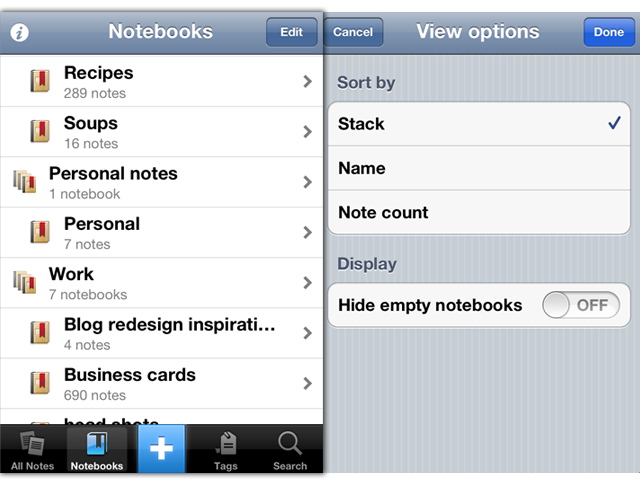
Also new is “predictive note titles” which means Evernote now uses contextual information to create a more appropriate title if you leave the field blank - so no more “Untitled Notes”. Instead it will look at calendar events, location, note contents and other info to create a contextual title that is far more useful and informative. Similarly handy is the new, easier method of sharing a notebook on the iOS app. Now you just need to go to the notebook list, tap on the desired notebook and you’ll see a share icon in the top right corner of the screen.

Notebook Stacks, which work well on the desktop are now better represented on the iPhone. They have existed but were hard to enable, now, viewing notebooks will use the Notebook Stacks view as default. Finally this update also includes the standard bunch of bug fixes and also improved stability - including faster and more reliable synchronisation. Now, if only we could get a new design for the iPad app…

For more information the Evernote Blog covers all these new features and improvements to the app in a little more detail.


Apple Warns Developers Against Using Services That Manipulate App Store Rankings

Apple has today posted a reminder to developers, warning them not to manipulate App Store chart rankings or face potential loss of their Apple Developer Program membership. The warning follows recent publicity surrounding services that have been offering the ability to artificially boost free app rankings in the top charts.

Adhering to Guidelines on Third-Party Marketing Services

Feb 6, 2012

Once you build a great app, you want everyone to know about it. However, when you promote your app, you should avoid using services that advertise or guarantee top placement in App Store charts. Even if you are not personally engaged in manipulating App Store chart rankings or user reviews, employing services that do so on your behalf may result in the loss of your Apple Developer Program membership. Get helpful tips and resources on marketing your apps the right way from the App Store Resource Center.

Yesterday, PocketGamer noted that one company was offering a service for $5000 where they would utilise bots to download an app repeatedly until it breaks into the top 25 charts. That report followed on from a TouchArcade post, where users warned others from using such fraudulent app promotion services which use automated scripts or bots.

[iClarified via MacRumors]


Grand Central Terminal Restaurant Sees Boost In Customers Since Apple Store Opened

Since the opening of Apple’s Grand Central Terminal store, at least one fellow tenant is seeing a 7 percent increase in sales. That tenant is Michael Jordan’s The Steak House, located across the terminal from the new Apple Store and its co-owner, Peter Glazier says the restaurant has seen the boost of sales since the Apple Store opened 7 weeks ago in December.

Glazier makes sure to point out that the boost isn’t due to Apple simply replacing another restaurant (the Apple Store is located where the Metrazur restaurant used to preside). He says “the jump only happened after Apple opened” - not during the months whilst the space was being renovated for Apple.

So far it seems that the “sweetheart deal” that the New York City’s Metropolitan Transportation Authority’s worked out with Apple is paying dividends — despite initial criticism of the deal. That deal saw Apple agree to a $60-per-square-foot lease agreement, with no revenue sharing agreement. The MTA made the argument that such a flagship store would bring in more customers, benefitting other tenants, so far, it seems that argument has been reflected in reality.

[Crains New York via MacRumors]


Focusing On iPads

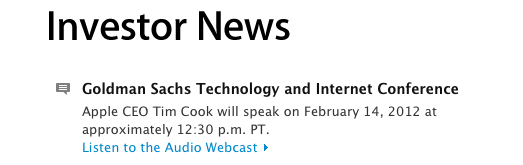
The latest report from AppleInsider claims that, after a meeting with CEO Tim Cook and CFO Peter Oppenheimer, Citi analyst Richard Gardner left with the impression that Apple is focusing on iPads, leaving little or no possibility for an ARM-based MacBook Air, which was previously rumored.

Apple doesn’t refer to iPad as a PC, but as a “post-PC device,” leaving the ARM-based tablet distinct from the company’s Intel-based Macs. Gardner further indicated the meeting dispelled the notion that Apple might introduce ARM-based Macs, countering rumors that a new MacBook Air featuring an ARM processor might appear sometime soon.

Gardner cited Cook as alluding to “rapid innovation on the iOS platform” that will “significantly broaden the use case for tablets,” and stated he “walked away from this meeting with the impression that Apple feels iPad satisfies—or will soon satisfy—the needs of those who might have been interested in such a product” as an ARM-based MacBook Air.

The rumors of Apple switching from Intel to ARM-based architectures on Macs left many wondering when they first surfaced online. And whilst it wouldn’t be a surprise to know that Apple has at least tested A5-based MacBook Airs and other sorts of ARM CPUs for portables – of course a company like Apple wants to experiment with as many hardware alternatives as possible – many debated whether it would make sense for the company to switch in the near future, when quad-core ARM processors are seemingly ready for the next-generation of iOS devices.

That Apple doesn’t believe an ARM-based MacBook Air – or, as the competitors would call it, an ARM Ultrabook – would be needed on the market isn’t a surprise, either. Assuming there is a market for users who want a low-power, battery life efficient portable machine in the range of 11” and 13” – a machine that, in theory, should be used for tasks such as word processing, lightweight image editing, browsing, and email – Apple believes that market can be satisfied – or will be “soon” satisfied as AppleInsider writes – by the iPad.

From a user’s standpoint, I think Apple’s reasoning here is that, ultimately, someone who’s seeking an 11-inch or even 13-inch machine with the technological perks of the iPad would be better off with an iPad, which is lighter, more portable, and has a richer selection of apps (from Apple’s perspective in looking at simple App Store numbers). There are edge cases, such as people who would strongly argue against iOS’ virtual keyboard, but I believe what Tim Cook is saying here – again, at least according to AppleInsider – is that the hypothetical market for an ARM MacBook Air should just settle with an iPad, as it’s a versatile, innovative machine that will get more feature soon. I don’t always want to look much into reports about interviews out of their original context, but if that “soon” is to be believed, I wouldn’t mind seeing more productivity-oriented software from Apple at the next iPad event – apps such as Aperture and, who knows, maybe even a portable programming suite would be perfect to further showcase the iPad’s capabilities as a “real” PC.

More importantly, Gardner’s “impression” that Apple feels satisfied with the iPad is also backed up by the numbers: in the past quarter alone, Apple sold over 15 million iPads, and “only” 5.2 million Macs. In the amount of time that Apple should spend transitioning a Mac product (the MacBook Air) to a new CPU architecture and getting developers to begin supporting this new “hybrid” machine, the company could easily sell another 20 million iPads. That’s not to say Apple will never switch to ARM (never is a dangerous word) on the desktop and that they haven’t considered it, but I’ve never believed it could happen in a short period of time as some of the early rumors claimed.

Looking at the first quarters of iPad sales and reception, I’d say Tim Cook is right to be focusing on iPads.


Apple, China, and Doing The Right Thing

There is an assumption currently making the rounds that the workers laboring in Chinese factories under terrible conditions are a direct result of Apple’s actions. Some people almost seem to think that Apple is literally enslaving people to work on its products. Needless to say, this is not true.

The fact is that these workers have a choice, albeit a limited one, about where to work. And they are working at factories like Foxconn —which, I remind you, is a wholly separate entity from Apple— because they are better than the alternatives: no job at all, or a job that pays far worse with even harsher conditions.

Think about that. As bad as the stories that we’ve heard about working there are —and make no mistake, they are horrid and no one should have to work under such conditions— the fact that Foxconn has a six-month waiting list of people hoping to become employees seems to suggest that they are still much better than any other opportunity these workers have available.

Given all that, is Apple being ethical by working with a company like Foxconn? A company that, for all its problems, still provides a significantly better alternative to the people clamoring to be hired? I would argue yes.

If Apple were to abandon their involvement with Foxconn and other abusive Chinese suppliers like these boycotts are calling for, what would happen to these workers? The boycotters apparently believe that they would be set free to find safe, well-paid work elsewhere. But if working at Foxconn was already one of the best opportunities they had, that outcome seems unlikely at best.

In reality, they would likely be forced to take a job at another factory with even worse pay and worse conditions. Or perhaps have no choice but to perform peasant work for a fraction of the money they were earning before. Worst case, they may not even be able to find another job at all.

If the goal of a boycott is to assuage the guilt of first-world citizens for buying Apple products made under harsh conditions, Apple leaving China would certainly accomplish that. But if the goal is to make things better for the workers themselves, the only realistic option I can see is for Apple to continue what they’re doing: work with these companies, demand better conditions, conduct audits, and have the workers paid as well as possible for people in their position. 1

Yes, the conditions these workers labor under are terrible. They may have no better choices in their economy, but that doesn’t mean what’s happening there is okay. If first-world companies are going to continue to do business with China and Chinese companies, the only ethical thing for these companies to do is demand continual improvement. And we too should demand as much of those companies whose products we buy.

But the fact remains that as of now, these people will be exploited no matter what we do. Ceasing to provide them better employment opportunities will not help them. Quite the opposite: it will only leave them subject to even worse alternatives. Given that, I believe the best thing we can do is support companies that are taking responsibility for improving conditions and wages for the people that make their products. And right now, the company that is taking the most responsibility…is Apple.


  1. Unfortunately I’m not sure how legally or economically feasible it is for Apple to reduce their margins and pass along the profits to the workers directly even if they wanted to. But if it is, they should be doing so as much as possible.

Quick Review: Remarks

Readdle is today launching their latest iPad productivity app, Remarks. In some ways it is similar to their existing products such as ReaddleDocs or PDF Expert because it features full PDF annotation capabilities, but it is distinctly different because it is the first of their apps to really push the idea of handwriting and note taking as a core function. We’ve reviewed many of Readdle’s products before and by this stage it is clear to us that they make quality productivity software for iOS, so the real question I had when I downloaded this app was what exactly does it let you do and how might it fit into how I work.

What struck me almost instantly was that this app is clearly aimed at being a PDF creation tool, it isn’t like ReaddleDocs or PDF Expert which are more focused as being document management and PDF annotation apps. Remarks may have those same annotation tools but it wants you to create PDF documents, whether it be a handwritten note, drawing or diagram that you want to send to a colleague or perhaps a study note.

In its current form, PDF annotation may be useful but it’s a bit of a pain to get a PDF into Remarks, unlike PDF Expert and ReaddleDocs it doesn’t (yet) have support for cloud services such as Dropbox or SugarSync. Fortunately, this will only be a short-lived annoyance, Readdle plans to have an update ready within two weeks that adds support for cloud services.

Once you do get a PDF into Remarks, you won’t be disappointed - the same powerful annotation functionality that is in Readdle’s other apps is also available in Remarks. So you’ll get the tools to add text, draw shapes and write or draw in freehand on those PDFs, and as usual it is all editable in Preview on the Mac or any other PDF reader such as Adobe Acrobat.

I think for me, this app will come in handy when I need to take down study notes that also require diagrams or illustrations. Things that I can’t do in Evernote, which is very much a text focused note-taking app. In the past I have sketched them down in an exercise book and then for the most important ones I have subsequently drawn them up in Photoshop, OmniGraffle or OmniGraphSketcher, importing those into Evernote. Now I could just use Remarks to make an electronic copy of all my study notes, not just those that are in plain text. I’ll probably still use Photoshop or one of the Omni apps for some of my diagrams that are super important so they are a little neater - but its no longer a requirement.

Before I wrap up, I just wanted to make a quick mention of using a stylus with the iPad. The app does recommend using one and I must admit using a stylus in the context of drawing diagrams and general notes does make a lot of sense - using my finger wasn’t as effective as I had hoped and it soon got tiring. So I foresee myself picking up a stylus in the near future, to make sure I can take full advantage of what Remarks offers.

If you are just looking for an app to annotate PDF documents it might be a better idea to go for PDF Expert or ReaddleDocs. But if you want to do more freeform note-taking, drawing diagrams or creating your own simple PDFs, Remarks is the way to go. Remarks is available in the App Store for $4.99.