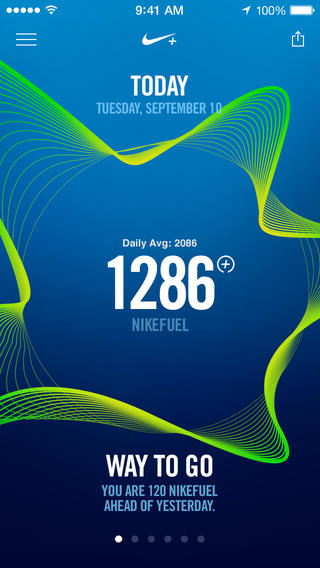
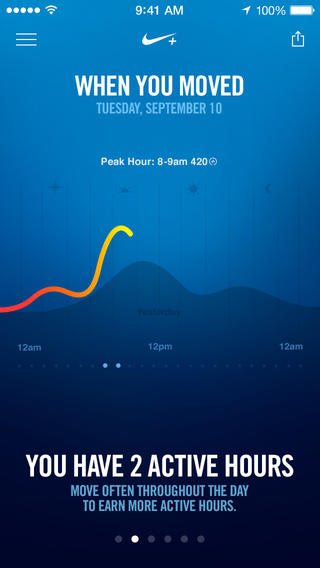
The waveform as shown in motion. It’s mesmerizing.
While not their own, it seems strange that an app Apple showcased on stage in September wouldn’t be available until early November, especially since it’s a major bullet point for one of the iPhone 5s’ key features. Designed exclusively for use with the M7 coprocessor, Nike+ Move is one of the iPhone 5s’ most anticipated apps, expected to set the bar for fitness apps and demonstrate how useful Apple’s new motion technology actually is.
While Nike has stated the app provides an introductory experience into the Nike+ ecosystem, I’m not sure if I’m left wanting more. The app is pretty good, despite being an obvious gateway to other Nike products such as the FuelBand.
There’s two things I’ve learned about NikeFuel, the universal system used to measure your activity throughout the day: it’s a much better way to measure activity than step count, and it’s much more adaptable to a wider variety of exercises. NikeFuel doesn’t discriminate against how you move, so long as you get off your butt and get active.
Ultimately, the Nike+ Move app on the iPhone 5s, provided you have one, makes me question wether you need a separate wearable device. My opinion boils down to the M7 coprocessor and how it’s able to determine what you’re doing at any given time.
The problem with wearable fitness devices is that they’re geared towards urbanites, with companies suggesting potential buyers to get fit by stepping out of the office and taking a stroll around the block. They record steps counted, calories burned, and distance climbed, but that’s a rather narrow view into the world of activity and personal fitness. And they’re step counters tied to your wrist, which don’t yet have robust algorithms to differentiate between walking and other activity to be considered reliable pedometers.
Apple’s M7 coprocessor is baked into a device you already have with you. It knows when you’re driving, and it knows when you’re walking vs. running. Being in a phone, it’s also not locked to your body, and it doesn’t (hopefully) end up in the wash. Combined with NikeFuel, you end up with a surprisingly honest fitness device.
Adding to that potency is Game Center support. I don’t have to sign into a separate social network, join a new community, or find my friends. They automatically show up in the Nike+ Move app, and suddenly the idea of gaming my fitness vs. my friends actually works. Not only do I want to get active, I’m motivated to stay active.
Nike+ Move adds a ton of value to the iPhone 5s. It’s free, and for most people, it obviates the need to purchase a separate fitness device.
There’s six sections in the Nike+ Move app that break down your activity into various charts and info graphs. At its worst, Nike+ Move is a marketing tool disguised as a fitness app. At its most, it’s the iPhone’s best fitness app solely because the concept is simple: beat your score.
Apple keeps a log of your movement data on the iPhone so that other apps can tap into it at a moment’s notice. This means that you’ll effectively have a good baseline of fitness data to start with when you open a fitness app on the iPhone, and Nike+ Move is certainly no different, which averages the prior week’s total from the get-go.
The app encourages you to get moving, not only to match the prior day’s score, but to go above and beyond. It’ll tell you when you’re behind your average, remind you to “win the hour” by staying continually active for a 5 minute workout, and pit your score against people nearby in addition to Game Center friends to up the ante.
Nike+ Move provides a very similar experience to the Nike+ FuelBand App, lacking only a few features such as move reminders, session recordings (useful for tracking specific workout activity), and sharing successes with the Nike+ community. I’m impressed that the Nike+ Move app offers so much.
The downside is that the app is borderline an advertisement for other Nike+ products. Nike really wants to get people who download in the app to further invest themselves in their community and products, but I really need a solid reason to own a FuelBand considering this app has all the key features in place. I feel a bigger opportunity would be having a shop link in the app menu for directing people to Nike’s store for shoes and apparel so people can gear up in ways that are more beneficial. With the phone having access to location data, there’s a lot you can do there with local and seasonal apparel suggestions.
Fortunately the ads are tucked into menus or hidden in stat info that you don’t have to tap on. In fact, the app is pretty good about just relaying your activity info. There’s no pressure to buy, and I’m sort of interested to see if Nike begins to add advanced features via in-app purchases for people like me who don’t see a need for the hardware component.
The app does require you to sign in via a Nike+ or Facebook login, and I chose the former rather than the latter. The login process feels like an unnecessary step for an otherwise good app, but on the bright side all of your activity data can then be taken to another device if you upgrade to a FuelBand or switch phones down the road.
Once you log in, Nike+ Move requires you to get moving before you can poke around and view your baseline data. A set of jumping jacks with the phone in hand will do the trick.
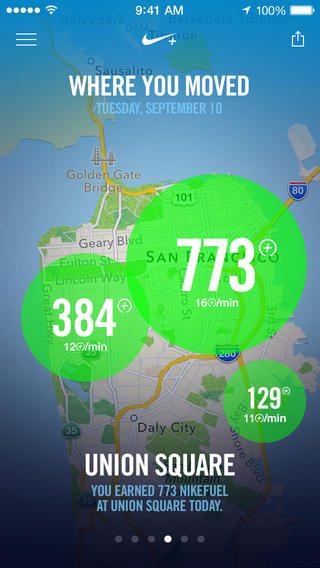
I don’t know if I need to go through all of the charts and graphs the app offers since they’re all self explanatory. There’s a few different ways Nike+ Move relays your activity, including a central NikeFuel counter, a daily line graph, and a weekly bar graph, but the one that people might raise questions is the location graph.
Nike+ Move asks to keep tabs on your location throughout the day, effectively keeping the location indicator in your status bar on all the time. While the app keeps tabs of your location in the background, I haven’t noticed any real noticeable battery drain (and I’m already running apps like Automatic in the background in addition to other apps that take advantage of geofencing).
These circles get bigger depending on how much you got active, not necessarily outlining the entirety of where you got active.
You can opt out of Nike+ Move’s location features, but they’re perhaps Nike+ Move’s coolest. Basically, the location graph puts big activity bubbles over (very general) areas that you’ve got active in. If you choose to compete with people nearby, you’ll likely end up competing regionally rather than hyper locally. It’s less like a FourSquare check-in and more like a neighborhood scoreboard. Just keep in mind your Game Center name and photo will be public.
I’ve talked a lot about an app that’s free, so at this point you should just download it if you haven’t already. I’m surprised that the app isn’t featured in this week’s Featured top banners on the App Store, but at least it’s found a spot in the enhanced collection.
Nike’s polish on Nike+ Move is remarkable, especially for the price of free. Lots of graphs and activity info is in motion, and Nike’s color palette is bright and captivating. Complaints about the app boil down to login issues, and I have to admit I’ve been logged out of the app at least once (but with no loss in recorded data).
The bigger story here is that the iPhone 5s is now officially a serious fitness device to be contended with. I’ve said before that the M7 in the iPhone 5s is Apple’s testbed for a potential wearable, but now I’m asking if they even need one.
Nike+ Move doesn’t break down nuanced data, calories burned, or supplement data with lifestyle information with nutritional plans. What it does do is encourage people to be just a little bit more active each day, and I think that’s absolutely enough for most people. Athletes who want more can have more, and that’s where the FuelBand, GPS running watches, and other fitness devices like heart rate monitors become compelling. For the rest of us? I’d say we’re set.
Download Nike+ Move from the App Store.