This Week's Sponsor:

BetterTouchTool

Now with a Powerful Launcher for Your Mac


Posts tagged with "app store"

Plex Now Available on Apple TV, and Apple Adds Top Charts to Apple TV App Store

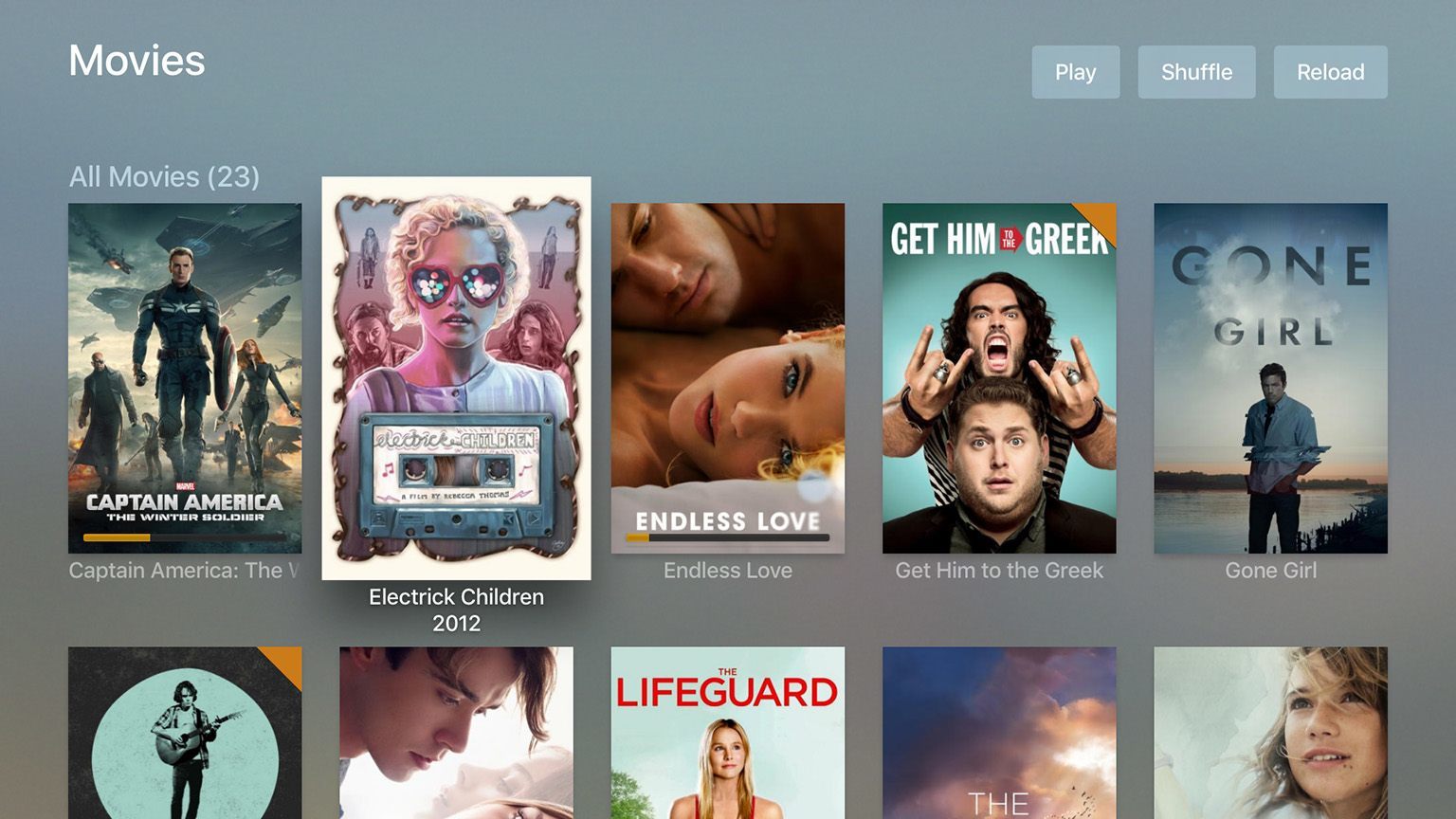
The highly anticipated official Plex app for the new Apple TV is now available on the App Store as a free download. The Plex Apple TV app can play all of your video, music, TV and photo collections from any computer or NAS device that you install the Plex Media Server on. You can view more screenshots of the Plex Apple TV app on the Plex Blog.

There truly isn’t any other platform we’ve wanted to be on for as long as we have the Apple TV. Today’s the day, and we’re celebrating. The app is free in the app store for everyone, and requires the latest media server.

Meanwhile, Apple appears to have listened to some of the complaints about the lack of discoverability in the Apple TV App Store and added a Top Charts section. Just as it does on iOS, the Top Charts section is broken down into Top Free, Top Paid and Top Grossing lists.

Top Charts is currently limited to the US App Store, but it seems likely that the feature will roll out to international stores over the coming days. Unsurprisingly, the lists for the Top Paid and Top Grossing apps are dominated by games, whilst the Top Free list is mostly occupied by media and entertainment apps. If you don’t have access to an Apple TV or live outside the US, you can see the top 10 apps in each list on MacRumors.

Perhaps in another effort to increase the discoverability of Apple TV apps, Apple has refreshed the App Store Featured page and is now highlighting some new apps. Typically on the iOS App Store they only refresh the App Store Featured page once a week on Thursdays. Hopefully this happens more frequently on the Apple TV App Store, at least until they introduce categories or some other ways to discover apps that aren’t featured or trending.


When a Dev Dies

Craig Grannell has written about a topic that is very dear to me – app preservation in the age of the App Store. Specifically, he wonders what happens to an app when its developer passes away:

Recently, I was asked by a games mag you’ve probably all heard of to write about Apple TV and gaming, largely from a development standpoint. As ever under such circumstances, I went through my list of email and Twitter contacts, seeing this as a good opportunity to offer some exposure to indie developers whose work I’ve enjoyed over the years. One response came back very quickly, albeit from a name I didn’t quite recognise. The message was in fact from a developer’s wife; the person I was trying to get in touch with had died the previous week.

The developer in question was Stewart Hogarth, who’d lost his battle with congenital heart disease; he was just 34. We’d only been in touch a few times, but I’d been captivated a couple of years ago by his truly excellent 8-bit tribute I Am Level for iOS and Android. This was a smart, charming, entertaining title that married eye-searing Spectrum-style graphics, old-school single-screen platforming challenges, and modern mobile tilt-based controls. It was still installed on all of my devices, and it was strange and very sad to think that the person who created it was no longer with us.

I know that this topic is uncomfortable to discuss, but it’s an important one. If we want to treat apps as cultural artifacts more than ephemeral utilities – at least some of them – we need to talk about ways to preserve them.

I genuinely believe that, years from now, apps and games will be studied as interesting data points and references for our society, behaviors, and sociological traits. Today, quite paradoxically, in many cases it’s actually easier to preserve physical media than digital app store (lowercase, as it applies to every company) content and developers’ back catalogues. Servers that eventually disappear, expired contracts, apps that are no longer supported on the latest OS – it doesn’t make much sense to me that the rules and limitations of software make it harder to preserve apps than something which physically decays.

I continue to believe that app preservation is a topic worth discussing, and Craig is touching on an important aspect of it.

Permalink

App Store Prices Increasing This Week in Australia, Indonesia and Sweden

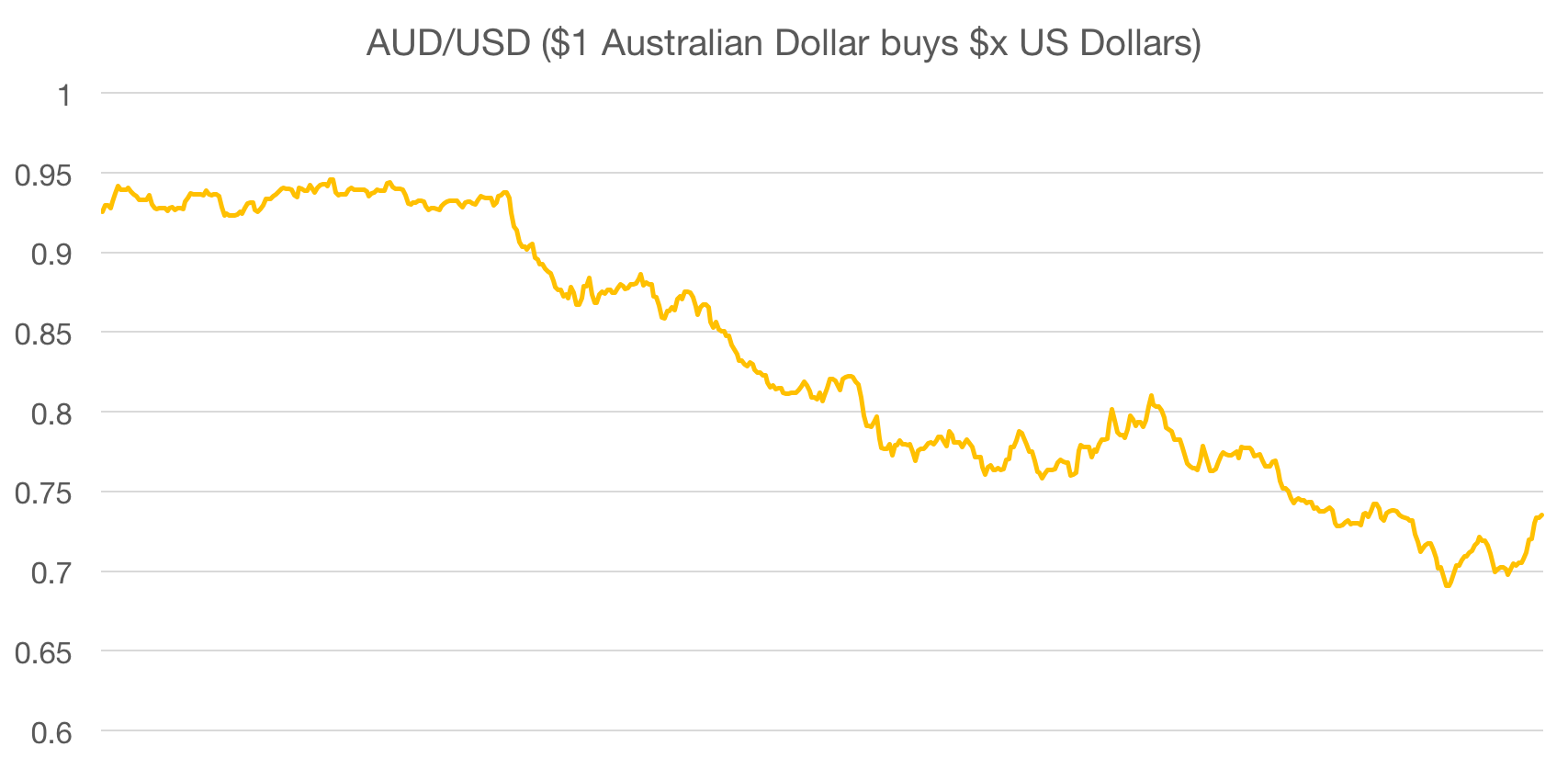
AUD/USD from 4 April 2014 (when App Store prices were last adjusted in Australia) to 13 October 2015.

AUD/USD from 4 April 2014 (when App Store prices were last adjusted in Australia) to 13 October 2015.

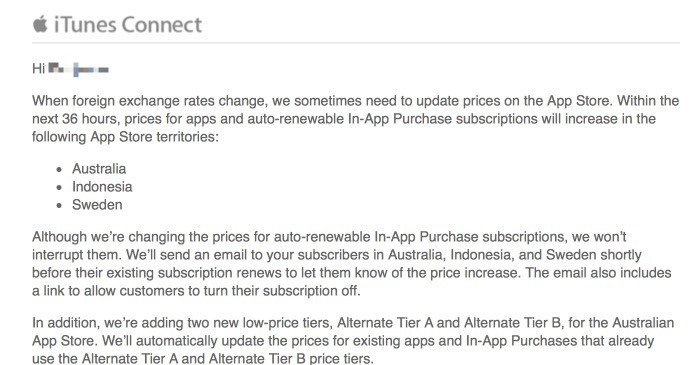
As reported by 9to5Mac, Apple is set to increase the prices of apps in Australia, Indonesia and Sweden within the next 3 days. The new prices will affect all paid apps, In-App Purchases and In-App Subscriptions. As an example, in Australia, the App Store pricing Tier 1 will be increasing from $1.29 to $1.49.

In an email to developers, Apple explained that the price increases are a result of changing foreign exchange rates. In the case of Australia, the above chart shows how the Australian dollar has depreciated in value against the US dollar since the last pricing change in April 2014.

Source: 9to5Mac

Source: 9to5Mac

Apple is also introducing the Alternative Tier A and Alternative Tier B pricing tiers to Australia. Apps sold at these price tiers will cost Australian App Store customers AU$0.99. These tiers have previously been used by Apple to enable developers to sell their apps at very low prices in some developing countries such as China where Alternative Tier A (¥1) is equivalent to US$0.16.

If you want to know a bit more about App Store Pricing Tiers, I wrote an article about them which has more information on how they operate and why Apple needs to adjust them occasionally.


Apple Refunding All Purchases of Peace

Apple has informed Marco Arment that all purchases of Peace will be refunded to customers after he pulled the app from the App Store:

Apple notified me this afternoon that they’ll be proactively refunding all purchases of Peace. It will probably take a few days to process.

As far as I know, this effectively never happens. When I decided to pull the app, I asked some Apple friends if this was even possible, and we all thought the same thing: iTunes billing works the way it works, period, and no special cases can be made.

This is the first time I’ve heard of Apple proactively refunding an app removed from sale. I wonder what will happen to purchase history in iTunes: will Peace be available for redownload from a user’s account, or will it effectively disappear forever?

(In the meantime, I’m keeping Peace on my devices. It’s still a great app.)

Permalink

Apple Launches App Store Games Twitter Account

Casey Newton, writing at The Verge:

Apple has launched a dedicated Twitter feed for gaming just days before the company is expected to reveal a new Apple TV that doubles as a gaming console. Apple confirmed the authenticity of the account to The Verge, which sent out its first tweet this morning. It included a GIF featuring some of the platform’s most popular games, including Clash of Clans and Angry Birds.

Staffed by App Store Games Editors, the new @AppStoreGames Twitter account will feature various kinds of content, as Apple told The Verge:

The Twitter feed will feature more than just the usual picks for app of the week, the company said. App Store editors will run the feed, and plan to populate it with sneak previews of games, tips and tricks, and profiles of talented gamers. Editors will also interact with game developers on the feed, Apple said.

This is far from Apple’s first foray into actively using social media, but in recent times they’ve become more sophisticated in the way they approach it, and the frequency to which they use it. Just a few short weeks ago Apple launched a Snapchat account for Apple Music, which has been incredibly well produced. Just looking at the first day of tweets from @AppStoreGames (a sample of which are embedded below) and it looks like this account is well worth a follow.

Read more


A Beginner’s Guide to App Store Pricing Tiers

It might be common knowledge to developers, but some readers might not be aware that Apple only permits developers to sell apps at certain price points. For example, customers in the US App Store will see apps costing $0.99, $1.99, and $2.99 but they won’t find any apps costing $5.20 or $2.75.

For various reasons, which we’ll cover, Apple permits developers to choose from 94 price tiers, which range from US$0.99 to US$999.99. Developers pick one price tier, which applies to every country that their app is distributed in.

In this story we’ll go into the details of the App Store price tiers, explaining how they work, some of the reasons why they exist, interesting consequences of them, and hear from developers who use them.

This is a bit of an experimental story, exploring an iOS/Mac developer topic for the benefit of anyone interested in the iOS/Mac app ecosystem. If enough people find this useful we’ll look at covering other topics.

Read more


1Password 5.5 Brings UI Tweaks and Improvements to Touch ID, Apple Watch App, and Security

Released today on the App Store, the latest update to our favorite password manager brings some nice minor adjustments. Most of the changes improve the flow and ease of use of the app, and while there aren’t any game changers here, numerous tiny annoyances that have been frustrating me for a while have been wiped out.

The first feature mentioned in the release notes is the ability to switch between multiple vaults with only two taps using their new vault switcher. I personally only use one vault with 1Password so I don’t have much to say here, but I’m always a fan of doing things in fewer taps so this feature gets a thumbs up from me.

My favorite changes have to do with Touch ID and security tweaks. There have been quite a few times when I’ve accidentally canceled the Touch ID dialogue, and until now that meant that I was then required to type my password back in before the app would unlock. With version 5.5, there is now a very nice looking fingerprint button that will show up beneath the password input box. If you accidentally cancel Touch ID before unlocking the app, you can now tap the fingerprint button to bring the Touch ID prompt back up and unlock without typing. The feature of course still respects your Touch ID timeout settings, so if you’re trying to unlock when Touch ID has been disabled until the next time your password is typed, tapping the fingerprint button won’t do anything.

Next on security, in regard to the 1Password extension, the extension and the main 1Password app now share unlock settings. This means that if you unlock the app, the extension is unlocked, and vice versa. If you, like me, have experienced typing your password into the extension (which should then enable Touch ID) and then going to the main app and discovering that you now need to type the password again, then you’ll be happy about this feature as well. Timeout settings are still respected on the extension as well, also of course.

Another small but appreciated security improvement: if you fill your login credentials on an unsecured website (think http://) when the saved URL for the login is secure (think https://), 1Password will warn you that this is about to happen. This is one of those features that you hope you would never need anyway but if you do it could save you a lot of trouble.

Finally, among some other various and very minor changes, the Apple Watch app has been updated to allow you to see the PIN numbers on your credit card entries. Convenient if you’re into that sort of thing.

Overall, 1Password 5.5 is a solid update. Mostly polish, but polishing shiny things just makes them shinier, and who doesn’t like that? If you don’t have 1Password yet then I’m not sure why you read all of this, but you can find it in the App Store, and you should go buy it right now.


The Colors Of An App Icon

Stuart Hall from AppBot has previously written articles about common trends amongst popular apps when it comes to app names, descriptions, screenshots and countries, and he is back today with one about the colors of app icons.

Hall was able to extract the dominant colors from app icons and then plot them on a color wheel. The article features several different ‘color wheels’ showing the top 200 free iOS apps, paid iOS apps, iOS social apps, iOS games and free Mac apps.

You really need to view the article for yourself, but I have embedded one color wheel below. Hall shared a draft of the article with me and I suggested he generate one more color wheel which plotted the app icons based on their major color and sized to reflect their position on the charts (#1 is largest). Hall kindly obliged and you can see the chart below, representing the top 100 free iOS apps.

Permalink

11 Million Customers Sign up for Apple Music Trial, App Store Has a Record July

Apple’s Eddy Cue and Jimmy Iovine spoke to USA Today reporter Marco della Cava about Apple Music’s early numbers:

One month after unveiling its new streaming music service, Apple has locked in 11 million trial members, company executives tell USA TODAY.

“We’re thrilled with the numbers so far,” says Eddy Cue, Apple’s senior vice president of Internet software and services, adding that of that sum 2 million have opted for the more lucrative family plan at $14.99 a month for up to six people.

Whilst there are still 2 months of the Apple Music free trial period before user’s credit cards start being charged, there’s little doubt that those numbers represent a solid launch. For those curious about how those numbers compare to other services, Spotify announced in early June this year that they had “more than 20 million subscribers and more than 75 million active users”.

Cue also revealed to USA Today that July was a record breaking month for the App Store:

July also brought a fiscal high-water mark for the company’s App Store, which did a record $1.7 billion in transactions, “with particular momentum in China,” says Cue. That brings the total amount paid to app developers to $33 billion, up from $25 billion at the end of 2014.

Permalink