
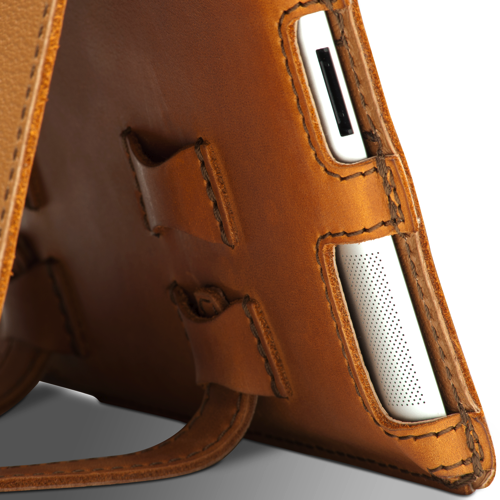
Saddleback Leather Co. makes some of the finest leather products from the Southern United States, rugged enough to haul a day’s load across the Mississippi River twice over and chic enough to protect your MacBook from the hipster-mobs of San Francisco. If you don’t know what the hype is about, we’ve previously taken Saddleback’s Leather iPad Case from the great American educational institutions back to the backpack before leaving the spoils on MacStories for all to see. Built pigskin tough and bound with enough rawhide to turn your aluminum slate into a cowboy’s workstation, the successor to the iPad will need its own set of skin for all of you early adopters. Now shipping is the iPad 2 Leather Case, hand made from the same bull-tough materials and kevlar stitching that’s now tapered to the iPad’s every edge. Available in Carbon Black, Chestnut, Coffee Brown, and Tobacco Brown (pictured) to fit your rugged personality, Saddleback’s iPad 2 Case is available for $104.00 online.
Posts tagged with "accessories"
Saddleback Now Shipping Next Generation iPad 2 Case

Access Extra Content and Perks
Founded in 2015, Club MacStories has delivered exclusive content every week for nearly a decade.
What started with weekly and monthly email newsletters has blossomed into a family of memberships designed for every MacStories fan.
Club MacStories: Weekly and monthly newsletters via email and the web that are brimming with apps, tips, automation workflows, longform writing, early access to the MacStories Unwind podcast, periodic giveaways, and more;
Club MacStories+: Everything that Club MacStories offers, plus an active Discord community, advanced search and custom RSS features for exploring the Club’s entire back catalog, bonus columns, and dozens of app discounts;
Club Premier: All of the above and AppStories+, an extended version of our flagship podcast that’s delivered early, ad-free, and in high-bitrate audio.
Kickstarter Project - GoPano micro: A Panoramic Lens for iPhone
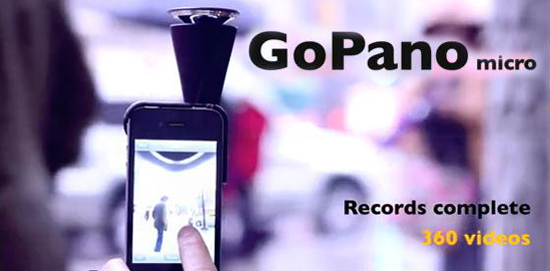
There are lots of Kickstarter projects aimed toward the iPad and iPhone but this is the first optics one I have seen. It’s called the GoPano micro; it’s a lense for the iPhone 4 that takes 360 degree panoramic videos. You attach the device to your iPhone and record from the free 360 video app.
The GoPano Micro will record everything all at one time. After recording, you can review the video and choose to view any perspective simply by swiping the screen, and view any angle at any point (pan and zooming too). With the app you can also upload your video on a web platform (not yet finished) and share your videos as well. You can also view other videos uploaded by anyone via the web too.
Video after the break. Read more
Access Extra Content and Perks
Founded in 2015, Club MacStories has delivered exclusive content every week for nearly a decade.
What started with weekly and monthly email newsletters has blossomed into a family of memberships designed for every MacStories fan.
Club MacStories: Weekly and monthly newsletters via email and the web that are brimming with apps, tips, automation workflows, longform writing, early access to the MacStories Unwind podcast, periodic giveaways, and more;
Club MacStories+: Everything that Club MacStories offers, plus an active Discord community, advanced search and custom RSS features for exploring the Club’s entire back catalog, bonus columns, and dozens of app discounts;
Club Premier: All of the above and AppStories+, an extended version of our flagship podcast that’s delivered early, ad-free, and in high-bitrate audio.
iDroplets: Tiny Rubber Feet For Your iPad 2
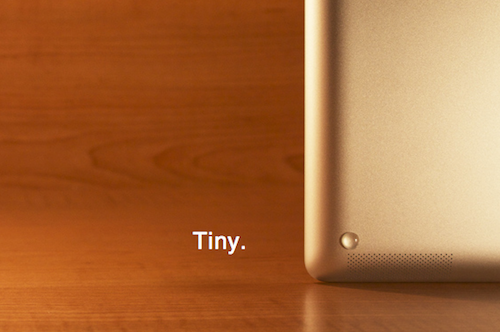
After using the iPad 2 for a while, I’ve noticed two things: the thinner and flat design makes for an incredibly better grip in my hands; second, it’s harder to pick it up from another flat surface (like a desk) than the original iPad and it tends to “slide” and move a little bit. Designer Morgan Allan Knutson apparently thought the same thing and created the iDroplets, a set of tiny rubber feet that attach to the iPad 2 with ease and also protect the edges of the device while it’s being used in typing mode with a Smart Cover.
The iDroplets cost $5 with free global shipping (as long as normal postage can reach your country) and we think it’s a pretty damn good idea. Sure you can do this by yourself if you buy four little rubber feet, but we like to support indie projects here at MacStories. So head over the (elegantly designed) product webpage, and order your iDroplets now.
Access Extra Content and Perks
Founded in 2015, Club MacStories has delivered exclusive content every week for nearly a decade.
What started with weekly and monthly email newsletters has blossomed into a family of memberships designed for every MacStories fan.
Club MacStories: Weekly and monthly newsletters via email and the web that are brimming with apps, tips, automation workflows, longform writing, early access to the MacStories Unwind podcast, periodic giveaways, and more;
Club MacStories+: Everything that Club MacStories offers, plus an active Discord community, advanced search and custom RSS features for exploring the Club’s entire back catalog, bonus columns, and dozens of app discounts;
Club Premier: All of the above and AppStories+, an extended version of our flagship podcast that’s delivered early, ad-free, and in high-bitrate audio.
Kickstarter Project - The Cosmonaut: A Wide-Grip Stylus for Touch Screens
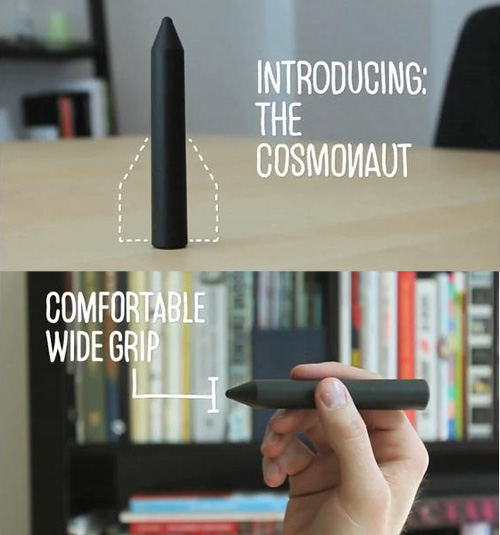
Last year before everyone was using Kickstarter, a new iPhone accessory showed up on the site and was a phenomenal success. It was “The Glif” - a tripod mount / stand. We’ve covered it’s rise to popularity here on MacStories. The creators of The Glif, Dan Provost and Thomas Gerhardt, are back with a new project, named The Cosmonaut.
The Cosmonaut is a minimal, wide-grip capacitive stylus for touch screen devices (not just the iPad). They modeled this new product after a dry-erase marker since it makes more sense on an iPad than a small stylus that people use on smartphones.
Video after the break. Read more
Access Extra Content and Perks
Founded in 2015, Club MacStories has delivered exclusive content every week for nearly a decade.
What started with weekly and monthly email newsletters has blossomed into a family of memberships designed for every MacStories fan.
Club MacStories: Weekly and monthly newsletters via email and the web that are brimming with apps, tips, automation workflows, longform writing, early access to the MacStories Unwind podcast, periodic giveaways, and more;
Club MacStories+: Everything that Club MacStories offers, plus an active Discord community, advanced search and custom RSS features for exploring the Club’s entire back catalog, bonus columns, and dozens of app discounts;
Club Premier: All of the above and AppStories+, an extended version of our flagship podcast that’s delivered early, ad-free, and in high-bitrate audio.
Wooden iPad 2 Cover Is Cheap, Beautiful, And Smart
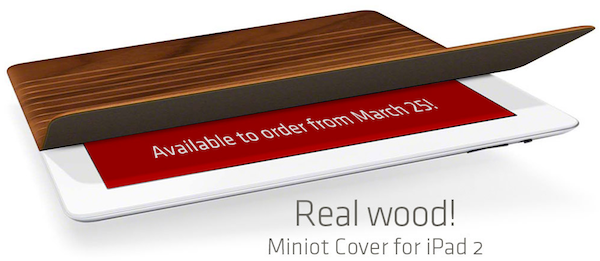
For as much as we at MacStories are in love with Apple’s Smart Cover, we’re also curious to see what kind of products third-party accessory makers will release for a device that’s got magnets and a flat surface perfect for covers and stands. Now that word about Apple’s magnet implementation is out there, it shouldn’t be long enough until we see all kinds of Smart Cover replacements come out. And while I’m sure many of them won’t offer Apple’s exceptional build quality and usability, the Miniot Cover for iPad surely is something to get excited about.
It looks like a Smart Cover, but it’s got a wooden surface that rolls into a cylinder (that’s right) to offer typing and stand modes. It easily attaches to the iPad and the wooden finish on the surface is simply beautiful. I can’t wait to try one of these things out, and I’m just going to say that Apple should allow Miniot to feature their product into the retail stores.
Shipping in a few days at €50 (it’s cheaper than Apple’s leather model sold at €69 in Europe), the Miniot Cover is set to provide a great alternative to the Smart Cover. Check out the video below. [Miniot via TUAW]
Read more
Access Extra Content and Perks
Founded in 2015, Club MacStories has delivered exclusive content every week for nearly a decade.
What started with weekly and monthly email newsletters has blossomed into a family of memberships designed for every MacStories fan.
Club MacStories: Weekly and monthly newsletters via email and the web that are brimming with apps, tips, automation workflows, longform writing, early access to the MacStories Unwind podcast, periodic giveaways, and more;
Club MacStories+: Everything that Club MacStories offers, plus an active Discord community, advanced search and custom RSS features for exploring the Club’s entire back catalog, bonus columns, and dozens of app discounts;
Club Premier: All of the above and AppStories+, an extended version of our flagship podcast that’s delivered early, ad-free, and in high-bitrate audio.
How To Use A Smart Cover With The iPad 1
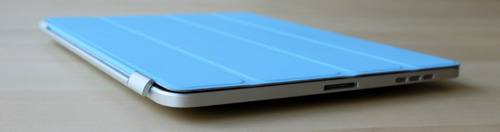
The Smart Cover is undoubtedly one of the reasons why people will consider upgrading to the iPad 2: it’s lightweight, it’s got magnets, it automatically attaches to the device to cover its screen and also happens to have a microfiber cloth for cleaning purposes. It doubles as a stand to prop your iPad for typing or movie watching, and thanks to the hardware implemented by Apple it can wake or put the iPad’s display to sleep. It’s genius.
Those people who don’t want to upgrade to the iPad 2 just yet, however, might be out of luck when trying to “retrofit” the Smart Cover for the iPad 1. The original iPad doesn’t have magnets, nor does it come with a system to automatically recognize whether or not a cover is lifted off the screen. Plus, it’s slightly heavier and it’s got a different design lacking tapered edges. Many thought it would be impossible to use a Smart Cover with the iPad 1.
It turns out though, with a bit of hacking and custom magnets it is possible to “install” the Smart Cover on the iPad 1. By placing a series of magnets on the iPad 1’s flat side so the Smart Cover’s hinge can fit, the guys at The Russians Used A Pencil managed to make it all work together. Sure, the iPad doesn’t automatically wake from sleep and the stand functionality is a little bit off because of the old design, but it works.
To place the magnets, I stuck them first to the magnetized hinge of the Smart Cover. I slid them around until they became locked into a position. This ended being asymmetrical, but I didn’t mind. I then lined up the cover with the iPad and used masking tape to mark where the magnets should be placed. I wanted this to be a somewhat permanent solution, so I used super glue to affix the magnets to the iPad. If you are not so daring, or want to test it out to make sure you like it, just use transparent tape. Even though the super glue keeps the magnets secure and in place, they are actually pretty easy to remove by just “chipping” them off with a flathead screwdriver and a very light tap of the hammer.
You’ll need glue to attach the magnets to the iPad, and I’m pretty sure the whole “automatic aligning process” isn’t as magical as Apple’s implementation in the iPad 2. Still, check out the video below if you, too, want to have a Smart Cover on your original 2010 iPad. [via The Brooks Review]
Read more
Access Extra Content and Perks
Founded in 2015, Club MacStories has delivered exclusive content every week for nearly a decade.
What started with weekly and monthly email newsletters has blossomed into a family of memberships designed for every MacStories fan.
Club MacStories: Weekly and monthly newsletters via email and the web that are brimming with apps, tips, automation workflows, longform writing, early access to the MacStories Unwind podcast, periodic giveaways, and more;
Club MacStories+: Everything that Club MacStories offers, plus an active Discord community, advanced search and custom RSS features for exploring the Club’s entire back catalog, bonus columns, and dozens of app discounts;
Club Premier: All of the above and AppStories+, an extended version of our flagship podcast that’s delivered early, ad-free, and in high-bitrate audio.
Here Come The Angry Birds iPad 2 Cases
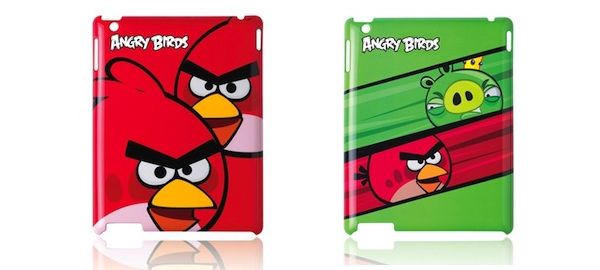
In a trip to the Apple Store back in December I noticed something really curious (and colored) on the shelves: official Angry Birds cases for the iPhone were heavily featured by Apple inside the retail space like no other case. The accessory section in the Apple Store is trafficked all day by customers willing to enhance their iOS or Mac experience, and especially with the iPhone 4 third-party cases of all kinds saw an explosion in demand and popularity. But the promotion reserved to these Angry Birds cases was unprecedented.
Now the same is about to happen all over again with the iPad 2, which doesn’t need a case according to Apple but still it’s going to experience the invasion of third-party accessories like the iPhone 4 did. Whilst most manufacturers are ramping up production for their cases, folios and stands now that the iPad 2 is available, Gear4 has once again signed Rovio over to release official Angry Birds hard-plastic cases for the iPad 2. Available in three different flavors at $49.99, the cases feature holes to let you access all the buttons and hardware cutouts of the iPad 2: camera, speaker, dock connector, and so forth. You can check them out here. And , of course, they have your beloved pigs and birds.
The iPad 2 is a beautiful piece of hardware and Steve Jobs wants you to use the elegant Smart Cover to carry it around, without actually covering the device’s beauty. But trust me: your wife kids are going to love the Angry Birds case. [via iPadevice]
Access Extra Content and Perks
Founded in 2015, Club MacStories has delivered exclusive content every week for nearly a decade.
What started with weekly and monthly email newsletters has blossomed into a family of memberships designed for every MacStories fan.
Club MacStories: Weekly and monthly newsletters via email and the web that are brimming with apps, tips, automation workflows, longform writing, early access to the MacStories Unwind podcast, periodic giveaways, and more;
Club MacStories+: Everything that Club MacStories offers, plus an active Discord community, advanced search and custom RSS features for exploring the Club’s entire back catalog, bonus columns, and dozens of app discounts;
Club Premier: All of the above and AppStories+, an extended version of our flagship podcast that’s delivered early, ad-free, and in high-bitrate audio.
I Want This Tetris-like Stand For iOS Devices On My Desk
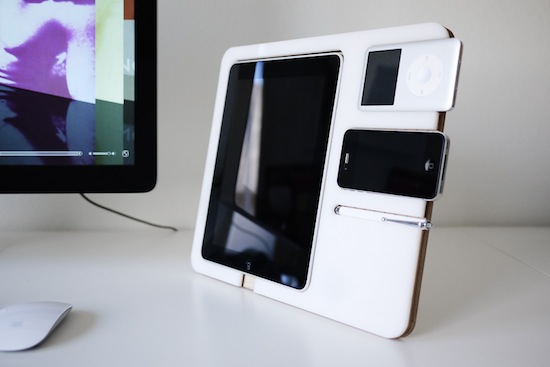
This product will likely never see the light of day on retail stores’ shelves, but it’d be so perfect on my home desk next to my iMac. The Polyply is a multi-device stand designed by Andrew Kim, and it’s made out of acrylic plastic and birch plywood. Realized as a two-week project by Kim to see how such an accessory would fit on an Apple’s fan desk, all parts were cut on a laser cutter. The Polyply could easily keep in place an iPad, an iPhone, and iPod and a stylus. It’s got room to plug in your Apple 30-pin dock connector and it even lowers for a better typing angle.
The design is simple and clean and, in spite of the times, it’d be just right for my desk that is daily cluttered by iPad, iPhone and, yes, an iPod Classic.
Like I said though, this was just an experiment. But I’d be ready to open my wallet if it was a Kickstarter project. [via Cult Of Mac]
Access Extra Content and Perks
Founded in 2015, Club MacStories has delivered exclusive content every week for nearly a decade.
What started with weekly and monthly email newsletters has blossomed into a family of memberships designed for every MacStories fan.
Club MacStories: Weekly and monthly newsletters via email and the web that are brimming with apps, tips, automation workflows, longform writing, early access to the MacStories Unwind podcast, periodic giveaways, and more;
Club MacStories+: Everything that Club MacStories offers, plus an active Discord community, advanced search and custom RSS features for exploring the Club’s entire back catalog, bonus columns, and dozens of app discounts;
Club Premier: All of the above and AppStories+, an extended version of our flagship podcast that’s delivered early, ad-free, and in high-bitrate audio.
Kickstarter Project - Hanfree: A Handsfree iPad Stand

We’re spotlighting yet another Kickstarter project. Why? Because we love to see handy, unique creations come to life. This one is an iPad accessory called the Hanfree. It makes the iPad handsfree, thus the name, for anytime you’re in bed, sitting down on your couch, in the kitchen using a cooking app, or anywhere you can find a place to use it; all without holding the device on your lap or in your hands.
Video after break. Read more
Access Extra Content and Perks
Founded in 2015, Club MacStories has delivered exclusive content every week for nearly a decade.
What started with weekly and monthly email newsletters has blossomed into a family of memberships designed for every MacStories fan.
Club MacStories: Weekly and monthly newsletters via email and the web that are brimming with apps, tips, automation workflows, longform writing, early access to the MacStories Unwind podcast, periodic giveaways, and more;
Club MacStories+: Everything that Club MacStories offers, plus an active Discord community, advanced search and custom RSS features for exploring the Club’s entire back catalog, bonus columns, and dozens of app discounts;
Club Premier: All of the above and AppStories+, an extended version of our flagship podcast that’s delivered early, ad-free, and in high-bitrate audio.