
Ecoute 2 Review

Ecoute 2

Ecoute 2

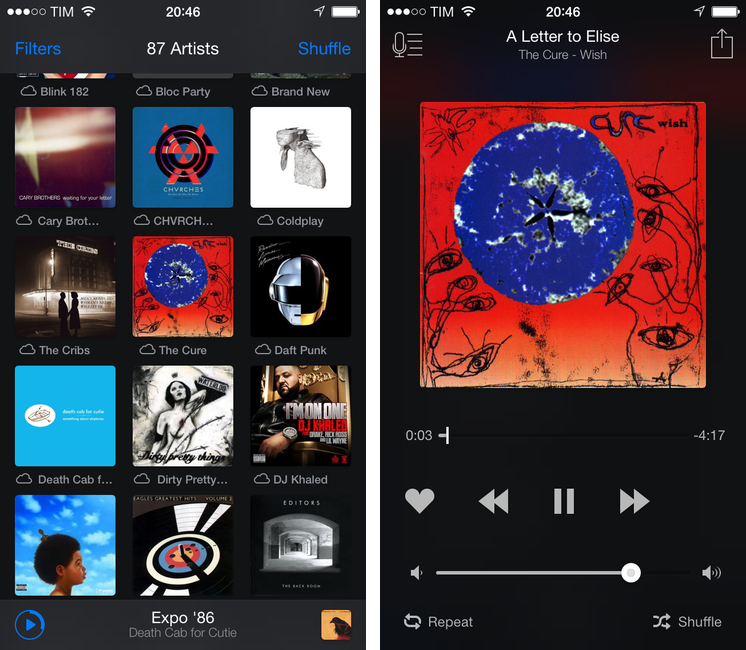
Last year, when we reviewed Ecoute, we called it the best music player for iOS. Apple’s Music app has never been packed with features when compared to iTunes on the Mac, but it’s the app that the majority of people use because it’s free and built into the operating system.

With iOS 7, Apple redesigned the Music app with some questionable choices for artist and album navigation and more advantages over third-party clients through the inclusion of iTunes Radio streaming and a special widget in Control Center to like songs and add them to your wish list. The Music app is, effectively, irreplaceable if you care about iTunes Radio and managing your music and playlists, but I think that the new Ecoute for iOS 7 does several things better than Apple’s app. Read more

Dailybook [Sponsor]

Our thanks to IdeaBlocks for sponsoring MacStories this week with Dailybook.

Memories are more than words. Transform your journaling with Dailybook, which supports multiple books, GPS location with maps, weather information, multiple pictures and audio notes to supplement life experiences. Share entries to Facebook or via email, and easily find posts through bookmarks, tags, and timestamps. Dailybook is a rich and rewarding journaling experience for the iPhone and iPad.

Dailybook is Universal and $1.99 on the App Store.

Permalink

Yahoo Weather 1.5 Adds iPad Support

Yahoo Weather, winner of an Apple Design Award at WWDC ‘13, has been updated today to version 1.5, which adds a native interface for the iPad, making the app Universal. I was a fan of the app before, and it’s good to see Yahoo releasing it on the iPad – a platform that Apple doesn’t think deserves its own built-in Weather app.

The iPad version is nothing revolutionary as it uses the same Flickr-powered photographic approach seen on the iPhone, making interface elements bigger and more spaced out. There are, however, some fun new transitions when scrolling through weather information on the iPad – such as columns of text sliding in from the sides of the screen and animated raindrop icons – that make the experience more fun on the iPad. These animations haven’t been enabled on the iPhone, likely due to screen constraints.

Yahoo Weather is free on the App Store.

Permalink

Tydlig: An Innovative Free-Form Calculator for iOS

Tydlig

Tydlig

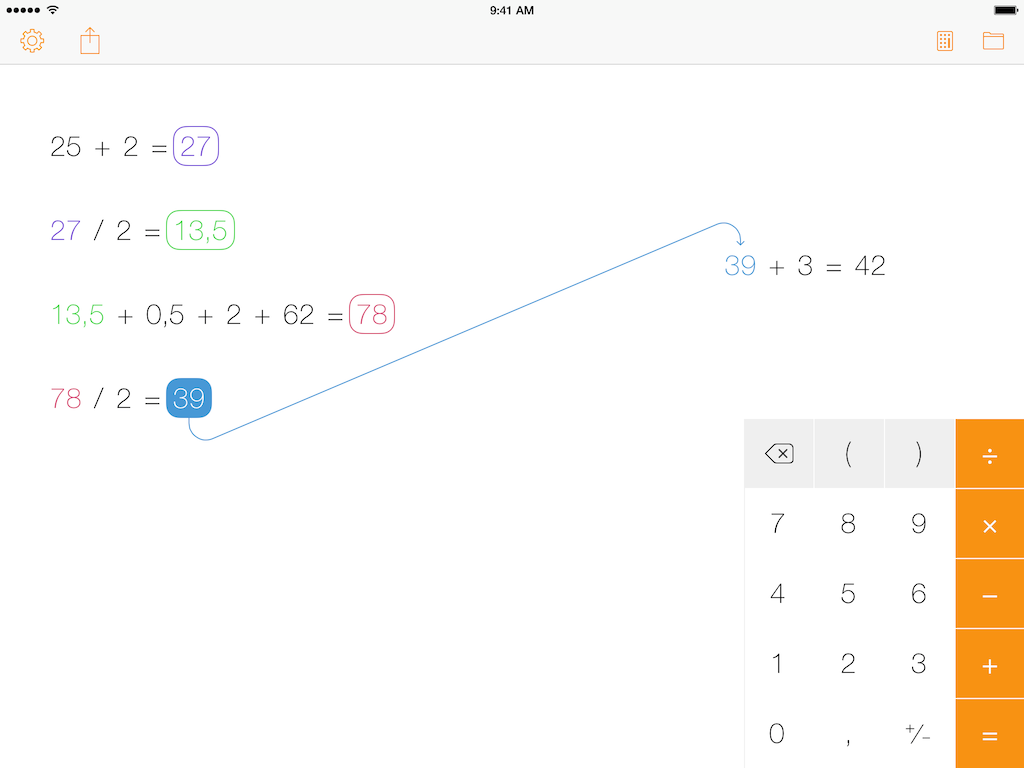
Developed by Andreas Karlsson, Tydlig wants to reimagine how a calculator should work in the modern age of iOS devices and multitouch screens. Rather than mimicking every aspect of old physical calculators in the transition to pixels, Tydlig eschews conventions by turning an iPhone or iPad’s screen into a canvas where numbers can be placed anywhere, linked together, and rearranged. The result is a breath of fresh air into the landscape of iOS calculators, but it also takes a while to get used to it and it likely won’t appease purists. Read more


Introducing A 27-Year-Old Computer To The Web

Jeff Keacher:

Reviving an old computer is like restoring a classic car: there’s a thrill from bringing the ancient into the modern world. So it was with my first “real” computer, my Mac Plus, when I decided to bring it forward three decades and introduce it to the modern web.

In 2040, will people try to connect 27-year-old iPads to the web?

Permalink

App Store Optimization

Dan Counsell:

An app’s name, and the keywords it uses are some of the biggest influencers in search results; all the research I’ve done suggests that the download volume acts as a multiplier on the name and keyword match. For example, If two apps have the same keyword (and rating), the app with the most downloads will come out on top — I’ve experienced this first hand with Clear for iPhone & Clear+ for iOS.

These are some good tips by Dan for third-party developers. I think the bigger theme is that the App Store is now so large, apps have to be treated like websites for a search engine with optimization tricks. This also explains why so many developers run regular promotions or agree to “free app of the week” initiatives (either official or not) – download numbers matter for long-term survival.

Permalink


Skitch Update Gives Retina Mac Owners Option to Export Lower Quality Images

The second update for Evernote’s line of products makes life easier for Mac owners who are working on Retina displays. Skitch has been updated with an option that can turn off hi-res images, which halves the DPI and makes the image easier to send over mediums like email. Cleverly, Skitch will still retain the original image size client-side, syncing the full version with your Evernote account.

Grab the Skitch update from the Mac App Store.

Permalink

Evernote for iOS Adds Business Card Scanning, Presentation Mode for Premium Members

In the first of two updates, Evernote for iPhone and iPad got a nice update yesterday that mainly benefits premium members. Premium members can now scan in an unlimited number of business cards that are converted into editable contact notes, which can be further updated with info from your LinkedIn account or address book contacts. Presentation Mode lets you present your notes as full screen presentations over AirPlay. Non-paying members can add 5 business cards and try Presentation Mode for 14-day days. Lastly, they’ve made a change to the quick note function, letting you choose whether ideas get siphoned into your business notes instead of a personal notebook.

Check out the App Store listing for all the relevant update info, and check out premium plans here.

Permalink