Apple’s Advantage

Kyle Baxter, writing about Apple’s Health app and HealthKit, both announced at WWDC:

Second, Apple takes this relationship very seriously. iOS makes it very clear when applications are requesting access to our personal data. Apple has worked quite hard to make sure that the user decides what and how much they want to share.

I don’t think Google or Facebook could announce that they are going to collect their users’ health data and optionally send it to their doctors without some reasonably large amount of criticism and fear of abuse. The reason is obvious: their primary business is utilizing user data to generate revenue, so why couldn’t they do the same with health data?

I agree. Apple highlighted the importance of user privacy several times during the keynote, and I appreciated many of the tech-related choices behind that – such as disabling network access for third-party keyboards by default.

Permalink

OS X Yosemite Beta UI Compared to Mavericks

Min Ming Lo has published a good initial comparison of the OS X Yosemite beta UI compared to Mavericks:

Apple revealed a sneak peek into Mac OS X Yosemite earlier this week. Not surprisingly, Apple updated its desktop OS to match iOS 7’s design language. The new OS X now embodies a brighter and flatter styling, coupled with icon updates, font changes, and translucent materials. Here’s a quick look at the visual design changes in Yosemite and my impressions of them.

Clearly Apple has a lot of work ahead to polish Yosemite before the final release, but I’m a fan of the new direction. And, unlike others, I’m glad to see a happier Finder. Who doesn’t like smiles?

Permalink

Brent Simmons’ Early Thoughts on WWDC 2014

Brent Simmons:

It was like this, though — we kept hearing about things, even relatively small things, that all by themselves would have made for a great week. It was like the greatest Christmas ever — and then Santa Claus hung out so you could take selfies with him. This friendly and generous Apple reminds me why I love writing iOS and Mac apps.

It’s a small thing, but I think the photos that Cook, Federighi, and Ive took with developers make Apple feel more human and approachable. Combine that with great announcements, and you get a fantastic WWDC.

Permalink

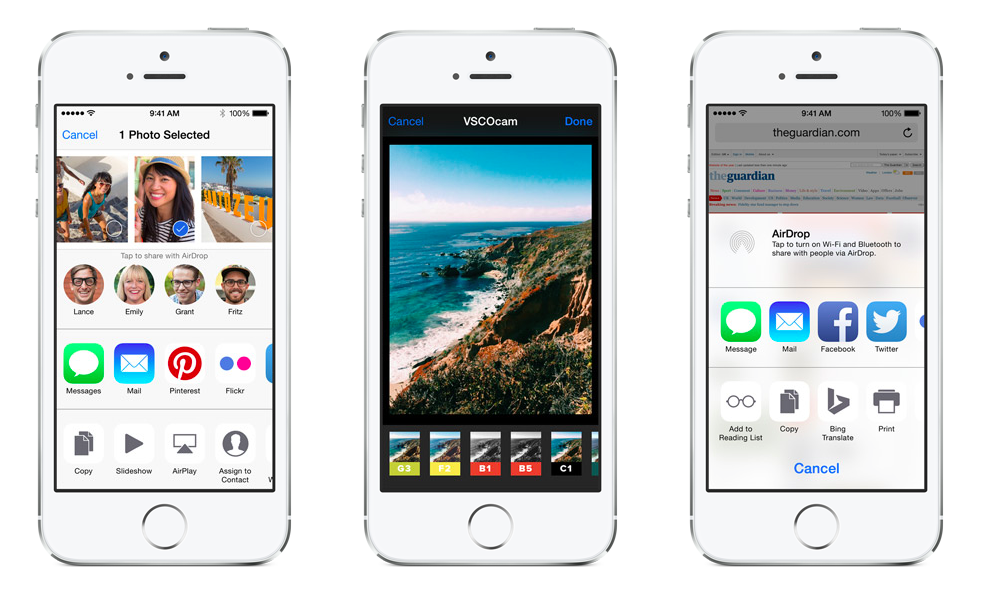
iOS 8 Extensions: Apple’s Plan for a Powerful App Ecosystem

Amidst the variety of announcements from WWDC 2014, Extensibility – a new set of technologies for developers to extend their apps – has been mainly regarded as Apple’s solution to the lack of inter-app communication on iOS.

Traditionally, iOS has been a closed platform in terms of software personalization and extensibility: due to a combination of design choices and strict enforcement of sandboxing rules, iOS users never enjoyed many of the benefits found on Google’s mobile operating system. Android users could, for instance, install system-wide replacement keyboards or pick documents from any app advertised as a storage location; iOS users, on the other hand, were forced to deal with unnecessary copies created by an outdated Open In system or stick with Apple’s dubious keyboard design in iOS 7.

Simultaneously, with Apple focusing on Maps improvements and a new design foundation for iOS, a few third-party developers took up on the task of creating apps and protocols capable of extending iOS as much as possible leveraging the tiny holes left by Apple in its sandbox.

We’ve seen a proliferation of apps that use URL schemes to facilitate the process of launching other apps and passing text to them; bookmarklets – pieces of JavaScript code executed in the browser – to let Safari communicate with third-party apps; developers creating their own SDKs and app ecosystems to solve document management; Fleksy – a popular Android keyboard – making an iOS SDK; a Python interpreter and a text editor with a workflow automation system, developed by a one-man shop in Germany.

The third-party iOS development community has been incredibly creative in spite of Apple’s longstanding limitations on iOS, but many of the devised solutions – especially URL schemes – were, ultimately, hacks and workarounds based on a protocol that wasn’t intended to let multiple apps communicate and exchange data.

With iOS 8, Apple wants to make iOS more flexible and powerful by letting developers extend custom functionality and content beyond their apps, making it available to users in other parts of the OS – and all while maintaining a secure design model, user privacy, good performance, and battery life.

As someone who’s invested in iOS as a productivity platform and uses the iPad as a primary computing device every day, I welcomed Apple’s move with excitement and optimism, but I also wanted to investigate the actual scope of the technology the company will ship later this year.

Read more



Developer Christmas

Mostly live from San Francisco, Myke, Federico and Stephen discuss the events of the WWDC 2014 keynote.

In the first of many episodes about Apple’s announcements at WWDC 2014, we talk about general impressions of iOS 8, Yosemite, Photos, and the improved App Store.

Get the episode here.

Permalink


Continuity’s Statement

From Shawn Blanc’s article on WWDC 2014, I particularly liked this bit about Continuity:

But I think Continuity is more than just a better implementation of a cool feature. I see it as a “philosophical” feature as well — it’s a statement that we use our devices for many of the same tasks, and that “work” is device agnostic. Continuity is a way of telling the Apple user it’s okay to expect their devices to always be in sync down to the very mid-sentence of an email in progress.

This is a great way to put it. Continuity is one of those features that “just make sense” – of course my activity should follow me around seamlessly – and it highlights an important point: devices and OSes are different, but the experience should always be consistent and natural.

Permalink