

Great video by Jason Snell, revisiting Steve Jobs’ old metaphor of cars and trucks in a modern context. (A transcript is available here.)
Trucks and Cars and Mac SUVs→
Pokémon Go Apple Watch App Released→

Niantic, maker of Pokémon Go, released an Apple Watch companion app for its popular iOS game today. According to Niantic the Apple Watch app lets players:
• Log each play session as a workout, with gameplay counting toward personal Activity rings
• Receive notifications about nearby Pokémon
• Count distance toward hatching Pokémon Eggs and receiving Candy with your Buddy Pokémon
• Receive notifications about PokéStops nearby and collect items from them
• Receive notifications when Eggs hatch and medals are awarded
The Pokémon Go watchOS app, which is available as part of a free update to the game, was first announced at Apple’s September iPhone event by Niantic CEO, John Hanke.
My Must-Have iOS Apps & Web Services, 2016 Edition
Feature of the Year
Spotify Discover Weekly
No software feature has brought as much joy into my life as Discover Weekly did this year. With its weekly assortment of songs I never heard before, Discover Weekly rekindled my love for mixtapes and the thrill of falling in love with a new band. I’ve learned to appreciate dozens of new artists thanks to Discover Weekly. I look forward to it every Monday.
Runners-Up
Workflow Web API Actions
With the ability to interact with any web API, Workflow has extended the power of its automation features beyond iOS apps. Workflow’s 1.5.3 release has been an important milestone for the app and the entire iOS automation landscape.
Ulysses Automation
Thanks to one of the richest implementations of x-callback-URL, Ulysses’ automation features have redefined how deeply an iOS text editor can be integrated with other apps. Over the past several months, I’ve integrated Ulysses with Todoist, Trello, and Workflow. Ulysses’ Markdown automation has raised the bar for other text editors on iOS.
1.0 Release of the Year
Scrivener
I wasn’t particularly excited about Scrivener when I first heard it was coming to iOS. After taking the app for a spin, though, I realized that its combination of desktop-class research tools and native iOS features were exactly what I needed for my iOS 10 review. Scrivener is the best 1.0 version I tried this year, and I trusted the app with my most important project for three months.
Runner-Up
PlayMira
I had my jaw-dropping moment on the iPad Pro this year when I was on vacation and successfully connected to my PlayStation 4 at home, woke it up from sleep, and started playing No Man’s Sky 400 miles away. PlayMira feels like sorcery. If you have a PS4, a fast Internet connection, and an MFi controller, you should spend some time setting up PlayMira over the holidays.
Web Service of the Year
Todoist
Todoist has fundamentally altered my idea of what a task manager should be. By embracing the web and integrations with other apps and services I use, Todoist is more than my todo app – it’s an interconnected and automated task management system that works everywhere.
Todoist’s extensible approach helped me accomplish more, collaborate more efficiently with my team, and overcome my productivity anxiety. Todoist perfectly encapsulates the advantages of flexible web services over app sandboxes.
Runner-Up
Zapier
Zapier’s hundreds of integrations and power-user functionalities made me realize that there’s a world of possibilities for web automation and connecting multiple services together. The most important aspects of our workflow at MacStories have been sped up by Zapier this year.
App of the Year
Airmail
The unique blend of modern email features, integrations with iOS apps and web services, and power-user options makes Airmail the most powerful email client for iOS, which deserves to be my App of the Year.
Airmail allowed me to reimagine the way I process and act on email messages. Despite some minor bugs, it’s a deeply customizable email client that adapts to my needs and works with the apps I already use to get work done. Airmail is a power-user email app with no equal.
I have tried several email clients over the past year, but I always go back to Airmail for a simple reason: it’s my favorite way to process email and get back to work.
Runners-Up
Ulysses
The Soulmen managed to distill the power and elegance of Ulysses for Mac into an uncompromising iOS text editor that offers a fantastic writing and editing environment. Behind its minimalistic appearance, Ulysses hides a set of advanced Markdown tools that make it my go-to text editor for MacStories articles and Club MacStories content. It’s rare to find a balanced combination of simplicity and power-user features, but Ulysses hits all the right notes while simultaneously abstracting much of the cruft of traditional Markdown text editors.
Timepage
Through a spectacular mix of attractive UI design and engaging user interactions, Timepage succeeds where other apps fall short – making the calendar fun to use and informative at the same time. Timepage exudes care and a willingness to subvert the classic metaphors of calendar client design for iOS, providing a standout calendar experience unlike anything else.
2016
Looking back at how I used my iPhone and iPad in 2016, I realize now that the tenets of my iOS workflow haven’t significantly changed. Some apps may be different – the App of the Year and Runners-Up are all new this year – but the fundamentals of how I work on iOS are consistent with 2015. The past year was mostly about optimization: I tried to find better apps for tasks I was already handling on iOS.
I wouldn’t say that iOS is a mature platform for productivity yet – there’s still a long list of aspects to improve, especially on the iPad. But I also feel like iOS 10 didn’t open groundbreaking possibilities for the apps I use every day – it was, as I wrote in September, a lifestyle update focused on consumers and our relationship with the iPhone. From this standpoint, it doesn’t surprise me that my favorite apps don’t appear drastically different from last year – it’s almost as if both users and developers are waiting for what’s coming next to iOS productivity and iPad multitasking.
Deeper automation with Workflow and the shift to web services are two trends I expect to continue in 2017. I see automation as an essential trait of how I like to work on iOS, but it’ll be interesting to measure the impact of iPad updates on my usage of Workflow and app automations. I suspect that web services and API integrations will keep gaining an important role for assistants by Google and Amazon, but I’m also waiting for Apple’s second wave of SiriKit extensions and a stronger integration with the iOS apps I use.
I think it’s going to be a fascinating 2017 for iOS productivity, and I’m excited for what’s next in iPad software.
As always, let’s check back in a year.
Connected 122:, Episode 2016: Big, Heavy and Vaguely Disappointing→
With 2016 (finally) drawing to a close, the Connected trio hop in their time machine and revisit the biggest tech stories of the last 12 months.
On this week’s Connected, we revisited the biggest stories from the past year. It’s funny how some of them feel like they happened a long time ago. You can listen here.
Sponsored by:
- Smile: Give the gift of Smile, and you’ll be giving the gift of time.
#MacStoriesDeals 2016 Holiday Edition: Best Deals for iPhone, iPad, and Mac Apps & Games
Every year, thousands of iOS and macOS app deals are launched for the holidays. At MacStories, we handpick the best deals for iOS and Mac apps and collect them in a single roundup with links to buy or share discounted products directly. You don’t have to be overwhelmed by app deals; we take care of finding the best ones for you.
Bookmark this post and come back to find updated deals later today. Updates will be listed as new entries at the top of each section; iOS apps are organized in sub-categories for easier navigation.
For real-time updates, you can find us as @MacStoriesDeals on Twitter.
Workouts++ Review
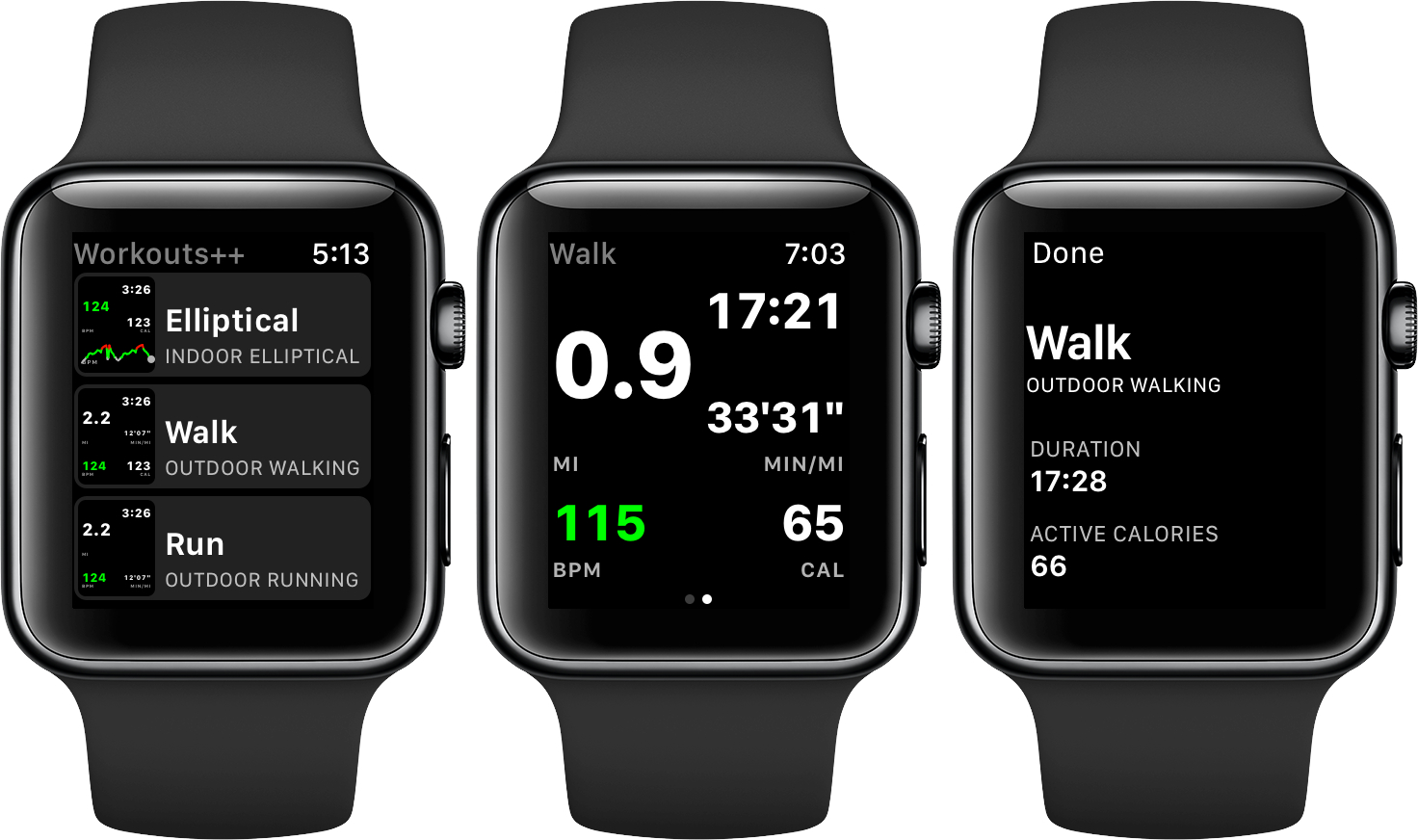
Workouts++ by David Smith takes my favorite aspect of Apple’s stock Workout app for watchOS – the ability to quickly start a workout – and adds layers of customization and workout tracking that takes the app to another level altogether. The key to Smith’s watchOS app is the inclusion of an iOS app that lets you customize the real-time statistics tracked on your Apple Watch during a workout and view the data collected in useful ways.
Super Mario Run Sets Records→
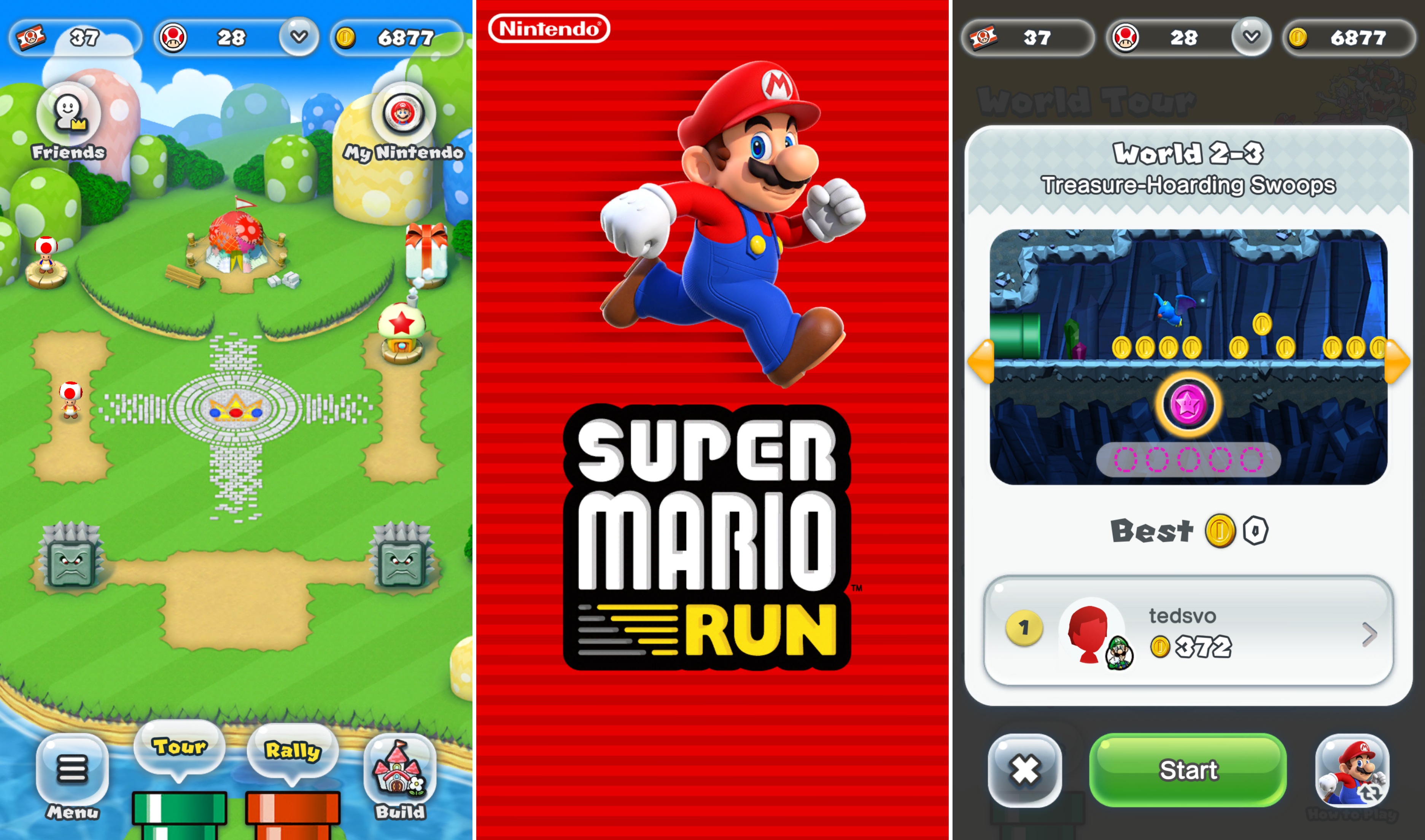
In a press release today, Nintendo detailed some of the App Store records Super Mario Run broke in the days immediately following its release last week. TechCrunch reports that:
…the company says that in addition to its top ranking in the “free” chart of the App Store in 140 different global markets (of the 150 where it’s available), it’s also now in the top 10 ranking for best grossing games in 100 different markets.
The press release also includes a quote from Phil Schiller, Apple’s Senior Vice President of Marketing confirming the record-smashing downloads.
HealthFace Puts Health App Data on Your Wrist
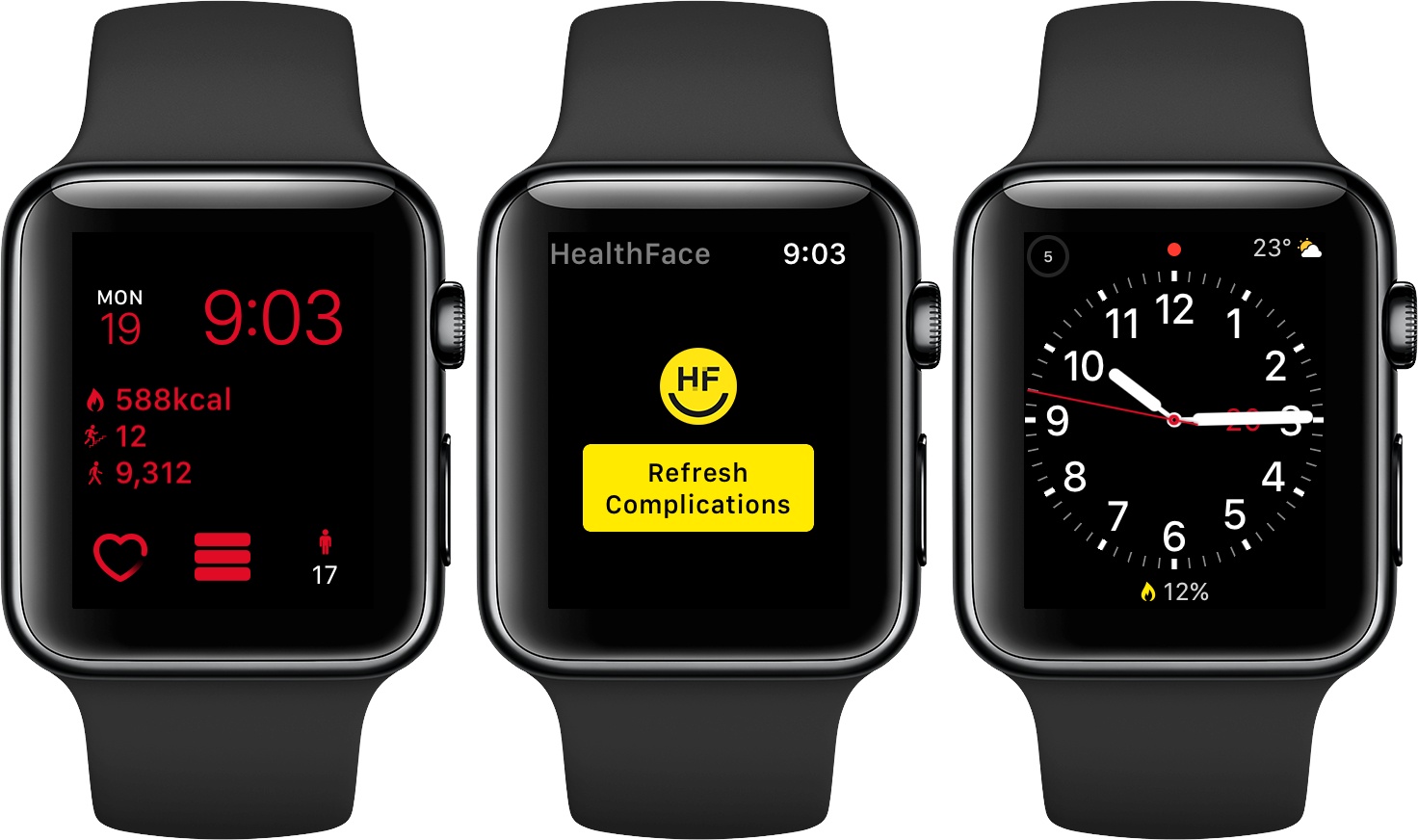
HealthFace, by Australia-based Crunchy Bagel, maker of the 2016 Apple Design Award-winning app Streaks, is an iOS and watchOS app that uses Apple Watch complications to display data stored in Apple’s Health app. The Health app got a much-needed makeover with iOS 10, but it can still take a lot of tapping to find what you want. HealthFace cuts through the clutter by letting you pick and customize the data that’s important to you and displaying it where it’s readily available – on your Apple Watch.