Apple Hires John Giannandrea, Google’s Chief of Search and Artificial Intelligence

According to The New York Times, Apple has hired John Giannandrea, Google’s chief of search and artificial intelligence. In a memo obtained by The Times, Tim Cook said:

“Our technology must be infused with the values we all hold dear,” Mr. Cook said in an email to staff members obtained by The New York Times. “John shares our commitment to privacy and our thoughtful approach as we make computers even smarter and more personal.”

Giannandrea joined Google in 2010 as part of the company’s acquisition of Metaweb and is credited with infusing artificial intelligence across Google’s product line. Giannandrea will report directly to Apple CEO Tim Cook.

This is a huge ‘get’ for Apple and comes fast on the heels of reports that the company is hiring over 100 engineers to improve Siri.

Permalink

iOS 11.3 and HomeKit’s Software Authentication

Mikah Sargent, writing for iMore, on the importance of software-based authentication for HomeKit devices that Apple officially rolled out with iOS 11.3 last week:

Up to this point, commercial accessories were also required to incorporate Apple’s hardware-based Authentication Coprocessor in order to obtain HomeKit certification. The coprocessor handled Apple’s strict rules for encryption and security for HomeKit-enabled accessories. Apple takes HomeKit security seriously — the company says all HomeKit sessions are end-to-end encrypted and mutually authenticated (authenticated by all parties). Each communication session also includes something called “perfect forward secrecy,” meaning that encryption keys aren’t reused — a new key is generated for every session.

These strict rules meant most companies had to build accessories specifically with Apple’s HomeKit requirements in mind. It was a beneficial rule for consumers in terms of privacy and security, but it also meant — at least at the beginning — fewer available HomeKit-enabled accessories. Companies who already had smart home products on the market would need to rethink their products if they wanted to offer HomeKit-enabled accessories. That changes as of iOS 11.3.

I was under the assumption that HomeKit software authentication was already available since Apple announced it at WWDC ‘17 (in fact, I covered it in my iOS 11 review here). As Sargent notes on Twitter, however, accessory makers only received support for software authentication with iOS 11.3, which explains why we haven’t heard of major “HomeKit software updates” yet. Assuming that Apple’s certification process for HomeKit accessories is still going to take weeks, I’m curious to see if software authentication will at least make it easier for third-party manufacturers to consider HomeKit integration.

Permalink

Progressive Web Apps on iOS 11.3

Great overview by Maximiliano Firtman on progressive web apps, which are now supported on iOS 11.3 thanks to new web technologies Apple adopted in Safari 11.1.

I wouldn’t call progressive web apps a “replacement” for native software from the App Store (just read the list of technical limitations from Firtman’s article), but they are indeed a remarkable improvement over how Safari used to save web apps to the Home screen. I recommend checking out these two lists to try some progressive web apps and see how they work on iOS. I spent way too much time playing around with Web Flap, a Flappy Bird clone that runs as a progressive web app and even supports offline mode on iOS 11.3.

Permalink

The RSS Revival

The platformization of the web has claimed many victims, RSS readers included. Google Reader’s 2013 demise was a major blow; the company offed it in favor of “products to address each user’s interest with the right information at the right time via the most appropriate means,” as it Google executive Richard Gingras put it at the time. In other words, letting Google Now decide what you want. And the popular Digg Reader, which was born in response to that shuttering, closed its doors this week after a nearly four-year run.

Despite those setbacks, though, RSS has persisted. “I can’t really explain it, I would have thought given all the abuse it’s taken over the years that it would be stumbling a lot worse,” says programmer Dave Winer, who helped create RSS.

I enjoyed this story on the state of RSS by Wired’s Brian Barrett because it resonates with a trend I’ve also noticed in the past couple of years. Many of us have often praised social networks as “winners” in the battle against pure old RSS feeds, but the reality is that RSS is here to say. Perhaps, like rock and roll, RSS can never truly die.

What’s even more interesting is that, beyond RSS as a protocol, RSS services and clients (web backends and apps) are improving and growing more powerful on a weekly basis now. Barrett mentioned Feedly, The Old Reader, and Inoreader (which I’ve been using since 2016 and offers terrific power user features); I would also add NewsBlur and Feedbin – two services that have relentlessly iterated on the RSS experience since Google Reader’s demise. Just in the past few months, for instance, NewsBlur launched infrequent site stories to fix the very problem of subscribing to too many feeds, and Feedbin rolled out support for Twitter subscriptions. Both are genuine innovations that help people who want to get their news directly from the sources they choose. And if we look at the iOS side of this, apps like Fiery Feeds and lire are rethinking what advanced RSS readers for iPhone and iPad should be capable of. We wanted to do an RSS-focused episode of AppStories, and we ended up producing two of them (you can listen here and here) because there was just so much to talk about.

While millions of people may be happy getting their news from Facebook or an aggregator like Apple News (which I also use, occasionally, for more mainstream headlines), the resiliency of RSS makes me happy. There was a time when I thought all my news could come from social feeds and timelines; today, I’m more comfortable knowing that I – not a questionable and morally corrupt algorithm – fully control hundreds of sources I read each day.

Permalink


Downie: Elegant and Efficient Video Downloads for Your Mac [Sponsor]

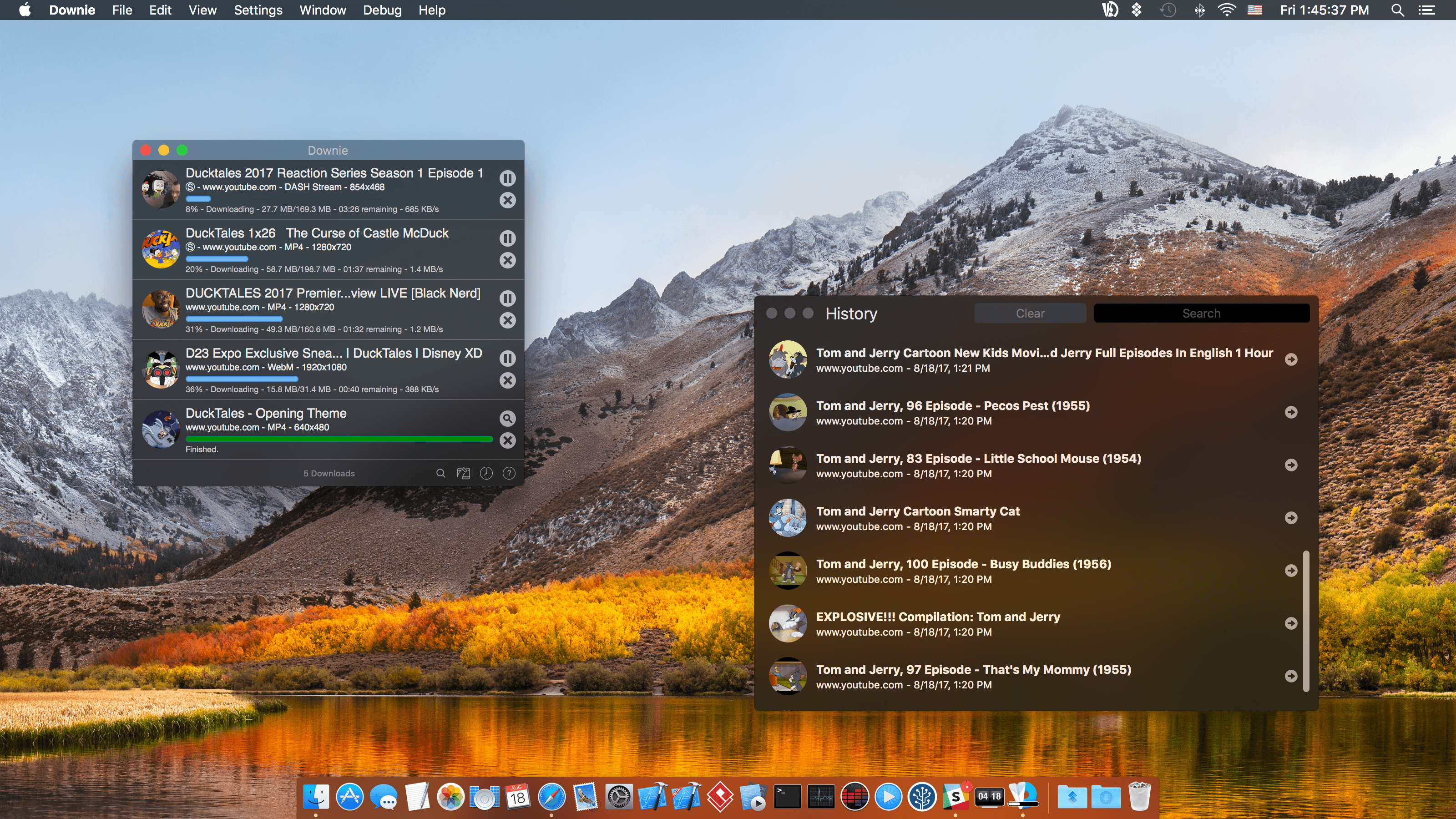
Downie for Mac makes downloading video from the web as simple as dragging and dropping a URL. From your browser, drag a URL to Downie’s menu bar icon or onto its Dock icon from sites like YouTube, Youku, Bilibili, Vimeo, and many more to immediately download a video. The app supports video downloads for over 1,000 different sites, and the list keeps growing.

Downie is efficient and organized. Instead of downloading now, queue up downloads for later. It’s a great way to process dozens of videos while you sleep and aren’t using your Internet connection for something else. Downloads can be organized autmatically into folders too based on source and playlist, saving you the hassle of organizing them yourself.

When you use Downie, you also know you’re getting the best version of a video that’s available. For example, unlike many other download apps, Downie can grab the 4K version from YouTube if one is available. It’s that sort of attention to detail, combined with attentive support, frequent updates, and localization that makes Downie a great choice for video downloads.

Downie has a special 25% discount just for MacStories readers. All you need to do is use this link to purchase the app. The same great deal applies to the Downie and Permute bundle if you use this link. Permute is a great companion to Downie that lets you convert video between a wide variety of formats. You can use the coupon code 905E0C5D at checkout to get either discount too.

Expand your video collection the easy way, with Downie.

Our thanks to Downie for sponsoring MacStories this week.



The Xcode Cliff

Paul Miller, writing for The Verge, argues that Swift Playgrounds, while an amazing tool to learn the fundamentals of coding and Swift, ultimately doesn’t let kids build real apps:

The Swift Playgrounds fantasy of what ARKit is like is closer to an ad than a tutorial. I’ve actually worked on an app using Apple’s ARKit and SceneKit APIs directly. I got stuck when my API call to Apple’s sound playback system wouldn’t work, despite all my best efforts at debugging. Writing software with Apple’s APIs is a powerful but difficult practice, and Swift Playgrounds’ penchant for hiding true complexity makes it hard to recommend for someone who doesn’t want to just “learn how to code” but instead wants to build something.

Apple would do its learners a huge service by providing them an Xcode equivalent on the iPad. Not because it would suddenly be easy to make applications and release them on the App Store, but because it would give iPad-bound learners a chance to engage that challenge and grow into true application developers in time.

I agree with Miller. I’ve been crossing my fingers for an iPad version of Xcode ever since the first-generation iPad Pro in late 2015. From aspiring programmers who would have a chance to see their creations on the iPad’s Home screen (without using a Mac) to developers who could create commercial iPad software on their own iPads, the iPad needs Xcode. If coding is as important as learning a language, the lack of Xcode for iPad is like not having a keyboard to express our thoughts.

Permalink