Adam Kontras is a popular comedian that has decided to make an original use of Apple’s latest device: use it as an additional “floating” monitor for his performances. The result is impressive, check it out after the break.
[via TUAW]

Unlock Your iPhone Camera
UPDATE: And…it’s back up. That was fast.
What’s going on with the iPad 3G + Wifi 64GB model in Canada? We’ve just noticed that the mode has been removed from the Store. The picture of the unit is simply not there anymore, as you can see in the screenshot after the break.
I thought this had already been settled? Our friends over at TUAW have already talked stands to death. Again. And Again. And this floated around when the iPad came out. But John Gruber (whom I dearly admire) is just getting on the band wagon, and now everyone is gawking about cheap iPad stands galore. Of course we don’t want to feel left out, but we’re not for cheap or practical things. After all, a plastic stand doesn’t deserve to seat the magical aluminum and glass iPad. No ladies and gents, it needs a seat made promptly for a king.
OnLive is a game streaming service that will allow you to play videogames over the internet, without the need of installing them on your local machine. You’ll have to pay a monthly subscription fee, have a decent internet connection and you’ll be ready to play any game available on the platform. You can run OnLive both on a computer using a browser plugin or on your TV by purchasing a micro set-top box. It’s a revolutionary service, and it’s launching on June 17th during the Electronic Entertainment Expo (E3). We can’t wait.
Now that the iPad has gone international, expect to see more posts like this one. I mean, I can’t wait to see what Italian people can come up with. In the meantime though, the owners of a restaurant in Sydney (the Global Mundo Tapas in the North Sydney Rydges Hotel) have decided to stop using printed menus and adopt iPads instead.
Currently, multitasking on the iPhone is a bit of a shamble, and many productivity killers will still remain even as iPhone OS 4 rolls out onto devices. The biggest problem is making apps work with each other; developers often integrate services like Text Expander or Instapaper, but you may not necessarily have those apps on your phone. Chris Clark calls them ‘convenience features,’ and he suggests that the iPhone OS should adopt services to absolve this problem.
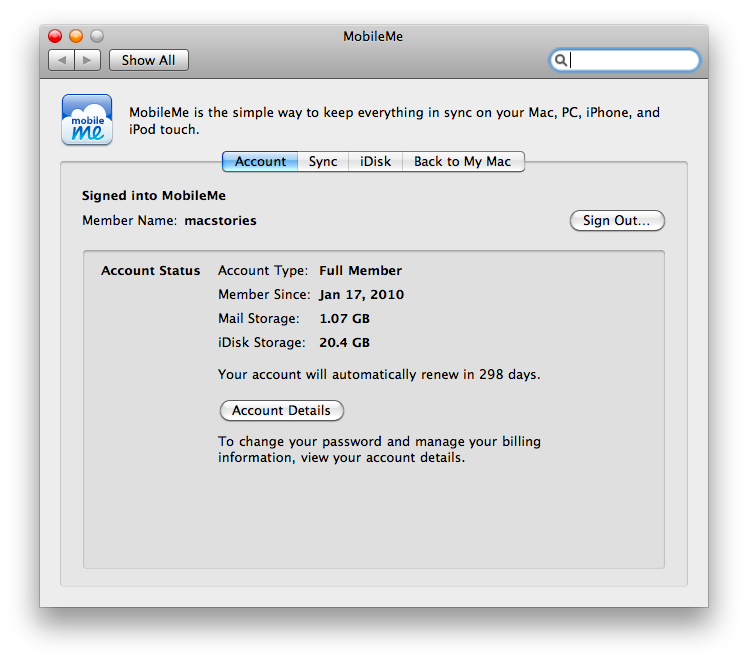
9to5mac suggests that Apple is getting ready to introduce a free version of MobileMe. As a proof to that, the MobileMe preference panel for Mac OS X now shows “Full Member” for previous customers who paid for the service.
Considering that the WWDC is in 4 days, we won’t have to wait much longer to find out the truth.
UPDATE: On PC as well: http://cl.ly/1GXn
[Thanks, @chrisherbert1]
Available for free on Take Control Books, great resource by Tonya Engst for everyone who’s getting started to the iPad. If you’re new to iPhone OS / iPa platform, look no further than this eBook to learn the basics.
The iPad has been available for 2 months today, and many users are still looking for a great application to catch up with Google Reader feeds. Sure we’ve reviewed a bunch of good apps here on MacStories such as Newsrack, NetNewsWire and Headline, but none of them can be described as the great piece of software that manages to show all the capabilities of the device it runs on.
Don’t get me wrong, those are good applications. I’ve used Newsrack for about a month and, even though it looks like a bigger iPhone version, it definitely did its job fine. What I’m saying is that we’re still missing that application that shines in the App Store, the one you could describe as “the best”.
Now, you’ve already read the title of this post so you know what I am about to review. Before we delve deep into it, let’s provide some background. Reeder for iPhone came out of nothing last year, and we were amongst the first blogs to spot the potentialities of that app and review it. Needless to say, I immediately fell in love with the app and decided to keep it on my home screen for good. Reeder 1.0 was a great app, and a stunning first version. It was fast, probably the fastest Google Reader engine I had ever seen in an iPhone application. The UI design was custom, with faux leather elements and paper to give the feeling of an old journal or something. Animations were smooth and pleasant, and so was navigation.
Overall, using Reeder was like using an Apple application - a perfect and polished experience. Silvio Rizzi, the developer behind Reeder, gained a lot of popularity thanks to his breakthrough app, and surely made some good bucks out of it. But he wanted more, and so he started working on a 2.0 version, which we reviewed here. Reeder 2.0 was (is) a well-thought refinement and betterment of the original application, with an even faster engine, faster loading times, more features and a better overall experience. I am not afraid to say that Reeder 2.0 for iPhone is the best Google Reader client ever made for a mobile phone.
Back to 2 months of iPad, you guys want to know whether Silvio Rizzi made it once again or not. Let me state this straight up: Reeder for iPad is the best Google Reader experience you can have on the tablet right now. It’s the app that perfectly manages to showcase all the great things about this device, and deserves to be installed by every user who daily checks his Reader account.