Google Docs Desktop Editing Comes To The iPad

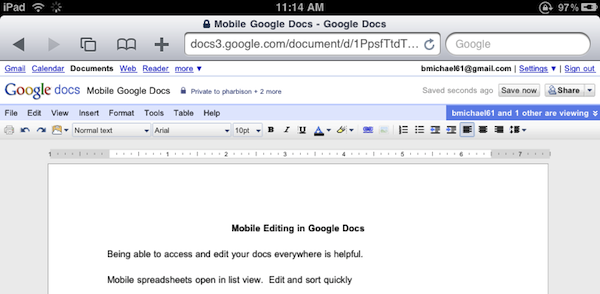
Great news for Google Docs users and iPad owners this evening: Google has announced that they have extended compatibility of the Docs desktop editor to include support for iPad. If you’re running an iPad, you can now switch from the mobile version to the desktop one with just a tap.

The desktop editor is the Google Docs you know and love, allowing you to modify fonts and alignments, paragraphs and font styles. It’s the usual Google Docs, running on a tablet.

As simple as it sounds, Google just made a great move towards ensuring millions of iPad users out there a desktop-class Docs experience without the need of a dedicated mobile client. Google announced a Docs Viewer in June, and released a mobile version for iOS and Android users with editing enabled a few weeks ago.

Once again, Mobile Safari wins.


Helping Developers, For Free

Helping Developers, For Free

Robert Scoble on how he helped the Flipboard developers in the early stages of the app:

Why do I do it for free? Because I love this stuff and want the best possible apps to use myself. Flipboard without Twitter list support would have been totally worthless for me. It isn’t obvious that Twitter list support is important. After all, how many people use Twitter lists. But for Flipboard it was a must have.

I’m passionate about seeing things early and work hard at adding value back to entrepreneurs for that honor.

See, it’s not about the “cool factor” of having access to stuff other people don’t know about. Maybe it’s that, too. I don’t want to call this a “mission” but, really – for some it’s just about helping people build better, innovative products.

Permalink

No In-App Purchases and Game Center In The Mac App Store

Looks like the Mac App Store is going to be quite different from the iOS model we’ve gotten used to in these past two years. Yesterday we broke the news that developers won’t be able to generate promo codes for Mac apps sold though the new Store (even if they’ve gone international for all users), today 9to5mac reports that in-app purchases and Game Center won’t find their way to Jobs’ latest reinvention of the Mac software environment, either.

Mark Gurman notes:

Apple has informed App Store developers that two major iOS app store features will not make their way ‘back to the mac.’

Note: In app purchases are not available for Mac OS X apps.

Note: Game Center is not available for Mac OS X apps.

As we wrote yesterday, Apple is clearly aiming at a simple purchase experience similar to the iOS App Store, but with less features than the mobile counterpart. Perhaps they don’t want Mac users to feel overwhelmed with new functionalities such as in-app purchases? Maybe they didn’t have time to implement them by the 2011 opening?

Still, we think Game Center on the desktop would be great. And terrible for our productivity.


Favorites: My Phone App Replacement

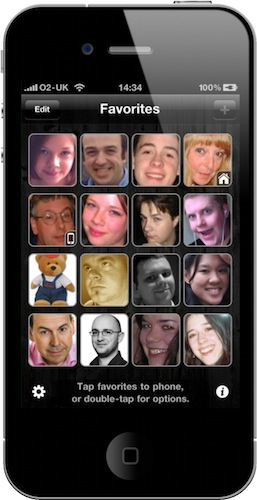
Every time I post screenshots of my iPhone homescreen here on MacStories, I get comments and emails asking me about “that blue icon” next to Captio in my dock. Since I wasn’t able to reply to all those comments and emails and I love to talk about apps that change my workflow, I want to clear the air on this app and write about it.

The app is called “Favorites”, it’s been around for a while in the App Store and it’s developed by Matt Legend Gemmell over at Instinctive Code. It’s a very straightforward app that lets you create shortcuts for your favorite contacts and tap on them to initiate a phone call. Think of it as a homescreen for your contacts. Read more


iFiles: Now With S3 Support, AirPrint and Text Editing In The Cloud

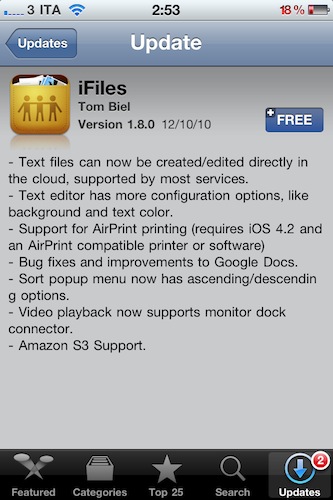
iFiles is one of my all-time favorite iOS apps for iPhone and iPad. I use it on a daily basis to get files in the devices and out of them, thanks to the app’s powerful sharing capabilities that allow it to get recognized on your local network as a web server. Plus, as I wrote in my review, iFiles was meant for a cloud-based workflow, for all those users who daily play around with items stored on Google Docs, Flickr, Rackspace, and so forth.

The latest 1.8 update, which showed up in iTunes a few minutes ago and I’ve installed on my iPhone, doesn’t come with a huge set of new features – but the ones that are there make this app a must-have, again. Read more


MoneyTron: Innovative Financial App for iPhone

I remember I installed MoneyTron on my iPhone back in August. Back then I thought it was cool, I gave it a brief spin and decided I would review it on MacStories in a few weeks. Weeks passed, we launched a new MacStories, iOS 4’s folders started getting crowded and I forgot about MoneyTron.

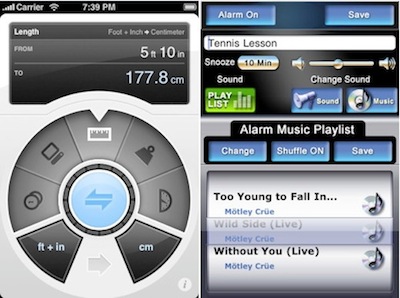
Now I think it’s time to talk about MoneyTron, which is a sexy little gem of a financial app. As you may remember, I’m not exactly into this kind of apps: mostly because I’m looking for something simple yet capable of adapting to my complex setup. It’s not easy to find an app that can do that. Most iPhone apps are geared towards simplicity but they don’t take into account (no pun intended) that when it’s about managing finances, simplicity is overrated. Sometimes you need the powerful tools to  get ahold of your transactions and keep everything clear.

MoneyTron offers a variety of innovative features I haven’t seen in any other financial apps for iPhone. Read more


10 Surefire Ways To Screw Up Your iPhone App

10 Surefire Ways To Screw Up Your iPhone App

So you want to build the next smash hit iPhone app? Extraordinary design is key to getting the attention of users and of Apple, so if an app exudes a stench of mediocrity, Apple won’t feature it and app shoppers probably won’t download it (even if they do, they won’t share it with others).

See the screenshot above? Guess which developer screwed up.

Permalink

Google Instant for Mobile Now Available Worldwide

Back in November Google announced Instant for Mobile, the same instant search for the desktop ported to iOS and Android devices. Instant for Mobile, though, was unveiled as beta and made available only in the U.S. with searches in English language. Google promised Instant for mobile would be released internationally in the coming weeks.

With a brief post on the company’s blog, today Google announced the global release of Instant for mobile, now available in 28 languages and 40 countries worldwide. To use the feature, users will need to run a device with iOS 4 or Android 2.2 and above, visit google.com and tap on the Instant link below the search box to activate it.

In case you missed it, check out Google’s promo video for Instant below.


Apple Releases Aperture 3.1.1 With Bug Fixes, Performance Improvements

Today Apple released a minor update to Aperture 3, which reaches version 3.1.1 and adds a number of fixes and overall performance improvements.

This update fixes an issue with iMovie ‘11 becoming unresponsive while scanning Aperture’s library for videos, incompatibilities with the media browser, issues with cameras causing the app to quit unexpectedly.

Aperture 3.1.1 also contains fixes for web publishing, slideshows and upgrades. More information about the update can be found here. Check out the full changelog below.

[Thanks, Bea!] Read more