Jailbroken Apple TVs Get VNC Hack

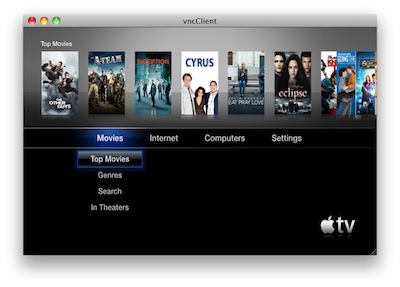
As if Wiimote hacks, third-party browsers and a brand new jailbreak coming before Christmas weren’t enough, jailbroken Apple TV owners can now enable a VNC server on their black boxes with a new hack called Exposed.

VNC access to the Apple TV should, from my understand, allow you to control the device remotely using apps like Screens and iTeleport.

The hack, however, is still in its early stages:

It’s method for getting screen data isn’t great and lacks some effects and animation, but it does work without HDMI plugged in. So if you want to try it out, grab Exposed and place it in the Lowtide Appliances directory. I think it is also important to note that this does require a jailbroken AppleTV 2G running Dustin Howett’s beigelist. Crazy busy with work, but I’m hoping to finish my site redesign by the new year. Peace.

So, jailbreak required and lots of bugs to fix. I’ll give this one a try once it’s more stable. [via 9to5mac]


SBSwitcher Brings SBSettings To The Multitasking Tray | Cydia Store

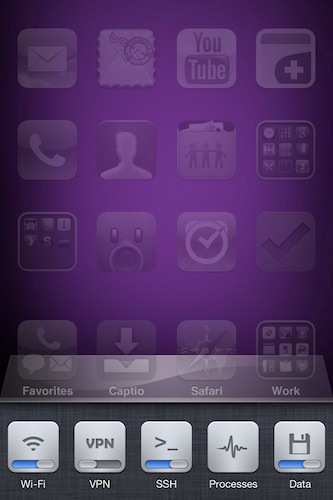
SBSwitcher is a new tweak available in the Cydia Store at $2.99 which brings the SBSettings toggles to the iOS 4 multitasking bar. SBSettings is one of the most popular applications in Cydia, which can be customized to display a series of buttons (indeed, toggles) that can perform a variety of actions otherwise buried deep down into the iPhone’s settings. I’m talking about shortcuts like “activate WiFi”, “turn on Bluetooth” or “open VPN connection”.

SBSwitcher will put these toggles in the multitasking tray, past the iPod widget controls and the volume slider introduced in iOS 4.2. The tweak supports themes for SBSettings and it’s got a bunch of options to set in the Settings app.

SBSwitcher is available at $2.99 in BigBoss’ repository.


Alfred 0.8 Adds Clipboard Snippets, Inline Definitions

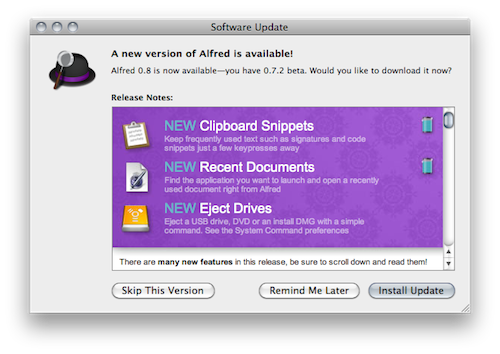
Here at MacStories, we’re big fans of Mac application launcher Alfred. I stopped using Apple’s Spotlight thanks to Alfred, and the app got a lot of better in the past months with clipboard history, improved keyboard navigation and several new features introduced in the paid version of the app, the Powerpack. For instance, I’m a huge fan of the iTunes Mini Player and the file system browser, which allow me to quickly start playing music from iTunes and browse in a Finder alternative view, respectively. Most of all, I like Alfred because it’s lightweight, blazing fast and entirely keyboard-based. Not to mention that the developers are coming out with updated every few weeks or so. I love it.

The latest Alfred update, version 0.8, brings lots of general improvements and bug fixes (check them out below) and a couple of new features that are very welcome in my workflow. Alfred can now save test snippets in its clipboard interface: say you have these recurring lines of text you find yourself typing on a daily bases (email addresses, templates, links), you can save them as snippets in Alfred’s preferences and paste them anywhere with a keyboard command. I type “snip” to open the snippet interface, then “keys” and there my snippet with unicode characters goes into the text field my cursor is on. Takes seconds and it just works.

Other new features include inline dictionary definitions, possibility to open recent documents and eject drives with just a few keystrokes. Great stuff for the keyboard geek. In case you still haven’t tried it, Alfred is available for free here.

Full changelog below. Read more


iPhone 3G Still The Top Camera On Flickr

iPhone 3G Still The Top Camera On Flickr

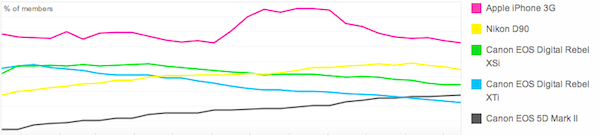
Slightly updated charts from Flickr, which show Apple’s iPhone 3G (released in 2008) is still the most popular camera amongst Flickr users. The iPhone 4 had a rapid increase in the Popular Cameraphones category, with the 3GS stable right below it.

Also, notice the perfect symmetry in the iPhone 4 and 3GS charts.

Permalink

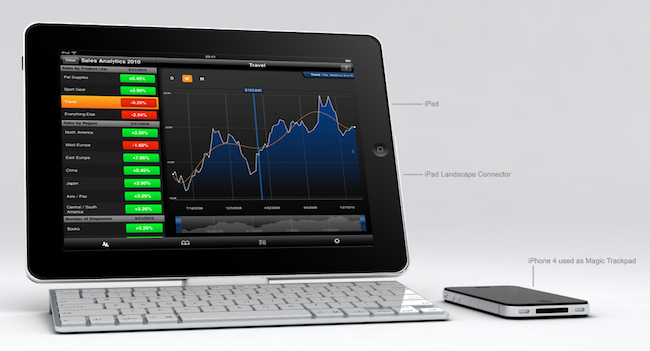
iPad Landscape Connector [Concept]

That keyboard dock Apple sells for the iPad? It’s meant for portrait mode. There’s no way to put the tablet in there and expect the dock to hold it in landscape (which offers a broader and better view in most apps), which is kind of a bummer considering that the iPad is not the iPhone and it’s not specifically meant for portrait. Still, this is what Apple is selling.

Italian designer Federico Ciccarese came up with a neat concept of an accessory that, placed between the dock and the iPad, would allows users to use the keyboard and dock functionalities while holding the iPad in landscape mode. It looks fairly simple and clever enough to provide an alternative solution for all those who wished Apple thought of a way to hold the iPad in both orientations in the first place.

But as usual, this is just a concept and Ciccarese is looking for a producer. [via iPadevice]


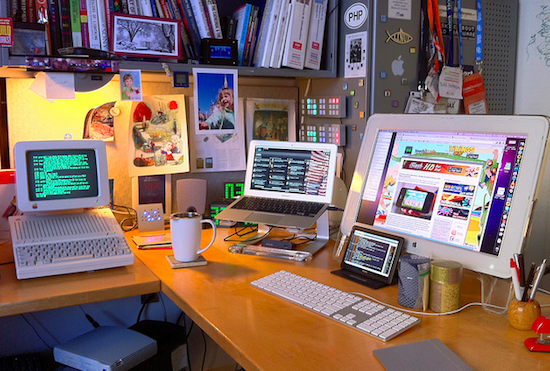
MacBook Air Runs On Four Screens, Including Apple IIc

Is the MacBook Air just another netbook that can barely run Photoshop? We all know it’s not. Benchmark numbers and stats aside, that thing is fast. I’ve been trying a 11-inch model (a friend of mine bought one) this week, and it literally screams. Instant-on thanks to SSD, strong battery life, responsive…just do yourself a favor and go try one at an Apple Store near you.

Or, if you want a quick example, take a look at the picture above. It doesn’t provide any numbers, but it gives you an idea of what this machine can do. It’s a MacBook Air running on four different screens: a 20-inch Apple Cinema Display, a 7-inch Mimo 720-S USB display and an old Apple IIc which is displaying a Terminal session through serial cable.

Geek stuff.

[Gizmodo via Flickr]