
Mailboxes Comes Back To Offer The Best Gmail Wrapper for iPad

In the past months, I’ve tried a lot of iPad apps to access multiple Gmail accounts. Sure, I could use Apple’s Mail app to manage them. The problem is, Apple Mail doesn’t let me access most of the features of Gmail and I love the Gmail web UI for iPad. Also, Google has been busy updating Gmail to make it play nicer with mobile devices (smoother scrolling, better selections in the left panel) and these native “wrappers” provide a way to quickly switch between accounts with the tap of a button.

So far I’ve tried Mailboxes, MailWrangler, MultiG and Mailroom on the iPhone. On the Mac I use Mailplane (which is simply amazing) and on the tablet I’ve sticked with MultiG for several weeks. Until Google changed something on its backend, MultiG stopped working and the developer didn’t release an update. I had to change, and I went back to Apple Mail because of all the alternatives I had tested none of them managed to top the excellence of MultiG. Read more


eBoy FixPix: 25 New Levels

I love the iPhone and iPad game “FixPix” from the folks at eBoy. In fact, we’ve already covered the app a couple of times in the past here on MacStories. Don’t let the original release date fool you, though: eBoy is continually updating the game to make it one of the most impressive puzzle / pixel experiences for iOS.

The latest 2.1 update (guess what, approved right ahead of Christmas) introduces 25 new levels (they’re all great, and genius), a new app icon, new menus, a new start screen. The bad news? Your game progress will be reset after the update. Ouch.

Still, I can’t recommend eBoy FixPix more. It’s universal, gorgeous to look at and it’s only $0.99 in the App Store. Go get it.


Someone Haz An iPad Game for Cats

Soon after the iPad came out in April, early adopters had fun trying to make their pets interact with it. As usual on the Internet, cats videos made the rounds. I mean, they’re just so adorable, right?

Wait, because someone actually developed an iPad game for cats. Not to be used by humans. Seriously, it’s real and live in the App Store for free. All your lovely cat haz to do? Chase teh mouse on screen.

Check out the video below. I want Steve Jobs demoing this on stage at the next Apple event. Or maybe the Apple Design Awards. [via Laughing Squid] Read more


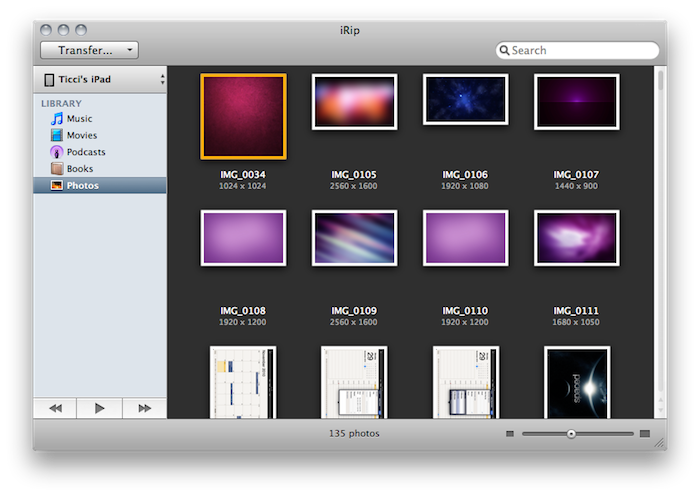
iRip 2: The Best Way To Get Anything Out Of iOS Devices

The Little App Factory has published some great Mac apps in the past year. First for me came Evom, a simple and free utility that can save videos from the web (even Flash videos) and convert to a number of different devices, such as iPads or Apple TVs. Then I installed Rivet, another little utility for the Mac that can stream video from your local machine to a PlayStation 3 or Xbox 360 console in your local network. Works like magic.

Last week I took a look at The Little App Factory’s latest effort, Grappler for Mac. Grappler provides an integrated view to browse Youtube without leaving the app and download videos to convert for an iTunes-compatible format. It’s got a great UI, inline previews and a lot more. Make sure to check out my review here if you missed it. Read more


Diacarta Adds Retina Graphics, Notifications - I Can Finally Use It

Diacarta is a cool app for the iPhone which, unlike most task managers quick reminders, doesn’t let you create items in a list. Diacarta wants to enable you to have a “picture” of your day by making an analog clock its main screen. Tasks are visualized as big icons linked to the clock in a specific time of the day. This way, Diacarts provides a quick view of your upcoming activities that you can edit at any time.

It’s visually rich and very, very custom. Read more


Want iOS Scrollbars On A Mac? There’s A Theme For That

In case you missed it at Apple’s Back to the Mac event, Mac OS X 10.7 “Lion” is getting redesigned scrollbars and a brand new scrolling system. In fact, Apple is taking iOS’ “rubber banding” effect and minimal, fading scrollbars to the Mac with the next major iteration due next year. As demoed by Apple’s Craig Federighi in the Mac App Store app running on Lion, scrollbars will behave similarly to iOS – you won’t any scrollbar if you’re touching the trackpad. Read more


Instagram Adds Two New Filters, Suggested Users and More Languages

It looks like the Instagram developers won’t stop adding features to their amazingly popular “app service” anytime soon. It was only 10 days ago that they added new sharing features and Posterous integration; today, two new filters and more languages have found their way to the app, together with a new “suggested users” option that lets you easily follow popular Instagrammers.

The new filters are cool, but I don’t really spot much difference from the existing ones. Maybe they just need to grow on me a little more. So, filters and international localizations aside, the suggested users section: it’s pretty. To access it after sign up, you’ll have to open your profile setting page, tap on Find Friends then Suggested Users. In this page you’ll see folk such as Robert Scoble and Kevin Rose that, according to Instagram, deserve a follow. What’s cool is that their photos are animated and rotate – neat effect. As you follow these people, new ones will be recommended to you.

Other changes in this version include bug fixes, improved performances and better handling of long comment threads. In case you don’t know (how could you?) Instagram is free and available here.


Facebook App Update: Improved Places & Chat, Bug Fixes

Among all the app updates that are coming out this week prior to the iTunes Connect shut down planned for December 23 (when developers won’t be able to submit new apps, updates or price changes until the 28th), the official Facebook app for iPhone was updated (to version 3.3.3) last night to include a variety of bug fixes and miscellaneous improvements.

The most notable improvements come in the chat and messages windows (which, at least for me, are not slow anymore), notifications and Places. Even if there aren’t many registered places in my town, the app seems now faster at retrieving local data information and distances. Crashes, group photos and memory usage have been addressed with bug fixes.

Other minor changes include the comeback of the ability to post on a page you administrate and the removal of the text field from walls you cannot post on.

The official Facebook app was updated in early November to include the new Groups UI and the Places functionality. The app is free, and available here.


Add Twtmore Shortening To Tweetie for Mac

By default, Loren Brichter’s Tweetie for Mac comes with Twitlonger shortening capabilities. That means, if you have a tweet longer than 140 characters (it usually happens for long iOS / Android debates, or Apple’s events commentary) Tweetie will automatically post that tweet using Twitlonger – a service that puts a link in a tweet to read the entire message in the browser. It works pretty well, but it doesn’t look exactly great.

Twtmore is a service that’s been in closed beta for some months, until the developers opened up its APIs for everyone to use. It’s similar to Twitlonger, but it’s beautiful. This is a twtmore page, for instance. As you can see, it’s delicious. Tweetie Twtmore is a SIMBL plugin (yep, another one) that replaces the default Twitlonger shortening feature with twtmore.

To install Tweetie Twtmore, make sure that SIMBL is installed on your computer. You can go download SIMBL for free here. Once SIMBL is running correctly, download the Tweetie Twtmore bundle, extract it and place the file in /Library/Application Support/SIMBL/Plugins or ~/Library/Application Support/SIMBL/Plugins if you want to install it for all user or just your account, respectively. Restart Tweetie for Mac.

The plugin works great even if Tweetie for Mac will keep saying “Post with Twitlonger”. As you can see in the screenshots below, long tweets will be forwarded correctly to twtmore. Go download the plugin here. Read more