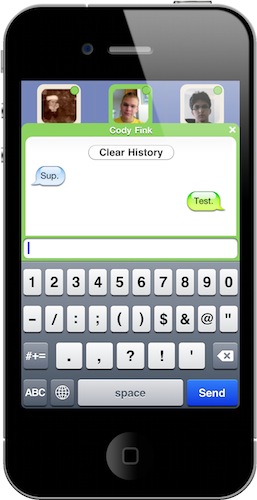
Tap To Chat Is A Simple, Useful App for Facebook Chat

I don’t use Facebook much, but when I do it’s for one thing: chat. I don’t like Facebook Messages, I don’t want to get in touch with my friends on walls, I don’t get the new Groups functionality – thus, I use chat. It’s not exactly reliable and full-featured (hello? easily file and photo sharing?) but as all my friends are on Facebook (and addicted to it) it’s the best way to get ahold of them.

What about the iPhone? The official Facebook app does chat, among other things. Those “other things” is what I don’t need: I don’t need to jump to people’s profile while I’m chatting, I don’t need the grid interface, I just want to find my friends online and chat. A simple request.

Guess what, we have an app for that. It’s called Tap To Chat, it’s universal for iPhone and iPad and it’s available at $0.99 in the App Store. Tap To Chat is the simple Facebook chat app meant for those who just want chat to work without all the bells and whistles of Facebook. Simple factor aside, Tap To Chat (developed by the same creator of Buddies) has a few tricks up its sleeve that make it the best implementation of Facebook chat I’ve seen on iOS devices. Read more


twttr.mediaTypes - A Great Safari Extension For #NewTwitter

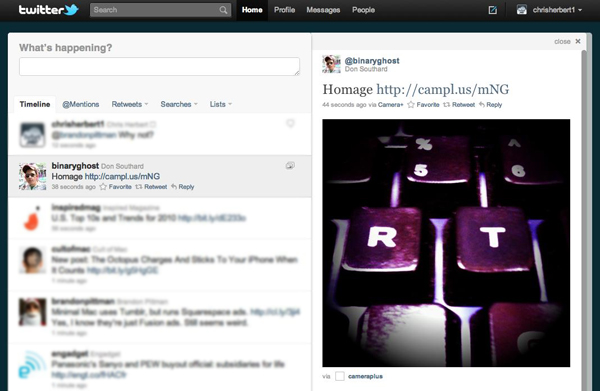
A while back I stumbled upon a few Safari extensions by Norio Nomura that embedded extra image service viewing into newtwitter that it didn’t yet support. There was originally one for dribbble and another for Instagram when it was still unsupported. I am a dribbble member and use Instagram so they were no brainers for me. I use the twitter.com website with Safari when I am at work (and sometimes at home), so it’s always open. Last week I visited Nomura’s github page and noticed he had combined the 2 extensions and added even more including post.ly, withings, moby.to and a few more, it’s now called twttr.mediaTypes. I tweeted a few days ago that this extension was my Safari extension of the day and it had a very good response and was retweeted a lot.

After yesterday’s huge Camera+ news / update, I wondered how easy it would be for him to add Camera+’s image hosting service to this already great extension. It took him less than an hour to get back to me with an updated version supporting Camera+, it even interested him enough that he bought the app as well. It works fantastic, just like it did before, placing the image into the details pane of twitter.com’s timeline.

twttr.mediaTypes is not a must-have for everyone but anyone that uses twitter.com as their client of choice with Safari or Chrome (yeah, he has a version for that too) should really check it out. I have also asked him to add img.ly support as well, but no word back yet.


iPhone To Play Nice With Ford Cars in 2011

If you have an iPhone and have a 2011 Ford Fiesta – or you’re considering a Ford car for your 2011 car fix – you’ll soon be able to control a couple of apps using your voice. As noted by Engadget, Ford has announced that it will extend of its Sync AppLink Platform to Apple’s smartphone sometime in 2011, allowing iPhone users to control music playing from Pandora vocally. Pandora Radio for iOS and Android is indeed one of the first apps to support Ford’s voice recognition technology in cars.

BlackBerry and Android phones are compatible with Ford’s Sync now, iPhone users will have to wait a little longer. I’ve always been interested in this kind of technologies that let users do stuff in the car without having to look at an additional display, but I do wonder how Ford’s solution will handle high music volume and voice control. I mean, I don’t want to scream to change songs.

Press release embedded below. Read more


“Designed by Apple in California”

“Designed by Apple in California”

Designed by Apple in California is usually presented dramatically and in isolation. Often you see it after opening a flap or unfolding a panel. It stands alone as a single line of type on a solid field. There is never anything that distracts from it. The early cube-shaped iPod packages were the best at this. You’d remove the sleeve, unfold two panels, and there it was. The next fold revealed the device. That I still remember this sequence says a lot about how powerful the experience was.

I remember unboxing my first iPod to find that line. I’m pretty sure Apple thinks it’s magical.

Permalink

MacStories 2010 Roundup: Top 10 Cydia Apps

Welcome to MacStories’ 2010 Roundup! In this new series, we collect the best apps released in 2010 for the Mac, iPhone and iPad — apps we have probably already featured here on MacStories. Only the best apps, both free and paid. Apps you shouldn’t miss.

2010 has been a great year for the jailbreak and Cydia community. The Dev Team managed to successfully deploy jailbreak tools for all the new OS updates Apple released this year (iOS 4, iOS 4.1, iOS 4.2) and they even released jailbreak for the iPad in May, a month after the tablet’s public release. The interest in jailbreak and Cydia, the alternative App Store, has grown exponentially in 2010, and Saurik (Cydia’s creator and main developer) decided that it’s time to bring Cydia to the Mac.

In this 2010 roundup we have collected the 10 best Cydia apps & tweaks that were released this year. These apps and tweaks are all aimed at enhancing the functionalities of the iPhone and iPad and overcoming the limitations imposed by Apple, which is the true spirit of jailbreak: tinkering with an iOS device to get the most out of it.

So jump after the break, and check out the top 10 Cydia apps of 2010. If you haven’t considered jailbreaking your device yet, maybe it’s time to do it. Read more


FaceTime Santa Spotted At Apple Store

Ok, Apple has a thing for Santa Clause and FaceTime. They launched a new iPhone 4 commercial to promote FaceTime with a dad dressed up like Santa, and now they have put FaceTime Santas in the Apple Stores. They previously installed iPad Snow Globes to get people and customers ready for the Apple Christmas season; now it’s time for Santa to take the spot and FaceTime with his elves at the Apple Store.

Check out the video below. I usually don’t like mannequins, and that smiling Santa with an iPhone 4 kind of creeps me out.[via TiPB]


Squarespace Introduces Their Official iPad App: Why Can’t All Blogging Tools Be This Awesome?

Squarespace is a phenomenal  blogging platform that allows customers to easily build their own websites, check statistics, moderate comments, and enjoy the freedoms of mobile blogging on both the iPhone and (now) the iPad. While many of us have struggled or implemented some wonky workflow to blog on the iPad, you may just want to ditch your Movable Type or WordPress blog for Squarespace simply because their iPad app is quite frankly amazing.

I’ve emailed blog posts before, but there’s nothing worse than the distraction of your inbox when writing blog posts. There’s also those Simplenote or Writer articles written in Markdown that eventually get converted to HTML on the Mac before being uploaded. I’ve also tried TextExpander for Markdown, but real time conversions are slow (especially if you have to edit on the iPad). Then we even have native blogging applications like WordPress that are honestly awful, though I supposed WordPress’ bare minimum iPad app is better than nothing. Squarespace did their blogging app right, because not only is it both beautiful and functional (all of your tools are available in a familiar interface), but you can blog in Markdown and Textile natively -> that’s the killer feature folks. You also get easy access to your web tools for moderating comments and checking page views, and I don’t feel like I’m hindered by what my tablet has to offer. Squarespace, you guys seriously rock.

If you have a Squarespace account, the iPad app is free to download. If you don’t have a Squarespace account, you can still download the app, though you’ll need to create a free trial to try it out (and we recommend watching the video above to see what Squarespace is all about).


Watercolor Painting On The Apple Canvas

When Apple sent out the invitations for its iPad announcement even in January, the email included a picture of a white canvas with lots of paint splattered on it. The invitation said “come see our latest creation”, and it eventually turned out to be about the iPad – the device we know and love today.

Several users and bloggers speculated “Apple Canvas” might be a good name for the rumored tablet back then. Of course it didn’t happen, but we liked the concept. And now it all comes back to life again, thanks to an app called Auryn Ink that will turn the iPad’s screen into a watercolor painting canvas.

The app doesn’t come with the best UI elements and menus ever (they’re actually pretty ugly and need a lot of refinements), but the functionality is there. Auryn Ink lets you choose between different canvas types, tip shapes and bristles, adjust the brush size and even set the fade of ink as you’re brushing. You can set different watercolors, adjust the thickness of brushes and apply pressure effects as well as speed of gestures.

Auryn Ink hasn’t got the most beautiful UI of the year but I’m sure real artists will make this work for them to come up with stunning creations. Plus, the app is free in the App Store.


BBC Can’t Get Apples and Blackberries To Work

We know you’re all playing with Camera+ 2.0 now, but let’s put that iPhone away for a minute and enjoy a good BBC comedy skit, shall we? In the following video, two BBC comedians have fun trying to make apples and blackberries to work because you know, they can freeze or crash sometimes.

I won’t tell you what happens in the video, you’ve got to check it out by yourself. And yes, you can go back to shooting pictures with Camera+ after this. [via TUAW]