Music Mashup with iPhone, iPad and iMovie [Video]

In 2010 we saw some amazing videos of songs played and, at best, created using only iOS devices. Does the new Gorillaz album sound familiar to you? That’s because it was entirely created with an iPad and some apps. iOS devices, also thanks to full-featured MIDI support introduced in iOS 4.2, now provide a feasible alternative to portable, digital music making and mixing.

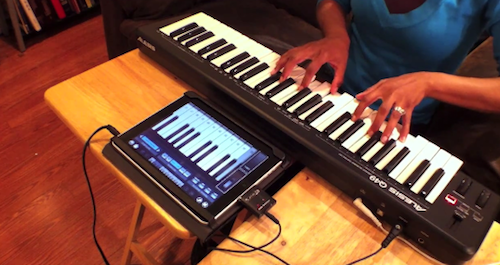
Ellen Hilton wanted to show her friends and family that it was possible to do music with an iPad and a MIDI external device. So she took two of her favorite songs – “Hey Soul Sister” and “New Soul” – mashed them up and played along with her iPad. She filmed the performance using Pro Camera on the iPhone, edited the video using iMovie ‘11. The session was recorded by running everything into Cubase. The result is fun and definitely worth a look.

The apps used in the video include Pianist Pro, NanoStudio, Percussions and BeBot. If there’s anything Steve Jobs should feature on stage at the next iPad keynote, that should be about people using the iPad to make music. Read more

Apple Patented Gestures For When You’re Not Looking At The Screen

Multi-touch gestures are great. With natural gestures like pinch, swipe and tap you can flick through your photos, scroll webpages, point items. The obvious downside is that, in order to confirm a gesture has worked properly, you need to look at the screen. And when the screen is not a MacBook’s one but an iPod touch and you’re running for your daily workout session, you can guess looking at the screen can become quite a task. That’s why Apple put buttons back in the Nano, for instance, but the engineers at Cupertino think it’s not enough.

Apple has, in fact, patented a way to perform certain multi-touch gestures and have actions happen on screen without actually looking at it. According to the patent, people could perform gestures similar to the commands on Apple’s own earbuds, or adjust the playback volume with a circular gesture similar to the classic iPod’s click-wheel. Other “special gestures” are mentioned in the patent.

The device used in the patent filing is a sixth generation iPod Nano, something that would suggest Apple is looking forward to a firmware update to enable more features, and gestures, in the device. Or maybe, the Nano being depicted in the patent is simply used to illustrate how Apple may implement “lookaway” gestures in future mobile devices.


Install OS X On Your Chrome Notebook with Luigi

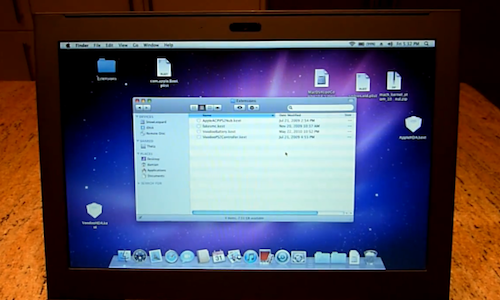
Got an early Cr-48 unit and you’re already tired of the demo nature of Chrome OS? Perhaps you’re simply looking for a way to do more with the Chrome notebook, like install a new OS on it? Two days ago, we saw hackers managed to install Windows and Mac OS X on the Cr-48, but the process required some serious manual tweaking. Luigi, a firmware toolkit developed by well-known Chrome OS “all-star” Hexxeh, can flash the Cr-48 device to install any OS “unmodified”. It’s fairly easy to use, but it still requires you to open the Chrome notebook and activate the developer mode.

However, it does require you to crack open your Cr-48. This is actually a security feature (if you can flash your firmware, so could a malicious program, and that could mean bricked device!), and so to disable it, you simply need to remove the bottom cover of your device. This does, of course, void any warranty you might have with Google and so you do so entirely at your own risk. This could, if it were to go wrong, turn your device into a shiny paperweight. Don’t come crying if it does.

To install Luigi you need to run a few terminal commands. After that, once the device is flashed and the custom firmware installed, you can plug in any USB stick or CD to install your new OS, like Snow Leopard. Sounds like fun if you have a Cr-48.

Demo video below. Read more


Steve Jobs, Not A Good Entrepreneur [Video]

The BBC has this show, called Dragon’s Den, in which entrepreneurs pitch their business ideas trying to get multi-million investments from “Britain’s top brains”, investors looking for the next big thing to believe and spend money in.

Steve Jobs? He’s not good enough for the show. The BBC has created this fake video of Jobs pitching the iPad to the Den, with investors coming up with their reasons to “stay out” of Jobs’ business idea. It’s kind of hilarious, especially when an investors says “I’m out” and Jobs seems to be very sad about it. Check out the video below. [9to5mac via Youtube]


Google Planning Digital Newsstand, Apple To Launch Subscriptions “Early This Year”

According to the sources close to the Wall Street Journal, Google is in talks with major publishers like Time Inc., Condé Nast and Hearst Corp. to discuss the launch of a digital newsstand for magazines and newspapers that would run on the Android mobile operating system. The move, still in its early planning stages, would be Google’s direct answer to Apple, which has long been at the center of digital newsstand rumors and iTunes recurring subscription speculations. Google’s newsstand, either based on the existing Market or a new infrastructure, would allow Android users to read digital content on the go. Rumors point out to Google willing to share subscribers’ data with publishers. Read more


Ecoute 2.0 - Small, Powerful Alternative to iTunes

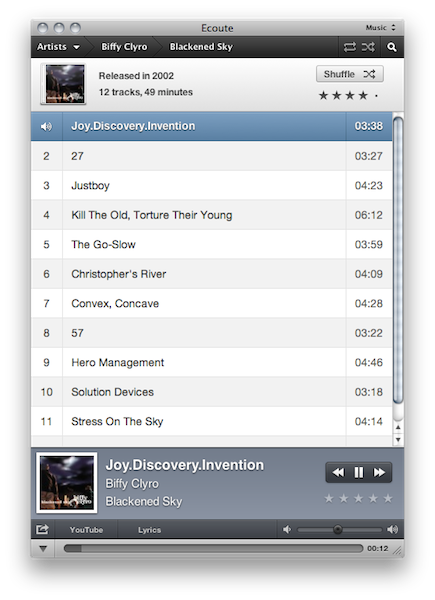
Just like any other alternative to iTunes on the Mac, Ecoute has been around for a while. Since Apple shipped its very own music player and digital hub years ago, many developers have tried to come up with original solutions for all those who couldn’t stand iTunes. And as iTunes grew bigger to accommodate apps, books, podcasts and just about anything you can put on an iPhone or iPod, thousands of users and even more developers started feeling the need of a minimal music player, again. What began as a hobby for a limited number of users (“let’s not use iTunes for music”) evolved into a real segment of a market willing to keep iTunes closed to listen to music libraries. And I understand the position of the users and developers that first thought about jumping out of iTunes: why would one need to stare at iTunes and all its features and options all the time, when you just need to listen to some music?

In spite of iTunes becoming many people’s less used music player over time, the apps that have surfaced in the past years that allow us to just play music are, in most cases, nothing but standalone iTunes controllers that strip away the clutter and focus on albums, artists and songs. They fetch a user’s library, take the music out of it and display it into a minimal, sometimes non-existent, user interface. Coversutra, Bowtie: they are two popular iTunes controllers for OS X that have gained support for other features such as last.fm scrobbling and iOS remote streaming. But in the end, they rely on iTunes.

So did Ecoute 1.0, and so does the just-released Ecoute 2.0. Ecoute is a well-known music player for OS X that plays music from iTunes, but doesn’t require you to keep iTunes running in the background. It automatically finds a user’s iTunes library file and takes content from there. It comes with a neat desktop widget for quick play / pause actions, but it’s also got its dedicated interface. Ecoute 2.0 depends on iTunes, but it adds great value while giving you a reason to stay out of Apple’s software at the same time. Read more


Monetizing The iPhone’s Photo Apps

Monetizing The iPhone’s Photo Apps

The Wall Street Journal has a piece on the difficulties faced by developers when trying to make apps like Instagram, Hipstamatic and PicPlz profitable. Speaking of Hipstamatic:

Since Hipstamatic’s launch in December 2009, the $1.99 app has been downloaded more than 1.7 million times. The app allows users to choose different lenses, films and flashes. The firm charges 99 cents for a package of add-ons such as infrared.

The company generates a third of its revenue from those extras, says CEO Lucas Buick, and is profitable. In September, it launched a service where users can send in photos and pay a fee for printed copies.

The app has been named “iPhone App of the Year” by Apple and it’s got lots of additional stuff and features to unlock with in-app purchase. The app is a one-time $1.99 purchase, but developers can keep the money coming in with updates and new items to buy. So far, it seems like this business model is working.

Permalink

Say “Cheers” With IKEA’s iPhone App

Feeling a little bit old with all that wooden furniture and lack of digital goodness, IKEA decided to develop apps for the iPhone. That’s right, but Swedish retail chain’s first attempt to enter the App Store market is far from being a furniture catalogue app. Instead, the developers at IKEA created an app to have a toast with someone and share the moment on Twitter, Facebook and the service’s online gallery.

The app, called IKEA Skal! (which stands for “Cheers”) lets you choose between different glasses (perhaps sold at IKEA?) and a drink you’d like to toast with (beer, wine, champagne). On screen, you’ll see the glass and the background captured by your iPhone’s camera – Skal works well with the iPhone 4 but it’s a little slow on the 3GS. As you’re ready with your glass and you like the background for your toast, find someone to share the moment with and toast with your phones. The app will play the sound of glasses, exchange contact information automatically and even snap a picture of the toast as it happens. You can then share the pic on Facebook and Twitter, send it to IKEA’s photo gallery and even browse other people’s toasts.

See? IKEA can make pretty cool apps. Skal is available for free here. Check out the promo video below. Read more


Turn Your iPhone Into A Vintage Polaroid

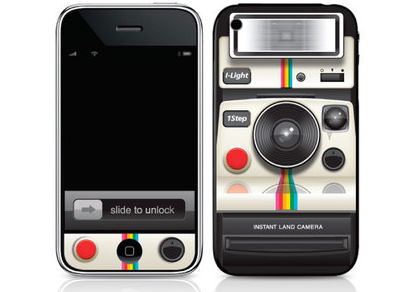
If your iPhone, besides being a phone, also happens to have become your best camera and you fancy some old-style gadgetry in your pockets, perhaps you’d like to consider Ryan Astle’s Photoroid skins.

Available in iPhone, iPad, Blackberry and Evo models, the skin costs $15 for the iPhone and $20 for the tablet. It’s made of 2 pieces of art for the front and back of the iPhone, it really resembles an old Polaroid camera and, personally, I think it’s got something that reminds me of the Instagram icon as well.

With all these apps that apply vintage effects to your photos (and videos, too), the Photoroid skin seems appropriate. [Gizmodo via Infectious]