Google Goggles for iPhone Gains Ad Recognition and…Sudoku

Earlier today, the Google mobile team announced an update to their official Goggles application for Android and the Goggles component in the Google Mobile App for iPhone. While Android users get advanced barcode scanning in version 1.3 of the app, printed ad recognition and Sudoku puzzle solving have been enabled both on iOS and Android. Yes, that’s right: as part of the Google Goggles labs experiments, the app can now solve Sudokuy puzzles. Just take a clear picture and let Goggles provide some help.

As for ad scanning, Goggles for iPhone can now take a look at any printed ad and return web search results for that brand or product.

Goggles will recognize print ad and return web search results about the product or brand. This new feature of Goggles is enabled for print ads appearing in major U.S. magazines and newspapers from August 2010 onwards. This feature is different from the marketing experiment that we announced in November. We’re now recognizing a much broader range of ads than we initially included in our marketing experiment.

The official Google iPhone app doesn’t seem to be updated yet, the new version should be propagating in iTunes in the next hours. In the meantime, check out the promo video for Sudoku support in Google Goggles below. Google Goggles for iPhone was launched in October as part of the Google mobile app. Read more


Little List Is The Simplest GTD App Ever Made

…Or maybe it’s not really a GTD app at all. Little List is an iPhone app developed by Caleb Thorson, the same guy behind the Trickle Twitter client we reviewed here. And just like Trickle, Little List is a minimal, elegant and focused app that takes a simple approach at a complex system: getting things done. Instead of providing tags, folders, projects and contexts, Little List is, well, a simple and clean list of things you have to do.

Many apps in the App Store have tried to go extremely simple against the most fundamental GTD principles. Little List, however, has a cool trick up its sleeve: it’s got yet another implementation of Loren Brichter’s “Pull to refresh”, but instead of refreshing, the gesture sorts items. The command is, in fact, called “Pull to sort”. So what do you sort? Normal items and starred ones. You can create a new entry by tapping on the + button and start typing; if you have important tasks you’d like to highlight, you can star them with an additional tap. “Pull to sort” will put the starred items on top.

Little List is as simple as it gets. It’s available at $0.99, it doesn’t have any kind of OTA sync – it doesn’t have any kind of anything, actually. It’s just a list, with starred items. And with a nice icon. Give it a try if you’re looking for a different take on aggregating your to dos.


Enable Hidden Mac App Store Debug Menu

We’re not sure why the average Mac App Store user would want to do this, but we couldn’t resist to post about the Debug menu Apple left behind in the Mac App Store. Discovered by Daniel Jalkut of Red Sweater earlier today, enabling the menu is fairly easy: you just need to quit the Mac App Store, open Terminal and write:

defaults write com.apple.appstore ShowDebugMenu -bool true

Then relaunch the Mac App Store. To revert back to a Mac App Store without Debug menu, simply replace “true” in the string above with “false”. The menu, anyway, is quite interesting as it allows you to play around with a bunch of hidden settings such as shadows and width in the App Store’s webview, the animations and duration of “flying icons” (when you download an app and it goes straight to the Dock). You can also enable and disable the Purchase Check, although we wouldn’t really recommend to tweak these default settings – you don’t want to break the Mac App Store app.

We think this Debug menu will be removed in a future update, as Apple doesn’t want users to modify, or even see, this stuff. Still, you can check it out for now.


Apple Featuring “College Survival Guide” in App Store Homepage

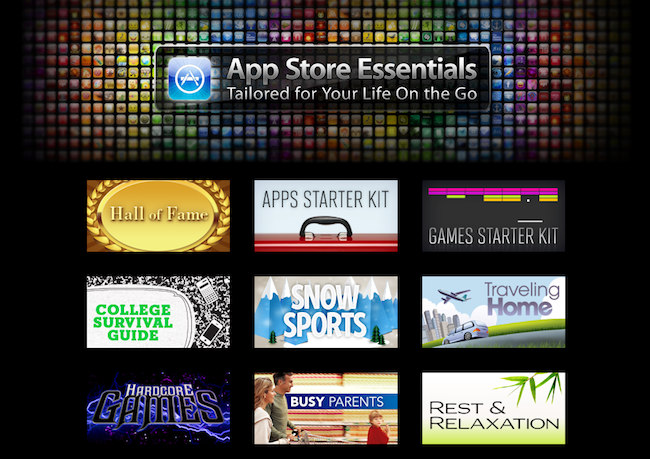
Once again, Apple is featuring apps for college students in the iOS App Store homepage. The new section, called “College Survival Guide”, is available here and showcases more than 40 free and paid apps for iPhone and iPad.

Among the apps included in the guide, iBooks from Apple, iStudiez Pro, AP Stylebook, Momento and Instapaper. We’re not totally sure about Twitter and Facebook during classes but hey, at least they’re useful tools to stay in touch with friends. What about Netflix and Pandora Radio, though? I’m personally not sure about them either. Still, it’s good to see gems like Evernote and Put Things Off in the list.

Apple’s College Survival Guide can be accessed from the App Store’s homepage here.


Apple Updates iWork.com with Keynote Animations, Private Online Storage

A few minutes ago Apple sent out an email to iWork.com beta users to inform them of some new features such as support for 15 new Keynote animations, private online storage for documents and sharing on social networks with a Public link. Support fo the new Keynote animations was actually introduced with the latest iWork update 5, although now Apple is letting users know that they can access presentations shared on iWork.com online with an iPad and swipe with their fingers to advance slides.

As for the new storage options, you can access documents marked as private from anywhere. iWork.com also provides a link to embed presentations on a website or blog now, which we think is a pretty neat feature.

Check out the full description and screenshots of the new features below. Read more


Acclaimed Film Director Creates New Movie with an iPhone

South Korean film director Park Chan-wook has a new favorite gadget: an iPhone. The director of popular movies such as “Old Boy” and “Thirst”, in fact, managed to realize his latest short film using only an iPhone. The fantasy-horror movie, called “Paranmanjang”, was shot with an iPhone 4 and has a budget of around $130,000. It will debut in South Korean theaters on January 27.

Park Chan-wook says realizing the 30-minute with Apple’s smartphone was easy and fun, and minor edits were required in the post-processing stage. The only downside to the experiment is a little shakiness in the first minutes of footage – although this “real life” feeling of the film should help as far as “horror” and anxiety are concerned.

The short is a fantastical tale that begins with a middle-aged man fishing one afternoon and then, hours later at night, catches the body of a woman. The panicked man tries to undo the intertwined fishing line, but he gets more and more entangled. He faints, then wakes up to find himself in the white clothes that the woman was wearing. The movie’s point of view then shifts to the woman and it becomes a tale of life and death from a traditional Korean point of view.

Intriguing (and kind of insane) plot aside, it’s exciting to see filmmakers and directors exploring new ways to produce content using Apple devices. We know the iPad is already popular among directors at Hollywood, and we look forward to seein its little brother, the iPhone, in the credits of more movies and short films in the next months. [9to5mac via Wall Street Journal via Yahoo]


Developer Goes From 7 Sales A Day to 1,500 With Mac App Store

We have already seen what the Mac App Store effect looks like. The new Store for Mac users is providing an easy way to discover and install Mac applications and, together with that, a better way for developers to showcase their software to a larger audience, as the Mac App Store is installed  by default on every system running OS X 10.6.6. Several developers reported good sales for the Mac App Store launch day, but we think LittleFin Software might be the best example of the power of the Mac App Store so far.

LittleFin was selling between 6 - 10 copies of Compartments, a simple home inventory app for the Mac we reviewed here, a day through their website. The day before the Mac App Store launch, they sold only 7 copies. But as soon as the Store launched on January 6 and Apple featured the app in the Mac App Store homepage and its “Great Mac Apps” webpage, LittleFin saw a terrific increase in sales. In fact, they sold 1,547 copies in the first 24 hours of the Mac App Store. The app, now featured under “Staff Favorites”, is available at $9.99. Before the Mac App Store the app was sold at $24.95; the developers decided to lower the price as an experiment. Since January 6, the app has been selling 1,000 copies a day on average. Read more


Apple Announces iTunes Festival London 2011

Just like every year, Apple has announced the dates for the iTunes Festival 2011, which will take place at the Roundhouse in London. For entire month of July, more than 60 artists will perform 31 consecutive live performances – among these artists, Linkin Park, Duran Duran and Rumer.

Tickets for the iTunes Festival are free, and can be obtained by entering a series of competitions from Apple. You can apply to win the first free tickets here. Entrants must be UK residents and over 14 years of age – sorry US folks, but you can’t enter the contest.

Regular updates about new confirmed artists will be sent out through the website’s newsletter, but you can also follow iTunes Festival on Twitter, Ping and Facebook. In 2010, Apple reported that more than 2 million people applied for tickets.