Further Evidence of Camera in iPad 2 and Photo Booth and FaceTime Apps

After digging around the 4.3 Beta 2 of iOS for iPad, Mac Rumors has found fairly solid evidence that pretty much confirms not only a camera addition to the iPad but also the addition of a Camera app (obviously), FaceTime and Photo Booth apps.

An image (homeScreenOverlayFaceTime~ipad.png)  used by the iPad in the Setting’s app to preview the wallpaper was found by Mac Rumors to contain three extra icons that do not exist on the image contained in iOS 4.2, those additional icons were those for a FaceTime, Camera and Photo Booth app.

FaceTime and Photo Booth are also largely dependent on the presence of a front facing camera, whilst a Camera app would seem rather redundant without a rear facing camera and so it could be thus presumed that this latest discovery seems to confirm previous reports of both a front facing and rear facing camera on the iPad 2.

Mac Rumors also says they found filters for Photo Booth that included the effects of Thermal Camera, Mirror, X-Ray, Kaleidoscope, Light Tunnel, Squeeze, Twirl and Stretch.

[Via Mac Rumors]


Apple Updates iWork Suite for iPad With Bug Fixes

Earlier today Apple issued an update for the entire iWork suite for iPad (which includes Pages, Numbers and Keynote) to address bugs found in version 1.3, released in November.

The minor 1.3.1 update for all the three apps of the suite fixes an issue with the predictive text menu when using Chinese or Japanese characters; Numbers for iPad went under a deeper bug-fixing procedure with a resolved crash due to Region Format in the Settings and the inability to save cells when the app was quit and restarted.

You can find the updates here. [Thanks, Willy]


New iOS Features? An Apple Social Network? Photo Stream and Media Stream

Digging into the latest iOS 4.3 beta build seeded to developers a few hours ago, we found references to two new features related to MobileMe called “Photo Stream” and “Media Stream”. There are several files, folders and code references buried deep into iOS that point to these new features as part of MobileMe and accessible through a device’s Settings.app.

As detailed by the folks over at 9to5mac, who also found out about these new features and went ahead to discover more of the implications of “Photo Stream” and “Media Stream” in iOS, Apple may be working on a serious MobileMe overhaul to offer social networking functionalities that would allow Apple to directly fight Facebook in the future, perhaps with iOS 5, with a social network built into iOS and tied to MobileMe and the Cloud. Read more


Cydia Adds Ability to Easily View All Your Past Purchases

Cydia, the App Store equivalent for all those jailbreak required apps that Apple has or would deny, has just received a handy new feature that allows you to view in one place all the packages that you have purchased from the Cydia store.

Jay Freeman, creator of Cydia has been working hard in recent months to improving Cydia in many ways from decreasing the all to common “Reloading” times, improving the polish and adding new features. This new feature has been a fairly common suggestion not only for Cydia but the App Store too, which whilst present in the Mac App Store has yet to reach iOS App Store - something which those of us at Macstories are hopeful Apple will add in the near future.

Read more


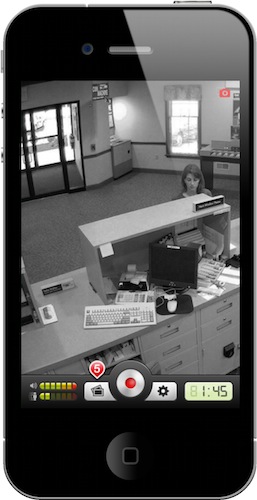
Security Cam for iPhone Keeps An Eye On Your Stuff, With Motion Detection

Now this is an interesting app I’ve recently discovered in the App Store. Months ago, I began thinking about setting up a homemade wireless security system in my house; I saw that the system could be easily put in place with a couple of hundred dollars, and I was getting serious about purchasing all I needed to get it up and running. As usual with my personal projects I dream about and save in my “someday” list, it didn’t happen. Work got in the way, priorities changed, I didn’t set up a home security system. As my to-do list suggests, I may actually do it “someday”.

Home security and monitoring, anyway, is a personal requirement (and hobby, I guess, or obsession) that can change according to one’s needs, workplace and items to protect from unwanted eyes and hands. This is why I think Security Cam, a $0.99 app for iPhone, may be just what the average user is looking for. Read more


Old Macintosh Plus Becomes Time Machine Server

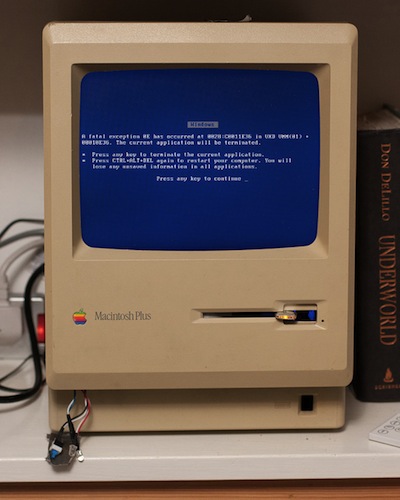
Oh, the things modders and geeks can accomplish with old Apple hardware and a bit of creativity. We saw and old Macintosh computer becoming a DJ headset last week, now it’s time for a 1986 Macintosh Plus to have its inner parts modified and adjusted to work as a Time Machine server.

Macenstein reader Dean Gray took a Macintosh Plus and filled the innards with 6 hard drives to get to 2.3 TB of storage. He put an Intel Atom motherboard in there, together with a 10.4” display and he says WiFi connection is coming soon as well. The unit is now acting as a Time Machine backup destination, similar to an Apple Time Capsule or a Drobo configured on OS X. Only it’s all happening inside a Macintosh Plus.

We can’t get enough of these cool mods. In 20 years, it will be nice to see the original iPad or a unibody MacBook become modders’ targets.


Next Generation iPad May Have Proximity Sensor

The next generation iPad may gain additional superpowers as it automatically powers on when you lift your case’s cover.

A new string spotted in iOS 4.3 reveals that Apple may be sweating the small stuff to perfect the user experience in the latest update: one particular item notes that the future iPad may have the capability to turn its screen on and off when a cover is removed and applied. The assumption is that you’ll want to open Apple’s case to access the iPad, so why not turn it and on and off for you without having to hit the power button? The Brazilian iPhone Blog notes that this feature would be accessible via the Settings app, where it can be enabled and disabled per your preference. The current iPad does have an ambient light sensor, but the proximity sensor would further refine its environmental awareness in respect to accessories.

[via iPhone Blog]