

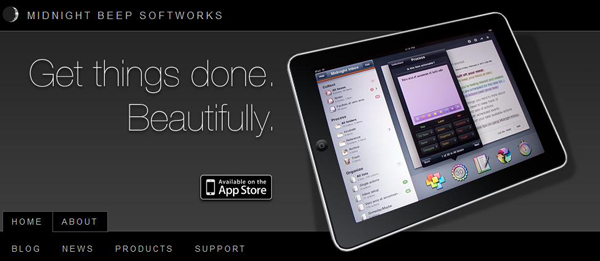
Today Midnight Beep Softworks released a major update to Midnight Inbox™ Touch, a GTD app for iPad. Midnight Inbox™ Touch is a professional-grade GTD productivity app and it’s now $9.99, compared to Thing’s $19.99 and OmniFocus ($39.99). The total system for an iPhone, iPad, and a Mac is only $35. There’s even a free version for Mac, Inbox Classic, if you want to save a few bucks and use an older version. Read more
Midnight Inbox Touch - Get Things Done. Beautifully.
iPad Magazines With Subscriptions Start Showing Up in the App Store

Well, look at that. Apple announced App Store subscriptions earlier today and, contrary to recent speculation, iPad magazines using the new billing system are already showing up in the App Store, before the public release of iOS 4.3. As noted by WSJ and AdAge, Elle and Popular Science are the first apps to come with the new Apple subscriptions, which rely on weekly / monthly / yearly payments and give customers the possibility to decide whether a publisher may access personal information like email and ZIP code or not. Read more
Radiant For Mac: Destroying Space Invaders In 1080p

Radiant takes arms in the Mac App Store as an iOS title with 8 bit roots in the classic Space Invaders. An an earth pilot, your mission is to obliterate the alien nemesis, advancing through reconfiguring waves of enemies. While you might have a hankering to blast those evil space aliens into an 8 bit grave, how well does an iOS title scale to the desktop?
Camera+ 2.1 Now Available: Faster, UI Refinements, Improved Effects
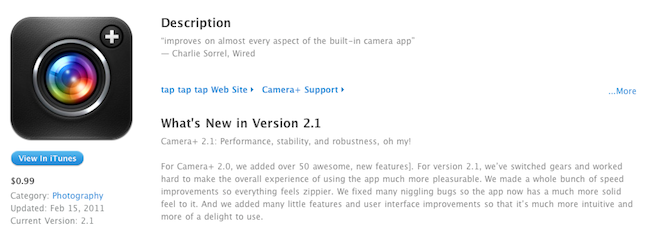
MacStories staff favorite Camera+ by taptaptap was updated a few minutes ago to include several interface refinements and optimizations to make the app faster, more stable and responsive overall. Since the release of the much anticipated version 2.0 (which marked the comeback of Camera+ in the iOS App Store), the developers have focused on improving the animations of the app when switching between the camera and the Lightbox, as well as providing a more intuitive UI design that now makes it easier to always jump back to the camera no matter where you are. Put simply, there are many camera shortcuts now. What I really appreciate though, performance improvements aside, is the possibility to automatically save pictures to the Camera Roll as they’re taken.
You can now get info on photos in the Lightbox without zooming (it was quite annoying before), set more sharing options. Taptaptap also improved the look of many effects, like Pinhole and Vintage Borders. After a first test (performed on the iOS 4.3 beta), this looks like a really solid update that builds upon the features introduced in Camera+ 2.0.
Camera+ is available at $0.99 in the App Store. Full 2.1 changelog below. Read more
iWork ‘11 Event At Mexican Best Buy on February 19th?

Previously rumored to debut with the Mac App Store and then spotted several times on Apple’s website, iWork ‘11 is apparently nearing release. As noted by Apple Bitch, a webpage on Best Buy Mexico website points to an event on Sunday, February 19th at 7 PM to learn the basics and see what’s new in iWork ‘11.
An AppleBitch reader has spotted a new page on the website of Best Buy Mexico which suggests that iWork ’11 will be arriving on February 19th at 7pm. The webpage describes an event where you can “visit Best Buy on February 19th and find out what you can do with iWork ’11″. While this is obviously not an official announcement from Apple, this event is a good indication that iWork ’11 is nearing release. We hope it is at least, otherwise there’s going to be a fairly unhappy crowd at a Best Buy in Mexico on February 19th.
The problem with February 19th is that it’s a Saturday, not really the usual day for an Apple software release. It’s also unclear whether this is a Best Buy event for the launch of the suite, or just something to see what’s new in iWork ‘11 – not necessarily to be released this Saturday. In that case, does this mean iWork ‘11 is coming this week? But then again, it might just be an error on Best Buy’s end.
Update: Best Buy pulled the page. The link to the event is gone from the homepage as well.

Washington Post Postpones iPad App Paid Subscription

In November, we reported the launch of the official Washington Post iPad app came with a nice free subscription until February 2011. An account was required, but there was no need to submit payment information. Now that we’re well into February, you’d expect WP to release an update to the app that brings subscriptions in – but apparently they’re delaying it.
The latest update, version 1.2, adds offline reading (finally, you could say, and it works both for articles and entire sections) and “complimentary full-access subscription still provided for a limited time”. What does that mean? Washington Post is clearly playing the waiting game, and now that Apple has announced App Store subscriptions it makes sense. The Daily extended its free promotion as well, and it looks like other may follow as well. Publishers are buying themselves time before rolling out real paid subscriptions on the tablet. Or, they need more time to update their apps to include Apple’s new billing system.
You, on the other hand, don’t have to buy anything as the app is available for free here with a free subscription ready to be activated. [iTunes via TUAW]
#MacStoriesDeals - Tuesday

You can always tell when an holiday passes, app prices jump back up! Here are today’s deals on iOS, Mac, and Mac App Store apps that are on sale for a limited time, so get ‘em while they’re hot!
iFacePad App Enables FaceTime On The iPad

Two weeks ago we reported a hacker managed to get FaceTime working in the first generation iPad, even if the device doesn’t come with the camera and the hack requires to perform a jailbreak and load some iPod touch system files. If you really want to run FaceTime on your iPad, but you don’t want to go through the manual effort of copying files and repairing permissions, iFacePad is a new app for the Mac that simplifies the process and allows you to install the iPod touch FaceTime app on the iPad in a few minutes.
To use iFacePad, you’ll need a jailbroken iPad and the iPod touch 4th gen firmware file. An app like PhoneDisk to access the iPad from the Finder is also required, and you can check out the full set of instructions here. Demo video below. [iSpazio via FunkySpaceMonkey] Read more
Replacing Flash Storage With The Cloud→
Replacing Flash Storage With The Cloud

Speaking of streaming for media through MobileMe, Chris Foreman at Ars Technica makes a good point:
Relying solely on the cloud, whatever the particular method, ignores the reality of wireless networks. Even in major cities, wireless data connections are not 100 percent ubiquitous. There are areas where connections are tenuous or nonexistent—suddenly, if you have zero bars, you would have zero data. As frustrating as it might be when you drop a data connection when trying to access a webpage, we believe the experience would be far more frustrating if your device became effectively useless anytime you went deep inside a large building, down into a basement, or on the subway.
While WiFi can help mitigate the problem somewhat, there’s still the issue of how quickly data usage rates would skyrocket if a potential iPhone nano streams all its data from the cloud. Part of the alleged reasoning behind Apple releasing an iPhone nano is the ability to offer a lower-priced device, possibly without a contract. But what benefit would this lower-cost device offer consumers if it required them to pay yet higher monthly data bills?
Ars’ report is more geared towards the recent rumors of an iPhone nano with no internal storage at all (which is incorrect anyway, as a minimum storage for the OS must be provided – you can’t “stream” iOS), but the problem remains: if Apple is moving to the cloud, then we’re all becoming dependent on always-available, reliable and “fast enough” internet connections. That’s why I believe a caching system for offline access will be needed in order for this to work properly for everyone.
The Spotify apps already do this and it’s great. You stream music, but you can save songs in your device’s cache for when you don’t have a 3G or WiFi connection available. Sure, cache can grow huge in size and waste space, but at least you’re sure you always have full access to your files.