This Week's Sponsor:

HomeSnap

A Private, Read-Only Window Into Your HomeKit Home


Apple Releases Digital Camera RAW Compatibility Update 3.6

A few minutes ago Apple issues a Digital Camera RAW Compatibility update, version 3.6. The update brings RAW compatibility in iPhoto ‘11 and Aperture 3 for these cameras:

  • Canon EOS Rebel T3 / 1100D / Kiss X50
  • Canon EOS Rebel T3i / 600D / Kiss X5
  • Olympus E-5
  • Panasonic Lumix DMC-FZ100
  • Pentax K-r
  • Pentax K-5

The update also fixes issues with the following cameras:

  • Nikon D7000
  • Nikon COOLPIX P7000
  • Panasonic Lumix DMC-GF1
  • Panasonic Lumix DMC-GH2

You can download it here, or fire up Software Update.


Restaurant Chain Will Let You Design Your Own Pizza - With An iPad

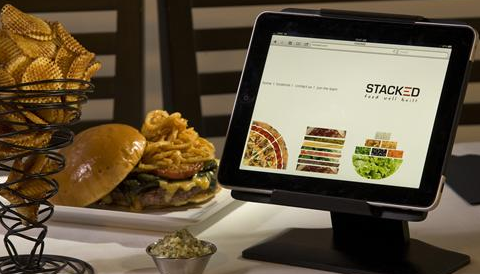
Since the iPad’s release, we have seen several restaurants replacing printed menus with iPads, which provide a good solution to build an interactive experience for customers and save on the cost of paper and ink with a constantly updating menu that’s also cool to use. Digital menus, however, might become a thing of the past as soon as Stacked: Food Well Built launches its restaurant chain, heavily based on iPads to order and design meals.

As USA Today reports, the co-founders of Stacked aim at placing 100 iPads per restaurant atop every table, allowing diners to order meals using static menus or design their own burger, pizza or salad through the iPad’s intuitive multi-touch interface and a custom app built specifically for the restaurant chain. The setup:

The iPads at Stacked will be in metal frames that sit about 3 inches off the tabletops. Folks wanting to order burgers will select the type of bun, meat and toppings on the iPad by clicking and dragging icons. The burger stacks visually on the iPad screen. Ditto for pizzas and salads.

Oh, and what if you try to steal the iPad by carrying it out in your bag? An alarm will go off. This sounds like a really clever implementation (do they have custom doors with iPad recognition?) and marketing technique, although the founders claim they won’t market their chain as “the iPad restaurants”. Still, it’ll be interesting to see how the iPad will further integrate with restaurants, coffee shops and bars in the next years. iPad cash registers are already in place in New York City.


Unicode Symbols In The iOS Keyboard with Jailbreak Tweak

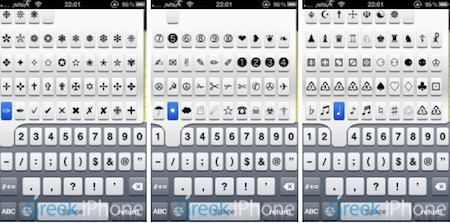
You know Unicode symbols, right? The ones you might find in tweets from time to time, or in links from Daring Fireball and Shawn Blanc’s website. Yes, these symbols. It turns out, they’re pretty cute. And it also appears that people love to use them to prettify their messages, tweets, Facebook walls and whatever else you can do on the Internet (suggestion: don’t use them too much on Reddit). Anyway, thanks to the efforts of the folks over at Vintendo, jailbreakers can now install a tweak that brings Unicode symbols onto the default iOS keyboard.

The tweak, called Vmoji and available in Cydia through Vintendo’s repo, can be activated the pressing the numeric keys in the keyboard. It’s kind of obtrusive, but I guess it gets its job done. So there you have it: a new way to get those cute symbols into your tweets. Just use them responsibly. [via RazorianFly]


Pixelfari: It’s Safari, In 8-bit. And It’s Totally Awesome.

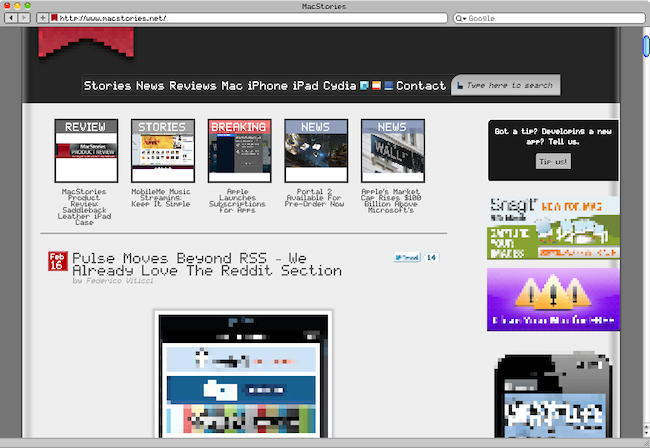
Pixelfari by Neven Mrgan is the coolest Safari mod I’ve ever seen. The app, very buggy and released as an experiment by Mrgan, is basically a skin for Apple’s browser completely realized in 8-bit style. Like those old Nintendo games, or The Incident from Mrgan himself. It’s pixel art applied to a browser: toolbars, fonts, menus, preferences – everything. It’s unreadable as hell. But at the same time, my beloved geeks, it’s kind of a dream come true: Nintendo from the 80s meets Apple. Mrgan writes:

Ladies and gents, fellow humans — presenting Pixelfari, a pixely, 8-bitty version of everyone’s favorite browser. Enjoy chunky fonts, blocky graphics, and a general sense of giddy inefficiency. Spearheaded by yours truly and developed by a very clever friend.

Maybe we’re all getting excited about this because it’s a neat hack no one ever did before. Still, you can’t take the 8-bit love away from me. So go download the app here , right now. Enjoy. Read more


Pulse Moves Beyond RSS - We Already Love The Reddit Section

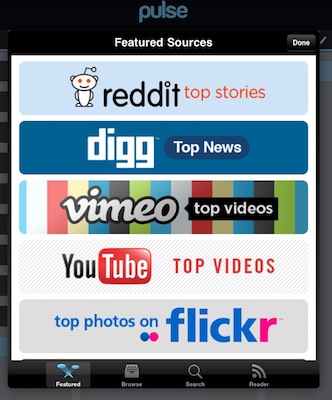
A few days after an update that brought proper Google Reader sync and faster loading times, the developers of Pulse News Reader for iPad issued a small update on their online backend (it means you don’t need to check for updates in iTunes) to bring extensive support for a series of APIs. What Alphonso Labs is doing is very simple: they’re slowly moving beyond RSS. And with this move, they have embraced APIs as the new way to fetch content from various services like Reddit, Vimeo, Youtube and Digg.

RSS, as many have noted, sounds very geeky - something we find impossible to explain to our mothers. RSS provides the plumbing to visualize a variety of news sources, but it is never mentioned in the app. We added a layer of usability that really resonated with our mainstream users.

For a lot of our users, Pulse has now become their go-to “browser” for consuming content. And this content does not have to be restricted to RSS feeds. Today, we’re adding SIX brand new sources to Pulse.

Read more


Quick Weather with QuickWeather

I love watching the weather and enjoy checking extended forecasts via my iPhone. The weather category in the App Store is flooded with sub-par apps with horrible UIs. Even some of the more popular ones look like they are being neglected in the pixel department. There are some great weather apps there but this review is only about one, a newcomer to the App Store, QuickWeather.

Although I like weather data, sometimes I want a simple weather reading that gives me some visual stimulation, not just numbers. If my hometown weather isn’t the best, I usually check Destin, Florida, where it’s always sunny and where my family goes once a year. QuickWeather, by App Jon, simply does this; it’s a beautiful app that makes it easy to quickly access weather anywhere in the world. Read more


First Screenshots Of Opera for iPad [Update: Video]

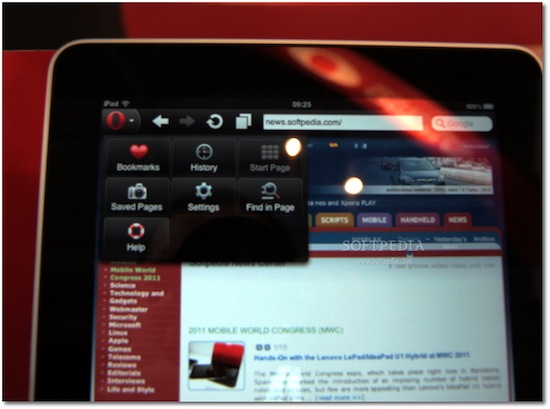
At Mobile World Congress 2011 the folks over at Softpedia managed to get their hands on preliminary version of Opera for iPad, and apparently they were impressed by the speed of the browser. Released on the iPhone last year, Opera for iOS raised some doubts over the quality of the app, mainly due to scrolling smoothness and font rendering on pinching and zooming – clearly inferior to Apple’s Mobile Safari. Opera for iPad is set to provide a much better experience on the tablet screen, with an interface that reminds of the desktop version (visual tabs on top) and menus accessible from a huge Opera button in the upper left corner. The developers also confirm the iPad app has been built on the same engine the powers Opera desktop.

The app runs very smooth, and allows for some rapid movement between visual tabs (open pages). Visual tabs allow users to have several web pages open concurrently and quickly switch between them using tabs. Each tab allows users to preview a thumbnail, as well as the page title and icon for each web page they have open.

Where the default touchscreen keyboard provides a less-than-optimal user experience, users can take advantage of Opera’s virtual keyboard to type and edit information without having to leave the page they are viewing.

I’m curious to see this Opera virtual keyboard and see how it compares to the iPad’s default one. No release date was provided by Opera at MWC, but Softpedia speculates we might see the app in the Store as early as next week. It will likely be free, and quickly jump the charts of free software like the iPhone counterpart did.

Check out more screenshots of Opera for iPad below. Read more