Daily Notes for iPad Makes A Comeback with Tasks, Dropbox Support

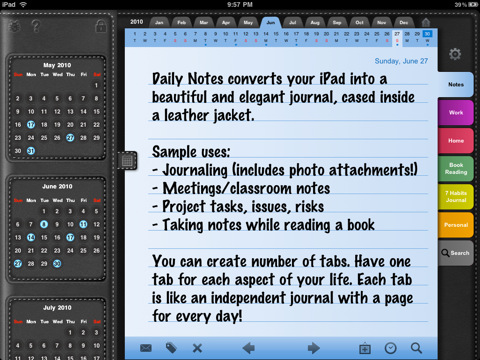
Daily Notes was one of the first apps to adopt a custom interface on the iPad back in the days when iPad apps were a novelty. Reviewed by Cody Fink in May 2010 (a month after the release of the tablet, and the grand opening of the iPad App Store), the app sported an intriguing faux-leather UI that allowed you to organize and schedule your daily events and priorities as if you were using a real agenda. Cody wrote:

Daily Notes is a more traditional styled notebook with lots of calendars built in. Seriously, you cannot miss a date wherever you turn. Asides from what could be overdoing it, Daily Notes has a couple great features built in, but also shows some odd design decisions that need ironing out. Despite some minor gripes, this is probably one of the best looking notepad applications currently available on the iTunes App Store, offering a fair level of organization, note tracking, privacy, and customization.

After a few months of silence, the app is making a comeback today into the App Store with a brand new version 4.0 that comes with several new features like backup through Dropbox and TextExpander integration. Together with that (and I’m sure being able to create daily notes through TextExpander snippets will be appreciated by many) the app can now organize tasks into a dedicated tab and has full multitasking support. But there’s more. You can switch between 30 different themes and 80 fonts, browse fullscreen photo attachments and insert multiple notes per day.

Daily Notes is chock-full of features, but I wish the interface was a little more streamlined. Admittedly, some users might find sections and calendar views confusing at first – thus the implementation of a tutorial when you first launch the app. Still, this is a truly complete app that I hope will get support for more online services in the future. Go check it out here.




MANsaver: The iPhone App That Will Save Your Relationship

It is no secret that men usually forget about things. Especially if you’re married and you have to think about paying the bills, your job, kids and that car insurance that just won’t go away, it might happen to forget about your 4th anniversay, the perfect gift for Valentine’s Day, or the anniversary of the day your first met with your wife. While girls seem to remember any kind of holiday, anniversary and important milestone with ease, guys…well, usually just forget. And if your relationship is anything like mine, you know this could become a problem. Like, a huge problem.

Now, for as silly as it sounds, we there’s an app for that. MANsaver, a free iPhone app by Oven Bits and Creation Code, is aimed at collecting all these kinds of holidays and anniversaries you should remember into a single list view that – and here comes the real trick – will also send you notifications five days ahead of a scheduled event, and on the same day as well. This app, also nicely designed, is literally a man saver: it allows you to build custom lists of dates based on your relationship, set up reminders and even send text messages based on “romantic templates”. This is an iPhone geek’s relationship-oriented OmniFocus, basically. Read more


Gamerami Serves News, Upcoming Game Info On Demand

Growing up, I was a subscriber of Nintendo Power and the later (manlier) Game Informer as I grew into my predestined Xbox phase. High school was great for zombie killing, but between college and MacStories I’ve little time to play or let alone get a heads up about the latest upcoming games. Gamerami is a mobile news stand that makes sifting through the latest titles easy and rather painless, and it just might save your butt when you’re on the spot. At least now I don’t look like a total nobody when I’m asked what cool & new games are coming out on the PS3.

Read more


“Pixels: The Art of iPhone Photography”

Attention budding iPhoneographers, think you can shoot some mean pixels with your iPhone? Addicted to photo apps like Instagram, Camera+ and Hipstamatic? Why not test your creative ability and submit some of your own original works of art?

The Orange County Center for Contemporary Art, or OCCCA, in Santa Ana, California, is opening an exhibit from March 31 to April 20, 20111 called “Pixels: The Art of iPhone Photography.” If you are interested in participating, here are the rules: all photos must be shot and processed with your iDevice (iPhone and iPod Touch devices are both acceptable) and you cannot use any photo editing software on a desktop computer. Read more


Today In Apple Patents: Dense Lithium Cells, iOS Controls via Smart Bezels

Two patents uncovered today by AppleInsider and Patently Apple give us some insight on technologies and features Apple might implement in future MacBooks and iOS devices. Smart bezels (a subject we’ve covered before) make a comeback today in a patent that describes how tablets could benefit from losing physical buttons and delegating functions like volume and brightness adjustment to touch-sensitive hardware parts running around the screen of a device. Read more


Vowl: Free, Simple Mac App For Flickr Slideshows

Vowl by Steven Frank is a straightforward Mac app, available for free in the Mac App Store, that generates an automated Flickr slideshow based on tags assigned in the app’s preferences. The app is really simple with its translucent black window style, and also allows you to click on any picture to get to the Flickr photo page with your default Mac browser.

In the preferences, you can set the delay between photos, add and remove tags (by default, the app comes with “cat”, “dog”, and “chicken” tags) and make the app float above other application windows. When resized to take the most part of your screen, Vowl becomes a pretty effective way to get random Flickr photos on your desktop, and I have to admit I loved the kitten ones.

The app is a free download here, or on Steven Frank’s website.


Plants vs. Zombies Now Available In The Mac App Store

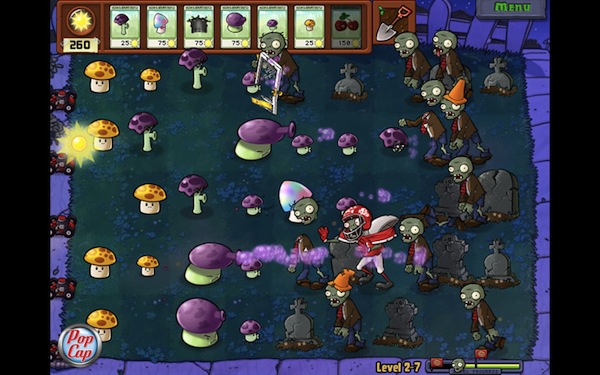
While we’re still waiting for Bejeweled 3 to become available on the iPhone and iPad, PopCap Games has released its hugely popular “Plants vs. Zombies” in the Mac App Store. You can find it here at $9.99.

The game, successful on the iOS App Store and firmly positioned in the first spots of the paid software charts, looks like a straight port of the iPad version, made bigger to run on every Mac’s screen. That means you’ll find the 49 zombie-killing plants you know and love, 26 different types of zombies to block from accessing your house and all the strategies and skills you’ve already implemented on the iOS platform. The game, for those unaware of its addictiveness, revolves around the concept of killing a horde of zombies marching towards your property using only seeds, powders and bombs released by…plants. Colorful graphics and funny sound effects, together with a great gameplay, made this game an absolute must-have for iPhone and iPad owners.

Perhaps Plants vs. Zombies for Mac won’t generate the same sales numbers of the iOS counterpart, but if Angry Birds is of any indication – it really looks like users are willing to pay again to play their favorite iPhone games on OS X. Go download the game here, and don’t forget to play The Cranberries’ “Zombie” every once in a while. Just to get in the right mood.


Game Preview: Rockin’ Rockets for iOS

Imagine you’re just minding your own business on the cattle farm when alien UFOs invade. Thinking fast, you man the grain silo and unhatch the lid, revealing a seemingly endless payload of clearly illegal black-market warheads. Grandpa was right! Those missiles would come in handy someday!

There is no explanation as to why you’re the target against alien angst (or why you have so much gosh darned ammunition), but they’ll take you dead or alive either way. An upcoming game for iOS, Rockin’ Rockets will have you tapping your way to victory as you destroy alien combatants on land, sea, and air. It’s a finger frenzy that’s bound to tucker out even the most muscular thumbsicles, and we promise you’ll be doing much more than shooting to stay alive long enough to outlast the alien threat. We’ll keep your interest peaked with a screenshot after the break, but in the meantime you can subscribe to receive updates for a chance to win a free copy when it launches. Also, be sure to follow the dev team @RocketsApp for explosive updates as well if you’re on the Twitter-tubes.

Read more