Huge Update: Google Launches New Search App for iPhone

Remember the Google Mobile app for iPhone? With an official post on the company’s blog a few minutes ago, Google announced a major new version of the with a completely new look, new features and a new name: Google Search for iPhone. Simple as that, the app packs all the functionalities from the previous version in a new UI, easily accessible for everyone and built on top of iOS 4’s multitasking and fast app switching capabilities.

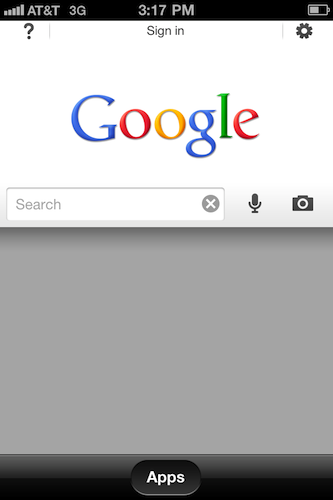
Google Search presents itself with a new search UI that makes it easy to start typing right away or perform a voice search through the iPhone’s mic. Search results can be tailored to your needs with a new toolbar that slides in and reveals more options as well as other Google applications.

Second, we’ve made it easier to pick up searching where you left off. If you leave the app and come back later, you’ll be able either to start a new search right away (just tap in the search box to type, hit the microphone button to do a voice search or tap on the camera icon to use Google Goggles) or get back to exactly where you were by tapping on the lower part of the page.

Finally, there are a number of improvements we’ve made to everything else you love in the app, including Google Goggles, Voice Search, Search with My Location, Gmail unread counts and more.

After launching the app for the first time, you’ll be guided through the new features of the app with an interactive overlay that places question marks on screen to explain what’s new and improved. Search, Goggles and Voice Search are still there, but placed next to the main search bar that is kept in a collapsible window you can open or dismiss at any time. The effect’s really cool as you can invoke search from anywhere in the app, even when browsing images or news results. A feeling I’ve got when trying the app is that Google is really trying to blend all its services together in this new Google Search app: with a single swipe, you can access Places, Images, Shopping search results, real-time updates, Blogs and more. It feels like they have rebuilt to app to unify all Google’s services in a single package, and I think that’s a step in the right direction. You can of course sign in with your Google Account and tweak the preferences to your needs.

Google Search for iPhone is a free download in the App Store. Check out the promo video and more screenshots below.

Read more


DropBook Integrates Facebook With Your Desktop: Review & Giveaway

DropBook is a little more difficult to show off than most apps in part because of its deep integration with your desktop and menubar. It isn’t an app that traditionally sits in your Object Dock, rather, you get a translucent Facebook icon that sits in the lower left corner of your screen which you can drag pictures and favicons/URLs into to instantly share content to your wall. As content is dragged into the Facebook icon, a window appears that shows you the attachment or link to your content. If it’s a picture, you can send it to your album of choice including your profile pictures. On your Mac, a lot of content is bound to be bundled in iPhoto, and you can drag multiple selected photos for a multi-upload. You currently can’t add tags to photos, which might be a deal-breaker for those uploading lots of pictures.

Read more


Voice Brief: Listen To Gmail, Twitter, Facebook and Calendar On Your iPhone

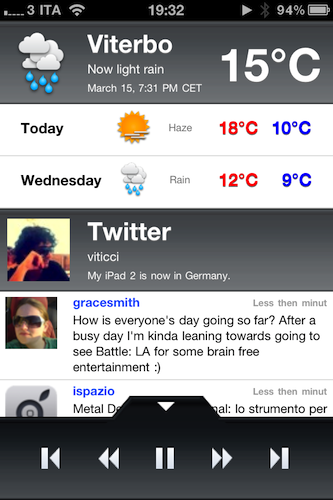
Voice Brief, an iPhone app that’s free until this afternoon in the App Store, aims at enabling you to listen to information coming from your social networks, email inbox and more through text-to-speech technology. Voice Brief, available only on the iPhone for now, can plug into Twitter, Facebook, Gmail, RSS feeds as well as Weather and Stock Prices to “speak” rather than simply displaying information.

How does it work? You choose the voices you want in the Settings (announcer voice for when the app switches sections, reporter voice to read status updates and news), set the speed and then you add new contents. You can log in Twitter and Facebook from within the app and set the amount of tweets and updates to fetch, manually enter RSS sources (there’s no Google Reader support) and set other details for your location, and so forth. Once the contents you need are in place, the main page of Voice becomes a dashboard with a summary of all your events (Calendar integration is also supported), social activity, emails and news. Hit the play button, and all this information will be spoken out loud by the app. Voice quality is good, sometimes above iOS’ default text-to-speech capabilities, sometimes below average iPhone quality. Overall, I’ve found Voice Brief to perform very well with regular English sentences, but of course the app fails badly at Italian contents and status updates containing very specific terms like tech products and acronyms (very common in my Twitter timeline).

Voice Brief is an interesting project that’s worth checking out, for sure. I can see some people using an app like this in their car while driving to the office in the morning. Go download it here while the offer is still valid. Read more


iPad 2 Launch Delayed In Japan, Donations Now Accepted in International iTunes Stores

In the wake of the recent earthquake and tsunami that hit last week, Apple won’t launch the iPad 2 in Japan on March 25th. As reported by Reuters the company isn’t providing a rescheduled date for the launch, but it’s very clear that Apple is focusing on helping out people and their staff in Japan rather than planning a product launch.

We are delaying the launch of the iPad 2 in Japan while the country and our teams focus on recovering from the recent disaster,” said Apple spokeswoman Natalie Kerris.

The iPad was originally scheduled for a launch in Japan on March 25th. In the meantime, iPadevice reports Apple has extended donations to the Red Cross through iTunes in various international Stores including the Italian one. Donations in the US iTunes Store were launched last week.


Apple: Donate Your Old iPads to Teach For America

Apple: Donate Your Old iPads to Teach For America

Apple is asking US customers to donate their old first-generation iPads to Teach For America on its official Retail webpage. By visiting this link, you’ll notice a box on the right that says:

Your old iPad can help teach kids a thing or two. Donate your old iPad at an Apple Retail Store, and Teach For America will give it to a teacher in a low-income community.

As noted by Macnn, there’s no mention of tax deduction for the donation, but Teach For America is a corporation listed among those that provide tax deductions for direct donations. So if you’re interested in donating your old iPad for a good cause, give your nearest Apple Store a call to get more details. I wish there was such a program in Italy.

Permalink

Due, The Best Reminder App for iPhone, Now Available on the iPad

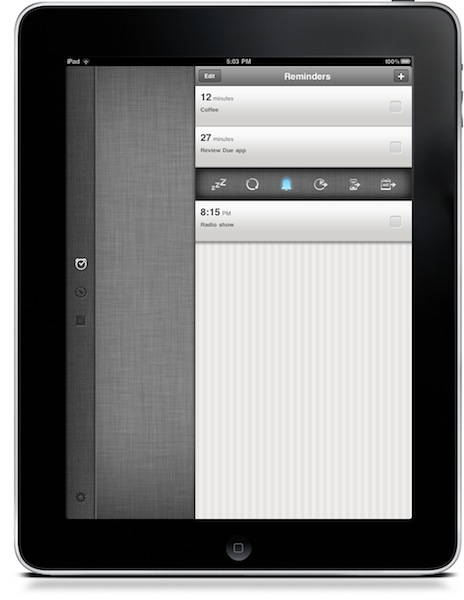
Due, a popular reminder and timer application for the iPhone we at MacStories reviewed several times in the past, was updated last night to include a native iPad version that, together with OTA sync through Dropbox introduced in version 1.3.1, now allows you to have your reminders, timers and logbook always in sync and available across a variety of devices.

Due for iPad sports a completely new interface for the tablet that reminded me of the official Twitter app at first with a vertical navigation bar on the left and a middle panel to add and customize your reminders and timers. The bar on the left lets you switch between the sections of the app, as well as the Settings which now have their own dedicated tab. As you may know Due syncs with Dropbox upon launch and exit, so if you’re running both the iPhone and iPad versions at the same time don’t expect changes to occur simultaneously. It’s highly recommended that you only use one version of Due at a time to avoid sync conflict issues. That said, sync is pretty reliable and fast enough to enable you to switch from a device to another within seconds.

New design aside, Due for iPad follow the steps of the iPhone app to offer an easy to use solution for your reminders and timers. Many of the interface elements are the same so you’ll feel comfortable when using the new Due for iPad. This update also introduces a number of fixes and various improvements, such as the possibility to relaunch the app in its previous state (reminders / timers tabs), double tap to edit reminders and timers, extended undo support. When adding new reminders, the app will now open the “quick panel” automatically to customize snooze and repeat quickly – this one is a very welcome addition to further streamline Due’s workflow and usability.

Due keeps getting better on each release, and this iPad version plays an important role in making Due a ubiquitous way to have your reminders and timers available all the time. You can get the app for $4.99 in the App Store, and check out the full list of changes and fixes below. Read more


7,200 iPad 2s Sold at Apple’s 5th Avenue NYC Store on Day 1

Apple has not officially released Day 1 sales for the iPad 2 but Business Insider is reporting that 7,200 iPad 2 devices were sold last Friday, March 11 at the flagship Manhattan store on 5th Avenue in New York City.

They claim a strong “well-connected source” released this number to them. To back up this number, there were over 1,100 people lined up this weekend, up from 700 when the original iPad came out about a year ago.

Apple has also reportedly stretched the waiting time for an iPad 2 to a 4 to 5 week wait now, it’s a good thing our Cody Fink made the hike to his local Apple store to purchase one for Federico and himself, but I am hoping that by next month I can buy one in person when I’m in Chicago. At least I hope Apple can reload and meet the more demands for the iPad 2.

[via Cult of Mac]


djay for iPhone Now Available, iPad Version Updated

djay by Algoriddim is an excellent music-mixing application for the iPad we reviewed in December that, with a beautiful user interface design and powerful features, managed to become the top solution for all those looking for a serious, yet accessible DJ solution on the tablet. Today Algoriddim is releasing an updated version of djay for iPad, as well as a brand new iPhone counterpart that brings the djay experience to smaller screens without compromising the usability and design of the app.

First off, djay for iPad got a major update (version 1.1) that adds auto, manual and bounce looping, 3 additional cue points and an improved library search to find songs that you’d like to mix. The update also adds compatibility with Bluetooth audio devices, extended support for AIFF and WAV files thanks to iOS 4.3 and a series of bug fixes meant to address the memory issues of the app. We wonder how well will this thing run on an iPad 2. djay for iPad is a $19.99 download in the App Store.

djay for iPhone, on the other hand, takes the basic principles of the iPad version and brings them to a smaller screen that should still enable you to mix your songs on the go. The turntable interface is still the same, as well as many of the commands and menus on screen. Only one turntable is displayed on the iPhone in portrait mode, to keep the experience as streamlined and elegant as possible. Two buttons at the bottom allow you to switch between songs, check how much time is left and regulate the volume output. Many of the other features of djay for iPad such as BPM auto-sync, equalizers and pre-cueing have been successfully ported to the iPhone, too.

djay for iPhone is available in the App Store at $9.99. Check out the promo video below. Read more