Microsoft Releases Bing for iPad

Bing for iPad has just been released onto the iTunes App Store and it is Microsoft’s first app to make it onto the tablet device. Just like their Bing iPhone app and the Bing website, the daily image is the first thing you’ll notice with the app and it looks beautiful on the iPad’s screen. Furthermore the app gives you a quick glance of key information of Weather, News, Movies, Trends and more in a bar at the bottom of the screen.

The app contains a wealth of features and has been exceedingly well-designed to take advantage of the iPad’s strengths - this can definitely not be called just a search engine app. Those bottom tabs of information are a gateway into a full screen of lots more information. However probably the best feature of the app is the Trends page which gives you a very nice, almost FlipBoard-esque, page with all the top searches on Bing, along with a relevant image. Like the iPhone app it features a Voice Search (which works pretty well) and search, whether it be done via text or voice, can be for a website, news, image, video or map.

There is a lot of swiping that can be done in the app and it allows you to go back and forward from your last ‘panel’ of information, whether it be a web search, news page or weather. Bing Maps is included and fully functional letting you search for an address or business, find local business and even get directions.

The iPad app is curiously only available in the US iTunes app store which is certainly odd considering the web version does have international editions, that even have a different daily picture. However even weirder is that I downloaded it from the US store and ran it in Australia and it not only gave me the correct weather but the daily image was the Australian one and even Bing Maps showed my location and correctly showed local businesses, only the movie theatre times didn’t work. Jump the break for some more screenshots of the app.

Read more


ESPN Launches ‘WatchESPN’ App, Commercial for iDevices

ESPN announced today its flagship network ESPN as well as ESPN2, ESPNU and ESPN3.com are now available to subscribers of Time Warner Cable, Bright House Networks and Verizon FiOS TV via the new ‘WatchESPN’ App in the iTunes App Store.

WatchESPN has shown up in time for the Masters, the NBA Playoffs and the Major League Baseball season. Qualified subscribers who receive the linear networks as part of their video subscription can now watch the channels from the convenience of their iDevices. They even made a very funny commercial to promote the app, check it out after the break. Read more


Here’s A Digital Whiteboard Running On 40 iPads Simultaneously

Back in January Cody reviewed SyncPad, a collaborative online whiteboard with web, iPhone and iPad applications that allow people to collaborate on sketches, wireframes or PDFs in real-time. SyncPad is a very powerful app, as it lets you create multiple rooms, work locally or over the Internet, share with Dropbox and even import PDFs in seconds to quickly mark up a document and show it to your colleagues. From the review:

As soon as you open SyncPad, you’re asked to enter a room name. You can make up anything, and a URL will be spit out enabling you to share that room with collaborators. With no sign-up required, collaborators can simply plug the URL into a web browser to watch you markup content in realtime. There may be a slight delay between what someone will see in a room as you draw on the screen, but it’s rather minor and personally unimportant. The WOW! factor is immediate as the simplicity behind SyncPad is astounding, and it’s an easy way to impress others on the other end. They’ll tell you, “it’s the future,” and I’m not exaggerating - SyncPad is a great way to share content with others because it’s such a fascinating little tool.

The “WOW” factor Cody mentioned is indeed well visible in the video shared by the developers, in which 40 iPads are running the same whiteboard simultaneously. The devices are on the same local WiFi network (they’re not connected over the air from different countries in the world – like Cody and I did in our tests), but the tech is still impressive. The animations are smooth, everything happens in real-time, and we can only imagine the possibilities offered by SyncPad during, say, meetings or conferences where all attendees have an iPad with the aforementioned app installed.

Check out the video below. Read more


Apple Patent Reveals Potential E-Ink And LCD Hybrid Display

A new patent revealed today shows that Apple has given consideration into a hybrid display that could dynamically switch and even simultaneously use e-ink and a traditional LCD system for displaying content for a device such as an iPad. The patent filed in October of 2009 and entitled “Systems and Methods for Switching Between an Electronic Paper Display and a Video Display” has a clear purpose in that it could be used for easier reading of text, particularly in an application such as iBooks.

The system described in the Apple patent would work by placing a translucent e-ink display above the traditional LCD panel (and below the touch panel), and depending on what content is supposed to be displayed, the switching on and off of the panel would be done by the system rather than the user. E-ink displays have some clear benefits in that they do not require a backlight, are less likely to induce eye strains than the bright screens of an LCD display and can be read in direct sunlight, as this Amazon ad last year highlighted to great effect.

An LCD obviously reigns supreme with high-resolution, dynamic and coloured content whilst e-ink is best for static text in black and white. The Apple patent aims to solve such an issue by allowing for separate display regions that can be independently activated when necessary. It was in fact previously rumored that the iPad 2 would have greater anti-reflective and anti-smudge treatments as a way to improve reading on the device but such a system described in this patent with a hybrid display of e-ink and LCD technology would be a far superior answer to the problems of reading in direct sunlight.

[Via AppleInsider]


iOS 4.3.2 Coming In Two Weeks?

BGR reports this morning that Apple is looking to launch another version of iOS 4.3 within two weeks. The update, labelled iOS 4.3.2, should contain various fixes and enhancements, address security issues (quite possibly a jailbreak fix) and it “will also fix several bugs that have affected users.”

On March 21st, BGR reported iOS 4.3.1 would be released within “one or two weeks”, and the OS was released on Friday, March 25th. If BGR’s track record is of any indication, there is the small chance to see iOS 4.3.2 becoming available next week if Apple really wants to close security holes and fix bugs quickly. In the past weeks, several users running iOS 4.3.1 reported bugs in the FaceTime application for iPad and iPhone, WiFi connectivity issues after the 4.3.1 upgrade and other minor glitches in the Camera app.


Apple Planning To Open First Apple Store In Russia

According to a report by ifoAppleStore yesterday, Apple is finalising plans and decisions to lease and open up its first Apple Retail Store in Russia. Top executives of the Apple retail division including senior vice president of Retail Ron Johnson and vice president of Real Estate Bob Bridger were seen touring the reconstructed Hotel Moskva where Apple is looking to lease a two-level, 16,000 square-foot space for an Apple Store.

Hotel Moskva is currently in the final stages of a reconstruction; the historic building is close by to the Red Square, the Kremlin and other historical monuments and sites in central Moscow that are popular among tourists. Whilst no lease has yet been signed, a decision could be made soon according to sources of ifoAppleStore. The hotel with its beautiful stone façade will also be home to the first Four Season’s hotel in Russia and numerous other retail stores in an extensive and modern shopping mall.

Eastern Europe is currently devoid of any Apple Stores and the opening of its first store in Russia could signal a significant commitment to expanding growth in the eastern Europe region, similar to that of its plans for Asia. Currently the most eastern store in Europe is the recently opened Altmarkt-Galerie in Dresden, Germany. But beyond that there are “no Apple stores in any of the 15 republics of the former Soviet Union (USSR), which dissolved in 1991”.

[Via ifoAppleStore]


Toys R’ Us To Sell The iPad 2 Next Month?

Despite the continuing shortages of the iPad 2, modmyi is today reporting that Toys R’ Us will next month begin selling the iPad 2 in the United States. If it comes to fruition, Toys R’ Us will join other third party retailers such as Best Buy, Walmart and Target in selling the iPad 2.

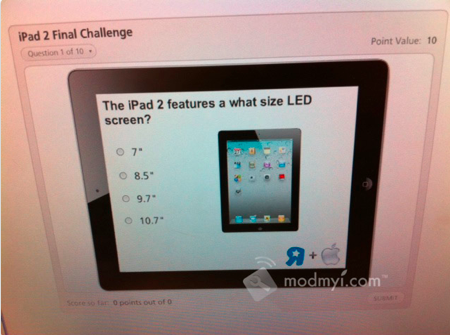
The source, an employee working at Toys R’ Us, also revealed to modmyi a series of employee training materials that have been distributed to ensure employees are up to scratch of the features of the iPad 2. Amongst the materials include a photo of the iPad with its various features noted including its two cameras, A5 processor and the home button and how it is “instant on”. There is also a quiz for employees to complete, which includes questions such as asking what size screen the iPad 2 has. Jump the break for a picture of the training diagram on the iPad 2’s features.

Read more


US Privacy Investigation Targeting Smartphone App Developers

Federal prosecutors in New Jersey are reportedly investigating whether various smartphone applications are illegally obtaining and transmitting data from users without their consent or knowledge. In the US it is a violation of federal computer fraud laws for companies to collect information about a user without notice or authorization.

The prosecutors are investigating whether various apps on smartphones such as the iPhone and various Android phones are not notifying users what data is being collected and why such data is required by the app. This data being collected ranges from a users location to the unique identification data for that device and even personal information. The Wall Street Journal tested 101 apps and discovered that 56 of those transmitted the unique identification number for the device without letting users know, 47 transmitted the phones location and 5 sent a users age, gender and other personal information. Worryingly 45 of the apps tested did not have any privacy policy either in the app or on their website.

Read more


FileBrowser for iPad Lets You Access Computers, Network Drives, Shared Folders

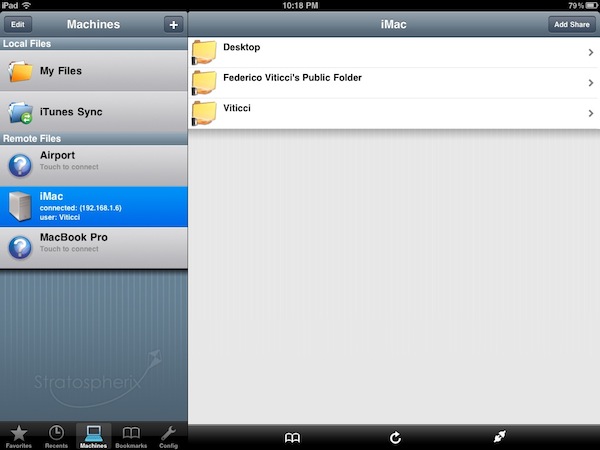
Earlier today I mentioned (again) Cloud Connect Pro, a universal $24.99 app that enables you to access online services like iDisk and Dropbox, local and remote computers, AirPort Disks and much more. Cloud Connect is a pricey app, but it also packs a whole screensharing app, runs on iPhone and iPads and it’s got the possibility to navigate a computer’s filesystem with a Finder-like interface. For quite some time, however, I’ve been using a cheaper alternative to Cloud Connect called FileBrowser that runs only on the iPad, it doesn’t have screensharing functionalities or Dropbox / iDisk / Google Docs integration but enables you to connect to your computers, shared folders and network drives just fine.

FileBrowser uses the CIFS and SMB protocols to connect to Windows and Mac computers, and NAS drives. Linux is also partially supported but you can’t connect using Apple File Sharing (AFP) or FTP. Once File Sharing is enabled on your Mac, FileBrowser should be able to see your machine on a local network. There’s no support for automatic computer discovery, but you can easily add a new computer by typing “username.local” in the “Name or Address” field – where “username” is the actual name you chose for your Mac’s Home folder. With the same .local domain, FileBrowser can connect to an AirPort Extreme station (and thus open the contents of a shared drive) or recognize the folders you’ve decided to share (besides Home) in your Mac’s System Preferences. This app is quite powerful in the way it lets you remotely connect to a machine using a DynDns hostname, enter username and password in the Settings (to avoid being asked every time), or tweak the Advanced Settings to change the SMB port number and pipelining.

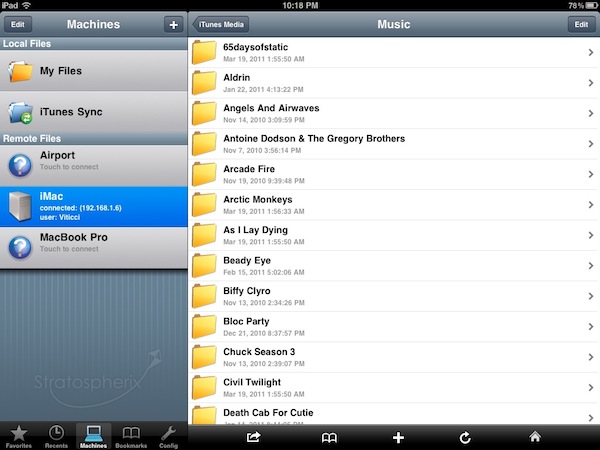
FileBrowser can also open and preview a variety of file types, including music files and video formats supported by the iPad (no, it won’t do live conversion for your AVIs like Air Video). Songs can play in the background and be shared through AirPlay, but the app goes fullscreen when playing them and there’s no way to keep browsing or creating a queue. I’m okay with having videos in fullscreen, but the developers should find another implementation for music playback. The app can load images and documents like PDFs too, plus every file can be saved as a “bookmark” for quick access or emailed as an attachment. Again, these files come from your computer and network drives, not the iPad itself. There’s a temporary file cache that you can “purge” from the Settings, alongside many other options to enable admin shares or change the remote permissions for file creation / deletion, for example. There’s a lot of stuff to play with to turn FileBrowser into a powerful app, finely tuned to connect to your computers and network drives. FileBrowser doesn’t have the best interface the iPad has ever seen, but as far as functionality is concerned we have a great piece of software here. Fast, stable, feature-rich and being actively developed by Stratospherix.

At $3.99 in the App Store, FileBrowser gives you the tools you need to access and browse computers and drives from your iPad. Make sure to also check out NetPortal for iPhone, from the same developers, which brings most of the functionalities of FileBrowser to the iPhone.

Read more