RockMelt Coming To The iPhone With “Desktop Sync” Feature [Update: Available]

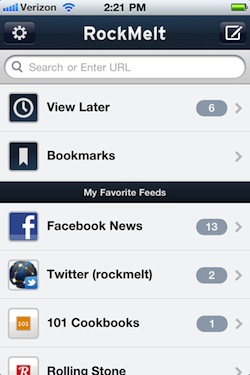
RockMelt, the social browser based on the open-source Chromium engine that aims at enriching the desktop browsing experience with visual previews and Facebook / Twitter integration, is coming to the iPhone. As reported by Venturebeat, the developers – who have received several rounds of funding in the past months and are committed to making RockMelt the ultimate social browser for Mac & Windows, especially after the departure of Flock – have been busy creating a smaller iPhone version that’s not really a full-featured browser, but it’s focused on the “app edge” aspect of RockMelt. On the desktop, RockMelt features a series of vertical sidebars that display the latest updates from your Facebook and Twitter friends, or emails from Gmail contacts, and so forth. In the developers’ vision of today’s browsing, people are more likely to discover content through status updates from social media, rather than manually typing a URL or spend hours looking for news on Google. That’s why the iPhone version – coming soon to the App Store – will be focused on letting you quickly open the app, and check on the latest updates from your friends. You can search and browse the web regularly, too, but the focus is on “favorite feeds”, read later and most accessed bookmarks.

Most mobile browsers provide a similar experience to PC browsing, just with a touch interface and smaller screen. But RockMelt co-founder and chief executive Eric Vishria pointed out that when you’re waiting in line for a cup of coffee, you don’t want to whip out your phone and type in a long website address. Instead, you’re more likely to check the latest updates on Facebook or Twitter.

With Facebook and Twitter support, users will be able to send their own status updates, or check on links shared by their friends. These links will be previewed inline by RockMelt below a Facebook message or a tweet, and you can also decide to view them later thanks to the Instapaper-like “read later” option introduced in RockMelt beta 2. Last, the iPhone version will feature a “desktop sync” option that will allow you to sync your bookmarks and, we assume, read later material across the iPhone and RockMelt for the desktop. This sounds very similar to what Mozilla did with Firefox Home, and we’re looking forward to seeing sync in action.

RockMelt for iPhone will be available “in the coming days” on the App Store. Read more


Real Racing 2 HD with 1080p TV-out Now Available

Last month, development studio Firemint announced they were working on an update to the popular Real Racing 2 HD that, thanks to the iPad 2’s hardware capabilities, would allow users to enjoy the game on their HDTVs with full 1080p TV-out support. The system developed by Firemint, unlike what Apple has demoed so far,  enables the game to run in fullscreen without black borders on the TV; this new feature doesn’t rely on scaling content for the HDTV, it simply runs in fullscreen mode at 30 frames per second. While playing Real Racing 2 HD with Apple’s TV adapter connected to the TV, the iPad will turn into a standalone screen displaying extra information like map and race position, yet retaining the gyroscope-based controls and touch functionalities.

The update has been released in the App Store, and Firemint provides detailed instructions about 1080p TV-out in its FAQ section:

Connect the Apple digital AV adapter to your iPad 2 via the 30-pin dock connector. Then, plug one end of the HDMI cable into the adapter and the other into a HDMI port on your HDMI-compatible display. Check that the correct channel or input mode is selected. Finally, turn on your iPad 2 and launch Real Racing 2 HD.

You can download Real Racing 2 HD here, and check out a demo video of fullscreen TV-out in action below.
Read more


Reuters: iPhone 5 In September, Looks Similar to iPhone 4

Following speculation and rumors in the past weeks that indicated Apple was not ready to announce and launch a new iPhone model in June, Reuters published a report last night claiming that, according to ”three people with direct knowledge of the company’s supply chain”, the next-generation iPhone will ship in September with production starting in July / August.

Apple’s next-generation iPhone will have a faster processor and will begin shipping in September, three people with direct knowledge of the company’s supply chain said.

Reports on the timeline of the new iPhone launch vary, though it is largely expected that Apple will likely refresh its iPhone 4 later this year.

The sources declined to be identified because the plans for the new iPhone were not yet public. An Apple spokeswoman in Hong Kong was not available for comment.

Whilst Reuters’ report doesn’t provide new details on the iPhone 5 – any different from what we’ve been hearing in the past months – the publication directly mentions Largan Precision, Wintek and Foxconn as key suppliers for the new device’s camera, screen and case, respectively. Reuters also reports the new iPhone will have a faster processor – presumably the Apple A5, as previously reported – and a design similar to the iPhone 4’s one – although it is not clear if Apple will adopt the same design but use different materials as a rumor suggested weeks ago. The iPhone 5 is also rumored to feature a bigger screen, as well as NFC capabilities and a new aluminum design with internal antenna.


FlashFrozen Brings “AutoKill” for Flash Player On OS X

Previously known as BashFlash to the Mac community, FlashFrozen is a Mac utility sold at $0.99 in the Mac App Store that puts Flash Player under control. How many times in the past did you find your Activity Monitor or iStat Menus displaying insane numbers for Adobe’s Flash Player CPU usage? Let me tell you – countless times. And how about that 11-inch MacBook Air that’s got pretty sweet performances when it comes to battery life, but inevitably starts suffering as soon as a Flash instance is loaded? It happens. FlashFrozen is the solution to the problem.

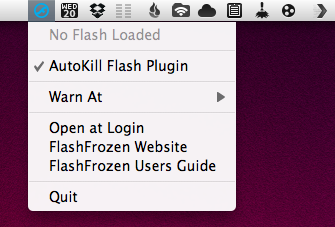
The app used to be able to “warn you” when Flash was using too much CPU, and allowed you to “kill” the plugin manually on a webpage that was displaying Flash content. With the latest 1.3 update, however, the developers have gone all-out to offer an option that automatically kills Flash system-wide as soon as it’s loaded – thus preventing it from using CPU, and giving you a chance to even forget about killing it. Once triggered, a blue AutoKill icon will sit in the menubar.

FlashFrozen is a must-have for those who feel uncomfortable with uninstalling Flash entirely, but still want to save some battery life off their Pros and Airs. Get it here.


Enhance Your Mac’s Clipboard with CmdVees

When it comes to quickly jotting items into my Mac’s clipboard and being able to access them later in a neatly organized folder view, Clipmenu is my app of choice. I’ve been using the app for years, it’s free, and it provides a lightweight yet powerful way to copy anything into your OS X clipboard – text, images, URLs, you name it. Clipmenu, also thanks to snippets and keyboard shortcuts, makes it super-easy to retrieve at any time information you copied with the standard Cmd+C. The application, however, is limited in the way it enables you to paste multiple items at once: say you’ve copied three different URLs for the ultimate Rebecca Black rickrollin’ tweet, you’ll have to hit Clipmenu’s shortcut three time (and navigate with the arrow keys) to paste those items. Open, copy, open, copy – you get it. The app keeps track of your clipboard, but it’s not aimed at letting you paste all at once with ease. CmdVees, a $0.99 app available in the Mac App Store, wants to fix this.

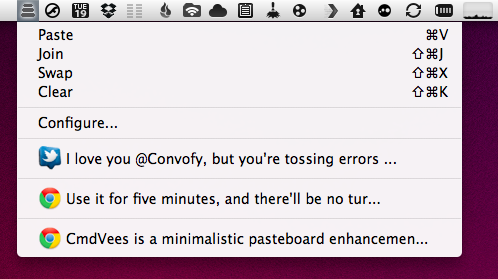
CmdVees’ concept is really simple: as you copy items into your clipboard, the app creates a stack. This stack lives in your menubar. Once you’re done copying and you want to paste all these items in a single location (say, a TextEdit window), you don’t need to invoke the application with a specific shortcut for every single item. No, you just keep hitting the default Cmd+V until you’ve pasted all the items. The cool thing is, as you hit Cmd+V the app will remove the most recent item from the stack and go to the next one – by default, hitting Cmd+V on OS X over and over simply pastes the most recent clipboard entry. CmdVees is meant for those users (like me) who copy a lot of material on a daily basis, and would like to be able to paste things all at once.

But there’s more: if you don’t feel like pressing the Cmd+V shortcut several times, you can “join” items with a single paste through a keyboard shortcut you can configure in CmdVees’ preferences. You can also swap items in the stack with a shortcut, or clear your queue entirely. Older items are accessible from a dropdown menu, plus you can specify how many items to keep in CmdVees’ history and set a time out for copied items.

At $0.99, CmdVees is a no-brainer if you’re looking for a utility that collects your clipboard items and is able to paste them all at once. I’ve noticed some compatibility issues with Clipmenu while using it, but I think customizing the settings a little bit should fix that – just in case, download a free trial here.


Giveaway: Remix the Beat with djay for iPhone & iPod touch!

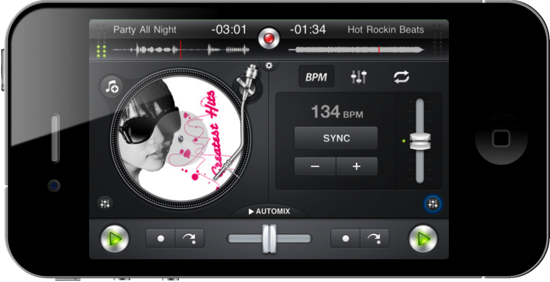
Let’s cut to the chase: djay is polished, good-looking, and a downright handsome virtual mixer that’ll have you scratching virtual vinyls like it was made all tiny for your thumbs and stuff. You’d think djay’s miniature client for the iPhone & iPod touch would be too small to get a proper remix of your favorite rap attack and guitar jam, but that little iPhone can instantly become the party superhero when equipped with an amateur DJ such as yourself and some stereo output to the nearest boom box. Choose any two tracks from your iPod’s library, adjust the equalizer to your liking, pump the gain, and position the needles to start laying down Scratch n’ Sniff quality beats. It’ll take some practice to get good, but all of the tools are available with a quick tap to help you combine tracks, and there’s even an automixer if you want to let djay do some the hard stuff. I couldn’t resist buying my own copy of djay for $0.99 in the App Store, currently on sale from $4.99. That’s a steal, but you can risk it all on one of two copies we’re giving away past the break.

Read more


WWDC 2011 Student Scholarship Details Now Available

As promised a few weeks ago after the official WWDC announcement, Apple has updated its website to provide details about the WWDC Student Scholarship program. You can visit the Official Rules page to see all the requirements, deadlines and general terms, but Apple offers a quick roundup:

Is there a WWDC Student Scholarship ?

Yes, we award a limited number of scholarships to student developers. To apply for a WWDC Student Scholarship you must be at least 18 years of age, currently enrolled part-time or full-time at a college or university, and either an iOS Developer University Program member, Mac Developer Program member, or ADC Student member as of August 1, 2010 or later, and have identified yourself as a “Student” in your developer profile.

Scholarship applications are due by April 26, and winners will be notified via email by May 3. Each winners will receive an “e-ticket” to attend the WWDC ‘11, and Apple is planning on giving away a maximum of 150 prizes. Apple also specifies “applicants will be judged on technical ability, creativity of ideas expressed in products or projects, prior WWDC attendance, technical and work experience.” The WWDC 2011 will kick off in San Francisco on June, and this year’s edition will feature Apple Design Awards for both iOS and Mac apps. Considering WWDC 2011 “regular” tickets were sold out in less then 10 hours, it’s very likely that thousands of students who didn’t get the chance to buy a ticket will apply to the program.


Apple Cracking Down On “Pay-Per-Install” iOS Apps?

Following speculation about Apple using a new App Store ranking algorithm to better promote apps by ratings and “active usage” rather than raw download numbers, TUAW reports today Apple is also effectively banning from the App Store the so-called “pay-per-install” apps – basically, applications (usually games) that let users get access to virtual goods by downloading another app, instead of paying a fee or unlocking features with in-app purchases. This practice has apparently caught the attention of Apple and the App Review Team, and several developers are reporting they’re being notified of the rejection of their software from the Store.

According to Tapjoy, several developers within their network are receiving rejection notices from Apple because their applications feature a pay-per-install promotion.

It appears Apple is somehow enforcing section 3.10 of the App Store Review Guidelines, which states:

Developers who attempt to manipulate or cheat the user reviews or chart ranking in the App Store with fake or paid reviews, or any other inappropriate methods will be removed from the iOS Developer Program.

Clearly, Apple isn’t happy with this freemium model of apps granting virtual currency and goods in exchange for another application downloaded from the Store, and we guess it’s for two reasons: a) the system inevitably “cheats” the App Store charts by inflating downloads of an app not because of quality, but because of promised benefits; b) Apple would rather see developers implementing in-app purchases, which return the company a 30% off every purchase.

As usual, Apple has every right to change the rules in its “walled garden.” In the meantime, Tapjoy, the biggest network for pay-per-install apps, says “the system is misunderstood” and that the model is actually “is beneficial to users, advertisers, and developers.”