

Here are today’s @MacStoriesDeals on iOS, Mac, and Mac App Store apps that are on sale for a limited time, so get them before they end!
#MacStoriesDeals - Wednesday
Introducing Evernote Peek: An App that Helps you Study with Apple’s Smart Cover
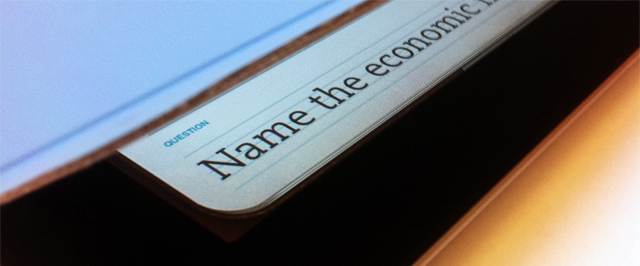
“What’s the best Apple blog on the Internet?” Hopefully “MacStories” is the answer to be revealed by Apple’s Smart Cover, via an app that’s from the same folks who help translate business cards to text and take notes on the fly. Evernote Peek is a brand new app that’s now available for free on the App Store. As a study aid designed specifically around Apple’s Smart Cover, Evernote Peek integrates with your Evernote account: create a new notebook with a subject title, with note titles as the question and note bodies as the answer. Evernote peek is designed to help you strengthen your memory, retain information, all while utilizing the best accessory for your iPad. As you answer questions, Evernote Peek will keep score of the questions you got right and wrong, and you can even add in images for visual aids. Since closing the iPad lid will lock the iPad, Evernote recommends the following.
There are two quick iPad adjustments that we recommend. First, turn up your iPad brightness to about 75%. Second, turn off your iPad’s auto-lock. Now, start studying.
While not completely magic, the idea behind Evernote Peek is pretty great. No more holding your hand over a study sheet or wasting index cards – the iPad’s Smart Cover reveals clues then unfolds as you answer the question. Past the break, we have a quick promotional video of Evernote Peek in action – we think it’s pretty great. When you’re done watching the vid, you can download it here.
[TechCrunch via Evernote Blog]
Apple Among World’s Most Reputable Companies According To Customers
In a survey of 48,000 consumers across 15 countries, the Reputation Institute named Google, Apple, Disney, BMW, and LEGO as the world’s most reputable companies overall. While I am a little astonished that Google made the top of the list, no one can argue that Google’s search engine is the front and center when we load up web browsers or open new tabs. However, while Apple and Disney were among the most reputable overall, it was Kelloggs that was the clear favorite in the United States, and LEGO took the crown in Europe. Speaking on company excellence, Reputation Institute Executive Partner Nicolas Georges Trad says,
“To build a strong reputation on a global level requires a broad platform that covers all seven dimensions of reputation, including Products & Services, Innovation, Workplace, Governance, Citizenship, Leadership, and Performance.”
Reputation is important for these companies not just for bragging rights, but because being reputable pays off in a big way. Companies with a strong reputation, on average, receive three times the support of less reputable competition. The loyal customer base is more willing to stand-by the brands the associate themselves with, spend more, and say good things about those products. As said by Reputation Institute Chairman, Dr. Charles Fombrun,
The greater the reputation of a company, the more support it earns from consumers, the better its operating performance, and the more money investors are willing to pay for its shares.
Below, we’ve highlighted the top ten overall most reputable brands below. Google edged out Apple (who are neck-and-neck), and Microsoft just missed the list in the 11th spot.
- Apple
- The Walt Disney Company
- BMW
- LEGO
- Sony
- Daimler
- Canon
- Intel
- Volkswagon
The Reputation Institute measures company reputation via a RepTrak Pulse statistic, and looked at over one hundred different companies before reaching their conclusion. Fore more information, check out the source link below.
[via PRNewswire]
Flare for Mac Updated to 1.1 with Many New Features

Back in March when Flare first came out, we said that it “has a fast learning curve, looks great and makes adding effects as simple or complicated as you want.” Version 1.1 was just released and adds even more options to your user experience.
Version 1.1 adds six spanking new presets, including “Daguerreotype”; if you know anything about the history of photography, you’ve heard of this photographic processes from the 1800s. There are many new effects to Flare such as new borders, lightleaks, and more to make your own custom presets for your photos. The Flare blog has more information about all the new effects and presets in 1.1.
Flare is on sale for $9.99 (reg. $19.99) on the Mac App Store, if you want to try it before you buy it, go the Flare website for a free demo. The only limitations to the demo version is that it limits the size of the photo you can work with to something quite small. The registered version and the MAS version have no such limitation.
Outside of intense photo editors such as Adobe Photoshop or Lightroom, Flare is one of the best photo editors for the Mac, and so much easier to use too!
Full release notes can be found here.
Lion Boots From SD Card, Has New OS X Utilities Screen

Following a report from earlier this week that suggested it could be possible to burn OS X Lion to a DVD and install it from a Mac’s disc drive, a new video surfaced on YouTube shows that, by grabbing the .DMG file inside the OS X Lion Installer app from the Mac App Store, users could be able to boot OS X Lion off an SD Card and choose from a new set of options after the system restarts. The new Mac OS X Utilities window, which appears at the end of the video, contains options to fire up Disk Utility to repair and erase partitions, possibility to restore from a Time Machine backup (Time Machine has been improved in Lion) and a standard “Reinstall” action to perform a Lion installation. The window also shows a link to “get online support” by browsing Apple’s online documentation.
Nature’s Eye Studios writes in an email to us:
Enabling Lion on an SD card was actually verry easy, easier than I expect it to be…
After downloading Lion from the Apple Developer site, you get a 4 GB DMG file, so the next step was to open up Disk Utility and erase an 8GB SDCX card (XC for the speed) After which I just had click the repair option in Disk Utility. Now select the Lion DMG as source and drag the SD card as destination. After about 10 minutes, the SD card was the Lion ESD installer. Then it was even easier: you just have to start the installation, and follow the on screen instructions.
To erase the hard drive or restore from a Time Machine backup, you have to boot from the installer; to do so, you have to turn off your Mac and turn it back on while holding Option (alt). When it powers up, you can choose from what drive to boot, you have your Macintosh HD and a Lion specific partition of your hard drive and then you have a USB device, which is actually your SD card. Follow the on screen instructions, and you’re able to erase your hard drive, and put everything back from a Time Machine backup.
Assuming the author of the video has followed the same method detailed by TUAW, the process should be fairly easy and useful to keep a portable copy of Lion that doesn’t live in your file system. Apple has announced at the WWDC keynote that Lion will be distributed only on the Mac App Store at $29.99, as opposite to previous speculation that claimed the company would also offer DVDs and portable USB drives for Lion. It’s unlikely Apple will publish documents to explain to users how to keep a physical copy of Lion (which involves opening the Installer package and finding a DMG file in the Contents folder), still it’s interesting to know there will be the possibility to do everything from Disk Utility as Lion’s Installer is nothing but a wrapper. Check out the video below. Read more
iOS 5: 8 Other Features We Love
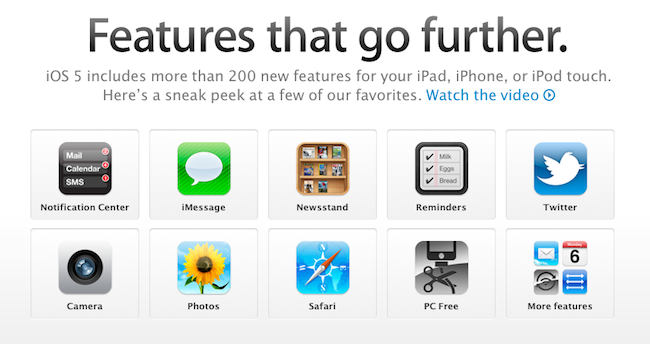
Since Apple’s official presentation of iOS 5 at the WWDC keynote on Monday and the release of the first beta to developers, lots of things have been said about Apple’s new modus operandi based on watching the community, seeing what developers and jailbreakers are building to improve the OS and answer the needs of hardcore iOS users, and going back to the drawing board to take inspiration from what the ecosystem has created to offer a native solution, designed from Apple, in most cases better than the competition or third-party solutions. If you followed our keynote coverage and WWDC ‘11 roundup, you know what’s new in iOS 5 and what we’re referring to: the new notification system is heavily inspired by jailbreak tweaks like LockInfo and Mobile Notifier (which were inspired by Android’s notifications); the new Reminders app will likely eliminate the need of simple to-do list application from the App Store (but not complex GTD software like OmniFocus); the iMessage solution built by Apple sounds like RIM’s BlackBerry Messenger, it’s exclusive to iOS 5 users and keeps your messages in sync with iCloud.
With hundreds of new features, there’s a lot to discover in iOS 5, and more will come with future betas and the final release this Fall, we’re sure. The way I see it, Apple didn’t “kill” anything as several pundits are claiming: it’s called progress. Whilst the term “killing” implies a voluntary action of willing to do something against someone, with iOS 5 Apple doesn’t want to “kill” Remember the Milk, Dropbox, or Boxcar. Apple sees where the platform is going and skates to where to puck is going to be. I agree with our editor Cody when he says it’s not really about copying, as much as it’s about improving existing solutions to provide a better experience for everyone. Nothing’s really new nowadays, but there’s still room for innovation. It’s a subtle difference.
So with iOS 5, we have lots of innovations, new features, improvements, and all of the above. You’ve probably already read everything about the most important functionalities in our roundup, so here’s what we’re going to do next: rather than assembling a list of every single screenshot of what’s new in iOS 5 beta 1, we’ve collected the 10 best new things (some of which you may not have seen yet) we’ve found in iOS 5 beta. Read more
Free Upgrade to Lion with a New Mac Purchase
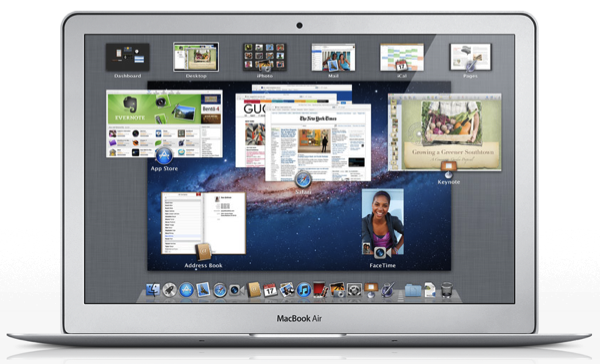
If you’re in the market for a new Mac, you’ll be eligible for a free upgrade to Lion once it hits the Mac App Store in July, thanks to Apple’s Up-To-Date program which keeps new customers on top of the latest technology. From the OS X Lion press release:
The Mac OS X Lion Up-To-Date upgrade is available at no additional charge via the Mac App Store to all customers who purchased a qualifying new Mac system from Apple or an Apple Authorized Reseller on or after June 6, 2011. Users must request their Up-To-Date upgrade within 30 days of purchase of their Mac computer. Customers who purchase a qualifying Mac between June 6, 2011 and the date when Lion is available in the Mac App Store will have 30 days from Lions official release date to make a request.
As MacRumors points out, you originally had to pay $9.95 for the installation DVD. However, as Lion is a download from the Mac App Store, there’s no longer going to be a charge to make up for packaging and shipping. Once Lion hits in July, you’ll have thirty days to request your free download through the program.
With new MacBook Airs around the corner, however, you might just want to wait to buy a shiny new Mac with Lion already installed.
[via MacRumors, OS X Lion Press Release]
iPad Games on Apple TV: Firemint Announces Real Racing 2 HD with iOS 5 AirPlay Mirroring
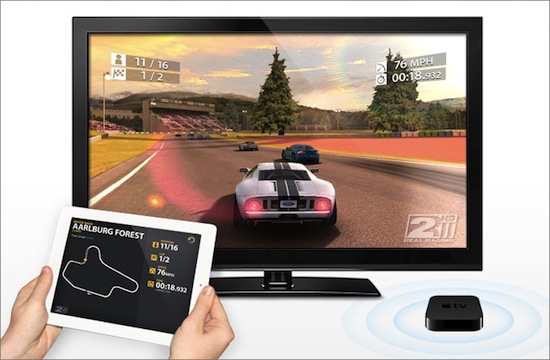
One of Scott Forstall’s big iOS 5 announcements at the WWDC ‘11 keynote on Monday was the possibility for iPad 2 owners to wirelessly mirror the entire device’s screen to an Apple TV on a local network. Thanks to the AirPlay technology previously used for videos and photos and following the concept of mirroring via HD cable introduced with the iPad 2, iOS 5 will allow users to see exactly what they’re seeing on the tablet’s multitouch display on the TV’s bigger screen. An Apple TV will be required for this (meaning the HDMI cable will still be sold for all other televisions and users who don’t want to buy an Apple TV), and since we heard about the feature one obvious possibility came to our minds: games. Think about it: with nothing more than a wireless network and the $99 little black box, you’ll be able to play iPad games on a TV.
Yet Firemint, as usual, wants to deliver more than simple mirroring to the screen and upscaled content. Just like the development studio (to be acquired by EA) was first to the market to support 1080p TV-out with the iPad being used for additional functionalities, Firemint has announced that Real Racing 2 HD will support full AirPlay wireless gaming – with the TV displaying the game without black borders, and the iPad visualizing additional information and graphics. Whilst standard AirPlay mirroring allows users to see content both on the iPad and TV screen, Firemint’s solution will let iPad 2 owners “split” content between the TV and the tablet using AirPlay.
With Apple’s announcement of iOS 5 and AirPlay mirroring at WWDC 2011, Firemint is thrilled to report that, come the new OS, Real Racing 2 HD will be the first title to support full screen wireless gaming over AirPlay!
This isn’t just mirroring – you’ll be able to play Real Racing 2 HD on your big screen without a cable, while your iPad 2 displays racing telemetry in real-time. No black borders, no wires – just iOS racing at its finest.
We think the concept is great and we can’t wait to see how developers will take advantage of the Apple TV and AirPlay to provide alternative views of their apps for when users are at home, checking out content on their TVs. Real Racing 2 HD won’t officially support this new feature until iOS 5 comes out publicly this fall, but in the meantime you can download the app here.
Apple Wants To Build A Spaceship-like Campus In Cupertino

Amidst the software announcements at WWDC that finally confirmed the existence of iOS 5 and iCloud, a new build of Lion and the Apple Design Awards, Apple has been busy releasing new software for its platforms and devices. But this week has turned out to be more than just software for the company, as CEO Steve Jobs explained to the Cupertino City Council earlier this week Apple’s plan to build a new campus in Cupertino: a spaceship-shaped, 4-story building to host 12,000 employees and completely revolutionize the way Apple operates in Cupertino. The proposed project is impressive: not only it really looks like a mothership landed on Cupertino, it’s green and eco-friendly in the way it should be built using curved glass thanks to Apple’s retail experience. Not a single piece of glass in the building would be a straight piece – it’s all curved. Parking would be underneath, the number of trees would increase from the current 3,700 to 6,000 with some “apricot orchards” as well – furthermore, it would be located in the 98-acre campus Apple bought from HP last year.

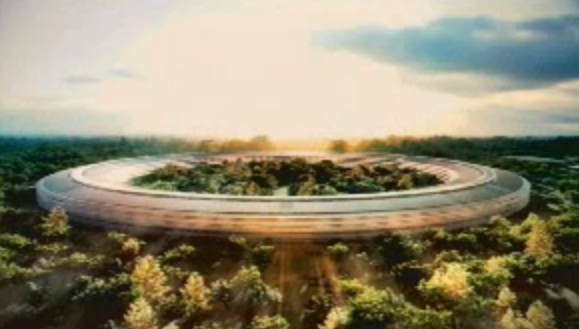
Overall, it’s an impressive project for Apple – and we suspect it may have something to do with a rumor that claimed Norman Foster was collaborating closely with Apple to build a revolutionary campus based on modern, green technologies and renewable energies. Apple would rely on its natural gas facility and use an electricity grid as backup.
As Steve explained to the Cupertino City Council:
It’s a pretty amazing building. It’s a little like a spaceship landed. It’s got this gorgeous courtyard in the middle… It’s a circle. It’s curved all the way around. If you build things, this is not the cheapest way to build something. There is not a straight piece of glass in this building. It’s all curved. We’ve used our experience making retail buildings all over the world now, and we know how to make the biggest pieces of glass in the world for architectural use. And, we want to make the glass specifically for this building here. We can make it curve all the way around the building… It’s pretty cool.

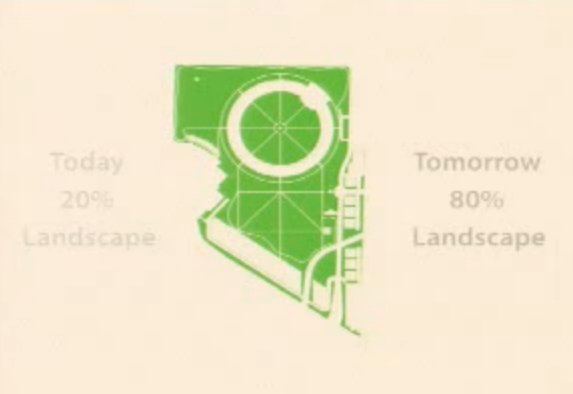
You can check out Steve Jobs’ detailed proposal of the new mothership after the break. [via MacRumors] Read more