When it comes to research for new subjects to write about, I’m constantly confronted with ones that are at heart too marginal to discuss, but I’m doing it nevertheless, because they have some interesting touch to them. In Apple news, editors know that kind of problem and the question connected to it always sounds like: “Should I post about it or not? Will it be interesting enough?” When it comes to apps and good design, it’s much easier most of the time. Most of the time I can divide UI/UX design in two parts. Either the app works, looks fine and is easy to use or it does not. When I started to test Detective by Notion, I immediately recognized: Oh god, that’s a hard decision; it has got a very nice look but I am not sure about its feature. Is it that good? To go even further, I’m still asking myself if the app has a feature at all. But let’s dive in a bit deeper and you’ll hopefully get my point.
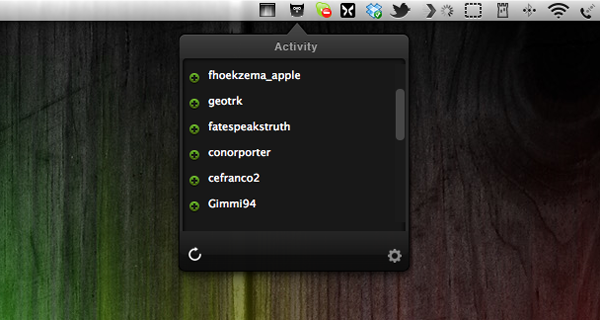
What Detective basically does is list your new Twitter followers and unfollowers in a top-down window from a menu bar icon. That’s it. Yeah, that’s it, really. You’re probably thinking that you could check that by yourself or that perhaps you don’t care at all about who and how many followers you have as long as you can tweet and follow what or whom you want. That’s all understandable, but I thought about it more and came to the conclusion that Detective — and especially its UI design — has got some advantages that may make the use of it legible to some people.
First of all, Twitter doesn’t notify you when people unfollow you at all. Psychologically speaking, that’s a good move, since everyone is more likely to enjoy seeing how he gets more and more famous over time without spending a thought on those who may dislike him (or her). But there are still some serious Twitter users out there, who do still care about their followership, they’re rare but they exist, trust me. They may even like to ask some of them why they stopped following them and what they could do better. For them, Detective could be nice to have. It just serves the need of showing up these people and does that with a polished, gloomy monochrome design only interrupted by the green pluses for new or red minuses for ex-followers, respectively. Apart from the very poorly designed preferences panel — which is in fact offending the rest of the app’s design and looks like it doesn’t belong to the app at all, Detective is minimalist, functional and performs very well.
Which brings us the the second, even more pleasant feature of Detective, at least to me: it’s totally unobtrusive. And I consider that as the main reason for granting this app such a long post. I assume that most of you who are twittering already deactivated the notification mails Twitter sends out if you have a new follower, direct message and so on. Detective on the other hand is faster than those notification mails and its basic approach of notifying you is different. It’s just there, you can check the changes by yourself when you want or you can choose Growl notifications if you’re too lazy to click on the menu bar icon, but even that is still better than those annoying mails which constantly interrupt your workflow and clutter your mail inbox. The rest of the time, when you don’t want to get distracted, Detective is completely invisible (yes, I know, there’s still that icon in the menu bar, but let’s be honest, no one can get distracted by an icon that small).
To me, it is this unobtrusiveness that really makes the app valuable, despite its very limited feature set and purpose. It definitely is an indicator for a knowledge of good design, if a developer is not out to usurpingly bring his work to the foreground just for the sake of making the user aware of it. Unfortunately I consider its price of $2.99 still too high. Although it’s by and large a very decent app, Detective needs way more features (which are promised indeed, but obviously not included in the current version) to justify such an expenditure. Hopefully Notion will keep their promise of implementing stuff like multiple account support or retweet/favorite notifications — because then I could recommend it with no hesitation.