NYT: Apple Considering Stake In Twitter

NYT: Apple Considering Stake In Twitter

The New York Times’ Nick Bilton and Evelyn Rusli are tonight reporting that Apple is considering an investment in Twitter to the tune of hundreds of millions of dollars. Whilst the companies are not currently in negotiations and there is no guarantee that the two would come to an agreement, earlier talks do suggest “they may form a stronger partnership”.

As the New York Times report explains, the deal would be one of Tim Cook’s “most important strategic decisions as chief executive” because of intensifying competition from Google and Facebook and the fact that Apple has struggled in the past with social. It would be a unique move for Apple, which typically buys a small start-up and absorbs it into the company rather than investing in a company.

The turf wars have fortified alliances and pushed companies to choose sides. Apple’s dealings with Twitter, for instance, began after its relationship with Facebook soured. In 2010, the company was eager to integrate its Ping service with Facebook, but discussions broke down. Mr. Jobs, the Apple chief executive who died last year, told the technology news site AllThingsD that Facebook had demanded “onerous terms that we could not agree to.”

Apple, which had spent months preparing to hook Facebook into iOS, its mobile operating system, swiftly reworked it for Twitter. One former Twitter employee, who described Twitter as the “lucky mistress” in this chain of events, said the partnership was essentially “handed to Twitter on a silver platter.” Ping, in the end, never caught on with users.

One big question to be resolved is whether Twitter would want a large investment from Apple. Earlier this year, chief executive Dick Costolo said Twitter had “truckloads of money in the bank”. At the same time though, Costolo also recently said in an interview that “[Apple] is a great partner, we think of them as a company that our company looks up to”.

The relationship with Apple is so prized at Twitter that the company assigned a vice president, Kevin Thau, to work with Apple full time, according to an Apple employee who asked not to be named.

[via The New York Times]

Permalink

WriteUp 3.2 Adds Swipe Selection On iPad

WriteUp

WriteUp

WriteUp is one of my favorite text editors. Since I published my comparison of text editors for iOS – with a focus on the iPad –the app has been vastly improved thanks to a major 3.0 update that added iCloud sync, a split browser, and possibility to “pin” notes and folders and mark them as favorite. While other text editors like Writing Kit may have better researching tools, or serious automation features like the macros of Nebulous Notes, I still like the streamlined UI of WriteUp to easily navigate across my Dropbox folders (the app can open any folder or sub-folder in your Dropbox) and create notes that require copy & paste from a webpage.

When version 3.0 was released, I wrote:

With strong sharing options, support for Versions (another feature most iOS text editors are lacking), images, custom CSS previews, and all the other features of version 2.0, WriteUp 3.0 has still some rough edges, but shows an incredibly promising, and possibly even more powerful text editing future.

With version 3.2, released earlier this week, WriteUp aims at making its text editing more “powerful” by addressing a popular concern of users of iPad text editing apps: text selection. Inspired by the Hooper Selection concept video that made the rounds back in May, WriteUp 3.2 allows you to move the cursor on screen by swiping with two fingers on the virtual keyboard. You can also swipe with three fingers to select text.

While slightly different from the concept video (apparently, several developers have struggled to find ways to activate the text cursor or iOS text selection with gestures performed directly on the content area), WriteUp’s implementation is still solid and, in my opinion, one of the best so far (a number of iPad apps followed up in recent weeks with similar takes on cursor navigation and text selection, all of them implementing two-finger swipes in different ways).

The fact that WriteUp’s swipe selection happens on the keyboard doesn’t, however, trigger keystrokes, and it can be used both vertically and horizontally. In my workflow, this is particularly useful to navigate Markdown list-based documents I create in Nebulous Notes (thanks to macros) and make changes without having to manually (and slowly) select everything. Most of all, I like how WriteUp’s swipe selection doesn’t get in the way with a custom UI and additional virtual trackpads (like other apps do).

WriteUp 3.2 also adds new features like research bookmarks and history suggestions, and new fonts. It’s a good update, and I recommend it. Get the app here.


Google Earth 7 for iOS Brings 3D Imagery to iPhone 4S, 2nd and 3rd Generation iPads

Ahead of iOS 6’s release and Apple’s new Maps application, which includes photo-realistic interactive 3D views with Flyover, Google has updated their Google Earth application for iOS, bringing 3D views to Apple’s most recent iPhones and iPads. Google’s 3D views are automatically rendered when you pinch into supported towns and cities — tilting your perspective will let you rotate about building model and get a sense of placement that flat satellite imagery simply can’t provide. The transition from a flat satellite image to 3D models is quite seamless, although rending those 3D models did put a lot of strain on my iPhone 4S, where I received a “memory low” error via an alert before the app crashed. Viewing your locale in 3D is nifty, at least while Google Earth cooperates. Funnily enough, Kansas City has yet to receive a 3D render of the city, despite today’s announcement of availability for Google Fiber.

Also in today’s update is a brand new tour guide that suggests places you might not otherwise search out, guiding you to explore suggested landmarks and natural wonders from your iOS devices. I found that while this feature is nice to have on the iPhone, it really makes sense on the iPad, where you have the larger screen real-estate to zoom and pinch around maps.

Google Earth is a free download from the App Store.

[via MacRumors]


Give Safari 6 Its RSS Back

Apple made the decision to remove RSS support from Mountain Lion with Mail (it felt out of place there anyway) and Safari 6 - no more RSS detection and easy-to-click buttons. RSS isn’t dead, so what can you do to get feed detection working again? One option is to download an older version of Safari, use an excellent 3rd party Mac app such as Reeder, or a new Safari extension (yeah, remember those?) by Daniel Jalkut of Red Sweater Software. It’s called Subscribe To Feed and in a blog post yesterday, he expressed his opinion about Apple’s decision and offers a solution to add RSS detection back to Safari 6.

My beta-quality, more-or-less unsupported Subscribe to Feed extension adds a handy button to the toolbar that, when a page offers RSS or Atom feeds, can be clicked to easily open the feed:// link, which should automatically open your favorite news reader.

I hope this extension fills a void for those of you missing the beloved RSS button from Safari 5 and earlier.

The extension not only works like it’s supposed to (this is beta?) but also matches the look and feel of Safari’s UI. When activated, it simply finds the RSS url and adds it /opens it in your default RSS app. The functionality really needed is the ability to view an RSS feed inside the browser but it does bring back the button functionality, which is nice. You can download Jalkut’s RSS extension on Red Sweater.

[Hat Tip TUAW]


Apple’s Podcasts 1.0.1 Update Feels a Lot Faster

While I’ve talked about Apple’s Podcasts app before, I’ve only largely talked about the implications of it being available on the App Store, what it does well, and how it’s not going to totally supplant feature rich podcatchers and their developers who want to continue improving upon the actual medium of podcasting itself. What I didn’t talk about was performance, but at the time it felt no different than my usual experience with the App Store or iTunes apps.

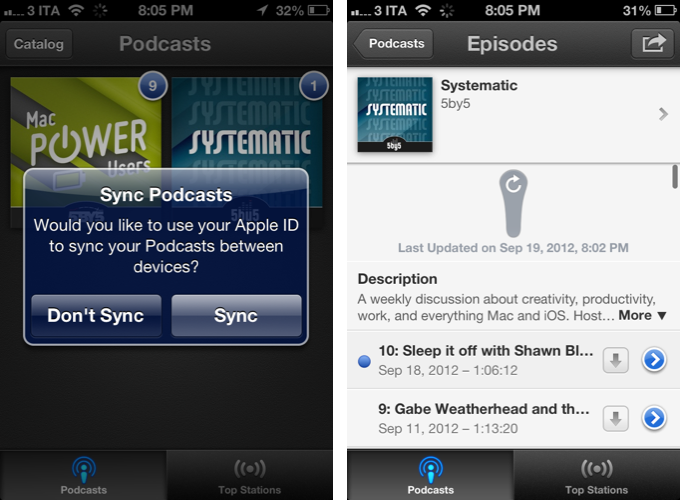
Podcasts 1.0.1 is a significant performance improvement for Apple’s podcatcher. While the Podcast catalogue still feels a little sluggish here or there, overall navigating the catalogue, browsing the library, and starting a podcast stream feels much snappier than before.

Much like a red badge on an app icon, Podcast artwork will display a blue badge indicating the number of unplayed episodes for your subscriptions. Also improved is how Apple handles missing for missing artwork in top stations — they now display the podcast title in its place. Apple has also fixed playback speed, keeping it persistent when a new episode plays.

Apple’s Podcasts 1.0.1 is a solid update, addressing small issues and improving how the app feels when browsing and playing podcasts. You can download Podcasts from the App Store.


Safari 6.0 Is Nathan Ingraham’s Next Browser

Safari 6.0 Is Nathan Ingraham’s Next Browser

Nathan Ingraham of The Verge writes,

But just as I’m getting fed up with Chrome, Apple goes ahead and launches Mountain Lion with Safari 6.0. With the addition of iCloud tab syncing across multiple OS X machines (which will finally come to iOS 6 this fall), integrated sharing to Twitter, a unified search and URL bar (finally), and a new gesture-based tab management system, I should be just as productive as I was in Chrome — but without the memory leaks and white screens. As a big fan of Apple’s gesturing system, I’m looking forward to pinch-and-swiping my way through the many tabs I have open all day long.

I love Nathan’s reminisce of Safari on the Mac, and how he, like myself, ended up using Chrome when working online became a priority.

I always have a hard time deciding between what browser to use on the Mac. While most of the websites I visit are now serving media to browsers without Flash plug-ins, there are still plenty of websites that don’t have HTML and Javascript substitues for Flash audio and video players. Chrome is convenient: Flash (while occassionally buggy) is built in, the browser handles having lots of tabs open quite well, and for a while, Chrome’s omnibox was advantageous over Firefox or Safari, whose separate address and search bars suddenly felt outdated. The decision is even harder now that Chrome is available on iOS.

Safari’s clean aesthetic, however, remains unchallenged. Safari’s experience is simply elegant, and I find myself missing the same features that Nathan has come to relish, such as Safari’s Reader, its superior support for gestures, and Apple’s implementation of the bookmarks bar. Safari gels with my idea of what the ideal browsing experience should be, and as with all of their apps, goes out of their way to include subtle pleasantries such as when a download jumps into the Downloads button. With Mountain Lion, Safari also includes the ability to open tabs from other devices, an important and recently added Chrome feature.

I think, for a little while, I’ll be returning to Safari as well. At least until I miss the ability to pin tabs when commenting on the next linked article.

You can learn more about Safari 6.0 for the Mac at apple.com/safari.

Permalink

.Mail is Coming To Your Dock

Remember Tobias van Schneider’s redesign of the classic email client? It’s happening.

.Mail’s main features include:

  • Actionsteps, which lets you prioritize mail without abusing favorites, flags, or labels in a typical email client.
  • Centralized attachments, putting email attachements in one easy to find place for recollection.
  • Integrated notifications, which removes the clutter of everyday emails like Facebook updates or Amazon receipts by filtering them into clever notification icons.
  • Personalized messages, showing pictures of your friends and company branding alongside the email’s subject line.

You can sign up to know when .Mail (pronounced ‘dot mail’) is ready by visiting dotmailapp.com, or by following Tobias on Twitter at @schneidertobias.


A History of Skeuomorphism In Apple Interfaces

A History of Skeuomorphism In Apple Interfaces

Thomas Brand has published a detailed overview of Apple’s past skeuomorphic designs in applications for classic Mac OS and OS X. As he notes, the trend towards designing apps that resemble real-life objects didn’t start with iOS at all.

As time progressed, the Aqua interface has evolved to reflect the changes in Apple hardware. Gone are the over the top transparencies, deep drop shadows, and distracting pinstripes. Subtle grays, mute reflections, and soft gradients now fill the retina displays of Apple’s latest portables. Some might say that Aqua is not a skeuomorphic interface because it does not resemble a specific real world object. To them I say Aqua is a mirror reflecting back the design decisions that have made Apple’s hardware so appealing over the last 10 years.

In his article, Thomas mentions old software such as Sherlock, the Appearance Manager of Mac OS 8, Apple CD Audio Player, and the Classic Calculator that Steve Jobs famously designed himself with a “build your own” kit created by a former Apple engineer. iOS may not have reinvented skeuomorphism in software per sè, but it surely gave this way of designing apps a whole new meaning and set of interactions thanks to screen constraints and multi-touch.

Check out Egg Freckles’ article for the full list of apps that influenced Apple’s skeuomorphic interfaces.

Image via TUAW

Permalink

Mountain Lion: Game Center

A key part of iOS gaming since it debuted with iOS 4, Game Center has finally come to OS X with Mountain Lion and effectively replicates the social gaming experience we have come to know and enjoy on our iOS devices. In Mountain Lion, players can now access their existing Game Center accounts through the new Game Center app, giving them complete access to all their achievements, leaderboards, friends, and statistics across all of Apple’s platforms. Read more