


Black Friday is getting close, expect the deals to get better everyday until Friday! Here are today’s @MacStoriesDeals on hardware, iOS, and Mac apps that are on sale for a limited time, so get them before they end!
Read more
#MacStoriesDeals - Tuesday
Evernote 5.0 for iOS Review
.jpg "Evernote 5")
I have been using the latest Evernote app for iOS, Evernote 5, for the past week. I am not an “Evernote power user”, but having recently revamped my paperless workflow, I thought I had a good opportunity to properly test the major update. I believe Evernote has a strong foundation to build upon, but the first result of this process – the new Evernote 5 for iOS – is far from solid. Read more
Andreas Zeitler’s Keyboard Maestro Macros Repo→
Andreas Zeitler’s Keyboard Maestro Macros Repo
A new collection of Keyboard Maestro macros by Andreas Zeitler:
Macros are meant to be imported “folder by folder”, rather than all at once. I’ve tried to make it more convenient for the user by putting all macros in a group labelled “Keyboard Maestro Macros Repo” before exporting. This way they are imported in a group of the same name, so that you can easier find them.
Note however: Some macros have very “commonly” used triggers like F1, ↑, or ↓. In these instances it is best to put the macros in a new group that is only available in one certain application, or a group that can be turned on and off by a separate shortcut. The window manipulation macros are an example of that. The triggers for moving a window by 1px in either direction is simply ↑, ↓, ←, and →. If not put in a new group you won’t be able to use these keys anymore.
Andreas is the creator of the Keyboard Maestro Markdown Library, which I use on a daily basis. In fact, I don’t think I could ever come back to using a Mac – or writing on my computer in general – without the Keyboard Maestro Markdown Library, which is now part of the repo available on GitHub.
I’m already a big fan of several macros Andreas included in this new collection. I particularly appreciate the ones related to Mail: there’s one to easily copy a message’s unique URL, and another one to print a message as PDF with a single keystroke.
Get them here.
Half Full Glass
Some people think Apple will eventually “dumb down” OS X and make it a “more casual” platform not suited for power users.
I disagree.
I covered this recurring theme in a section of my Mountain Lion review:
I think the Mac power user will be just fine using Mountain Lion. In practical terms, Mountain Lion’s new features and design choices haven’t hindered my ability to install the apps I want, run macros to automate tedious tasks, or fly through applications using keyboard shortcuts. I prefer Scrivener to Apple’s Notes app, I rely on Keyboard Maestro to be more efficient, and I keep my notes in Dropbox rather than iCloud. On the other hand, I can jot down a quick todo in Reminders knowing instantly that it will “just work”, and I can pick up any conversation I was having on my iPhone thanks to Messages on my Mac. Making the entire operating system more cohesive and refined hasn’t diminished the relevance and utility of third-party software on my Mac; if anything, it’s made the key apps and functionalities I rely on better.
The argument usually goes something like this: iOS is so successful, Apple will eventually make Macs more like it. Plus, Gatekeeper and Sandboxing are signs that this will happen.
Usually, this piece by Rands in Repose is cited as a somewhat obvious confirmation to the fact that Apple is not afraid of “cannibalizing itself”.
This argument needs to be deconstructed on multiple levels. Read more
Siri Vs. Google Voice Search→
Siri Vs. Google Voice Search

Clark Goble has posted an excellent review of Siri and Google Voice Search, taking into account the improvements Apple and Google made to their services in the past few weeks. His experience largely reflects mine: Siri is more useful to do stuff, Google is faster at transcribing dictated input and displaying search results.
That said Siri still has places it needs to improve. It really should speak far more results. For certain classes of queries Siri should display a large simple result and speak it rather than the stylized Wolfram result it now provides. Given that Siri already has started speaking more results, I suspect we’ll see that added over the next month. Siri also has a problem of not letting you speak over it. I’d like it to be able to let me answer before I have to listen to every part of the question she’s asking. Finally I think there are several types of queries Siri needs to be optimized for. Temperature conversions, forthcoming movie releases, television schedules, and time series sporting event statistics really are all things Siri needs to do better.
In October, I wrote:
Google Search for iOS doesn’t want to be Siri: after all, it can’t. It has some similar features (“Do I need a raincoat today?”), but it’s not an assistant. It couldn’t be per Apple’s restrictions, and Google isn’t even trying to posit it as a Siri replacement. It’s Voice Search.
I also agree with Clark in regards to the tests many people conduct to compare Siri to Google. I’m not interested in the funny and witty responses – for as much as they’re an entertaining demo – because, after all, I want to know how voice works in real life. I’m always around a computer or iOS device, and the only times when I can’t directly manipulate a UI with my hands is when I’m driving or cooking. I want to know how Siri compares to Google in letting me complete tasks such as converting pounds to grams and texting my girlfriend, not showing me pictures of the Eiffel Tower.
As an Italian user, I have to say Siri has still a long way to go with a language that’s full of variables such as conjugations and pronouns. Some Italian responses are poorly worded (see screenshot above), and sentences containing a “that” are still plainly transcribed. Sports results for Serie A lack player pictures and coach information, and results for the last match are displayed instead of rankings. Siri asks me if I mean “November 19th” or “November 20th” when I ask for “tomorrow” minutes after the midnight of November 19th, but simply replying “the 19th” doesn’t work.
Italian Siri has also been getting better, though. It presents more results for businesses open at night in my area if I ask after 11 PM, and it appears to accept a more variegate vocabulary for Reminders and Calendar integration. I can also attest reliability has improved recently, but it’s still far from perfect.
If you want a balanced and detailed take on the differences between Siri and Google, read Clark’s review here.
Tweetbot 2.6.1 Tweaks UI→
Tweetbot 2.6.1 Tweaks UI
A minor update to Tweetbot has been released today by Tapbots: among bug fixes, version 2.6.1 introduces a slightly tweaked user interface with a different design for buttons and icons seen throughout the app. Unchanged since the first version, the new icons are similar to the old ones, yet somewhat more rounded and, in my opinion, peculiar.
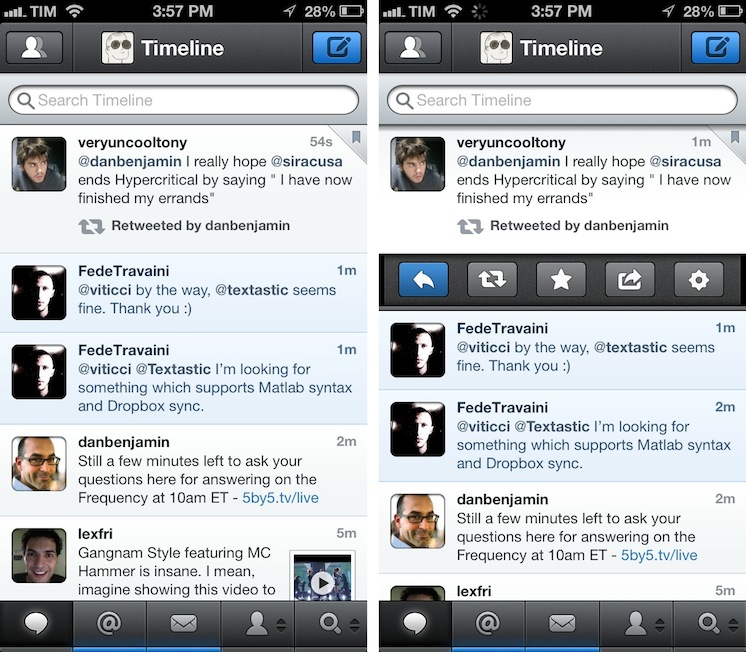
Like I said, it is a very minor change. However, if you, like me, stare at Tweetbot for several hours a day, it is something you’ll quickly notice upon updating to 2.6.1. It certainly contributes to subtly differentiating Tweetbot from Netbot, which I appreciate.
Tweetbot 2.6.1 is available on the App Store.
Weekend Sublime Text Links→
Weekend Sublime Text Links
Following my overview of Sublime Text for Markdown users, I have been collecting additional links of interest for plugins and tips I’ve fit into my workflow.
ReadmePlease: a plugin that allows you to easily read other plugins’ ReadMe files directly into Sublime Text. Easy to bring up with the Command Palette menu, and useful to remember what a package does and does not.
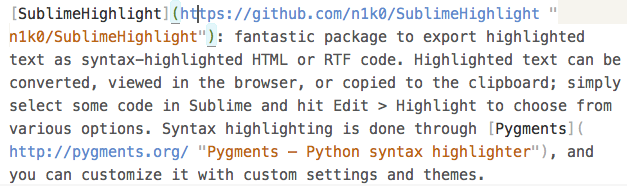
SublimeHighlight: fantastic package to export highlighted text as syntax-highlighted HTML or RTF code. Highlighted text can be converted, viewed in the browser, or copied to the clipboard; simply select some code in Sublime and hit Edit > Highlight to choose from various options. Syntax highlighting is done through Pygments, and you can customize it with custom settings and themes.
Ross Hunter’s “Configuring Sublime Text 2”. Nice roundup of some packages and custom Sublime settings I didn’t know about.
BracketHighlighter: interesting package to highlight brackets – (),[],<>,{} – or quotes where the cursor is in. It comes with a plethora of customizable settings and keybindings, and it’s really meant more for coding, but I found it useful to edit my Markdown text with inline links as well.
#MacStoriesDeals - Friday
Here are today’s @MacStoriesDeals on hardware, iOS, and Mac apps that are on sale for a limited time, so get them before they end!
Read more
The Magazine 1.1→
The Magazine 1.1
Marco Arment shipped today version 1.1 of The Magazine, which I reviewed when it first came out in October:
Marco Arment’s The Magazine falls exactly under this aspect of writing. It’s about people who love technology, delivered as a curated collection of articles from great writers. In a way, it’s the opposite of Instapaper: while Marco’s more popular app is what you make of it, The Magazine is Marco’s own vision. So, yes – you’ll have to trust him on this one.
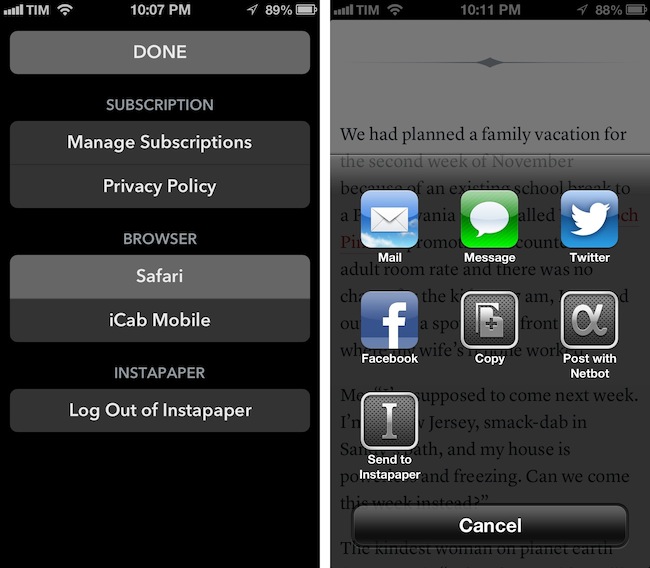
The Magazine has been growing in terms of quality of content and as an app. Version 1.1 adds new sharing options and a settings window to choose the default browser to open links with – a design decision that Marco has extensively discussed on his podcast Build and Analyze with Dan Benjamin. Fortunately, the added screen doesn’t make the app more complex: The Magazine 1.1 scans for installed third-party browsers and offers a popover (on the iPad) or a new view (on the iPhone) to set the default browser. Safari, Chrome, Opera Mini, iCab Mobile, Grazing, Mercury, Dolphin, and Terra are supported. In the same screen, Marco added buttons to manage subscriptions and read the privacy policy, as well as log out of Instapaper if you’ve enabled the service.
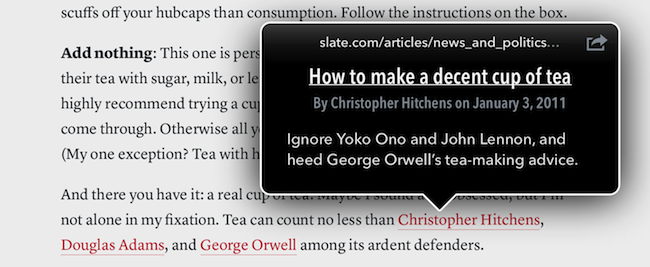
There are more improvements I like in The Magazine 1.1. The hyperlink popovers now have an icon to share and send an article to Instapaper, but you can also share selected text through the same method. It is a small addition, but I particularly appreciate support for posting to App.net using Netbot and its custom callback protocol: if you send a post to Netbot and hit Cancel in Netbot, you will automatically go back to The Magazine. This system is based on Tapbots’ custom protocol for URL callbacks, but it works similarly to x-callback-url, which I’m a big proponent of.
The Magazine 1.1 is now available on the App Store.