Today Weather 1.2 Goes Universal

Today Weather 1.2 Goes Universal
Today Weather

Today Weather

Today Weather is my go-to weather app for iPhone – the one I keep on my Home screen – and with the 1.2 version released today, the app has gone Universal adding iPad support.

Those coming from Today Weather for iPhone will instantly be familiar with the iPad app. All the features of the iPhone counterpart have been ported to the iPad, keeping the navigation consistent across versions, but using the iPad’s larger screen to offer more information. My favorite feature of Today Weather was the Forecast view:

What I like the most about Today Weather is the screen on the left. Called Forecast view, it comes with a normal and “geek” mode to visualize temperature and weather for the next week. Unsurprisingly, I like geek mode, which is enabled by tapping on the screen: with a set of vertical bars, the graph displays high and low temperatures for the week using the NOAA color gradients. Normal mode simply displays the highest value, and you can switch between the two with a tap. In doing so you’ll notice the nice animation that brings up the bars one after the other. It’s a fantastic touch. Forecast view is the screen I’ve been checking out every day because I like to know, in simple terms, “what the next days will be like”. Today Weather provides that kind of information in three ways: data (numbers), icons, and colors.

On the iPad, Forecast has two extra days, spanning more than a week worth of visual forecasts. It is, by far, my most used feature in Today Weather.

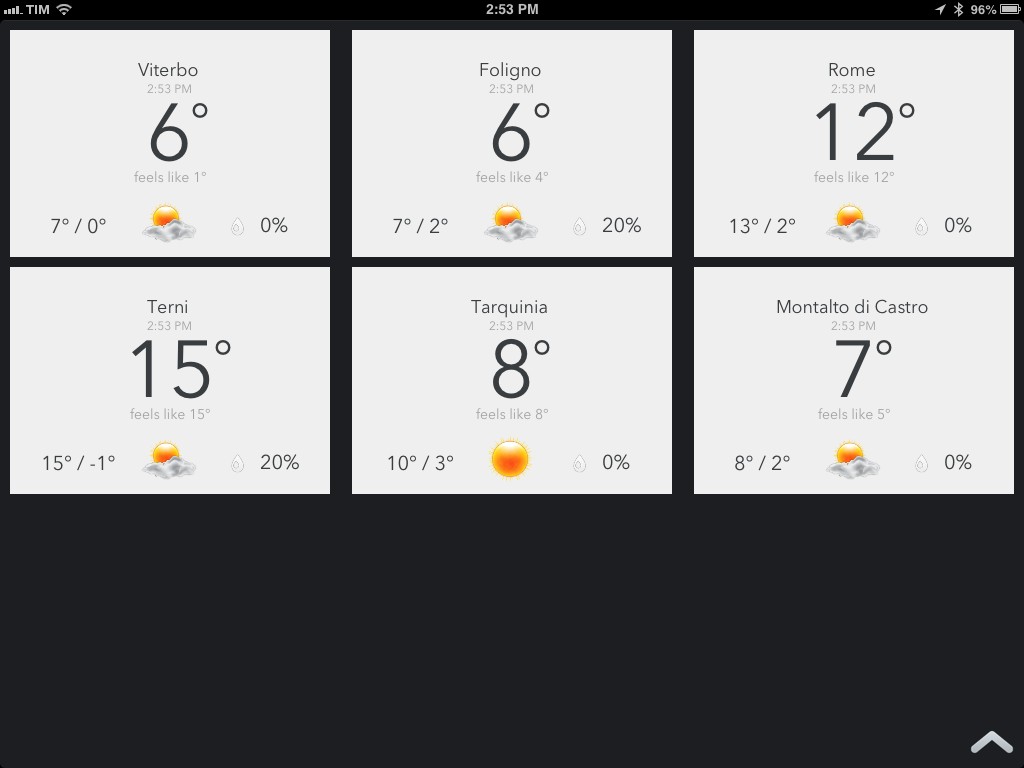
The initial screen has been reworked for the iPad. Instead of presenting multiple locations stacked on top of each other, Today Weather for iPad offers a Dashboard view that takes up the entire screen and lays out the same information with a design that feels more native to the iPad. I really like this idea as it lets me quickly fire up Today Weather and understand in a few seconds what the weather is going to be like in those 5-6 locations that I care about – without having to scroll or drilling down into their detailed views.

Today Weather is $0.99, Universal, and I highly recommend it.

Permalink

Apple Tweaks Prices and CPUs of MacBook Pro, MacBook Air Lines

Apple Tweaks Prices and CPUs of MacBook Pro, MacBook Air Lines

With a press release published this morning, Apple has announced they have updated the MacBook Pro and MacBook Air lines with new prices and faster processors.

Apple is making the MacBook Pro with Retina display faster and more affordable with updated processors and lower starting prices. The 13-inch MacBook Pro with Retina display now starts at $1,499 for 128GB of flash, and $1,699 for a new 2.6 GHz processor and 256GB of flash. The 15-inch MacBook Pro with Retina display now features a faster 2.4 GHz quad-core processor, and the top-of-the-line 15-inch notebook comes with a new 2.7 GHz quad-core processor and 16GB of memory. Apple today also announced that the 13-inch MacBook Air® with 256GB of flash has a new lower price of $1,399.

Thanks to @setteBIT, here’s a quick rundown of the changes: the 13” MacBook Pro with Retina Display is now $200 and $300 cheaper for the 128 GB and 256 GB (with SSD) models, respectively; the CPU has been bumped from 2.5 GHz to 2.6 GHz. The price difference in Euros is €250 and €350. The 13” MacBook Air with 256 GB SSD is now $100 cheaper (€150).

The 13” MacBook Pro with Retina Display was announced on October 23, 2012 – 113 days ago; the 15” MacBook Pro with Retina display was announced at WWDC ‘12 – 247 days ago.

In the first fiscal quarter of 2013, Apple sold 4.1 million Macs. It’s unclear whether Apple might have been able to lower the prices of Retina MacBook Pro (while offering faster performances) due to possible reductions of component prices (i.e. high-resolution displays), but the timing is interesting: just a few days ago, Apple and other tech companies (such as Adobe) were summoned to appear before the Federal Australian Parliamentary Committee that has been investigating IT pricing in Australia. In response to the inquiry, Adobe promptly dropped the price of its Creative Cloud service.

Permalink


Sponsor: Orbicule

My thanks to Orbicule for sponsoring MacStories this week.

Undercover is Find My Mac done right. After a very simple installation, Undercover will run in the background, constantly monitoring the location of your Mac. If your Mac gets stolen, in addition to tracking location Undercover will also snap mugshots through the computer’s built-in camera and capture keystrokes.

I personally use Undercover 5 because I like its web-based interface better than Apple’s Find My Mac. If you’re looking for a more powerful Find My Mac, I highly recommend Undercover 5.

Find out more about Undercover here.


CriticMarkup: Plain Text Syntax for Editorial Reviews

cm

cm

Gabe Weatherhead is a good friend who writes and makes great stuff. Together with Erik Hess (MacStories readers may remember his particular iPad workflow), he launched CriticMarkup, a new project I’ve helped testing for the past few weeks.

Essentially, CriticMarkup is a plain text syntax for marking up text in editorial reviews. For someone who writes in Markdown and works with a team on a daily basis, CriticMarkup is the missing piece of a puzzle that required using clunky software like Word for Mac to do any sort of change tracking or markup. CriticMarkup feels like an extension of Markdown in that it allows you, through a simple and easily understandable syntax, to insert additions, deletions, substitutions, comments, and highlights into plain text.

Read more


Apple Releases iOS 6.1.1

Apple Releases iOS 6.1.1

iOS611

iOS611

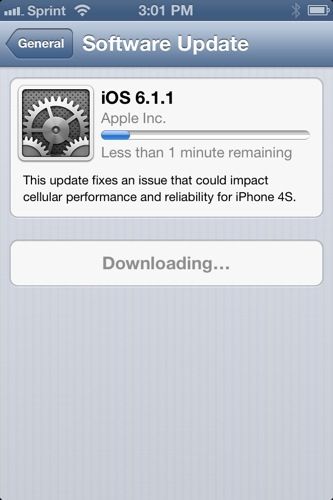
Apple has just released iOS 6.1.1. The software update is, at the moment, available only for the iPhone 4S, where the changelog says the new version “fixes an issue that could impact cellular performance and reliability for iPhone 4S”.

The last update to iOS 6, iOS 6.1, was released on January 28, adding Siri support for purchasing movie tickets, iTunes Match improvements, and more carriers for LTE compatibility.

iOS 6.1.1 is available for direct download here.

Permalink

Chris White’s iOS Workflows

Chris White’s iOS Workflows

Chris White is putting together an impressive collection of JavaScript bookmarklets, URL schemes, and iOS services and actions in a GitHub repo:

It seems like we’ve recently been seeing a ton of new ideas, clever tricks and tools for making users who are willing to dive into the deep-end more productive on our iOS devices through automation, seamless app communication and some really great shortcuts. This is a collection of bookmarklets, scripts and custom URL scheme actions that help bridge apps and manipulate the data you can send between them.

Chris included some of my bookmarklets and URL schemes in his collection, which I recommend checking out if you’re looking for a single place containing several moderately advanced tips for doing more than just launching apps via URLs.

iOS automation is, of course, a subject that I’ve been covering on a daily basis on MacStories for the past months. While I haven’t had the time to put together a GitHub repo like Chris did, allow me to list the various articles and tag pages where you can get started:

URL scheme tag page

Bookmarklet tag page

Automation with Drafts and Chaining Apps with Drafts

Pythonista review and scripts

Pythonista tag

I’m very glad Chris decided to collect these resources in a repo. I especially like the Drafts bookmarklets he made, which contain a check to see whether the browser has an active text selection (something I haven’t been doing as I’ve always created separate bookmarklets for Chrome and Safari).

Permalink

Apple, Adobe & Microsoft Forced To Appear Before Australian IT Pricing Inquiry

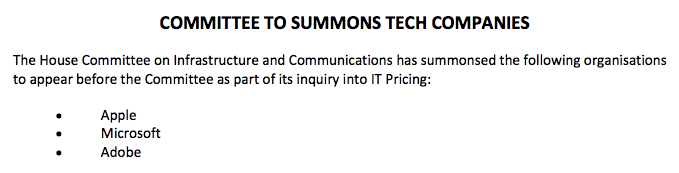
Apple, Microsoft and Adobe have been summoned to appear before a Federal Australian Parliamantery Committee that has been investigating IT pricing in Australia. The move forces the three companies to appear on March 22nd after they had refused to do so voluntarily. Ed Husic, a driving member behind the creation of the committee and one of its members, put out a press release welcoming the move, but stating it is one “we shouldn’t have to take”.

 “Adobe, Apple and Microsoft are just a few firms that have continually defied the public’s call for answers and refused to appear before the IT Pricing Inquiry.”

The IT Pricing Inquiry has been examing whether a price difference exists between Australian and international pricing of IT goods and services, and if so, why they exist, what impact they have and what actions can be taken to reduce the disadvantage of Australian consumers. Formed in May last year, the committee received 100 submissions from individuals, organisations and companies and has so far held 5 public hearings which included the appearance of Australian Recording Industry Association, the Department of Foreign Affairs and Trade, consumer group CHOICE and many others.

It should be noted that Apple, Microsoft and Adobe all made written submissions to the Committee but refused to appear before the committee to answer questions of the committee members.


Chaining Multiple Apps Together with Drafts

A few weeks ago, I took a look at the automation possibilities opened by Drafts, Agile Tortoise’s multi-purpose text app. In the article, I mentioned how a bug prevented Drafts from “linking to itself” more than once:

Therefore, my idea for cross-posting was: I can link to Drafts itself, and if the first action is successful, I can link to Drafts itself again. Essentially, I wanted to leverage the built-in App.net and Twitter actions to avoid the use of any third-party app. Unfortunately, there’s a bug in the current version of Drafts that doesn’t make that kind of action work.

With an update to Drafts released yesterday, Greg Pierce has brought various improvements to the app, including support for more customizable timestamps and dates using strftime, date and time tags for file names and URL actions, and a new way to encode strings with curly brackets.

Seemingly minor, the option to more easily URL encode strings is actually a very welcome addition: like in the latest Mr. Reader, instead of forcing the user to encode a URL into a longer string, you can simply put a URL inside {{ }} and let Drafts take care of encoding it. It means I can now experiment with building more complex workflows that contain actions for more external apps and, more importantly, for “sequential” tasks in Drafts itself. Easier encoding means we construct URLs that will tell Drafts “do this, and then do that” in a single workflow.

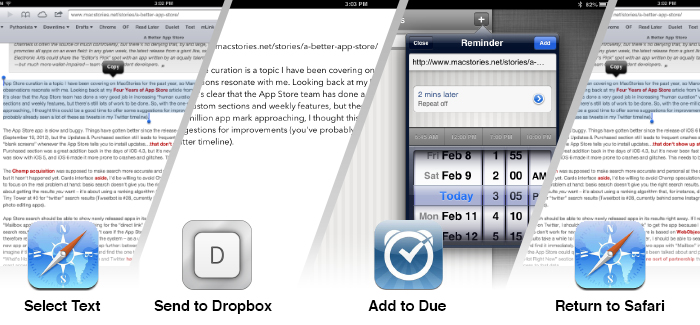
Those who follow me on Twitter know that I’ve been trying since yesterday to see how many apps I could chain together in a workflow, mainly out of curiosity and as a “proof” of concept. First, I tweeted about a Mr. Reader -> Drafts -> Poster workflow that would take selected text from an article, convert its Markdown to HTML, and then send it to Poster; the workflow consisted of three apps chained together, but I knew I could try to accomplish something a bit more ambitious. I kept on experimenting with Drafts URLs, and eventually I managed to build a single workflow with 3 apps and 4 different tasks involved. I’m posting it here for two reasons: a) I believe it’s a quite useful workflow; and b) it can serve as an example of what Drafts can do when you understand how to properly link multiple apps together. Read more