

Linus Edwards of VintageZen takes a look at the color palette Apple has used throughout their history in a variety of products, from the original Macintosh to the translucent plastics in iMacs and iBooks to colorful iPods. Compare that history to today’s flagship products, which are aluminum and framed by black or white glass. The conversation comes in light of an impending update to the iPhone 5, which is rumored to be launching with graphite and champagne as additional colors options at the high-end. Perhaps these classy colors are intended to be throwbacks to the gray Powerbooks and beige Macs of the 90s.
The Colors of Apple→
Apple’s New iPhone Trade-In Program Launches Nationwide
Apple’s new iPhone trade-in program is now being offered at Apple Retail Stores across the United States, details of which have been doled out to a number of news organizations. The trade-in program, a part of the iPhone Reuse and Recycling Program, lets customers receive a credit towards the purchase of a new iPhone by bringing in a working iPhone that’s currently under contract. Apple has provided the following statement to various news outlets:
iPhones hold great value. So, Apple Retail Stores are launching a new program to assist customers who wish to bring in their previous-generation iPhone for reuse or recycling. In addition to helping support the environment, customers will be able to receive a credit for their returned phone that they can use toward the purchase of a new iPhone.
Joanna Stern from ABC News explains.
Apple store employees will assess the condition of the phone and determine the value of the phone. According to sources, a 16GB iPhone 5 in good condition would be valued at close to $300. It is unclear if phones with more storage would be worth more …
If you are not currently on a contract or if your contract is up, customers will have to sign up for another cellular contract to take advantage of the program.
As Darrell Etherington of TechCrunch reports, the new trade-in program specifically applies to iPhones at retail stores.
Apple’s intentions for building its own in-store trade-in program were originally outed back in June, when it was revealed that it would partner with Brightstar Corp., a distributor of mobile devices, in order to offer the deal to users. Apple has previously offered up iPhone trade-ins via PowerOn thanks to its “Apple Recycling Program,” but this is in retail stores instead of only working via mail, and specific to iPhones, rather than covering a range of Apple hardware.
According to Mark Gurman of 9to5Mac, the program won’t be widely advertised to consumers.
The trade-in process can be conducted on the store floor, or at the Genius Bar. Apple will not be heavily promoting the program with marketing signage (as of now), but Apple Store employees have been instructed to recommend the program to applicable customers.
Update: Roberto Baldwin of Wired clarifies that the trade-in value you receive must be applied to a newer iPhone that the Apple Retail Store has in stock. This is correct. The iPhone trade-in program that’s launching today is different from Apple’s traditional online recycling programs. (I added this since the Wired article has everything in one place.)
It’s been reported elsewhere that Apple will issue credits or gift cards for new phones. That’s incorrect. If the iPhone you want is out of stock or unavailable, you will not be able to trade-in your old iPhone. The whole process has to happen at the same time. You go in with a phone and walk out with a phone. The employee will offer to set up the new iPhone with you at the store. Or you have the option of taking it home and setting it up there.
You can alternatively receive an Apple Store Gift Card for your iPhone or other electronic device by going through the Reuse and Recycling Program online, which works similarly to trade-in services such as Gazelle.
[via ABC News, TechCrunch, 9to5Mac, and Wired]
Blind, A 1X Web Browser for Retina Displays→
For web developers building websites on the latest MacBook Pros, Blind lets you see what your site looks like on a 1x display. Using it is as easy as clicking on a bookmarklet. It’s $2.99 in the Mac App Store.
Nintendo Vs. Apple Pundits
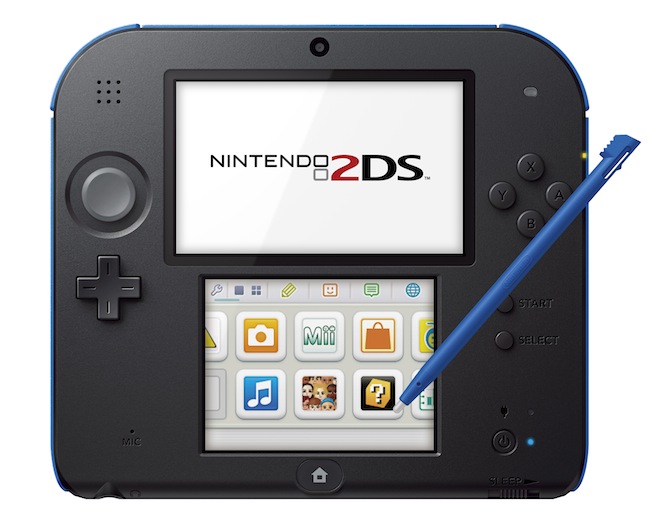
Yesterday, Nintendo announced a new portable console to play 3DS games that doesn’t actually support the 3DS’ 3D effect, a price cut for the Wii U, and various release dates for its upcoming holiday line-up. Unsurprisingly, several Apple-focused writers and bloggers suggested – again – that Nintendo is doomed; that they should start making games for iOS; and that Apple should just outright buy Nintendo.
I believe this notion – that in order to survive, Nintendo has to start making games for the App Store – shows a profound misunderstanding of how Nintendo works, operates, and, generally, plans its long-term future. I have discussed the topic with Myke last night on The Prompt.
Lukas Mathis has published an excellent post that aptly sums up what is wrong with the new “default narrative” about Nintendo:
Mac users should be familiar with the argument against this reasoning. Fantastic games like Super Mario 3DS Land can only exist because Nintendo makes both the hardware and the software. That game simply could not exist on an iPhone.
But there’s an additional problem with this argument: the premise is completely wrong. Nintendo is actually not doing poorly in the portable market. iPhones have not destroyed the market for portable gaming devices. The 3DS is, in fact, doing very well.
Nintendo and Apple may share some similarities (namely, tight integration of hardware and software), but their execution is profoundly different. Following Nintendo’s history and patterns through the years and just looking at the company’s numbers reveals a different approach and strategy.
Again, from Mathis’ piece:
The hypothesis that Nintendo needs to abandon the hardware market because the iPhone destroyed the market for portable gaming just isn’t consistent with reality.
The idea that Nintendo should make games for iOS is fascinating, easy to grasp and follow, but flawed. Nintendo doesn’t work like Apple. And, more importantly, Nintendo can’t – and doesn’t want to – be Apple. Nintendo is a mix of a toy company and a game company: consoles exist to support Nintendo’s crown jewels – the games and first-party franchises.
Nobody is denying that the Wii U is doing poorly: the console needs more quality first and third-party games, a better marketing message (same for the upcoming 2DS), and a clearer position in the market. But the overall numbers paint a different picture than what some Apple pundits are claiming: the Wii U is only slightly behind the point where the GameCube was at the same point in the console’s lifespan – and Nintendo did manage to turn a profit on the GameCube. The Wii remains the top-selling console of the current generation. The first 130 weeks of sales of the 3DS – as Mathis also notes – are comparable to those of the Nintendo DS – the second (soon first?) best-selling console of all time. Again, to understand this all you need to do is look at Nintendo’s numbers.
Mobile “casual” games are selling millions of copies (in many cases, in-app purchases) today, and Nintendo’s portable game sales are healthy, too. Here’s just one data point: Animal Crossing sold 1.54 million copies in the last quarter (a month ago, it was up to 4.5 million copies sold since its original release). Assuming that Nintendo makes around $30 in average revenue on first-party games, that would make for $46 million in revenue, in a single quarter, on a single game. Want more examples? As of March 2013, Luigi’s Mansion sold 1.22 million copies; Super Mario 3D Land moved 8.19 million copies; Monster Hunter 3 – a third-party, four-year old game – sold 2.10 million copies; also as of March 2013, Mario Kart 7 sold 8.08 million copies. Here’s what Nintendo’s upcoming line-up looks like, and add Pokémon X & Y to that (the series’ DS games, Black & White 1/2, sold 23.05 copies combined as of January-March 2013).
The 2DS is controversial and it may seem to lack any sort of practical sense, but it’s actually basic Nintendo 101 (do these other revisions ring a bell?). Except that, this time, the 2DS is aimed at addressing concerns of 3D games for children and the whole point is to sell the 2DS to kids for the holiday season, possibly alongside a copy of Pokémon.
Nintendo’s strength right now is that, once again, they can revolve around the fulcrum of portable hardware and game sales to sustain their operation, turn a profit, and buy more time to fix the mess that was the Wii U launch. Saying that Nintendo should shut everything down, go home, and start making games for iOS is an easy but flawed solution that just isn’t supported by the facts.
Soulver for iPhone Updated with iCloud Syncing, URL Scheme→
Soulver, my favorite iOS calculator app that isn’t really a calculator (I like another app for that), was updated today on the iPhone to support iCloud syncing, sub-folders, and a URL scheme. iCloud syncing was first brought to Soulver for Mac in December 2012, and now the iPhone app (Soulver for iPad hasn’t been updated yet) should be capable of syncing named documents with its Mac counterpart. If you trust iCloud with your Soulver documents, I guess that this will be a handy addition.
The URL scheme is much more interesting for my workflow. According to the release notes on iTunes, there’s now a URL scheme to launch Soulver, create a new document with text, or even to append text to an existing document. I am already thinking about the possibilities opened up by this feature for integration with apps like Launch Center Pro and Drafts – but I can’t find documentation anywhere. The app does support a soulver:// URL scheme, and hopefully more information will soon be posted on Acqualia’s website.
I’m looking forward to playing with Soulver’s URL scheme and updated preferences (not so much with iCloud sync). Soulver for iPhone is $2.99 on the App Store.
Update 9/1: The guys at Acqualia have posted a URL scheme documentation here. I have already set up a Drafts URL action that lets me quickly type a calculation in Drafts – which is my go-to text capturing tool – and append it as a new line to a specific Soulver document I have called “Calculations”. From Drafts:
soulver://new?text=[[draft]]&title=Calculations
I’m already using this action all the time to launch quick currency conversions in Soulver. Open Drafts, type “2 usd in eur”, and boom – Soulver opens, displaying the result. It’s a nice URL scheme.
The Omni Group Releases OmniKeyMaster Mac App Store License Tool→
From The Omni Group’s blog:
OmniKeyMaster is a simple app that finds App Store copies of Omni apps installed on your Mac, then generates equivalent licenses from our store - for free. This gives Mac App Store customers access to discounted pricing when upgrading from the Standard edition to Professional, or when upgrading from one major version to the next. Another benefit: since they don’t have to wait in an approval queue, our direct releases sometimes get earlier access to new features and bug fixes. OmniKeyMaster lets App Store customers access those builds, as well.
Tools like OmniKeyMaster have become quite common lately, as developers of third-party Mac apps keep struggling with the limitations imposed by Apple on the Mac App Store. Having new versions of apps every time a major upgrade is released isn’t an option for many developers, and they are resorting to workarounds like this to have the best of both worlds: the Mac App Store’s purchase system and the control on your own website and app updates. It’s a trade-off, and, in most cases, the process is quite convoluted.
In The Omni Group’s defense, their Mac App Store license tool seems easy to use and clever in how it finds all App Store copies of Omni apps on a Mac. Apple may not be interested in offering upgrade pricing on the Mac App Store, but developers find a way…or at least a viable workaround.
Twelve South Introduces the GhostStand, A Clear Elevated Stand for Your MacBook→

Twelve South has been busy this year. Their latest new product, following HiRise, is a brand new laptop stand made out of lucite. From the product page:
GhostStand is a transparent, ultra-modern platform– and a brilliant work of art– that elevates MacBook to a more comfortable viewing height. Pair your MacBook with a full-size keyboard and mouse, then set it on GhostStand to enjoy desktop style comfort at home or work. While GhostStand makes it look like your MacBook is floating in midair, two sets of soft silicone rails keep your Mac safely grounded to this affordable lucite stand.
It’s also $34.99, and can alternatively be purchased from the Apple Store online. It would pair well with a lot of Mac accessories, including those famous Harman Kardon SoundSticks. I was under the impression that the interlocking pieces of glass could be separated, making the stand portable, but that doesn’t seem to be the case. This is very much a stationary piece for your desk, designed to look beautiful and give the appearance that your Mac is floating on air.
Apple TV Gets Vevo, Disney Channel, and The Weather Channel in Latest Update→
Eric Slivka from MacRumors writes:
Apple today added several new apps to the Apple TV, including the previously reported Vevo music video channel. Other new additions include a dedicated app for The Weather Channel, an app for the Smithsonian Channel, as well as two Disney television apps: Disney Channel and Disney XD.
Vevo’s library of 75,000 HD music video should keep the kids busy for a while.
Have a Chromecast? There’s Now an iOS App For That→
It’s little more than a configuration utility, but Chromecast for iOS (App Store link) lets you set up your newly acquired dongle so that you can connect it to your Wi-Fi network and change your device name and password.