
The New, Adjustable Glif

In 2010, we wrote about an interesting Kickstarter campaign for an iPhone stand and tripod mount called Glif. Simple and elegant, the Glif allowed you to easily mount an iPhone 4 on a tripod or act as a kickstand to prop it up at an angle. After the Kickstarter success, the duo behind the project, Tom Gerhardt and Dan Provost, went on to form Studio Neat; in the past three years, they have released other products that include the Cosmonaut stylus, iPhone apps, and a book.

Today, Tom and Dan are back with an update to the original Glif (called, in a very iPad 3-esque way, “The New Glif”) that makes it adjustable for practically any smartphone size. From their description:

The Glif will fit virtually any smartphone, between 58.4–86.4mm wide and 3.1–12.7mm thick. Some exceptions include “phablets” like the Samsung Galaxy Note, or phones with incredibly bulky cases.
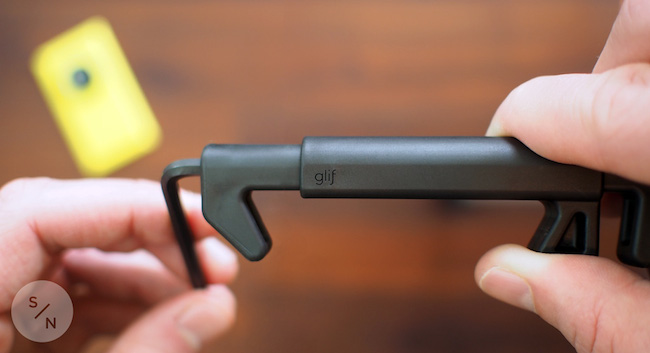
With the new Glif, you’ll get a 5/32 hex key to adjust the device for your smartphone. Besides non-Apple phones, I think that having an adjustable Glif is a good idea for users who like to keep their iPhones cases that don’t fit with the original Glif design (which is still available for purchase).

The new Glif is $30 and available here.

Mark Jardine Interview

Sam Rosenthal interviews Tapbots’ Mark Jardine. The interview isn’t too long and it’s a good read.

Allow me to quote a single answer by Jardine, in which he talks about the reaction of some people to iOS 7:

I think a fair analogy is when photography started to go digital. There were the early adopters that embraced DSLR’s and the use of Photoshop for post. And then there were the film guys who refused to move on. In many ways, film was still better than digital, but we knew where the future of the industry was headed. And a lot of die hard film guys got left behind. iOS 7 is a reboot and it will get better over time. I’m learning and embracing the design language now so our future apps can be better because of it.

Permalink

Dayli

Nice app by Adam Swinden: Dayli lets you take a picture every day and create a timelapse video to see how things have changed over time. The app produces best results with selfies and it’s reminiscent of Everyday, although Daily is fully ready for iOS 7 (which is also required).

There are some details worth mentioning. The app can create multiple “daylis” (albums) that can contain separate collections of pictures. You can set reminders for each dayli and a frequency (you will get a local notification on your iPhone); once you have a collection of pictures you want to put together, you can create a video at 2, 4, or 8 FPS. In the camera view, you can create and turn on guides to better align your face with the iPhone, and there’s a button to overlay a previous pic on the screen so you’ll always capture pictures with the same angle/distance.

The app is relatively new, so I can’t comment on its reliability over several months with a library of hundreds of photos (which, by the way, can be saved to the Camera Roll or kept in the app). I’ve been taking a picture every day for the past two weeks; Daily has worked fine for me and I like its design and feature set.

Dayli is $1.99 on the App Store.

Permalink

Fantastical for Mac Gets Due Times For Reminders

With the release of Fantastical 2 for iPhone, using the Mac app revealed an annoying bug that I either hadn’t noticed or just forgotten about: you couldn’t assign due times to reminders created inside the app.

The bug has been fixed with version 1.3.11, available on the Mac App Store. You can now write “todo Buy Zelda at 5 PM” and Fantastical will parse every piece of your command correctly. In the process, Flexibits also fixed some iCloud-related errors, which I’ve been noticing in the past few weeks.

Permalink


The Prompt: Radioactive Chocolate Cake

This week, Jason Snell puts on his best Italian accent and joins Stephen and Myke to talk about online collaboration, keyboards and the third rail of 5by5 podcasting — comic books.

Bad news: as you may know by now, I couldn’t record on Wednesday due to issues with my ISP.

Good news: Myke and Stephen had a great discussion with Jason about iPads, comics, and more. And: my Internet should be back next week. Get the episode here.

Permalink

Life on iPad

Last night, Apple published a new mini-site called “Life on iPad” that, alongside a video that was first shown at the iPad event on October 22, includes profiles of people whose personal lives and businesses have been transformed and enriched by the iPad.

While I agree with Fraser Speirs’ comment, I think that this bit from Palmaz Vineyards’ profile sums it up well:

iPad brings us the perfect balance of function and creativity. And I don’t think it’s a coincidence that the one device we all love at home is the same device we want to use at work. Nothing else comes close.

The examples that Apple is showcasing are obviously specific (wind service technicians; Broadway dancers; a surgeon) because they need to tell a captivating story (“Frank, average iPad user from Dallas” doesn’t exactly make for an enticing profile), but the underlying theme is clear. The iPad is what you make of it.

Permalink

Dropbox 3.0 Released with iOS 7 Redesign

Dropbox

Dropbox

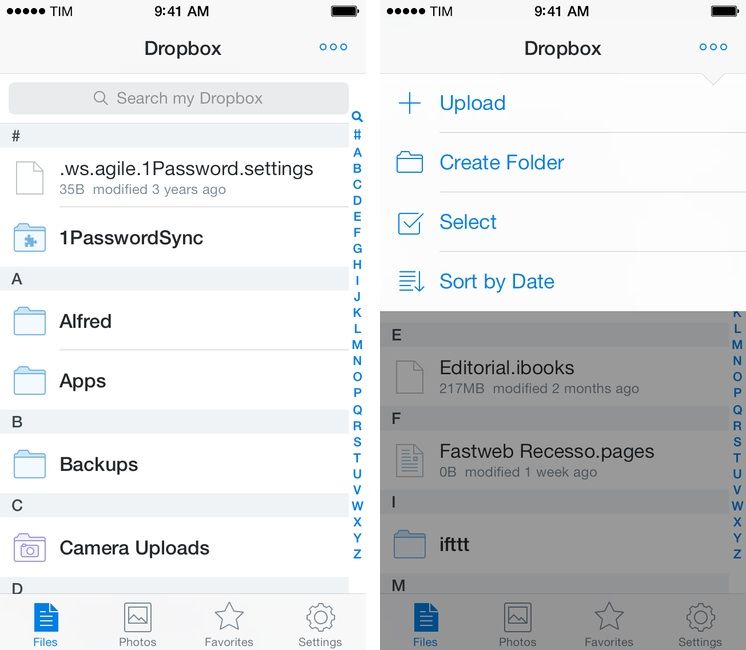
Released today on the App Store, Dropbox 3.0 is a complete redesign that gets the app ready for iOS 7.

Two months after the release of iOS 7, the new Dropbox shows the work of designer Tim Van Damme, who left Instagram to join the Dropbox design team earlier this year. “Dropbox 3.0 is all about your content. We stripped out as much branding as we could, just so you can focus on what’s important”, Van Damme told me. Noting how several functionalities and interactions have been simplified in this update, he mentioned how, for instance, documents and photos are easier to enjoy in full-screen: “On your iPad, it used to take two taps to see a photo full-screen. Now, a single tap will let you enjoy your photo full-screen, and this also works for most other file-types”, Van Damme added. Read more