This Week's Sponsor:

Dropzone 5

Improve your Drag-and-Drop Workflow


Posts in reviews

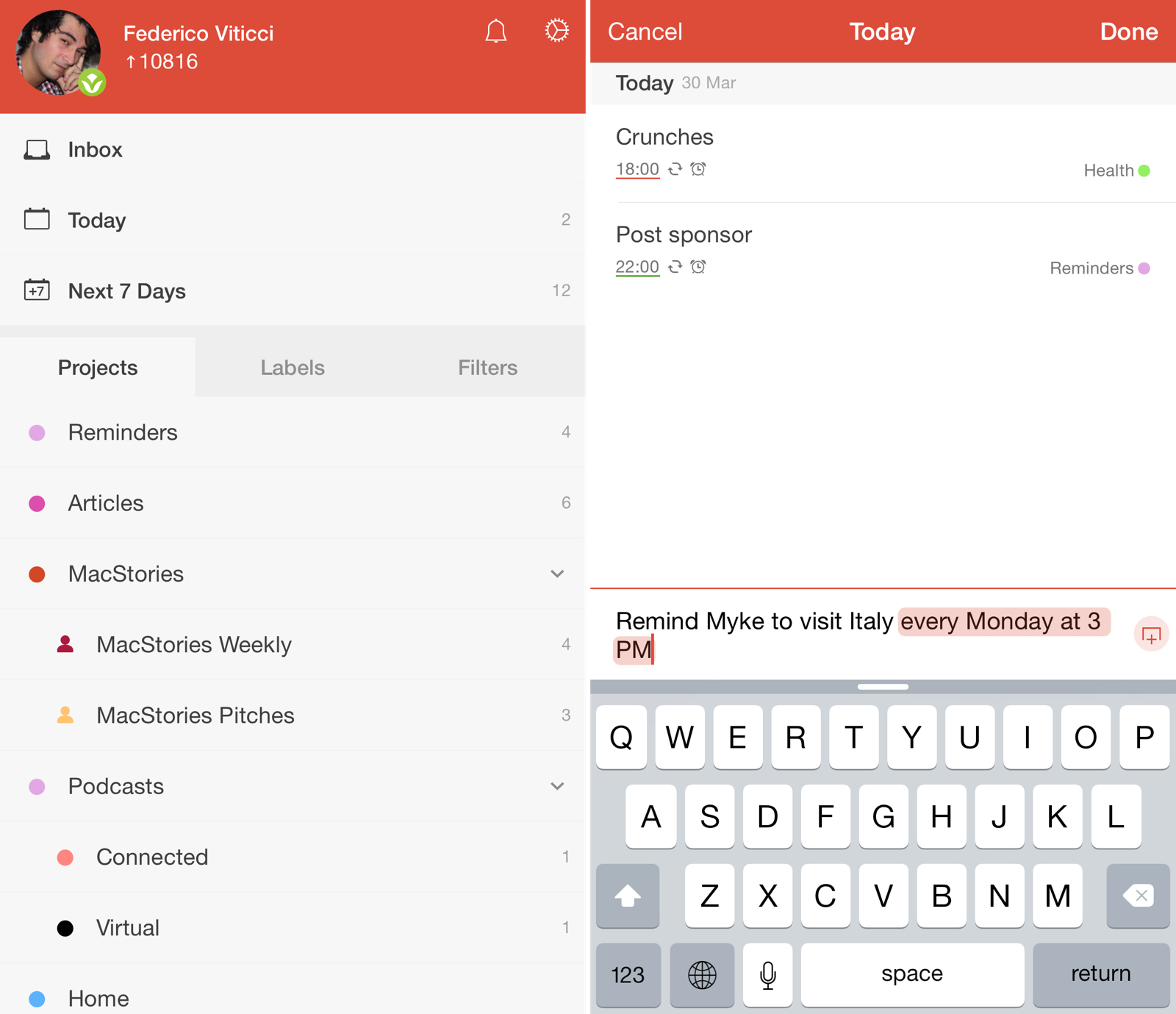
Todoist 10 Brings Intelligent Input, Themes, and New Gestures

Last November, I wrote about my decision to switch from iCloud Reminders to Todoist as my task management app of choice. I concluded:

Todoist strikes a good balance of powerful features and clever implementation that doesn’t push me to customize everything all the time. I’m not writing scripts for task management, I’m not changing icons and themes – I set up a few filters and I’m just focusing on doing stuff. The Todoist app for iOS integrates well with iOS 8, and, overall, I’m thoroughly satisfied with my decision to switch from Reminders to a professional-grade todo system to manage my life.

Over the past five months, I’ve kept using Todoist every day and I’ve enjoyed its reliability and integration with other apps and services. Everything from my original review still stands: while I don’t rely on all of Todoist’s features, its flexibility allows me to scale my tasks and projects at any time. If a big new project comes in and I need to take care of it with my team and have a deeper visualization of my responsibilities, I know I can count on Todoist. If I have to jump from a couple of tasks each day to a few dozen, I can rest assured Todoist can do it.

In spite of my appreciation, though, I’ve been critical of Todoist’s iOS app before, and I’m happy to see the company addressing some of my major complaints in Todoist 10, launching today for iPhone and iPad.

I upgraded to a beta of Todoist 10 a few weeks ago, and, while it doesn’t profoundly change the capabilities of Todoist on iOS, the new version brings some powerful (and long-needed) functionality that will help users be more efficient and spend less time managing todos.

Read more

Access Extra Content and Perks

Founded in 2015, Club MacStories has delivered exclusive content every week for nearly a decade.

What started with weekly and monthly email newsletters has blossomed into a family of memberships designed for every MacStories fan.

Learn more here and from our Club FAQs.

Club MacStories: Weekly and monthly newsletters via email and the web that are brimming with apps, tips, automation workflows, longform writing, early access to the MacStories Unwind podcast, periodic giveaways, and more;

Club MacStories+: Everything that Club MacStories offers, plus an active Discord community, advanced search and custom RSS features for exploring the Club’s entire back catalog, bonus columns, and dozens of app discounts;

Club Premier: All of the above and AppStories+, an extended version of our flagship podcast that’s delivered early, ad-free, and in high-bitrate audio.

Learn more here and from our Club FAQs.


Fantastical 2 for Mac Review: Reinvented

Fantastical for Mac, originally released in 2011, redefined calendar apps for OS X and my idea of a modern calendar client.

Developed by Michael Simmons and Kent Sutherland – together known as Flexibits – Fantastical pioneered features and design choices that, with time, have become a staple of other calendar apps and OS X utilities: natural language input is now expected in popular todo apps and services; the OS X menu bar has grown into a popular destination for desktop utilities; integration with multiple calendar services in a single app is now a de facto standard.

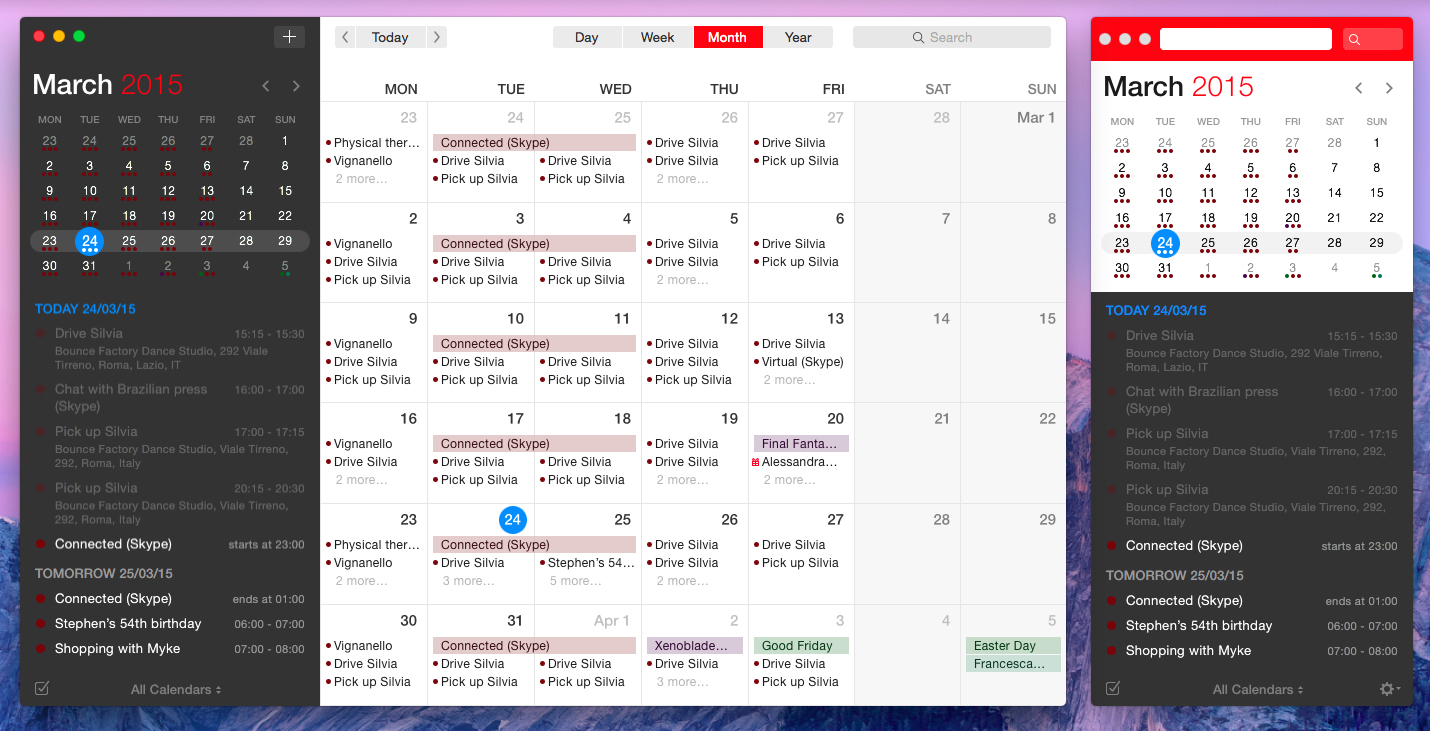
Fantastical was a powerful calendar assistant. Four years later, Flexibits wants Fantastical 2 for Mac – their latest creation years in the making – to be the only calendar app you’ll ever need. While the original Fantastical was a companion to the full Apple iCal experience, Fantastical 2 reinvents itself as a full-blown calendar client that retains the most important aspects of the app’s debut and adds a whole new calendar interface to the mix. And in the process, it exudes the finesse and attention to detail that Simmons and Sutherland are known for.

In 2011, Fantastical raised the bar for modern calendar interaction. Fantastical 2 builds on that solid foundation, bringing design changes and new functionalities that will define the evolution of the Fantastical family.

Read more

Access Extra Content and Perks

Founded in 2015, Club MacStories has delivered exclusive content every week for nearly a decade.

What started with weekly and monthly email newsletters has blossomed into a family of memberships designed for every MacStories fan.

Learn more here and from our Club FAQs.

Club MacStories: Weekly and monthly newsletters via email and the web that are brimming with apps, tips, automation workflows, longform writing, early access to the MacStories Unwind podcast, periodic giveaways, and more;

Club MacStories+: Everything that Club MacStories offers, plus an active Discord community, advanced search and custom RSS features for exploring the Club’s entire back catalog, bonus columns, and dozens of app discounts;

Club Premier: All of the above and AppStories+, an extended version of our flagship podcast that’s delivered early, ad-free, and in high-bitrate audio.

Learn more here and from our Club FAQs.


Das Keyboard 4 Pro for Mac Review

The Das will totally dominate smaller desks

The Das will totally dominate smaller desks

Das Keyboard 4 Professional for Mac

Das Keyboard 4 Professional for Mac on Amazon

I like almost everything about the new Das Keyboard 4 Pro, but what I like best is the big volume knob on the top right corner. Not only is it way funner to use than boring old keys, but it’s also easier and quicker. You can lean in from anywhere and quickly adjust the volume without decoding your keycaps from upside down.

In fact, the whole top-left media control panel is pretty sweet. But more on that in a moment. First, what is this thing?

Read more

Access Extra Content and Perks

Founded in 2015, Club MacStories has delivered exclusive content every week for nearly a decade.

What started with weekly and monthly email newsletters has blossomed into a family of memberships designed for every MacStories fan.

Learn more here and from our Club FAQs.

Club MacStories: Weekly and monthly newsletters via email and the web that are brimming with apps, tips, automation workflows, longform writing, early access to the MacStories Unwind podcast, periodic giveaways, and more;

Club MacStories+: Everything that Club MacStories offers, plus an active Discord community, advanced search and custom RSS features for exploring the Club’s entire back catalog, bonus columns, and dozens of app discounts;

Club Premier: All of the above and AppStories+, an extended version of our flagship podcast that’s delivered early, ad-free, and in high-bitrate audio.

Learn more here and from our Club FAQs.


Blink: Effortless Affiliate Link Generation on iOS

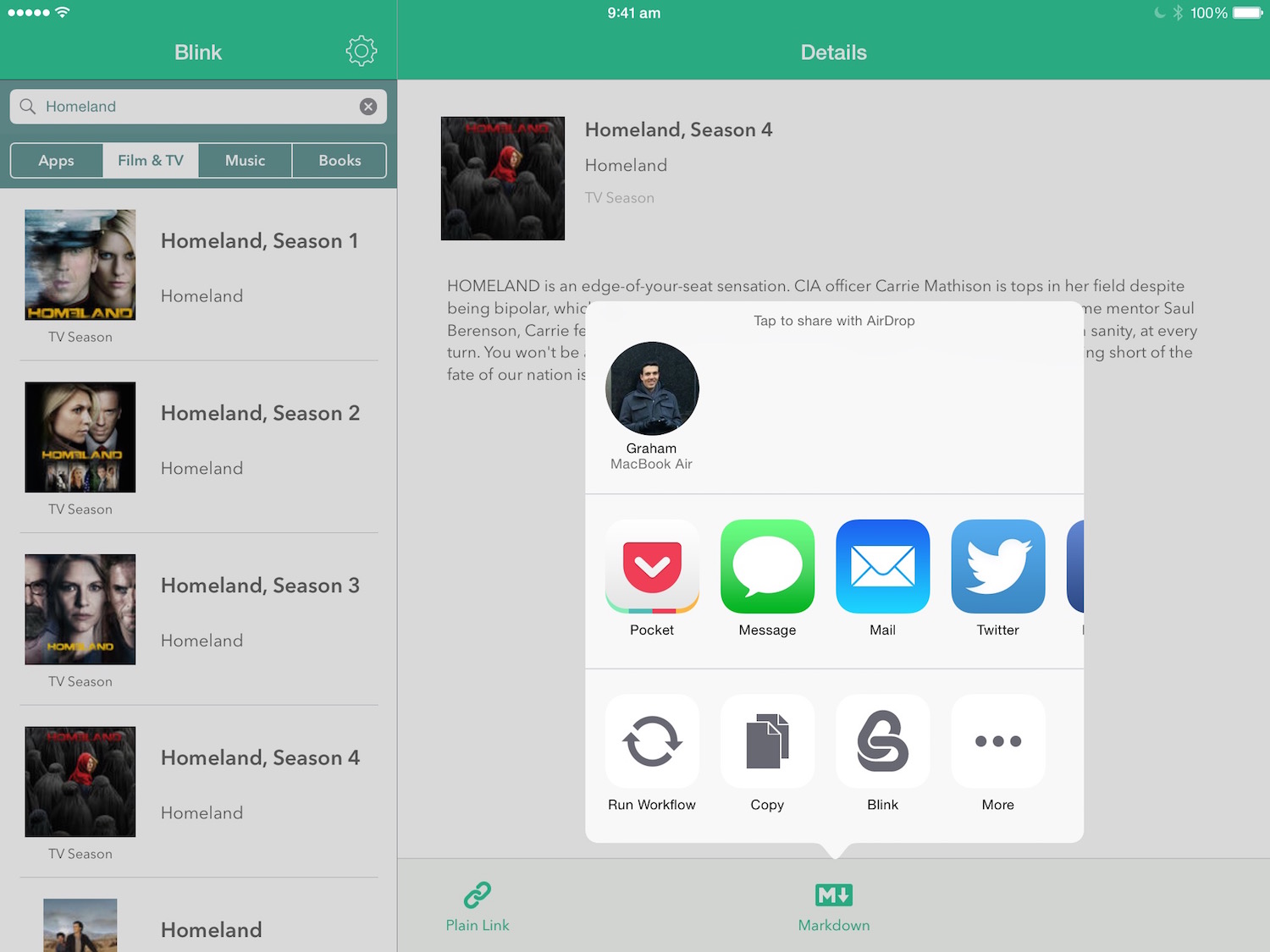
Launching today, Blink is a new Universal iOS app from Squibner that quickly generates affiliate links for content from the App Store, Mac App Store, iTunes Store and iBooks Store. If you’re a member of the iTunes affiliate program you’ll know that you don’t want to be manually editing iTunes links with your own token and campaign tag – Blink automates that process on iOS, making it quick and effortless.

Before I continue, a quick introduction to the world of affiliate linking for those that are unaware. Essentially, anyone can register for the iTunes affiliate program and they will receive their own affiliate token (a series of letters and numbers). If they generate an iTunes URL that includes this affiliate token and share that link with others that click on it, they will receive a (small) percentage of any iTunes sales that flow from any clicks. For many small and independent sites, such affiliate programs are a valuable source of income (and yes, MacStories uses affiliate links). Apple’s website has more details if you’d like to learn more about the technical details of affiliate linking and perhaps even sign up.

Read more

Access Extra Content and Perks

Founded in 2015, Club MacStories has delivered exclusive content every week for nearly a decade.

What started with weekly and monthly email newsletters has blossomed into a family of memberships designed for every MacStories fan.

Learn more here and from our Club FAQs.

Club MacStories: Weekly and monthly newsletters via email and the web that are brimming with apps, tips, automation workflows, longform writing, early access to the MacStories Unwind podcast, periodic giveaways, and more;

Club MacStories+: Everything that Club MacStories offers, plus an active Discord community, advanced search and custom RSS features for exploring the Club’s entire back catalog, bonus columns, and dozens of app discounts;

Club Premier: All of the above and AppStories+, an extended version of our flagship podcast that’s delivered early, ad-free, and in high-bitrate audio.

Learn more here and from our Club FAQs.


Skala Color 2: A More Functional and Beautiful Color Picker for OS X

Bjango is a small development studio, probably best known for the (very handy) iStat Menus utility. For the past few years they’ve also been hard at work on Skala, which will be a UI and icon design tool that Bjango promises to have ‘phenomenal rendering quality and a unique blend of vector, bitmap and 3D abilities’. But in the interim, they’ve released Skala Preview (which lets you preview Photoshop documents on your iOS device) and Skala Color (a new color picker for OS X).

Marc Edwards, founder of Bjango, explained why they’ve created Skala Color and Preview in a brief interview with Khoi Vinh:

When we began work on Skala, we decided it could be good to break out some features into separate apps. Doing so helps ensure those modules are well tested, and creates awareness Skala is coming (we’re a tiny company, so we can’t afford expensive ads).

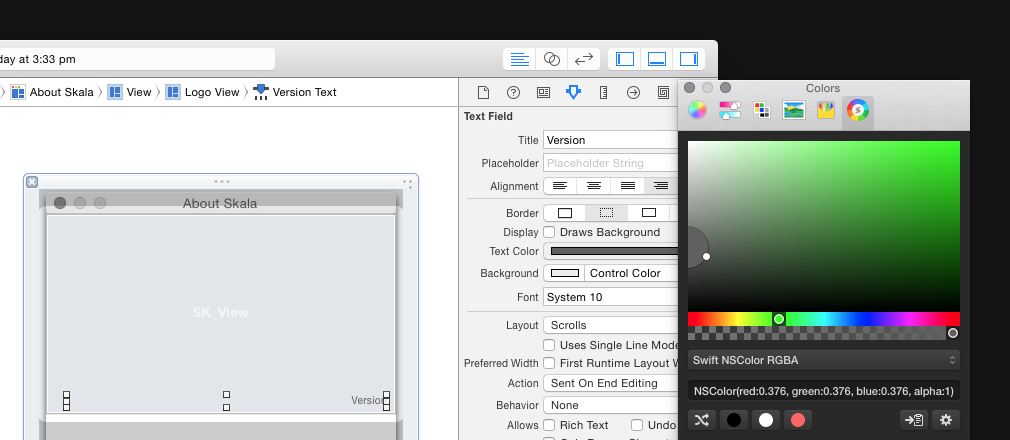
Late last week Bjango released version 2 of Skala Color which brings a revamped user interface, support for copying color values for use with Swift, random color generation and improved format parsing.

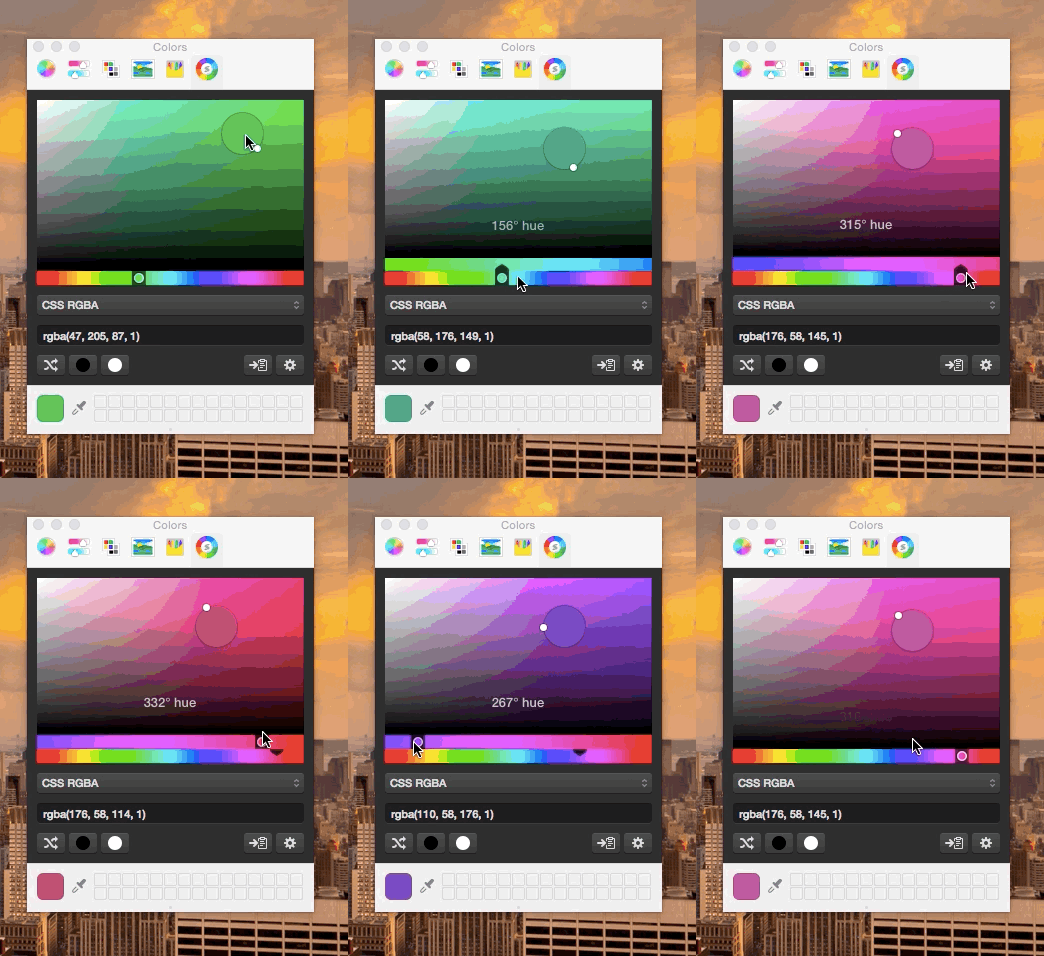
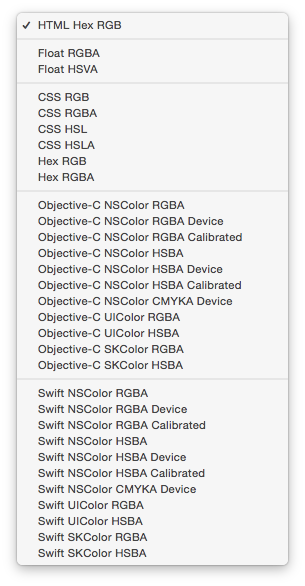
For those that aren’t familiar with Skala Color, it adds a tab to the system color picker window in OS X. The key features you get from using Skala Color is the ability to easily copy color values in a wide variety of formats (full list here), and really fine control over selecting a color thanks to the new user interface in version 2.

Skala Color 2 may just be a little utility, but it is full of great little design touches. For example, you don’t necessarily have to use the color sliders, you can also hover your mouse over the ring of the magnifying glass and cycle through the 360 degrees of hues. Another is how Skala Color will recognise if you have a color value on your clipboard and let you select that color with one click.

One thing to keep in mind is that Skala Color is a 64-bit app, so it won’t show up in an app that is 32-bit. That shouldn’t be a problem for the vast majority of apps on OS X these days, but I did run into it with Microsoft Office Preview.

Skala Color 2 is a free utility for OS X.


Access Extra Content and Perks

Founded in 2015, Club MacStories has delivered exclusive content every week for nearly a decade.

What started with weekly and monthly email newsletters has blossomed into a family of memberships designed for every MacStories fan.

Learn more here and from our Club FAQs.

Club MacStories: Weekly and monthly newsletters via email and the web that are brimming with apps, tips, automation workflows, longform writing, early access to the MacStories Unwind podcast, periodic giveaways, and more;

Club MacStories+: Everything that Club MacStories offers, plus an active Discord community, advanced search and custom RSS features for exploring the Club’s entire back catalog, bonus columns, and dozens of app discounts;

Club Premier: All of the above and AppStories+, an extended version of our flagship podcast that’s delivered early, ad-free, and in high-bitrate audio.

Learn more here and from our Club FAQs.


Alto’s Adventure Review: A Beautiful Descent

You, llamas, and mountains.

You, llamas, and mountains.

There’s a moment in Alto’s Adventure when you realize that bouncing off rocks in a snowy downhill isn’t a glitch, but a game mechanic designed to make it harder to complete certain goals and combos. This sums up my experience with playing Snowman’s new iOS game, out today for iPhone and iPad.

Read more

Access Extra Content and Perks

Founded in 2015, Club MacStories has delivered exclusive content every week for nearly a decade.

What started with weekly and monthly email newsletters has blossomed into a family of memberships designed for every MacStories fan.

Learn more here and from our Club FAQs.

Club MacStories: Weekly and monthly newsletters via email and the web that are brimming with apps, tips, automation workflows, longform writing, early access to the MacStories Unwind podcast, periodic giveaways, and more;

Club MacStories+: Everything that Club MacStories offers, plus an active Discord community, advanced search and custom RSS features for exploring the Club’s entire back catalog, bonus columns, and dozens of app discounts;

Club Premier: All of the above and AppStories+, an extended version of our flagship podcast that’s delivered early, ad-free, and in high-bitrate audio.

Learn more here and from our Club FAQs.


Workflow 1.1: Deeper iOS Automation

Released by a small team of indies in December 2014, Workflow reinvented iOS automation. Combining an interface reminiscent of Apple’s Automator for OS X with easy access to native iOS features such as Safari, the photo library, and iOS 8 extensions, Workflow promised to make automating tasks on an iPhone and iPad a simple and pleasant affair. The results spoke for themselves: Apple selected Workflow as Editor’s Choice, the app trended for weeks in the App Store’s Top Charts, and thousands of users released interesting and useful workflows in various online communities. MacStories readers may remember that Workflow was my iPad app of the year.

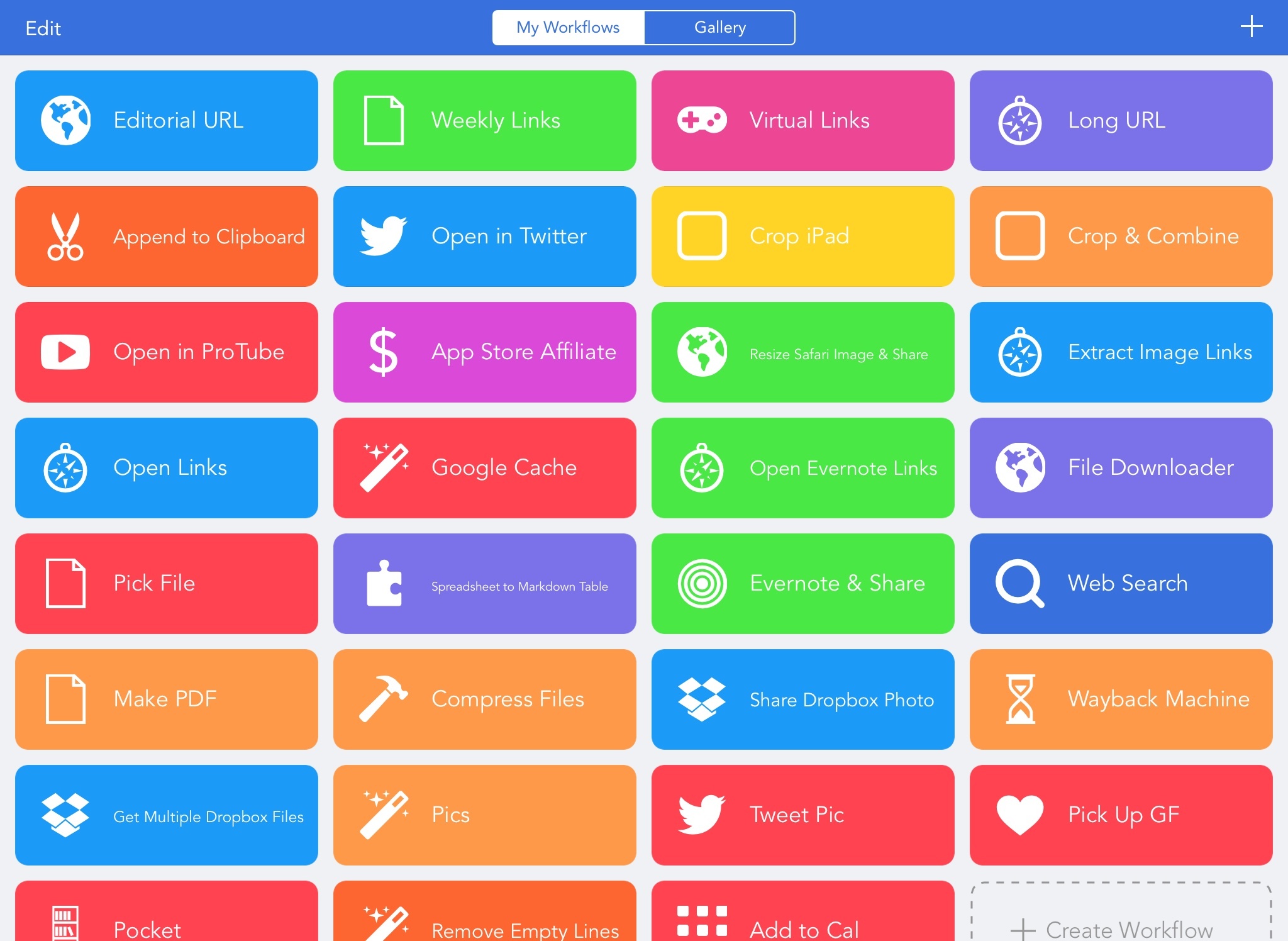
Workflow is one of those few apps that have dramatically changed how I work on my iPad. For me, the point of using Workflow isn’t to put together chains of actions to show off the app’s power – I just want to save time I can spend doing something else. While I have fun experimenting with Workflow and understanding its capabilities, ultimately the app just sits there in the background, waiting for me to call a series of actions I need. I love Workflow the most when it’s summoned for those two seconds and it does something magic that would have normally required minutes of manual interaction. Things like appending links to Evernote, converting spreadsheets to Markdown tables, or adding text to the clipboard.

Workflow fits my routine like a glove. I’ve used it every day to automate aspects of my work that speed up how I write and communicate on my iOS devices. And with Workflow 1.1, released today on the App Store, its developers are further expanding the app’s capabilities with powerful new functionality that includes filtering, better conditionals and image manipulation, URL expansion and deeper calendar access, and even the ability to open multiple links at once in a web browser.

Version 1.1 of Workflow includes over 50 new actions and dozens of fixes, improvements, and changes to existing actions. Core parts of the app have been revised for a faster experience and the foundation laid with the Content Graph has started to pay off with the addition of metadata and filters. Because I’ve been playing around with Workflow 1.1 since the app’s original release two months ago, I’m going to offer some practical examples with a high-level overview of the changes.

Read more

Access Extra Content and Perks

Founded in 2015, Club MacStories has delivered exclusive content every week for nearly a decade.

What started with weekly and monthly email newsletters has blossomed into a family of memberships designed for every MacStories fan.

Learn more here and from our Club FAQs.

Club MacStories: Weekly and monthly newsletters via email and the web that are brimming with apps, tips, automation workflows, longform writing, early access to the MacStories Unwind podcast, periodic giveaways, and more;

Club MacStories+: Everything that Club MacStories offers, plus an active Discord community, advanced search and custom RSS features for exploring the Club’s entire back catalog, bonus columns, and dozens of app discounts;

Club Premier: All of the above and AppStories+, an extended version of our flagship podcast that’s delivered early, ad-free, and in high-bitrate audio.

Learn more here and from our Club FAQs.


Saver 2 for iPhone Review

This week saw the release of Saver 2, a big update to the personal finance and expense tracking iPhone app from Alex Solonsky and Vadim Shpakovski. I reviewed the original Saver nearly four years ago, and whilst the core of the app is very similar, the new features and completely refreshed and modernised design make Saver 2 a lot better.

There are quite a few personal finance apps available these days and it’s important to know that Saver, an iPhone-only app, is one that won’t be for everyone. For example, you won’t be reconciling multiple bank accounts – that’s just not how Saver works. But at the same time, don’t think of Saver as just a barebones tool: it is far more than that and will work terrifically for many people. This is particularly true if you purchase one of Saver’s subscriptions which add a bunch of advanced features (more on that later).

Read more

Access Extra Content and Perks

Founded in 2015, Club MacStories has delivered exclusive content every week for nearly a decade.

What started with weekly and monthly email newsletters has blossomed into a family of memberships designed for every MacStories fan.

Learn more here and from our Club FAQs.

Club MacStories: Weekly and monthly newsletters via email and the web that are brimming with apps, tips, automation workflows, longform writing, early access to the MacStories Unwind podcast, periodic giveaways, and more;

Club MacStories+: Everything that Club MacStories offers, plus an active Discord community, advanced search and custom RSS features for exploring the Club’s entire back catalog, bonus columns, and dozens of app discounts;

Club Premier: All of the above and AppStories+, an extended version of our flagship podcast that’s delivered early, ad-free, and in high-bitrate audio.

Learn more here and from our Club FAQs.


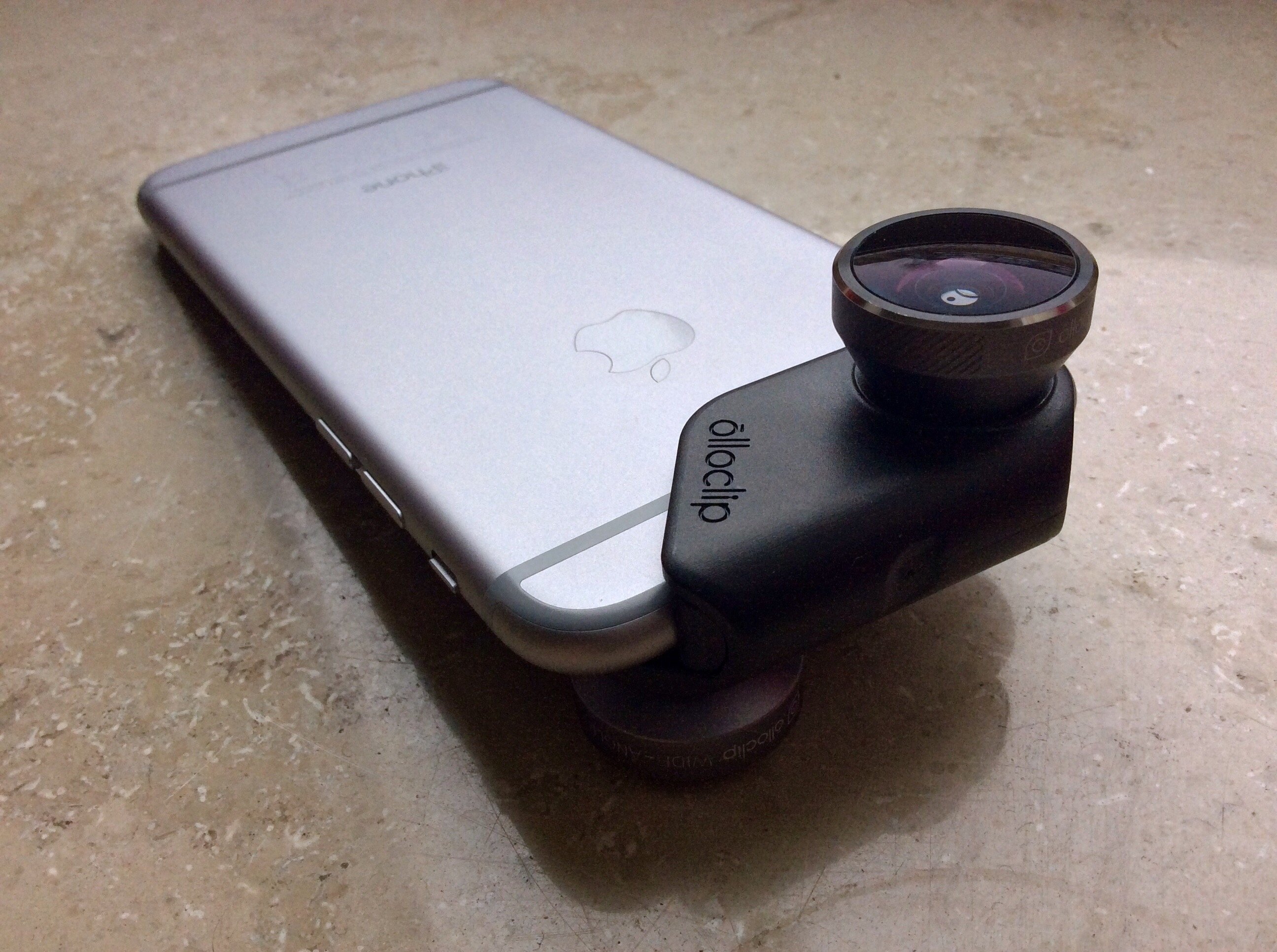
Olloclip 4-in-1 Lens for iPhone 6 Review

olloclip 4-in-1 Pocket-Sized Lens Kit for iPhone 6

For convenience and high-quality results, it was hard to beat the Olloclip accessory lenses for the iPhones 4 through 5s. The 4-in–1 model was especially good, cleaning up a lot of the optical aberrations of the earlier models.

Then came the iPhone 6, in regular and plus sizes, and your old Olloclip was suddenly useless.

The Olloclip is a widget that slides over the corner of the phone and places a wide-angle, fisheye or close-up macro lens over the iPhone’s camera. The new iPhones’ design meant that the old Olloclips wouldn’t fit. But did the folks from Olloclip just pull out a Dremel and cut a groove to let the old model slip over the new iPhone’s sticky-out lens?

Of course not. They came up with a whole new design, a design that’s bigger, but which adds support for the front selfie camera. So how does it compare?

Read more

Access Extra Content and Perks

Founded in 2015, Club MacStories has delivered exclusive content every week for nearly a decade.

What started with weekly and monthly email newsletters has blossomed into a family of memberships designed for every MacStories fan.

Learn more here and from our Club FAQs.

Club MacStories: Weekly and monthly newsletters via email and the web that are brimming with apps, tips, automation workflows, longform writing, early access to the MacStories Unwind podcast, periodic giveaways, and more;

Club MacStories+: Everything that Club MacStories offers, plus an active Discord community, advanced search and custom RSS features for exploring the Club’s entire back catalog, bonus columns, and dozens of app discounts;

Club Premier: All of the above and AppStories+, an extended version of our flagship podcast that’s delivered early, ad-free, and in high-bitrate audio.

Learn more here and from our Club FAQs.