

Old Man’s Journey by Vienna-based Broken Rules is equal parts game and story. You play as an old man who receives a letter that seems to upset him. He immediately grabs a backpack and walking stick and sets out into the countryside on a journey. Along the way, you clear a path for the traveler by manipulating the landscape to solve a series of puzzles. The puzzles aren’t difficult, but they help draw you into the beautiful interactive environment and pique your curiosity about the man’s story. Before long, I found myself completely absorbed by Old Man’s Journey.
Posts in reviews
Game Day: Old Man’s Journey

Access Extra Content and Perks
Founded in 2015, Club MacStories has delivered exclusive content every week for nearly a decade.
What started with weekly and monthly email newsletters has blossomed into a family of memberships designed for every MacStories fan.
Club MacStories: Weekly and monthly newsletters via email and the web that are brimming with apps, tips, automation workflows, longform writing, early access to the MacStories Unwind podcast, periodic giveaways, and more;
Club MacStories+: Everything that Club MacStories offers, plus an active Discord community, advanced search and custom RSS features for exploring the Club’s entire back catalog, bonus columns, and dozens of app discounts;
Club Premier: All of the above and AppStories+, an extended version of our flagship podcast that’s delivered early, ad-free, and in high-bitrate audio.
Things 3: Beauty and Delight in a Task Manager
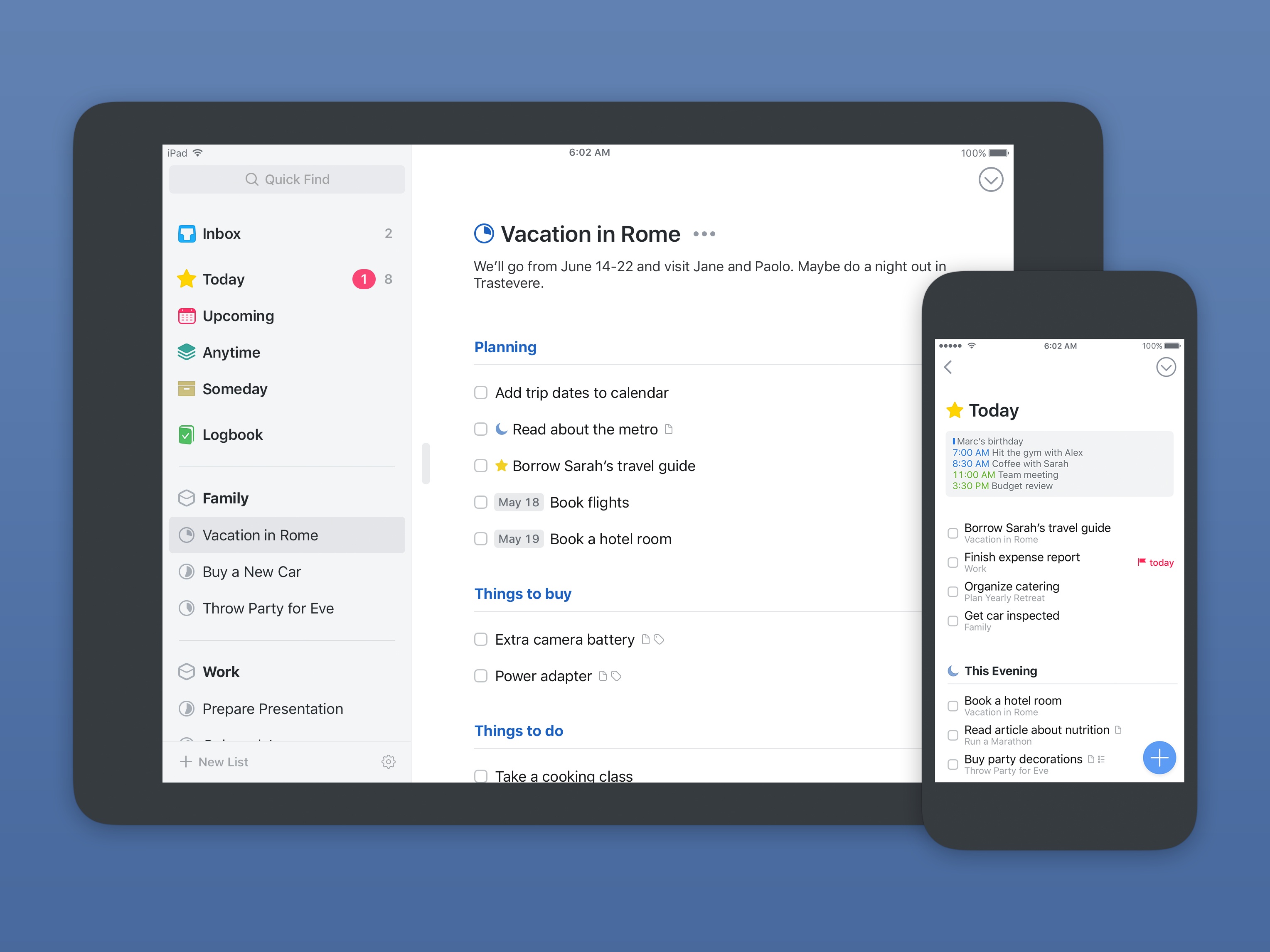
Today Cultured Code launched the long-anticipated next version of its task management app, Things, for iPhone, iPad, and Mac. Things has been one of the go-to task managers on Apple platforms since its initial release in 2008, and for good reason; the team at Cultured Code is known for the thought and care they put into their apps. For much of its life, Things has been a shining example of quality iOS and macOS development.
Over the last nine years, Things has been quick to adopt the latest OS features introduced by Apple in an effort to keep the app current; more substantial updates, however, have been few and far between. It took four years for Things 1 to give way to Things 2, and the gap between versions 2 and 3 has been even longer. Many of the once-loyal Things users have moved on to newer, more modern options for task management. But now, Things 3 has finally arrived.
Was it worth the wait?
Access Extra Content and Perks
Founded in 2015, Club MacStories has delivered exclusive content every week for nearly a decade.
What started with weekly and monthly email newsletters has blossomed into a family of memberships designed for every MacStories fan.
Club MacStories: Weekly and monthly newsletters via email and the web that are brimming with apps, tips, automation workflows, longform writing, early access to the MacStories Unwind podcast, periodic giveaways, and more;
Club MacStories+: Everything that Club MacStories offers, plus an active Discord community, advanced search and custom RSS features for exploring the Club’s entire back catalog, bonus columns, and dozens of app discounts;
Club Premier: All of the above and AppStories+, an extended version of our flagship podcast that’s delivered early, ad-free, and in high-bitrate audio.
Mitch Brings Better Twitch Viewing to the Mac
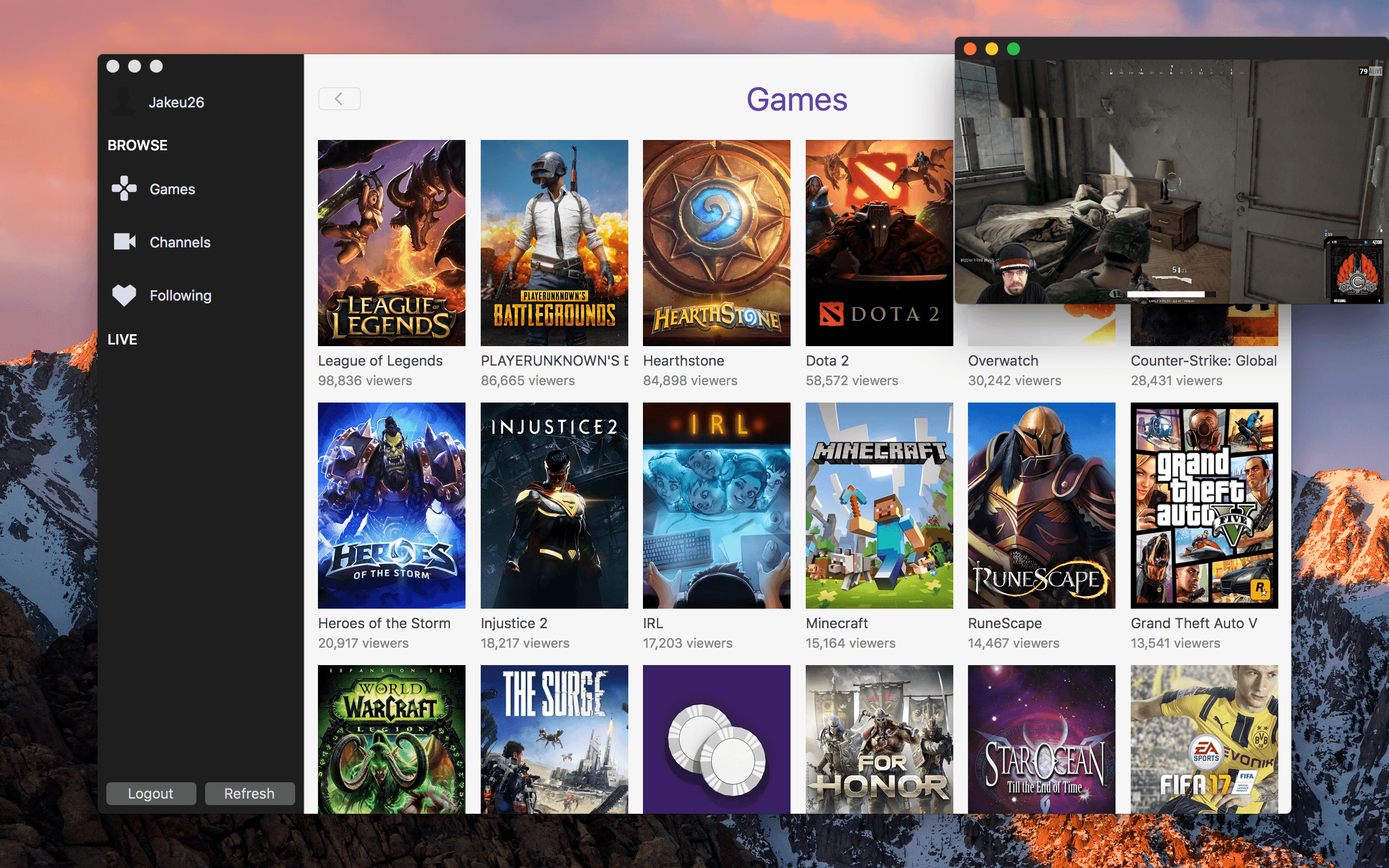
Twitch, the platform for video game live streamers and personalities, has become an integral part of my online entertainment, joining sites like Netflix, YouTube, and HBO. Just last weekend, I joined in with 70,000+ other viewers to watch Grand Finals of Super Smash Bros. Melee at Royal Flush as I streamed the tournament from my browser.
For future Twitch viewing, though, I’ll be watching in Mitch, a lightweight client for macOS that offers small but appreciated benefits over the website.
Access Extra Content and Perks
Founded in 2015, Club MacStories has delivered exclusive content every week for nearly a decade.
What started with weekly and monthly email newsletters has blossomed into a family of memberships designed for every MacStories fan.
Club MacStories: Weekly and monthly newsletters via email and the web that are brimming with apps, tips, automation workflows, longform writing, early access to the MacStories Unwind podcast, periodic giveaways, and more;
Club MacStories+: Everything that Club MacStories offers, plus an active Discord community, advanced search and custom RSS features for exploring the Club’s entire back catalog, bonus columns, and dozens of app discounts;
Club Premier: All of the above and AppStories+, an extended version of our flagship podcast that’s delivered early, ad-free, and in high-bitrate audio.
PDF Viewer Adds iCloud Drive Sync, Improved Apple Pencil Support, Document Providers and Search
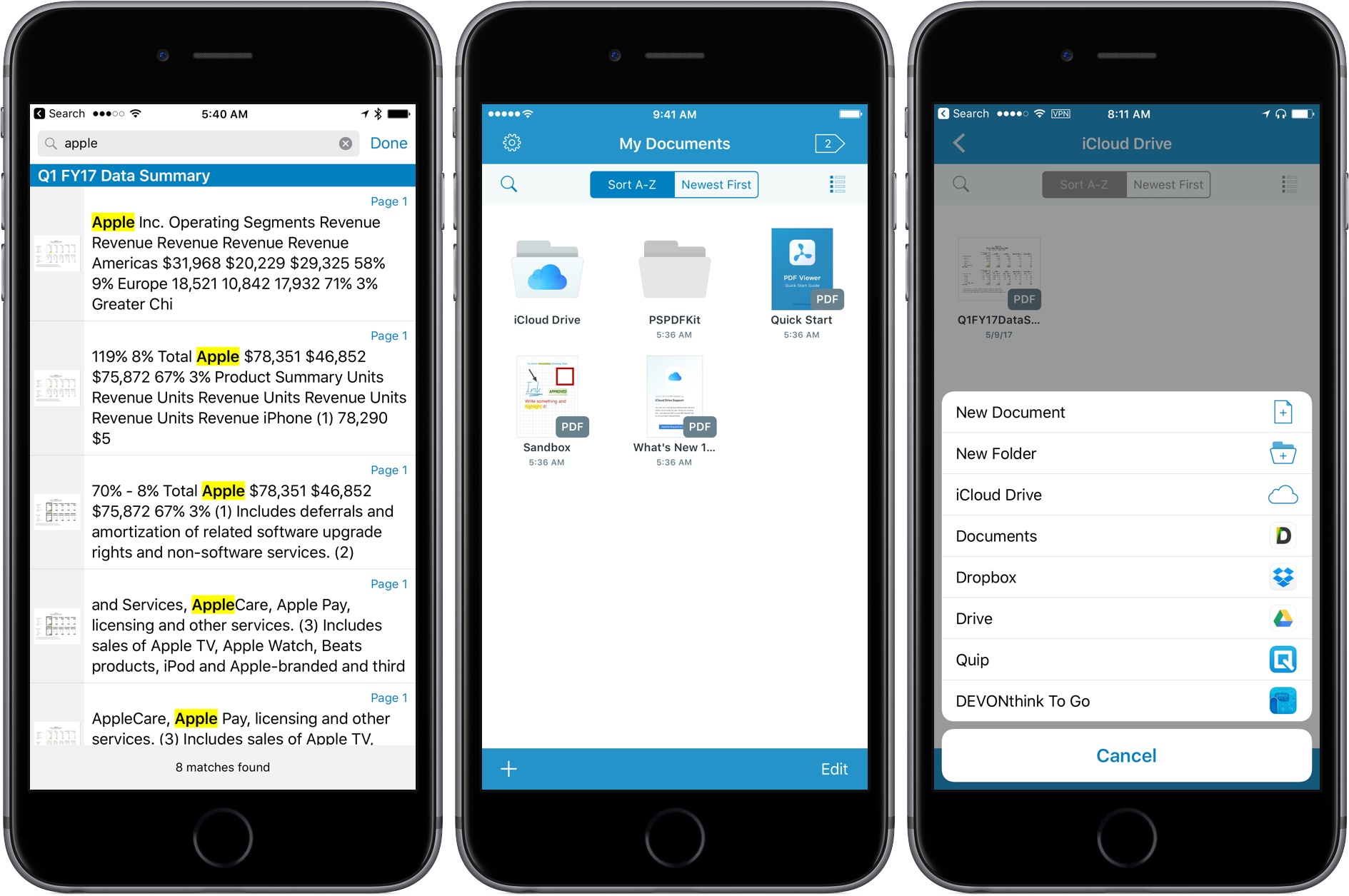
Last fall, PSPDFKit introduced PDF Viewer, a powerful, free iOS app for viewing and annotating PDFs that matched or exceeded many of the features found in paid PDF apps. Since then, the team behind PDF Viewer has rolled out a steady series updates, adding new features and refining existing ones. The latest update continues that trend with major additions that round out PDF Viewer’s feature set.
Access Extra Content and Perks
Founded in 2015, Club MacStories has delivered exclusive content every week for nearly a decade.
What started with weekly and monthly email newsletters has blossomed into a family of memberships designed for every MacStories fan.
Club MacStories: Weekly and monthly newsletters via email and the web that are brimming with apps, tips, automation workflows, longform writing, early access to the MacStories Unwind podcast, periodic giveaways, and more;
Club MacStories+: Everything that Club MacStories offers, plus an active Discord community, advanced search and custom RSS features for exploring the Club’s entire back catalog, bonus columns, and dozens of app discounts;
Club Premier: All of the above and AppStories+, an extended version of our flagship podcast that’s delivered early, ad-free, and in high-bitrate audio.
FocusList Review: A Minimalist, Pomodoro To-Do App
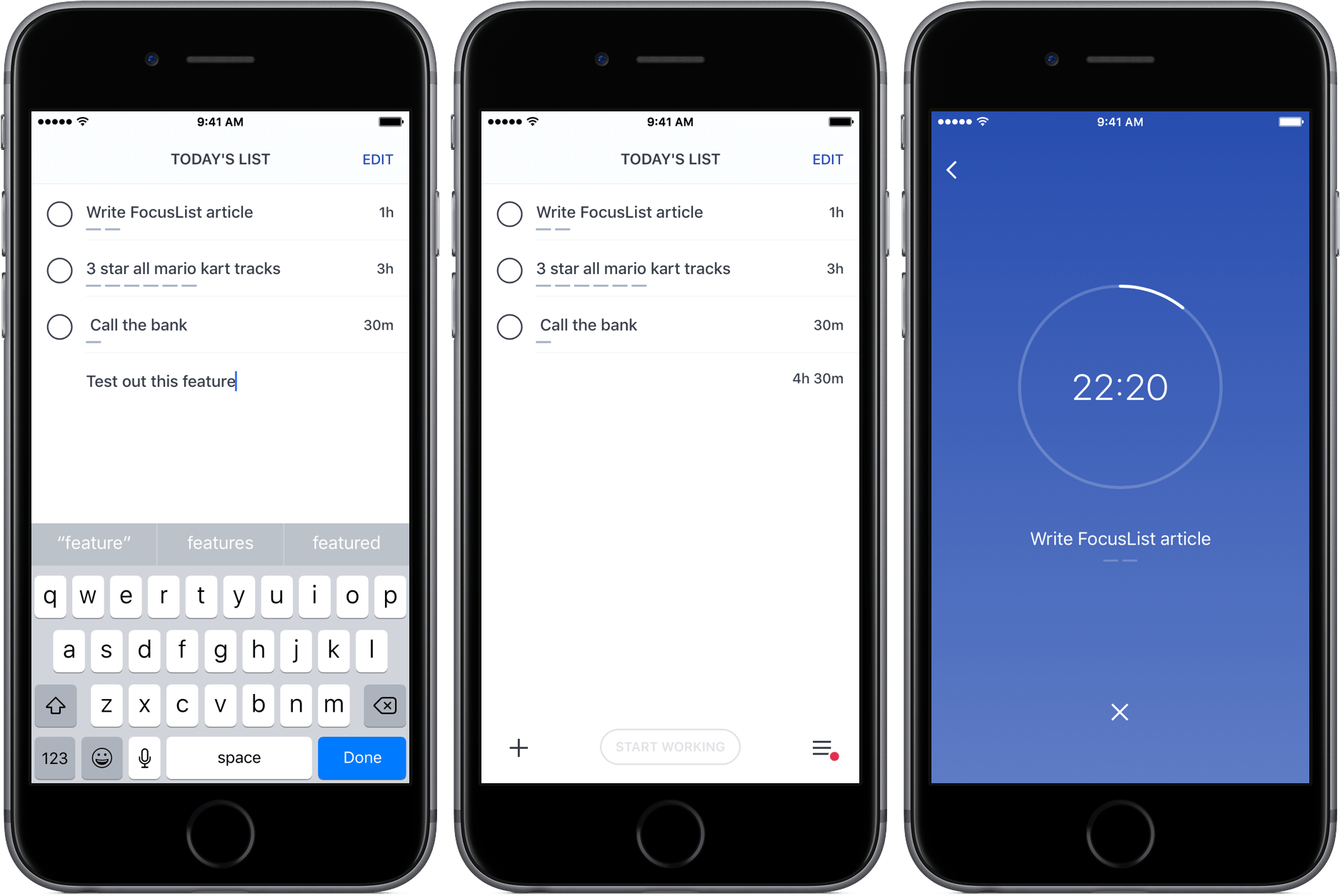
Through testing productivity apps like Doo and Time, my to-do preferences have changed; while I was once a fan of feature-rich task managers, I’ve learned to appreciate the simplicity of apps that just focus on helping me get stuff done.
FocusList is a great example of that sort of minimalism in action, an unadorned display of your tasks, their estimated completion time, and, on occasion, a timer. Its content is driven by your list of tasks, but no more – its one goal is to focus you on your work.
Access Extra Content and Perks
Founded in 2015, Club MacStories has delivered exclusive content every week for nearly a decade.
What started with weekly and monthly email newsletters has blossomed into a family of memberships designed for every MacStories fan.
Club MacStories: Weekly and monthly newsletters via email and the web that are brimming with apps, tips, automation workflows, longform writing, early access to the MacStories Unwind podcast, periodic giveaways, and more;
Club MacStories+: Everything that Club MacStories offers, plus an active Discord community, advanced search and custom RSS features for exploring the Club’s entire back catalog, bonus columns, and dozens of app discounts;
Club Premier: All of the above and AppStories+, an extended version of our flagship podcast that’s delivered early, ad-free, and in high-bitrate audio.
Oilist Review: A Painter in Your Phone
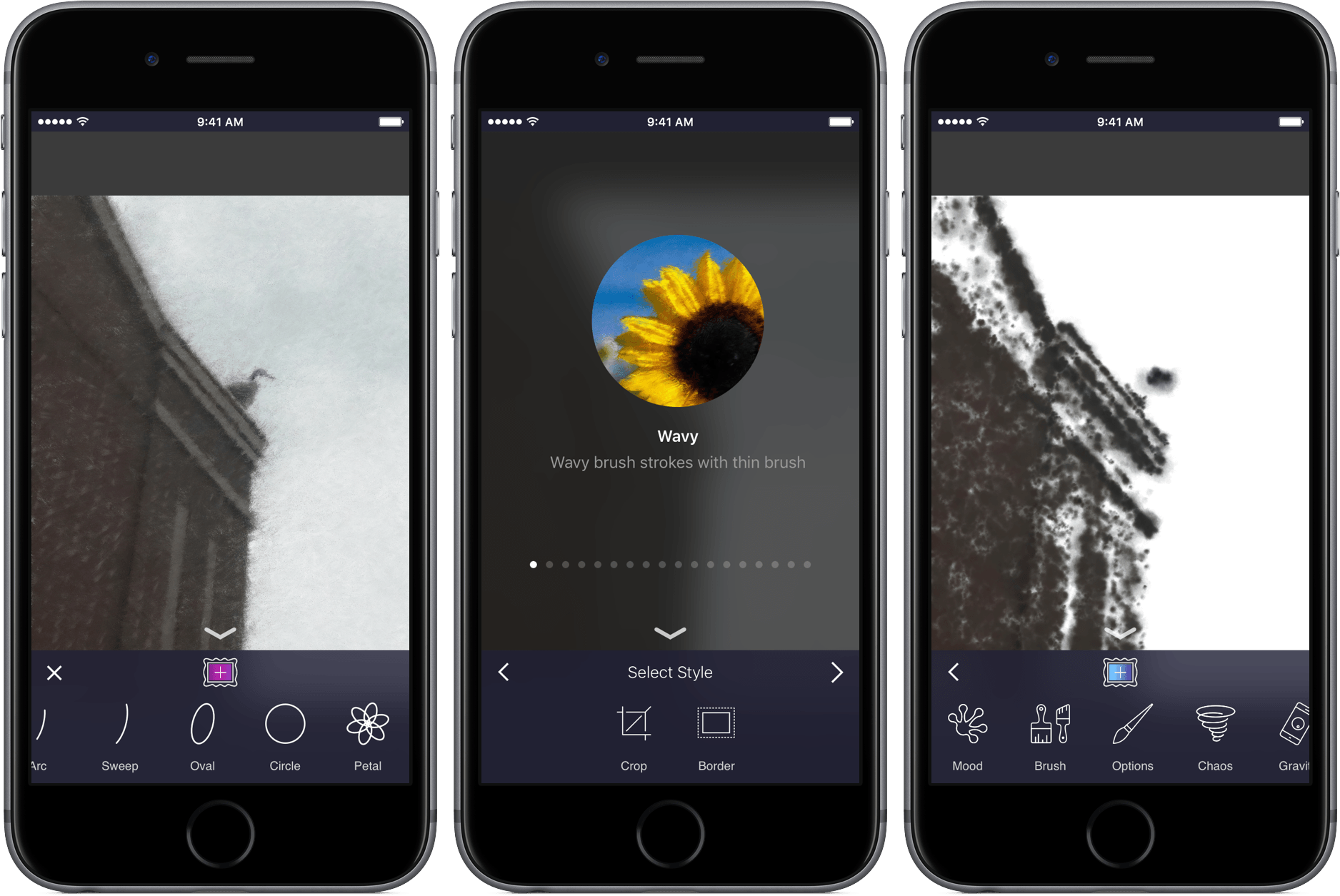
If you’ve ever been to a fair or amusement park, you’ve likely stood and watched as a caricature artist drew a goofy picture while the subject sat completely still. As the artist’s hand glides across the page, you begin to see the bigger picture, and watch the artist’s style come to life in the form of a cartoonized version of a stranger. When the drawing is finished, the final product is not only a representation of the subject itself, but also one of the creator’s personality.
Oilist is an artist in your phone, one that you watch sketch, paint, and craft a unique version of a photo you’ve shot. The app uses AI – and your creativity – to turn pictures into works of art. Through creating with its own personality, you’ll get a new take on your old images in a fun and original way.
Access Extra Content and Perks
Founded in 2015, Club MacStories has delivered exclusive content every week for nearly a decade.
What started with weekly and monthly email newsletters has blossomed into a family of memberships designed for every MacStories fan.
Club MacStories: Weekly and monthly newsletters via email and the web that are brimming with apps, tips, automation workflows, longform writing, early access to the MacStories Unwind podcast, periodic giveaways, and more;
Club MacStories+: Everything that Club MacStories offers, plus an active Discord community, advanced search and custom RSS features for exploring the Club’s entire back catalog, bonus columns, and dozens of app discounts;
Club Premier: All of the above and AppStories+, an extended version of our flagship podcast that’s delivered early, ad-free, and in high-bitrate audio.
Game Day: A.S.I.
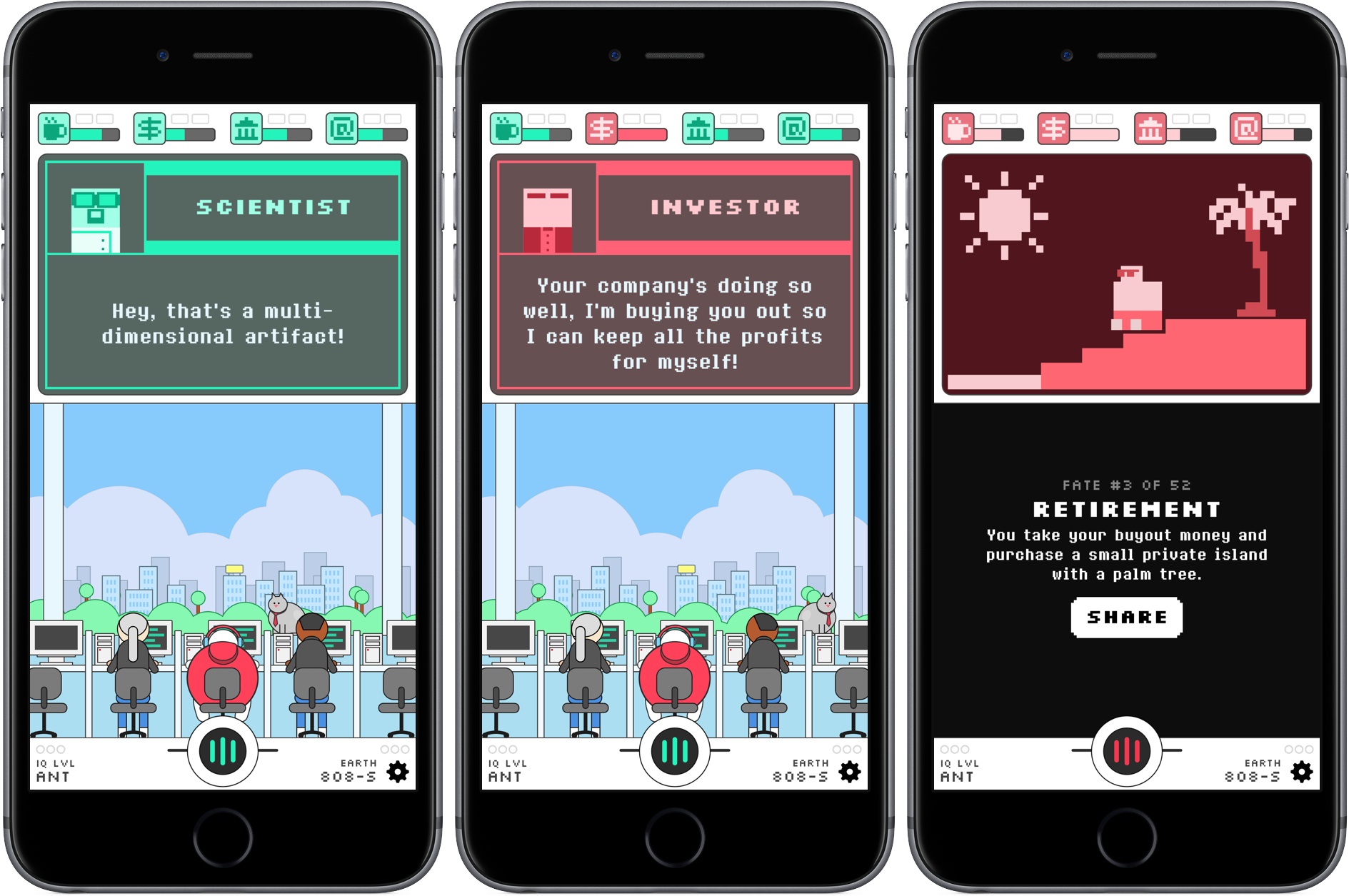
Brian Mueller’s CARROT series of apps serve up healthy doses of snark along with the weather, fitness, tasks, and alarms. It’s a style that is immediately recognizable and adds an element of humor and fun that give his apps personality. That unexpected game-like quality, combined with utility and productivity apps, is what makes Mueller’s apps stand out from the crowd. Watching the family of CARROT apps grow over the years, it’s not surprising at all that Mueller has taken what feels like the next logical step and made an iOS game. A.S.I. brings CARROT, the star in his apps, to life in a sprawling and fun sci-fi sendup of artificial intelligence and tech culture.
Access Extra Content and Perks
Founded in 2015, Club MacStories has delivered exclusive content every week for nearly a decade.
What started with weekly and monthly email newsletters has blossomed into a family of memberships designed for every MacStories fan.
Club MacStories: Weekly and monthly newsletters via email and the web that are brimming with apps, tips, automation workflows, longform writing, early access to the MacStories Unwind podcast, periodic giveaways, and more;
Club MacStories+: Everything that Club MacStories offers, plus an active Discord community, advanced search and custom RSS features for exploring the Club’s entire back catalog, bonus columns, and dozens of app discounts;
Club Premier: All of the above and AppStories+, an extended version of our flagship podcast that’s delivered early, ad-free, and in high-bitrate audio.
PDF Expert 6 Adds Powerful Editing Tools and More
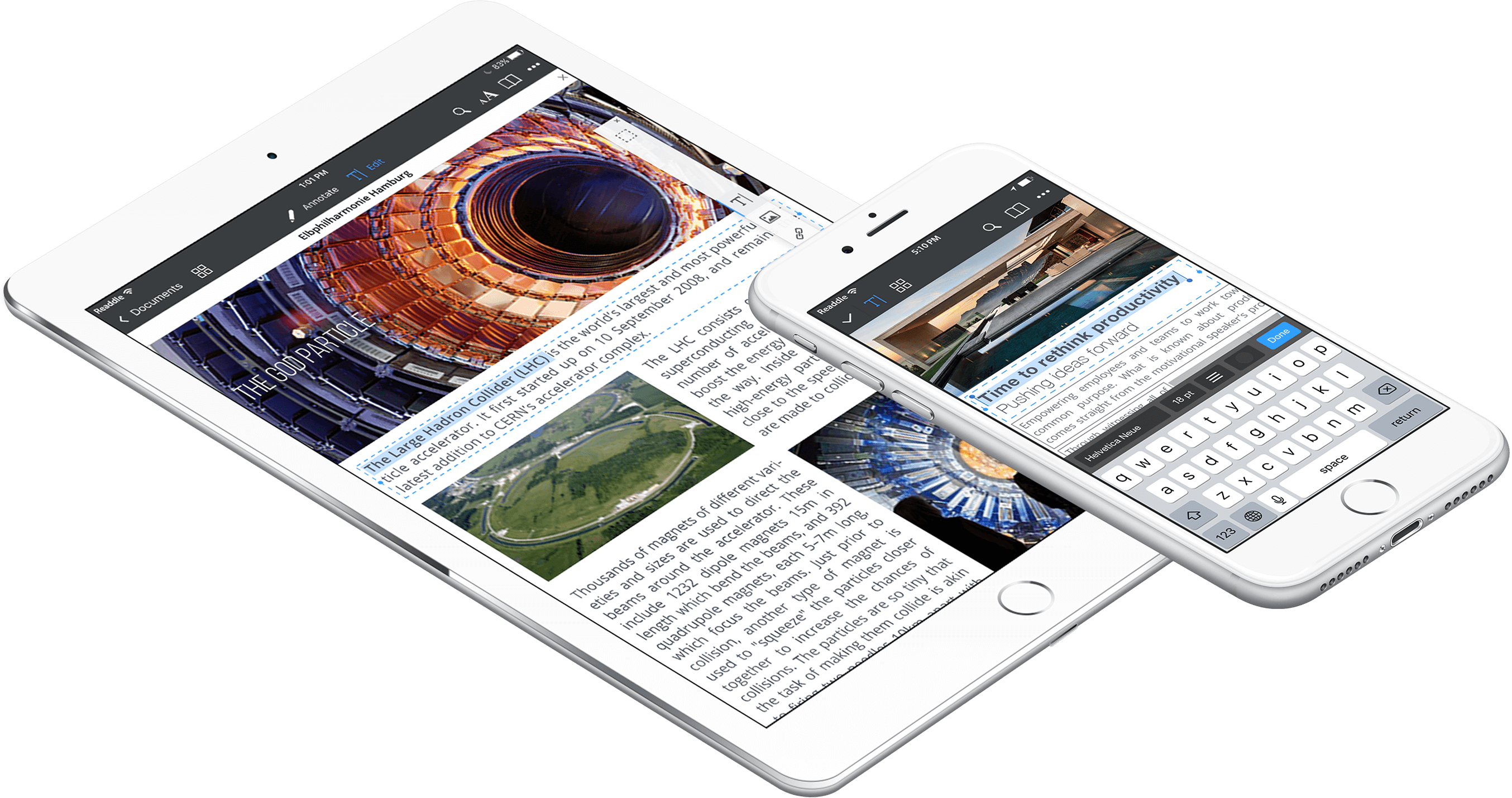
Readdle released a major update to PDF Expert today. Version 6 incorporates powerful PDF editing tools, in-place cloud-based editing and annotation, document-level assignment of passwords, and more. PDF Expert was already one of the premier PDF apps on iOS, but free alternatives have given it a run for its money recently. The new features in PDF Expert 6 should help maintain its status as a favorite for many PDF power users.
Access Extra Content and Perks
Founded in 2015, Club MacStories has delivered exclusive content every week for nearly a decade.
What started with weekly and monthly email newsletters has blossomed into a family of memberships designed for every MacStories fan.
Club MacStories: Weekly and monthly newsletters via email and the web that are brimming with apps, tips, automation workflows, longform writing, early access to the MacStories Unwind podcast, periodic giveaways, and more;
Club MacStories+: Everything that Club MacStories offers, plus an active Discord community, advanced search and custom RSS features for exploring the Club’s entire back catalog, bonus columns, and dozens of app discounts;
Club Premier: All of the above and AppStories+, an extended version of our flagship podcast that’s delivered early, ad-free, and in high-bitrate audio.
Timing 2 Makes Time Tracking on Your Mac a Pleasure
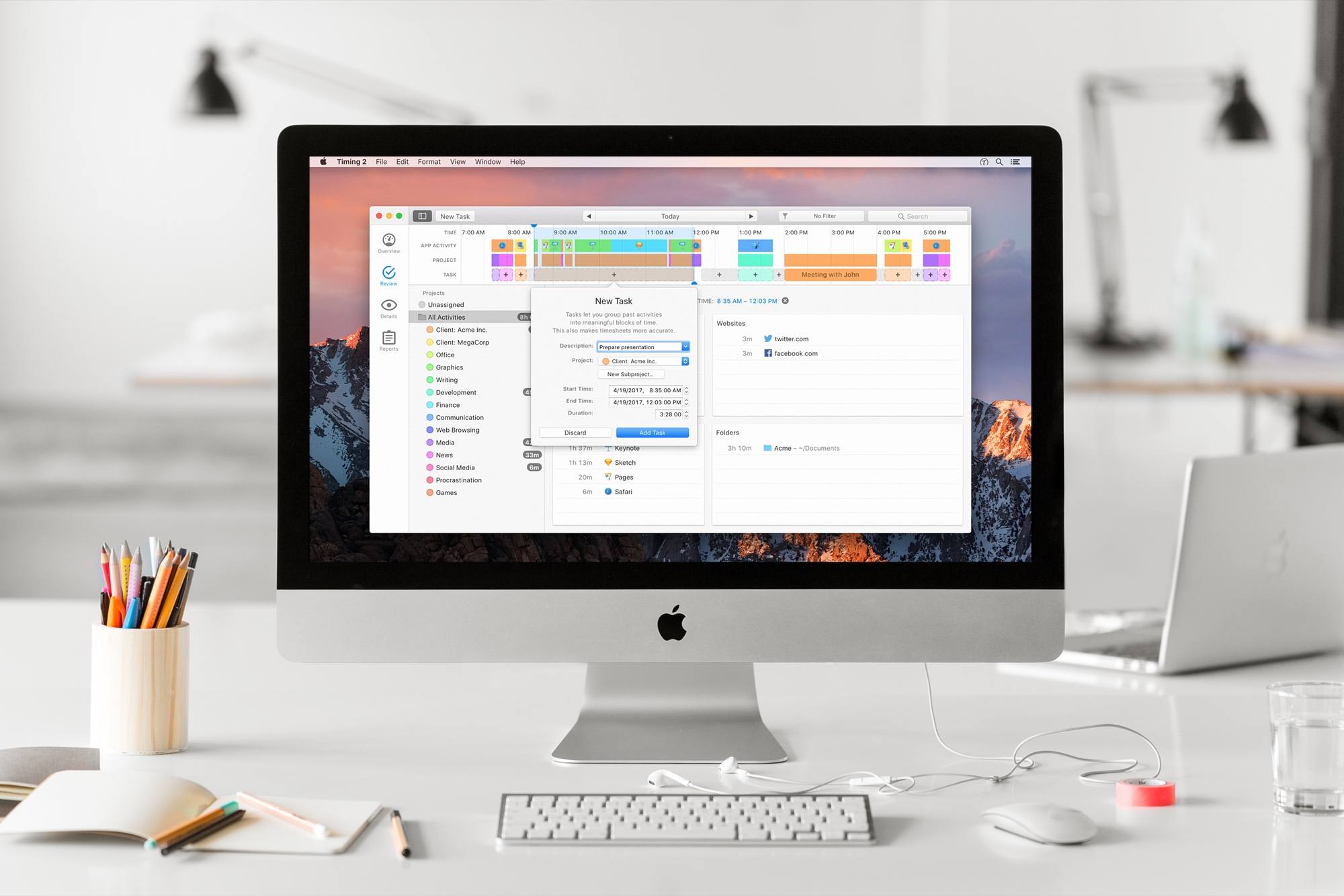
Timing 2 for Mac is out today. I’ve been a long-time user of Timing, and have had the pleasure of beta testing the new version for a while now. It’s an excellent update to a great tool.
Timing is an app that runs on your Mac and tracks everything you do. Sounds creepy at first, but the data is completely safe, and the tracking is only for your own productivity purposes (never uploaded anywhere). By helping you see how you’re spending your time, you can start to change behaviors. Plus – because it can intelligently associate activities with actual projects – it serves as a detailed work timer for your paid projects.
Timing 2 comes in three versions: Productivity ($29), Professional ($49), and Expert ($79). No recurring payments needed, you own the app and you own your data. Some of the features I’ll be talking about are from the Expert version, so be sure to check the feature list before you purchase one of the other versions.
Timing tracks more than just what app you’re using. It will record what websites you visit, what documents you open, what folders you work in, and every way you spend time on your Mac. You can even add in notes about what you did while you were away from your Mac.
Timing 2 does a brilliant job of grouping tasks together and automatically assigning “keywords” to add new tasks to groups. You can also assign tracked tasks to projects, and do fine-grained editing on the criteria Timing uses to determine the purpose of the time it tracked.
Keywords and manual assignment of activities can be grouped into categories such as “Research” or “Podcasting.” As a result, you can easily see what activities you spent the most time on – and possibly realize that you’re not focusing on what you thought you were.
Timing also provides automatic suggestions for blocks of time that might belong together. It makes it easy to group activities and reap the benefits of manual time tracking with the ease of automation.
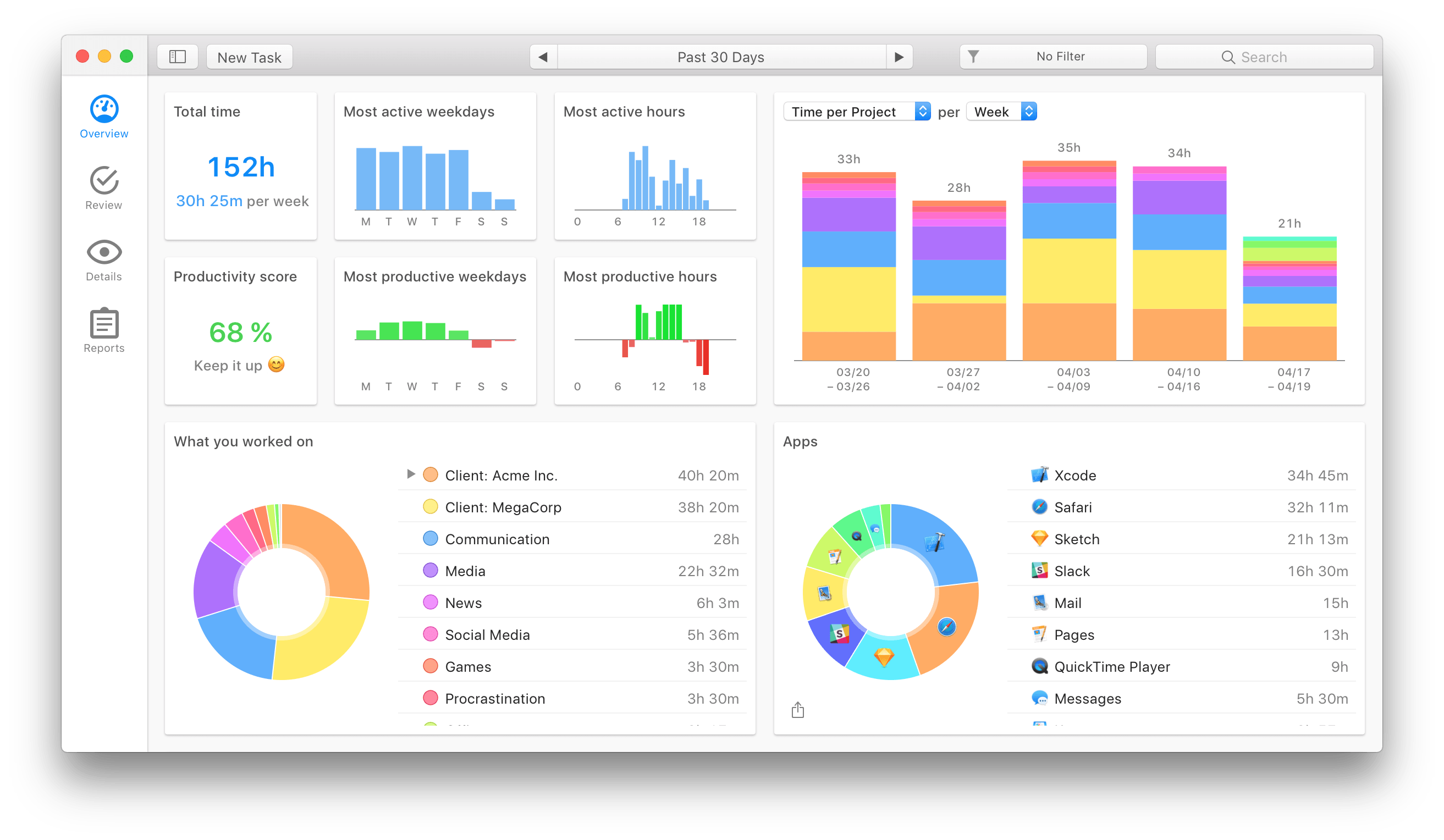
Then you get the reports. Timing 2 has truly upped its game in the data visualization section. Beautiful and useful graphs showing your most active times, most productive times, the type of work you spent your time on, and a pie chart of your most-used apps. Keep in mind that all of this is gathered automatically – you don’t have to configure anything to start getting detailed overviews.
When you edit a task, you can even assign a productivity rating to it. For me, an app like VLC gets a 25% productivity rating. A quarter of the time it’s active I’m watching something educational, but 75% of the time is probably less than productive. Now when I get reports, time tracked in VLC can automatically contribute to my overall productivity rating without unduly distorting it, and without me having to go in and manually mark each video as “productive” or “not.”
Timing 2 is the result of a solid year of development by Daniel Alm, who left his job at Google to work full time on it. In the process he’s turned a useful tool into an indispensable one for freelancers and productivity nerds. If that sounds interesting, go check it out!
Access Extra Content and Perks
Founded in 2015, Club MacStories has delivered exclusive content every week for nearly a decade.
What started with weekly and monthly email newsletters has blossomed into a family of memberships designed for every MacStories fan.
Club MacStories: Weekly and monthly newsletters via email and the web that are brimming with apps, tips, automation workflows, longform writing, early access to the MacStories Unwind podcast, periodic giveaways, and more;
Club MacStories+: Everything that Club MacStories offers, plus an active Discord community, advanced search and custom RSS features for exploring the Club’s entire back catalog, bonus columns, and dozens of app discounts;
Club Premier: All of the above and AppStories+, an extended version of our flagship podcast that’s delivered early, ad-free, and in high-bitrate audio.