


Growing up, I was a subscriber of Nintendo Power and the later (manlier) Game Informer as I grew into my predestined Xbox phase. High school was great for zombie killing, but between college and MacStories I’ve little time to play or let alone get a heads up about the latest upcoming games. Gamerami is a mobile news stand that makes sifting through the latest titles easy and rather painless, and it just might save your butt when you’re on the spot. At least now I don’t look like a total nobody when I’m asked what cool & new games are coming out on the PS3.
Posts in reviews
Gamerami Serves News, Upcoming Game Info On Demand
Duplifinder Eradicates iPhoto Doubles, Saves HDD Space
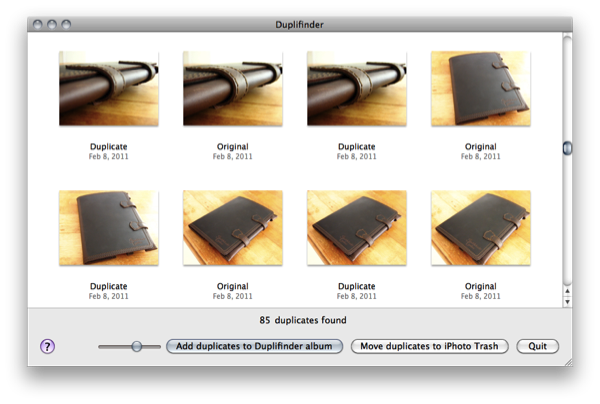
If you’re as fumbly with the camera as I am, you might download several of the same images to iPhoto over and over again before finally deleting them off your camera. Thankfully you don’t have to delete whole albums to remove those well hidden duplicates: you can simply run Duplifinder from Haystack Software. Duplifinder runs as its own app, closing and launching iPhoto when it’s necessary to accomplish one of its two tasks. Firstly, Duplifinder will scan your iPhoto library before presenting you with the option to dump duplicates into their own folder, or deleting them via iPhoto’s trash. You’re shown both the original and duplicate images before you commit to any rash decisions (extras of those ex-girlfriend photos are handy to have on hand), and you can bet you’ll use the software often if you’re taking photos all day long.
The app is only $7, and works with iPhoto ‘08, ‘09, and ‘11.
MacStories Product Review: AViiQ Portable Laptop Stand

The big bulky laptop stands of yesteryear have gone the way of the dinosaur. Forget about fans, large plastic shells, or sometimes gimmicky USB connections. Laptop stands need to be simple and portable, rethinking what we traditionally think of as once shelf-worthy home and messenger-bag solutions. You should not be compromised by the tools you carry, and if you ask AViiQ, the solution needs to be lightweight and reconfigurable.
Quick Weather with QuickWeather

I love watching the weather and enjoy checking extended forecasts via my iPhone. The weather category in the App Store is flooded with sub-par apps with horrible UIs. Even some of the more popular ones look like they are being neglected in the pixel department. There are some great weather apps there but this review is only about one, a newcomer to the App Store, QuickWeather.
Although I like weather data, sometimes I want a simple weather reading that gives me some visual stimulation, not just numbers. If my hometown weather isn’t the best, I usually check Destin, Florida, where it’s always sunny and where my family goes once a year. QuickWeather, by App Jon, simply does this; it’s a beautiful app that makes it easy to quickly access weather anywhere in the world. Read more
Dayboard: Animated Clock, Weather and Twitter Widget for iPad

Dayboard by Blend is a beautiful and, at the same time, interesting application for all those who prefer to keep their iPads on the desk as a clock widget / second monitor while they’re working. The app, sold at $0.99 in the App Store, combines a minimal, elegant and sexy design with clock, weather, calendar and Twitter widgets displayed on screen at the same time.
Dayboard provides all kinds of information without being just a flip clock – like many other apps in the App Store. Upon launch you’ll be asked to grant location access to the app, and I’ve noticed Dayboard reliably and correctly fetches my current location – which, for some reason, has been kind of a problem with several apps lately. Together with location and weather info, Dayboard displays time and date. On top of the animated flip clock, there’s a button to switch from dark theme to light theme. Last, a widget at the bottom rotates Twitter trends – and you can even pick local trends for your country or stick with the worldwide ones. You can’t tap on them to load Twitter in Safari, but the animation is pretty cool.
Dayboard is available at $0.99 in the App Store. Give it a try if you’re looking for a great addition to your desk.
MacStories Product Review: Saddleback Leather iPad Case

The iPad case market is full of cheap faux leather folio stands, plastic shells, and silicone grips that don’t quite do the beauty of the iPad justice. Face it: you want to spend your money on a case that’s going to last you a lifetime whether or not your iPad itself is going to last that long. You want a case that’s strong, hardy, and reflects the personality of its proud owner. If you’ve never heard of American bred Saddleback Leather, then you wouldn’t know about their range of real leather laptop bags, backpacks, and iPad cases. It’s probably the finest case I’ve handled to date, and I think you’ll fall in love with it too after reading this review.
Radiant For Mac: Destroying Space Invaders In 1080p

Radiant takes arms in the Mac App Store as an iOS title with 8 bit roots in the classic Space Invaders. An an earth pilot, your mission is to obliterate the alien nemesis, advancing through reconfiguring waves of enemies. While you might have a hankering to blast those evil space aliens into an 8 bit grave, how well does an iOS title scale to the desktop?
MacStories Product Review: iSkin Duo For iPad

We certainly read about a lot of folio style cases, but I’ve longed for a good scuba-suit that gives my iPad the extra grip and texture I need for a comfortable reading experience and not a bulky one. The iSkin Duo is a fit silicone case that snuggly fits your iPad like Under Armour to prevent moisture and protect your iPad from the nicks and dings of daily life. Is the iSkin Duo just what you’re looking for in an iPad case? Read on to find out!
Tap-Translate Does Inline Mobile Safari Translations
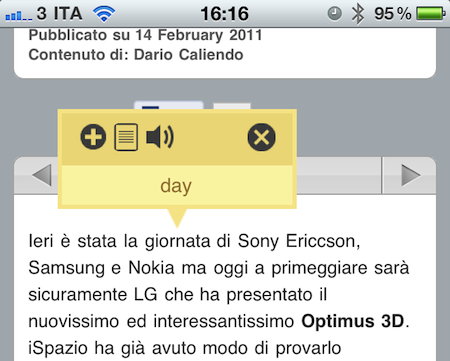
Tap-Translate, a $1.99 universal app by developer Ronen Drihem, brings an interesting approach to translations on iOS, and more specifically in Mobile Safari. Tap-Translate, in fact, isn’t exactly an “app”: it’s an app whose only function is to let you install a bookmarklet in Safari that will let you tap on a word on any webpage to get an instant translation inside a cute yellow popup menu.
It works like this: once you’ve followed the steps provided by the app to install the bookmarklet (which allows you to choose from a variety of languages), you’ll find the bookmarklet in Mobile Safari (works on any iOS device, but I’ve also tested it in Chrome and Safari on the desktop) ready to give you inline translations on tap. The translation’s popup allows you to “speak” a selected word, or jump directly to the Google Translation page. Tap-Translate can also do entire paragraphs, and be dismissed at any time. It’s fast, easy to use and convenient.
At $1.99 you could argue you’re spending money to install a bookmarklet. The thing is, Tap-Translate works really well and, most of all, it’s integrated with Safari and it’s unobtrusive. Recommended.