

You shouldn’t have to sacrifice the lack of a power outlet when you’re traveling, and I’m betting your iPhone’s GPS is quickly draining that once long-lasting battery. Whether it be for in-car navigation, the passenger playing a game, or those movie watching kids in the back seat, you’ll need a good plan in place to keep those iDevices juiced throughout your trip. A good ol’ fashioned car charger should do the trick.
Posts in reviews
MacStories Product Review: XtremeMac InCharge Auto For iPad
PhotoSync Enables iOS-to-iOS, iOS-to-Computer Photo and Video Sharing
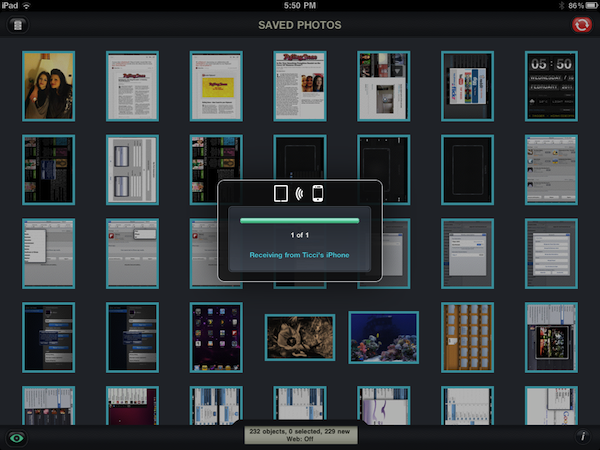
PhotoSync, a universal $1.99 app available in the App Store, has quickly become one of my favorite tools to enhance my iOS devices’ photo and video sharing capabilities. The app, which requires a free Mac companion software to be installed from the developers’ website, allows you to share photos and videos from your iPhone and iPad libraries between computers and other iOS devices running the app. PhotoSync can send multiple photos at once or sync entire libraries with iPhones, iPads and iPod touches, as well as PCs and Macs. Read more
WiFi2HiFi Makes Streaming Music From Your Computer to a HiFi Easy

Just released today is WiFi2HiFi, a new iPhone and iPod Touch app that effectively allows you to use your device to stream audio from your computer to an iPod dock, stereo system or anything else that can connect to the 3.5mm jack or the 30-pin port. It virtually emulates the AirPort Express feature of streaming audio from a computer to connected sound system, but how well does it work? I was given a pre-release build to review and a review follows the break.
MacStories Product Review: iKit Exec Case For iPad

Any product shouldn’t go completely exposed if you care about keeping your devices in their best condition, though the baggage of a flip-style case or ‘tuff wrap can be unfulfilling for those picky few. If you have an eye for style and a need to stay fit & slim, iKit’s Exec iPad Case will smoothly slip onto your iPad for a brand new finish.
PDF Hero Combines Images, PDF Documents

Available as a limited time offer at $0.99 in the Mac App Store, PDF Hero is a Mac app to combine images and PDF files into a single document you can consequently export as PDF from within the app.
The concept is simple: PDF Hero acts as a “bucket” where you can drop multiple images and PDF files at once. With these files, the app will create a single document where each page contains the files you attached. It should come in handy for those who daily manage dozens of PDFs and find themselves constantly forwarding them to their colleagues or clients, or users who do a lot of image -> PDF converting. In this way, with just a drag & drop, you can create a single document containing everything you need. Please note that the current version of PDF Hero only supports PDFs and images – sadly, .txt or .rtf files won’t be attached. But there is a nice trick I noticed (fluid animations when flicking through attached files aside), and it’s the possibility to keep attaching files to an existing set without having to start over (see screenshot above).
That said, PDF Hero won’t get you to the top of PDF editing and management, but it’s a cool utility to merge images and other documents in seconds. Give it a try.
Store News Is The Easiest Way To Find Mac App Store Deals

If you’re not a regular #MacStoriesDeals reader (you should be), here’s a nice Mac app that will help you find the best offers available in the Mac App Store. Store News, a free app available here, allows you to check for deals of free and paid apps in a simple to use interface that brings offers and price drops to the desktop.
The app doesn’t seem to rely on the usual AppShopper infrastructure (the one we love and rely on to curate our daily deals section), instead it aggregates what are considered the best offers from the developers. The app is streamlined and comes with three tabs in the top toolbar to switch between all apps, the ones available for free and paid apps. A blue button similar to the Mac App Store “Buy” one will open a new tab in your web browser, allowing you to launch the Mac App Store and download what you want. Store News also displays previous price before the price drop and a percentage of how much you’re going to save with each deal.
Store News is a pretty good way to stay up to date with offers in the Mac App Store. Combined with AppShopper and our Deals posts, it’ll help you achieve the ultimate deals hunter setup on your Mac. Go download it here.
MacStories Product Review: XtremeMac Play-Through Sleeve

“Protection Transparente.” Two words couldn’t more boldly describe the hybrid case + sleeve XtremeMac is hoping to find the niche market for. An iPad sleeve is an iPad companion for those who want the protection of case, but still appreciate the naked qualities of aluminum when in use. A middle ground was met somewhere as a plastic shield was added to reveal the iPad’s display, yet the full body coverage of neoprene padding couldn’t quite constitute a case. Today, we look at the weird offspring dubbed the Play-Through Sleeve.
MacStories Product Review: Just Mobile UpStand for iPad

There are hundreds of iPad stands available on the market, but until a few weeks ago none of them managed to stay on my desk for more than two days. Not even Apple’s own dock for iPad, which is a $29 tiny piece of plastic that could work as a stand to hold the iPad upright, but only works in portrait mode. In the past three weeks, however, I’ve been using the Just Mobile UpStand for iPad and haven’t really looked back to find another solution.
The UpStand is an elegant and simple product to hold your iPad in landscape and portrait modes – there’s not really much else to say about it, but read along past the break to see why I decided to use the UpStand as my iPad stand of choice. Read more
A Must-Have Mac Utility: App Tamer
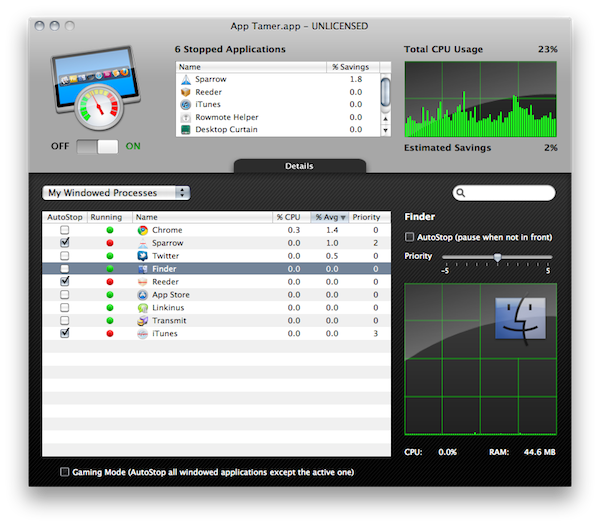
Over the past weeks, I’ve noticed my MacBook Pro (unibody late 2008) has started feeling the weight of the years of intensive usage. I replaced my internal hard drive with an SSD last year, and while overall performances have increased (especially when open and closing applications or large files) clearly the computer’s fans aren’t the same anymore. I might hold to buy a new computer until this one really dies, but in the meantime I’ve begun looking out for some utilities that could help me better manage the software running on my Mac all the time. Read more