This Week's Sponsor:

Inoreader

Build your own newsfeed and cut through the noise


Posts in news

Fruit Ninja Lite, N.O.V.A. 2 for iPad Now Available

Together with an update to Infinity Blade, two other popular games for iPhone and iPad were updated last night. First off, Gameloft finally released an iPad version of N.O.V.A. 2, which as you can guess is simply called N.O.V.A. 2 HD. The app isn’t universal, but at least it’s sold at the same price of the iPhone counterpart. The features are the same (improved graphics, new weapons, better AI, new multiplayer mode) and the game, like the first N.O.V.A., is “just” bigger on the iPad.

Your call if that’s a good thing or not – I personally can’t play first-person shooters on the iPad so well.

Also, Halfbrick Studios released Fruit Ninja Lite for iPhone and iPad (Fruit Ninja HD Lite), two free samples of the smashing mobile hits. The “lite” versions offer most of the game modes of the paid apps, but come with limitations (for example, only a few achievements) so you can try before you buy.

Check out Fruit Ninja Lite and other discounted Halfbrick Studios on the team’s App Store page.


TomTom Updated To Include Map Share: Don’t Get Lost Again

You’re casually driving in your pink tank when your TomTom alerts you with a Map Share update. “Warning! Landmines ahead!” Thank god for your iPhone, because you’ve just potentially avoided both disaster and what would eventually end up being the day’s longest traffic jam. With TomTom’s latest update, you can avoid this and other manmade disasters thanks to other drives like you who just want to get to work without being bothered by road construction, falling bridges, or meteor showers. TomTom figures they can’t possibly update the entire landmass of the United States everyday, so you have the opportunity to trust your fellow drivers to update the map and point you in the right direction. If we’re cynical, we might just direct you into a gigantic lake for lols all around, but hopefully those that paid the premium for satellite driven directions won’t be spreading any sort of misinformation. With new roads being added each day, visiting that town in Pennsylvania won’t leave you dazed and confused.

On sale for $40.00, everything from traffic jams to instant route changes can be delivered to your iPhone for the comfort of knowing you can drive safely.


Textie Hits 1.1, Now For Both iPhone & iPad

One my favorite text messaging solutions on the iPod touch is Textie, and it’s just hit version 1.1. Bringing a myriad of customization features such as custom chat bubbles and font sizes, photo previews, and the ability to see which of your friends have Textie, free text messaging is getting a much needed facelift. Not on a phone? Textie now allows you to initialize Facetime, perfect for folks like me who opt for the free-model of an iPod touch communication device. It really is an excellent companion for the Facetime icon on your homescreen, and you can download the latest version in the iTunes app store right now.


Erica Sadun Releases AirFlick for OS X: AirPlay Just About Anything

Wouldn’t your new Apple TV be much more enjoyable if you could beam Internet videos to it? One of our favorite fangirls over at TUAW, Erica Sadun, has just announced AirFlick (an alpha build) for OS X. Having previously released the awesome and MacStories approved AirPlayer (which allows you to play AirPlay content on your Mac), AirFlick allows  you to drop files and URLs to play the content on your ATV 2. Can you say, “awesome!?” We’ll have an in depth review of AirFlick later, but in the meantime you can read the full release notes and download the application over at TUAW. You can also follow Erica on Twitter @ericasadun, where you may find recent tweets related to the progress of AirFlick and her related AirPlay hacks. Be sure to send her a warm thanks for all of her hard work!


Screens 1.1 Available: More Gestures, Better SSH, Bug Fixes

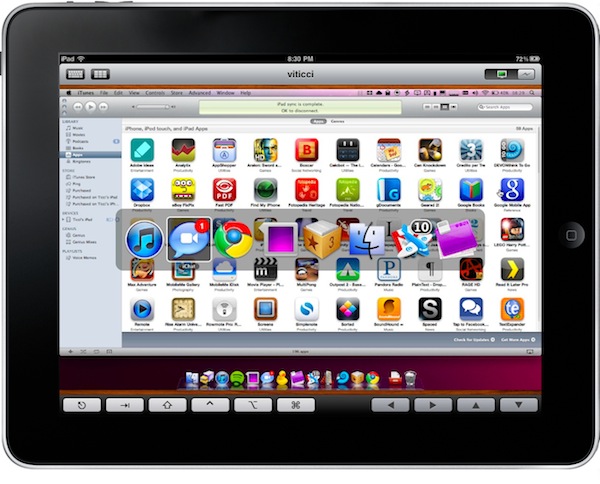
Edovia released Screens for iPhone and iPad last week, and it quickly became thousands of people’s new favorite VNC client for iOS. The app makes it easy to access a computer remotely and actually use it on the iPhone or iPad thanks to the support for multi-touch. No mouse cursors to move, you just touch the windows. Also, Edovia’s Screens Connect feature is simply great to log in a computer while on the go with a 3G connection. Tested last week and it was perfect.

Screens was updated a few minutes ago, and this 1.1 version brings a lot of improvements, new features and bug fixes to make the app even better. Screens now supports customizable 3-finger gestures to map to any action you want and lets you launch the Mac’s app switcher with a 4-finger gesture. Edovia improved SSH in the app, which now allows for an address for the SSH tunnel, lets you customize the port and also doesn’t force you to activate SSH tunneling when connecting to a computer on a local network.

The list of changes and bug fixes is huge, so check it out below. Support for more gestures single-handedly makes this update worth it, so go buy the app at $14.99 now if you still haven’t. Screens is the best VNC client for iOS, hands down. Read more


OpenDNS May Slow Down Your Apple TV Streaming

I noticed this issue last week and I thought it was, once again, my ISP’s fault. The Vodafone Station connection I have here doesn’t exactly play well with…anything. Basically, I tried to set up the device using OpenDNS and I saw streaming speed of iTunes content go terribly down – even lower than what I’m used to with the Vodafone Station. It turns out, though, that it might not be Vodafone’s fault at all this time. Instead, it appears that the Apple TV doesn’t play nice with third-party DNS providers such as Google’s DNS or OpenDNS.

According to TUAW, developer Joe Maller and quite a few users on Apple’s discussion boards, setting different DNS other than your ISP’s in the Apple TV can cause iTunes to take even hours to start a streaming session. Maller’s Apple TV took 2 hours to start streaming content under a 20 Mbs connection. Read more


Au Naturale iPhone Dock

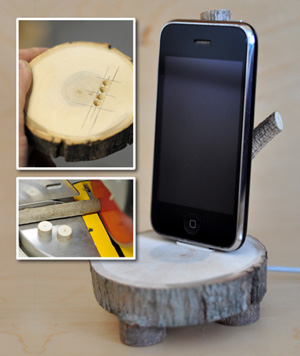
The Enchanted Woods iPhone Dock from Anthropologie is “a fun nature-meets-technology way to stand and display your iPod or iPhone.” It’s very popular but has a very high price (for what it is). Chris Gardner over at ManMade decided to make his own because at nearly $100, it’s lot to pay for something that didn’t have “speakers, a clock, or even a way to plug it into the wall.” Because it’s 100% wood and doesn’t require electricity he made a DIY instructional guide.

Garder’s version is good, if not better. As long as you have easy access to some timber and some power tools, why not make one yourself instead of forking out $100? Then you can cross ‘making something with your own hands’ off your Man Stuff To-Do list.

[via Crave]


tap tap tap Releases Voices 2, Camera+ Is Coming Back

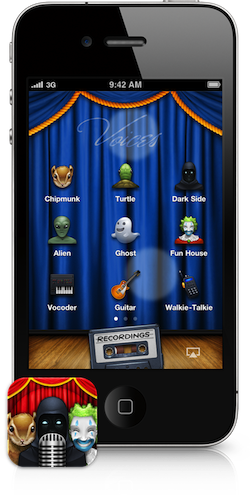
After months of silence following the removal of Camera+ from the App Store, the folks at well-known development team tap tap tap announced the released of a brand new version of Voices for iPhone, a popular app we reviewed last year that allows you apply cool effect to your voice using the device’s mic.

Together with the release of Voices 2, tap tap tap has confirmed Camera+ isn’t dead, they have a new version “in review” at Apple’s App Review Team and it should go live in the App Store any day now. They call the new Camera+ “their biggest update yet”. I’m kind of intrigued.

As for Voices 2, the developers have added Retina graphics for the iPhone 4 and iPod touch 4th gen, the possibility to edit recordings by choosing different effects, 9 new effects, AirPlay support. The new effects include stuff like “computer” (nice Macintosh in there!), “walkie-talkie” and “underwater”. I’m pretty sure the app will turn out to be the perfect prank maker this holiday season, especially with AirPlay support that will let me record creepy messages and send them through the house on Christmas day.

Voices 2 is a free update for existing users and you can check out the new effect by visiting this link, where the devs have set up a demo section to test the new features. You can buy Voices 2 for $0.99 in the App Store.

That said, while Voices 2 “sounds” like a great update, I’m looking forward to seeing the new Camera+ now. I loved the app, one day it was there and then it was gone. I used it on a daily basis, then the iOS updates Apple release made it unusable. Hopefully, Camera+ will be released before Thursday.