This Week's Sponsor:

HomeSnap

A Private, Read-Only Window Into Your HomeKit Home


Posts in news

Vodafone Issues Carrier Update and (Finally) Activates FaceTime in Egypt

Back in October of last year, it was reported that several countries in Africa and the Middle East were excluded from Apple’s list of supported countries for FaceTime on the iPhone, iPod touch and Mac. Not only did Apple mysteriously remove mentions of FaceTime from Saudi Arabia’s website, they later confirmed through an official document that carriers were blocking video calling on the iPhone and even went ahead to restrict FaceTime for Mac (which doesn’t rely on any mobile carrier – well, unless you tether your Mac to an iPhone) to specific countries in the application’s preferences. After months of discussions and hacks to enable FaceTime on African and Middle Eastern handsets, the takeaway was that carriers were definitely putting a lot of pressure on Apple for some reason.

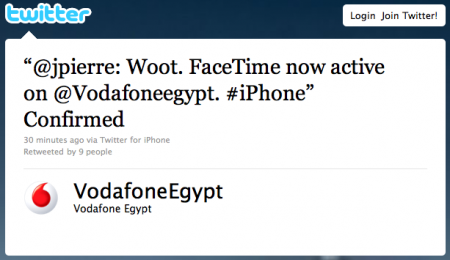
The first step towards FaceTime availability in these countries has finally been taken by Vodafone, which has enabled FaceTime in Egypt with a carrier software update for iPhone. As noted by SaudiMac, the update simply adds a boolean string to the iPhone’s configuration file with video calling set to “yes”. This leads us to think that carriers can restrict and restore FaceTime at any time with software updates – something Apple can’t apparently control.

Egypt is still included in the countries with blocked FaceTime, but we guess it will updated soon with possibly more countries receiving carrier updates. [via SaudiMac]
New µTorrent Beta for Mac Adds Remote Web Access, Scheduler

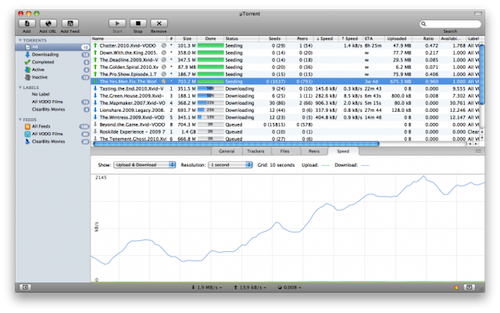
Popular BitTorrent client µTorrent was updated in its beta version for Mac last night adding support for a series of features that have made the app a must-have among Windows users. Namely, the latest beta for Mac adds the ability to control torrents remotely from any desktop or mobile browser, without having to mess with complicated network and firewall settings. It’s quite handy if you’re that kind of user who likes checking on his torrents on the go and wouldn’t mind adding new ones as well. Everything happens with a Web interface that’s completely accessible from anywhere. Together with the web UI, the application’s design has been improved as well.

Other important features in the 1.5 beta include feeds and the scheduler. While the second option is pretty obvious as it lets you schedule start and stop times for µTorrent (so your internet service provider will be happy), the RSS support is interesting. It allows you to subscribe to torrents’ feeds to automatically download them as new ones become available.

µTorrent is a free download for Mac, and the beta version is available here. [via Cult of Mac]


Personal Hotspot Limited To 3 Devices on AT&T?

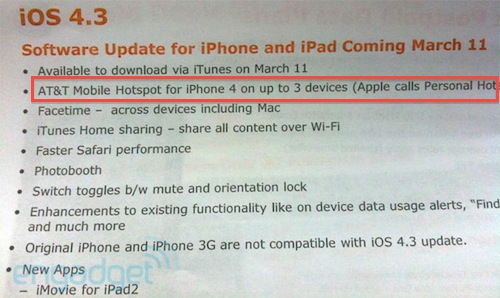
AT&T has confirmed it will offer the Personal Hotspot functionality starting March 11 with the release of iOS 4.3, but it looks like the functionality will be modified to work only with connections up to 3 devices. By default, Apple’s Personal Hotspot allows up to 5 devices to connect to a single iPhone sharing its 3G connection. A picture of an internal AT&T document posted by Engadget in fact suggests the carrier is going to restrict the usage of Personal Hotspot to only 3 incoming connections.

While it’s highly unlikely that you’ll end up letting 5 people connect to your iPhone on a daily basis, it’s still interesting to study the possibility of AT&T limiting a feature so heavily promoted by Apple. Guess carriers do have some kind of control on the iPhone, after all. (Personally, I’m just happy 3 Italia is going to keep Personal Hotspot free to use for every iPhone owner)

Update: the image shared by Engadget doesn’t specify whether or not AT&T is simply following Apple’s implementation of Personal Hotspot, which allows 3 devices to connect using WiFi. It’s not clear from the leaked photo if AT&T didn’t mention the additional Bluetooth and USB connections, or is really enforcing Personal Hotspot on 3 devices simultaneously.

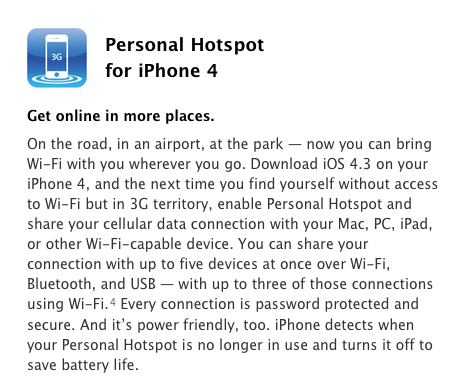
From Apple’s website:

You can share your connection with up to five devices at once over Wi-Fi, Bluetooth, and USB — with up to three of those connections using Wi-Fi.4 Every connection is password protected and secure. And it’s power friendly, too. iPhone detects when your Personal Hotspot is no longer in use and turns it off to save battery life.


Here, File File! Updated with Retina Graphics, Background Audio

Here, File File! is an iPhone app we reviewed a year ago that eventually disappeared from our radar. The app, mixing a beautiful interface design with a weird and funny name, allowed you to browse the contents of your Mac (read: file system) from a native iPhone UI. You only needed to install a desktop server app in order to connect from the iPhone both through WiFi and 3G. In Here, File File! you could browser and open folders, preview images and documents, play music and video and even search with Spotlight from the iPhone itself. It was a gem.

The iPhone 4 came out last summer and an update to Here, File File! to support iOS 4 and the new device was nowhere to be seen. Not to mention the iPad, which would be perfect for an app like HFF.

This silence has been interrupted today with the release of version 1.2 that brings Retina Display graphics for iPhone 4, bug fixes, background audio support and several enhancements. An iPad app is in the works too, and beta testing should start soon after today’s release of HFF for iPhone. So how’s the update? The app looks beautiful on the iPhone 4 display and much more responsive than before. I also tweaked the desktop application to work with a global DNS hostname so I can access my files from anywhere. Background audio works as expected and you get a nice HFF icon in the multitasking tray to send music across your room to AirPlay speakers. These music files are on your Mac.

Here, File File! is the same great app as before, only it looks beautiful on the iPhone 4. While waiting for the iPad app to come out, go check out the iPhone version here. More screenshots below. Read more


They’re Back: Banned iPad 2 Promo Video

Last year, a US-based agency known as jLE made the rounds of the Internet with a series of fake “banned promo videos” for Apple products. They did videos for the white iPhone 4, the iPad, and even the iPhone 4 Antennagate. They were hilarious and spot-on, and now they’re back to their usual game with a banned iPad 2 promo video.

Once again, it’s funny. The “only Apple black employee” complains and jokes about the availability of a white iPad 2 at launch, other fake Apple executives comment on the two cameras they managed to put in the iPad 2, or the Photo Booth app that allows you to take “silly pictures with two heads”. There’s even a Charlie Sheen joke in there.

Check it out below. Once again, we love it. Read more


Personal Hotspot Lets Another iPhone Connect and Use FaceTime Over 3G

Here’s an interesting feature we didn’t know had been implemented on iOS 4.3 that has been brought to our attention this morning by German blog Macerkopf.de [Google Translation]: on the iOS 4.3 GM (released last night) you can start Personal Hotspot and let a second iPhone connect to use FaceTime over 3G.

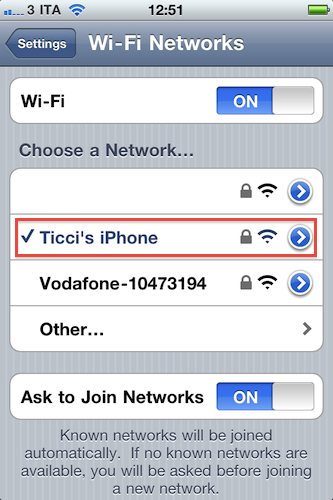
Personal Hotspot creates a WiFi connection, but we know that’s actually a shared 3G one. Starting with an active 3G connection on the first iPhone running iOS 4.3, up to 5 other devices can connect to the Personal Hotspot, which is recognized in the Settings as a WiFi network. Macerkopf speculates that the fact that iPhones can connect to Personal Hotspot and use FaceTime is new to the 4.3 GM build seeded to developers yesterday.

I’ve tested this with my two iPhone 4s and a Mac running FaceTime, and it works. With the first iPhone, I made sure I had 3G active and created a WiFi network with Personal Hotspot. With the second iPhone 4, I connected to Personal Hotspot and called my Mac using FaceTime. It worked the other way around as well. Video quality and sound weren’t excellent (like I said, it’s a 3G connection) but definitely acceptable.

This is an interesting little detail because Apple doesn’t want you to use FaceTime over 3G. A number of Cydia tweaks surfaced in the past to overcome Apple’s restrictions, like Facebreak and My3G. But if you happen to have two iPhones (say, your wife’s) and you really need to use FaceTime on the go to call someone, Personal Hotspot will let you do that. Even if it’s actually a 3G connection, it appears that as long as the iPhone “sees” the network as a WiFi one, it’s fine. Clearly the second iPhone isn’t able to tell whether the connection comes from 3G or not.

We don’t know if this was possible on the previous betas of iOS 4.3, so if you’re still running one of those and the method works, please let us know in the comments below.


Apple Negotiating With Record Companies Over Cloud Service?

According to sources who talked to Bloomberg, Apple is negotiating with the key record companies of Universal, Sony, EMI and Warner for an improved iTunes service that would simplify access to music that users have purchased. The service would allegedly allow consumers to retrieve a backup of all their music perhaps if their originals were lost.

According to Bloomberg’s three sources, an agreement could be announced midyear which could have the potential of bringing consumers “closer to universal access to content centrally stored on the Internet.” The record companies are supposedly concerned of the gaining popularity of Internet services such as Pandora, which allow users to stream songs rather than purchase them and want to offer users who purchase music a similar convenience.

Read more


Want To Get Rid of Twitter’s Quick Bar? There’s A Cydia Tweak For That

By now you’ve probably updated your iOS Twitter app and noticed that the iPhone version comes with a new “Quick Bar” at the top that’s meant for letting you cycle through…the popular and beloved Twitter trends. Really, that translucent bar doesn’t do anything else but putting trends and promoted tweets (thus, ads) in your timeline. It doesn’t follow you around as you scroll, but it appears every time you tap on the timeline tab or switch back and forth between, say, mentions and the Twitter timeline. We get it: it’s annoying and partially ruins the design of Tweetie – ehm, Twitter for iPhone.

But here comes a solution: if you’re running a jailbroken device and you want to get rid of the Quick Bar, go install Twizzler now from Cydia, for free. It removes the Quick Bar and gives you control back over what appears in your timeline. That’s it.

Did we say it’s free?


Xcode 4 GM Seed 2 Released

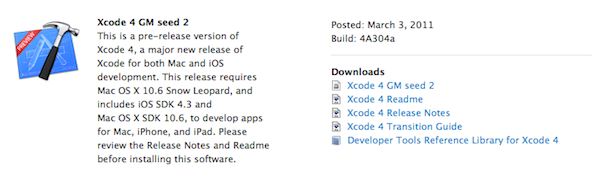
Together with the GM seed of iOS 4.3, Apple has updated the developer center with a new build of Xcode 4 GM. The “seed 2” available for developers includes performance and stability improvements.

The first Xcode 4 GM seed was released in February. It included support for submitting iOS and Mac apps to the App Store and brought along the impossibility to build apps for OS X 10.5 Leopard. Xcode 4 is a major new version of Apple’s development suite which sports lots of new features and a new single-windowed UI.