Posts in news

Apple Releases Lion Developer Preview 3 in Dev Center

Following the release in Software Update last week, Apple just released Lion Developer Preview 3 in the Mac Dev Center as a direct download through the Mac App Store. Changes in Lion DP 3 can be found in our previous coverage, and we’ll update this post as more details come in. Build number of Preview 3 is 11A459e – same of the Software Update version.

The new build in the Mac Dev Center comes after a series of reports of users unable to correctly download and install Lion Developer Preview 3 through the Software Update mechanism.

Update: Lion Server Developer Preview 3 is also available as a separate download from the Mac App Store.


Apple Schedules US Retail Meeting on May 22

According to a tip we received from a trusted source, Apple will hold an all-hands employee meeting in US retail stores on Sunday, May 22. The retail meeting will start at 7 AM, an “unusual time” says our source, considering Apple usually holds this kind of meetings on Sunday evenings, after stores close.

Store meetings at 7AM Sunday across United States. Unusual time. Expecting some announcement. All stores, brand-wide US. Don’t know about other countries.

Last week, Cult of Mac reported the Apple Store in Fresno, CA, was planning on holding an employee meeting on Saturday, May 28. Our source says it’s normal for store leaders to choose a different meeting date within a certain window, and that could be the May 22-29 week. Of course, there’s plenty of room for speculation about this retail meeting: with the WWDC approaching (kicks off in San Francisco on June 6), Apple might want to train employees for the rumored new MobileMe features, iCloud, or some other product scheduled to be announced at the developer event – as also suggested by MacRumors back in April. It’s worth noting, however, that Apple celebrates the 10th anniversary of Retail this week, with several websites claiming the company was on track to set up special events and store merchandise for the anniversary.

AppleInsider reported on April 20 Apple was restricting employees from taking time off between May 20-22; our source says that’s because of the all-hands meeting set for May 22, though he couldn’t confirm as to whether it’s an anniversary-related meeting, or an internal training for new products and announcements.

Update: BGR has posted more details on the event Apple may be planning for its retail anniversary. These include NDAs to sign, overnight shifts at Apple Stores through mid-Sunday, May 22, new hardware to install and a password-protected folder for employees called “training.”

During the overnight shift, it’s going to be required that employees lock cell phones in the main office. They will also have to sign an NDA with Apple.

There are a wide variety of roles, we’re told, for the overnight shift. This includes all visuals staff, a manager, a business team member, a few Genius team members, one back-of-house employee, and a few generic Apple specialists.

Apple stores have apparently already received hardware to install, and are expecting more hardware to come on Friday or Saturday. All materials that Apple stores have received have been instructed to be under lock and key until after close on Saturday night.

Apple employees will be putting up black curtains at all stores so that people walking outside cannot see inside.

Employees have had to download gigabytes of data from Apple corporate labeled, “training” in a password-protected zipped folder that won’t accessible to managers or anyone else until Saturday afternoon.

BGR also confirms meetings are scheduled for Monday morning, May 22.


Elgato HDHomeRun Streams Digital TV To Your Macs, Lets You Record & Export

Elgato’s latest addition to the EyeTV software family for OS X machines and iOS devices is the HDHomeRun, a small device that can be connected to your TV and home router to share digital TV over a network. Combined with EyeTV for Mac and Windows Media Center for PCs, the HDHomeRun allows you to stream TV content from antenna or cable channels, send it off to multiple computers simultaneously for live streaming, and record it for later viewing with options to export to iTunes for maximum iOS compatibility. Alternatively, thanks to the EyeTV app for iPhone and iPad, users will be able to stream digital TV to mobile devices as well. Some of these features, like 3G streaming or iTunes compatibility, are of course iOS and Mac specific.

The HDHomeRun retails at $179.95 and it comes as a bundle that includes the device and the EyeTV 3 software. What’s really cool about the HDHomeRun digital tuner is that it can stream TV content to two connected desktop machines at the same time, allowing two users to watch and record separate shows and programs. Streaming can be enabled either wirelessly or via Ethernet, and a list if supported channels in your country can be found here.

With the EyeTV software for Mac, you also get popular features like:

  • Watch, pause, and rewind live TV on your Mac
  • Search two weeks of Program Guide listings; includes one year of free TV Guide data, with optional renewal for only $19.95 per year
  • Set up schedules to record your favorite TV shows
  • Edit out unwanted content
  • Share recordings with other Macs on the same network

Placed next to an Apple TV, Elgato’s HDHomeRun seems like the perfect solution to get your favorite digital TV programs available over the air for Mac and iOS streaming and recording. The product is available now for purchase on Elgato’s website, and we look forward to a full review in the next weeks.


ProductiveMacs Bundle: 8 Great Mac Apps at $29

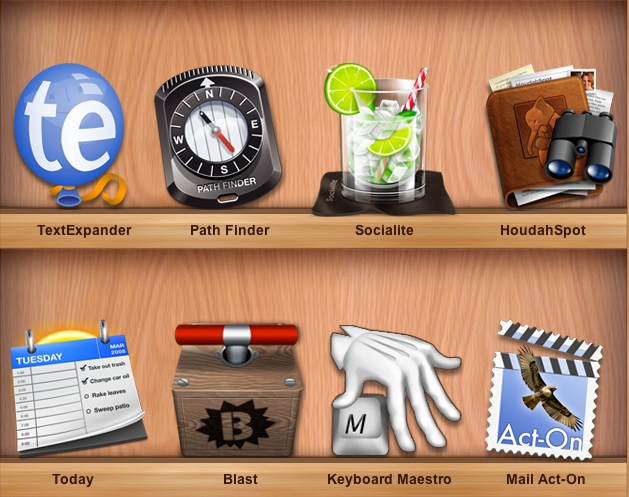
Given all the great apps available for the Mac, wouldn’t be great if someone bundled together some really powerful utilities that help you get work done? How about utilities like Keyboard Maestro, Mail Act-on, TextExpander, and Path Finder all in one shot? If the addition of HoudahSpot and Today wasn’t enough, then how about the killer price tag of $29? The ProductiveMacs bundle, organized via Apparent Software (who just picked up Socialite from Realmac Software) are hosting a bundle that features a fine collection of seriously powerful software for your Mac.

Read more


Seagate Announces Portable Wireless Hard Drive for iOS Devices

With all the recent talks about MobileMe and the cloud, it’s easy to forget most users still don’t have access to fast and reliable Internet connections that would allow them to stream their entire music library, movies and photos off the web. Whilst streaming is undoubtedly the future of media consumption (just look at the Apple TV, Google Music Beta, Netflix, or Spotify), managing media locally still plays an important role, especially for iPhone and iPad owners who are forced to keep everything organized into iTunes, and sync. Seagate wants to become the new middle man in this scenario, and with the official announcement of the GoFlex Satellite this morning, it looks like they have a chance to provide a better solution for many users.

The GoFlex Satellite is an external portable 500 GB drive that’s got a wireless connection and can stream content up to 3 connected devices at once. It’s got a built-in battery with 25 hours of promised life, and can stream 5 hours of continuous movie content. It works with iPhones and iPads through the GoFlex Media app, but Seagate says it’ll also be compatible with other WiFi-enabled devices and it will be accessible on a local network from a web browser. The portable drive, offering way more storage than an high-end iPhone or iPad, is clearly meant to carry all your music and HD movies around, bridging the gap between local storage and streaming. So while you’ll have to carry yet another gadget in your bag, at least no cable will be required to beam content to iOS. Most of all, music and movies won’t need to br synced locally to an iPhone or iPad; on the other hand, media can be transferred from your Mac or PC to the GoFlex Satellite with a USB 3.0 (USB 2.0 compatible) cable and the Media Sync desktop software.

With the growth of the tablet and iPad markets and the larger volumes of high-quality media now being consumed, there is a clear need for access to content that is not plagued with the challenges of streamed video over the Internet,” said Patrick Connolly, vice president and general manager of Seagate’s retail group. “The unfortunate fact is that these popular new mobile devices are hampered by their limited storage capacity while one of their primary functions is that of media consumption.

“With the GoFlex Satellite mobile wireless storage, we wished to create an elegant solution that provides real value to the multitude of iPad users out there by delivering a seamless connection to local storage. No longer will a consumer feel as though it is a compromise to purchase a lower capacity tablet or iPad. With GoFlex Satellite, people will be able to carry their entire media library with them without the need for wires or the web at a fraction of the cost of adding 3G or purchasing or a higher capacity tablet.

In spite of non-exceptional battery life (5 hours of video doesn’t sound exactly great, considering I like to watch my Lost episodes one after the other), I think this is a great idea, and I’m definitely looking forward to the product. The GoFlex Satellite ships this summer, and it’s available for pre-order now at $199.99 from Seagate.com, Amazon and BestBuy.com.


Castlerama Takes On Epic Citadel with Unreal Engine for iOS

If you were one of those who followed or watched Apple’s September 1, 2010 media event – where, among other things, iOS 4.1 and Game Center were officially unveiled – then you most definitely remember Epic Games’ Mike Capps and Steve Jobs talking about a revolutionary game that would set new technical standards on iOS devices. The game was based on the popular Unreal Engine ported to iOS, and on stage it was presented as a work-in-progress demo called Epic Citadel, also released for free on the App Store. The demo was impressive: there was nothing to do besides wandering around a medieval village, but the graphics, the lightning and the details were impressive. Tech-wise, everything about Epic Citadel was amazing. And as you may know, the game evolved and eventually became a real adventure with a plot and sword fights: Infinity Blade, based off the Unreal Engine and Epic Citadel’s first-person setting, was a huge success on iPhones and iPads.

As the story goes, however, other developers have tried to implement the Unreal Engine powerful set of tools in their games. The latest entry in the Unreal Engine-based game market is Castlerama by the Codenrama development studio, a first-person game with a striking resemblance to Epic Citadel and its environment. Castlerama seems to offer different landscapes though, as well as its own control scheme based on two virtual analog sticks displayed on screen.

The developers also explain their decision to accept “compromises” in order to make the game run on new devices like the iPad 2 and older units like the iPhone 3GS:

While developing Castlerama, we had to face the fact that newer devices such as iPhone4s and iPad2s are very different from their predecessors, iPhone3GSs and iPads, in that the former have twice as much memory. In order to have the app run on all devices, we had to compromise quite a bit, pushing the old devices to their limits (risking crash if other applications are left running) while keeping the new devices well behind their capabilities. In the future we believe we will have to develop two versions for each application.

Castlerama is available for free in the App Store as a universal download. With more games supporting the Unreal Engine coming out in the near future, it’ll be interesting to see how Castlerama will manage to provide a unique experience for iPhone and iPad owners. In the meantime, check out the app’s demo video and a walk down the Epic Citadel memory lane below. [9to5mac via TouchArcade]
Read more


Lodsys Responds to iOS Developers Over Patent Infringement Notices

Last Friday there was news that a number of independent developers for the iPhone and iPad had received legal warnings that they were violating patents that Lodsys owned. Suffice to say it sparked an outcry from developers, users and commentators; few had anything nice to say of Lodsys. Well today they have responded to a number of criticisms on their website in a series of Q&A posts. The key patent in question was that of Dan Abelow who sold his portfolio of patents to Lodsys back in 2004.

Its first response was in regards to the fairly frequented notion that Lodsys is a “parasite, troll, should die etc.”, they respond to this in saying that they are just like any other company who sells a product or service – they try to “get value for the assets it owns”. They write in the post “threats and irrationality don’t help.  In particular, the death threats are seriously uncool.”

As for the question of the patents being “too broad”, Lodsys notes how easy it is too look back in hindsight, saying “of course this is how everyone is going to do it”. In response to patent licensing being unethical and similar questions, they say that it seeks an economic return to sell their patent assets, completely legal and furthermore citing the notion that patent licensing encourages future invention.

As for why they directly contacted developers and not Apple, they say it is because Apple (as well as Microsoft and Google) has already licensed the patents in question. They claim that they cannot provide the third party developers with the rights to the patent, and Apple hasn’t approached Lodsys for the purpose of attaining an eco-system-wide license for the patents. They say their goal is not to prevent developers from using the technology, rather that it is to popularize it and charge a relatively small license for it.

They claim in multiple areas that they specialise in efficiently selling rights to patents, they say that by having a consistent price model it also means independent developers aren’t unfairly disadvantaged.

As for how much developers will need to pay, Lodsys clarifies that the in-app purchasing mechanism for example would cost a developer 0.575% of their US revenue over the period the technology was implemented until the patent expires. It gives an example of an app that earns US$1 million in one year would pay US$5,750.

[Via TheNextWeb]

You can read all of Lodsys’ responses on their blog.


Flipboard Blocked By The Great Firewall Of China

It appears that the Chinese government yesterday blocked Flipboard, meaning the app, which is available on the App Store in China, is largely unusable from within China. Flipboad’s CEO, Mike McCue, made the revelation on Twitter yesterday and said in follow-up tweets; “Lots of folks in China had been using us happily until now” and “Guess we had unwittingly poked a hole in their wall which has now been shut down… Presumably unless we block Facebook and Twitter ourselves in China”

The block impacts on Flipboard’s Amazon servers, which are required for users to aggregate their content from various sources, effectively this means that services such as Google Reader, Instragram and Flickr are all blocked from Flipboard users in China. Facebook and Twitter, which were already blocked by the Chinese government, had previously been accessible to some users who used a VPN service, but this latest move has blocked Facebook and Twitter completely from the app.

[Via @mmccue]


iOS 5 Voice Recognition Interface Conceptualized

With far improved voice recognition expected to make its way into iOS 5, the next questions is how Apple will implement it. Well one person, Jan-Michael Cart, has thought of how it might be possible to implement and put together a well-thought out video demonstrating the concept (after the break).

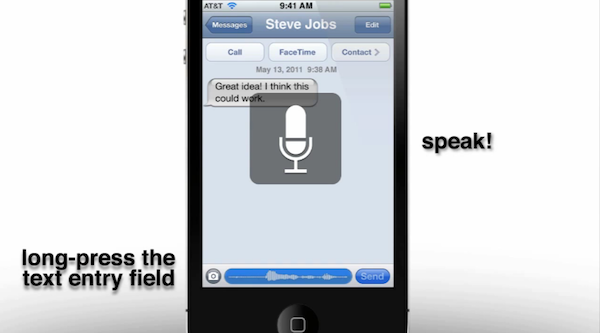
There are number of aspects to the voice recognition he conceptualizes, starting with the notion that it can be used to navigate the entire user interface and is triggered by holding down the home button – much like how Voice Control currently works. Yet instead of bumping you to a whole new screen like Voice Control does, the status-bar will turn blue and serve as a visual guide as to when to speak and telling you how it interpreted what you said.

That’s a fairly straightforward extension of what iOS currently does, what is more intriguing is Jan-Michaels concept of how any text-field can have voice input. All you would have to do is press and hold the text-field and again the status bar turns blue and you speak. For somewhere like notes or mail (which don’t have a text-field but rather an area for a block of text) you would double tab to open the copy and past bar but which would also now have a microphone icon – pressing it would start voice dictation.

As would be reasonably expected, Jan-Michael also believes that APIs would be offered to developers to use voice-recognition and shows how the Facebook app would be an easy candidate for voice recognition support. Make sure to jump the break to watch the video by Jan-Michael, and if you like it, I would highly recommend checking out his YouTube page which has some other iOS 5 concepts including faster app switching using gestures and how widgets could be implemented.

Read more