
Posts in Linked

Facebook Pulls Poke and Camera Apps From The App Store

Ellis Hamburger:

To Facebook, Poke was always “more of a joke” than anything else — so why did the company leave it in the App Store for more than a year after its troubled debut? We may never know, but today, Facebook finally put an end to Poke. If you check the App Store for Facebook’s famed Snapchat clone, you won’t find it. Facebook also took the opportunity, seemingly, to remove Camera, its photo uploading app. A Facebook spokesperson confirmed the removals to The Verge, but provided no further comment.

Poke was indeed a joke, but Facebook Camera was a solid app with lots of clever details. From our original coverage in 2012:

Animations throughout Facebook Camera are fluid, the app is fast, and there’s a lot of clever interaction to take advantage of throughout the interface — clearly Facebook’s acquired talents have been hard at work in making the app to not just feel like a boring extension of Facebook, but rather a necessary addition that belongs, no, deserves to be on a Facebook user’s smartphone. Facebook has made an incredibly bold statement with Facebook Camera — they’ve stepped up to the plate to deliver a solid application that doesn’t feel tacked on or only done for the sake of their platform. It’s a serious release. Just look at their landing page.

In fact, the way uploads and editing were handled in Facebook Camera were so good, Facebook eventually integrated them into the main Facebook app, making Facebook Camera essentially useless. The app never received an iOS 7 update and I’m surprised it stuck around this long.
Permalink

Chrome Canary Adds OS X Finder Integration for Chrome Apps

Kevin C. Tofel, writing for Gigaom:

Google’s strategy to use the Chrome browser as a desktop replacement took another step forward on Friday. Users of Chrome Canary, an experimental version of Google’s browser, can now associate Mac files with supporting Chrome apps in the Finder. This means that instead of opening a basic text file with the native OS X TextEdit, you can open it with a Chrome app like Text, Caret or Simple Text.

Interesting move from Google, but not a surprise either. Google has been building an ecosystem of apps on iOS for over a year, and it’s only obvious that they’re going to continue extending the effort to OS X, where they have even less limitations.

On iOS, they redirect YouTube links to the YouTube app, leverage x-callback-url for Chrome, and make sure you always use Google apps when opening links; on OS X, the Finder’s “Open With” menu makes perfect sense to redirect users to Chrome – especially for Office-type documents.

Permalink

Great Coffee App

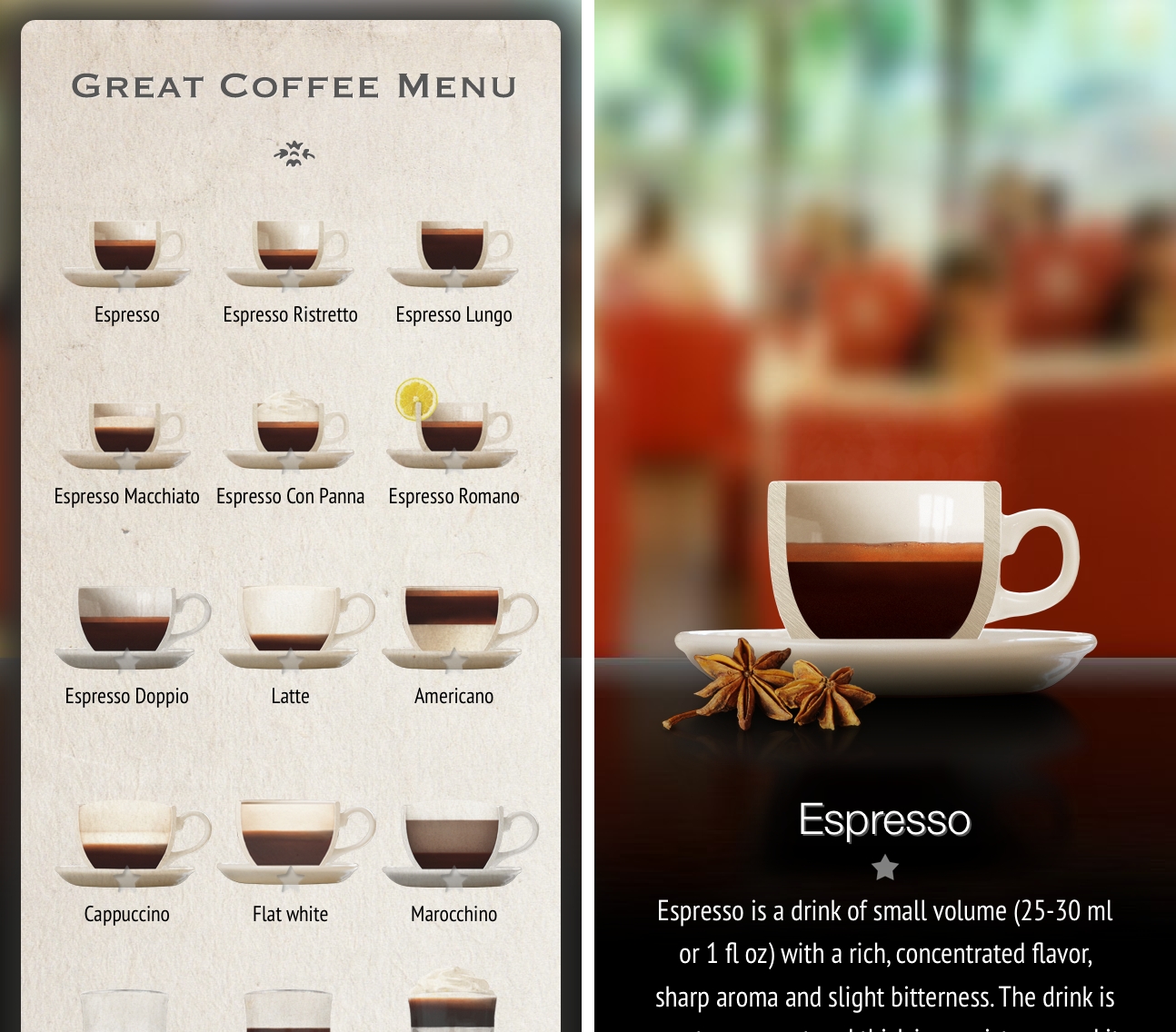
As listeners of Directional may have guessed at this point, espresso is my favorite coffee drink. Living in Italy and being extremely conservative with my espresso choices, I’ve never got into coffee-related iPhone apps (I don’t have a fancy coffee-making ritual; it’s just an espresso machine), but Great Coffee App is, as the rather bland name implies, actually pretty great.

Great Coffee App provides an introduction to 16 popular espresso-based drinks. The app is delightfully skeuomorphic in its presentation of espressos and coffee cups; there’s some nice background music when you browse the main screen, but it can be disabled. In the app, you’ll find descriptions and interesting facts for the classic espresso, the espresso lungo, the macchiato, as well as the more peculiar Irish Coffee and Cafeccino; you can tap on each drink and see zoomed-in view of its ingredients and layers. For each drink, the app comes with good localized descriptions (at least based on what I saw for the English and Italian versions), and a downloadable video showing the preparation process.

I found Great Coffee App to be beautifully done, informative, and a great visual introduction to popular espresso-based drinks. It’s only $2.99 on the App Store.

Permalink

Symbolay Combines Unicode Symbols with Power User Features

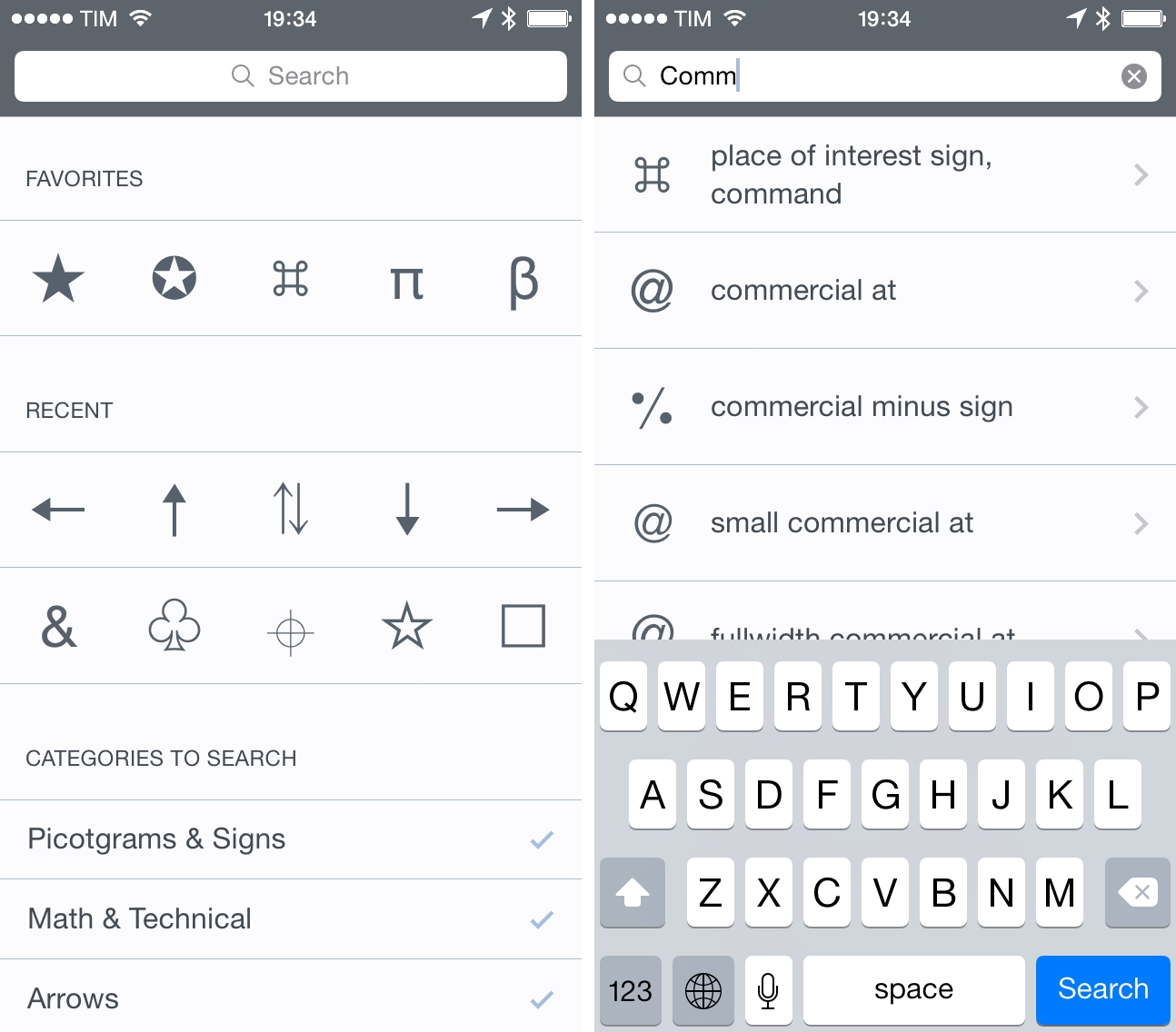
Whether you want to add a little personality to your tweets or include special characters in your notes, there’s no easy way to copy Unicode symbols on iOS. While I’ve covered my fair share of iOS apps for the task in the past, Symbolay stands out for the amount of options it gives you when copying symbols and launching searches from other apps.

Symbolay’s main screen offers the usual section-based organization with categories for pictograms, arrows, shapes, alphabets, and more. There is a search bar to look for specific items by name, and the interface is clean and obvious on iOS 7. The app’s real strength lies in the output options: symbols can be copied directly in the clipboard, or you can copy them as Python code, HTML entities, or pure code names – these help if, for instance, you’re writing code on the iPad and don’t want to rely on an online converter to turn symbols into code using Safari. You can save favorites and browse your recently viewed symbols, collect them in a scratchpad, and, if you’re on a keyboard, use shortcuts to speed up the entire process.

Furthermore, the app supports a URL scheme that allows you to trigger searches from Launch Center Pro or Drafts; on the website, there’s even a workflow to integrate Symbolay with Editorial for text editing.

Symbolay is a nice reference tool for Unicode symbols with handy features aimed at power users and programmers. It’s Universal and $4.99 on the App Store.


Instapaper Highlights

Instapaper received a series of major updates today, including a new Highlights feature and a redesigned website based on feedback gathered by Betaworks in the past few months.

From the Instapaper blog:

In true Instapaper fashion, your highlights are seamlessly synced across all of your devices. We’ve also added the option for you to post automatically your highlights to your linked accounts. It’s disabled by default, but if you turn it on, you can do nifty things like automatically Tweet your highlights, or post them to a Tumblr blog, or drop them into Evernote.

And about the website:

Along with highlights, we’ve completely revamped the Instapaper website, incorporating the feedback you’ve provided us over the last few months. At long last, the Instapaper website is a fully-functional file system for managing, organizing, and acting on the articles and videos you see and save online.

I stopped using Instapaper shortly after their iOS 7 update when I switched to Safari and realized that Reading List could be enough for my needs. But with today’s update, I’m going to give Instapaper another try.

Reading List is a fine read-later solution that’s nicely integrated with Safari and iCloud. I enjoy the ability to save from anywhere on iOS and I like that I don’t have to think about sync problems because iCloud has been surprisingly reliable in Reading List. However, after a few months of daily reading in Safari, I can say that I often miss search, I miss a proper archive of items I’ve read, and I wish I could easily find articles I’ve liked. Safari’s Reading List is extremely convenient because it comes with no configuration or third-party limitations, but it’s not meant for permanent article archival or user interactions besides “Delete”.

Highlights is one of the features that I’ve always wanted from Instapaper, and the implementation looks good enough for what I need. Highlights are available to premium subscribers (free accounts get only 5), and they can be shared with one tap to connected services. Furthermore, you can activate automatic saving of Highlights to Evernote, which works well for me as I keep my research material for The Prompt and Directional in Evernote. Highlights remove a lot of friction – I used to rely on Drafts workflows to share quotes from articles – and, more importantly, they are differentiated visually in the article text (which I couldn’t get with the aforementioned quote sharing). Highlights are synced across devices and they get their own section in the Instapaper apps and website, which helps when I’m on my Mac.

I’m going to subscribe to Instapaper again and try out the Highlights feature for my daily reading and research. While I could simulate highlights with workflows before, they weren’t integrated with Instapaper in any way, and it seems like Betaworks really nailed the experience in the app.

Permalink


The Markdown Payoff

Hilton Lipschitz, writing about switching to Markdown and whether it paid off:

The key to Markdown writing is that you focus on the content. Structure, format, look and feel are all secondary. It’s pure distraction-free writing. Which means that you have no choice but to write and think about writing and focus on the content. Which encourages you to become a better writer.

For me, Markdown has singlehandedly revolutionized the way I can put together articles for MacStories without wasting hours over HTML and RTF issues.

I used to write in the WYSIWYG editor of WordPress, which meant that I often ended up with strange formatting in my posts and I didn’t have any local copies of my files because there were no files. If the browser tab crashed and I hadn’t saved a draft, the post was gone and I had to start over from scratch. I didn’t want to use Word for Mac and pasting from Pages created even more issues with formatting in WordPress (we are talking about 2009-2010 WordPress), so I stuck with writing in the browser. And it was terrible.

Since I switched to Markdown in late 2012, I have generated an archive of over 600 plain text files that are fully searchable, indexed by Spotlight and Dropbox, and readable by any operating system. Thanks to plain text, my articles and notes are portable and I can switch text editors whenever I want. When I convert to HTML and I see that everything looks good, I get a geeky serotonin kick that reminds why I will never write in the WordPress editor again.

Markdown and related services1 make it easy to add links, formatting, tables, footnotes and to generate HTML with a wide array of settings and options; because of that simplicity I have written more, fixed more typos, and generally dealt with more readable files. Markdown didn’t merely pay off – I don’t know how I’d go back to any other format at this point. It’s just natural.

Tools may not make me a better writer, but Markdown allowed me to ignore the bureaucracy of web publishing, enabling me to write complete articles from anywhere. I’m thankful that it exists.

Permalink

RSS: What Not Dying Looks Like

From The Old Reader blog:

However, just because a technology is widely available does not guarantee success. What makes RSS truly powerful is that users still have the control. The beauty of the system is it that no one can force you to be tracked and no one can force you to watch ads. There are no security issues I am aware of and no one ever has to know what feeds you subscribe to. This may be the last area of the Internet that you can still say things like this.

Every few months, the topic of RSS being about to “die” pops up somewhere on the Internet and some publications run with it. While I don’t think that RSS as a consumer product will ever catch on at a large scale, I’m glad that the technology is still around and powering several of my favorite services and apps. And even if it doesn’t attract millions of customers, I think that the healthy ecosystem the demise of Google Reader created shows that there’s a niche willing to pay for RSS-based products.

Permalink