Posts in iPhone

iPhone 4S Voice and Data Plans: AT&T vs. Sprint vs. Verizon
iPhone 4S Voice and Data Plans: AT&T vs. Sprint vs. Verizon

If you’re looking for the cheapest possible monthly deal, Sprint wins, with a total monthly cost of $99.99 for 900 minutes, unlimited texting, and unlimited data.

Excellent roundup of plan prices from PC Magazine. Contrary to the above, what I’ve found is that you can get the cheapest plan on AT&T, but you’re only going to get 450 minutes and 200 MB of data without a text messaging plan to pull it off. No frills here, but you’d only have to pay $55 a month. If you’re on WiFi a majority of the time, your friends have iPhones (for iMessage), and have good AT&T coverage, this is your budget plan.

The best overall plan would go to Sprint. The nights and weekends given are good, 450 minutes, and unlimited data and text messaging will net you a solid plan for $80 a month. Pricey, but cheaper than AT&T and Verizon for similar upgrades. Keep in mind the “unlimited data” is around 5 GB, though this was true for Verizon as well when they carried unlimited plans.

If you want the best coverage, Verizon is likely going to be your choice. I have never had a signal problem with Verizon no matter where I ended up in my travels, although call quality is lacking in my opinion. Verizon is a good choice if you want better text message flexibility (250 messages for example) where AT&T gives you none, although you don’t have the same choices with data use.

[via OS X Daily]

Permalink

#MacStoriesDeals - Wednesday

Here are today’s @MacStoriesDeals on iOS, Mac, and Mac App Store apps that are on sale for a limited time, so get them before they end!

Read more

Access Extra Content and Perks

Founded in 2015, Club MacStories has delivered exclusive content every week for nearly a decade.

What started with weekly and monthly email newsletters has blossomed into a family of memberships designed for every MacStories fan.

Learn more here and from our Club FAQs.

Club MacStories: Weekly and monthly newsletters via email and the web that are brimming with apps, tips, automation workflows, longform writing, early access to the MacStories Unwind podcast, periodic giveaways, and more;

Club MacStories+: Everything that Club MacStories offers, plus an active Discord community, advanced search and custom RSS features for exploring the Club’s entire back catalog, bonus columns, and dozens of app discounts;

Club Premier: All of the above and AppStories+, an extended version of our flagship podcast that’s delivered early, ad-free, and in high-bitrate audio.

Learn more here and from our Club FAQs.


Real Racing’s “Party Play” To Bring Split Screen Multiplayer with AirPlay Mirroring

One of the lesser publicised new features coming in iOS 5 is AirPlay Mirroring, a new functionality that enables an app to connect to an Apple TV and mirror its contents on to the connected TV. It effectively allows users to show their iPad or iPhone screen on a TV without the HDMI cable as is currently required. Back in June, Apple’n’Apps posted a video of how it worked and Engadget showed off Angry Birds Rio HD and Real Racing 2 HD being played on a TV through AirPlay Mirroring.

In June Firemint announced that it will be bringing an optimised AirPlay experience to the app, and today they are expanding upon that announcement, revealing ‘Party Play’. Using AirPlay and wireless local multiplayer, ‘Party Play’ in Real Racing 2 will enable up to 4 players to play together in a split screen match streamed to a TV through AirPlay.

The only downside is that it will require a host player to be using an iPad 2 or the newly announced iPhone 4S (this is due to the requirement of the A5 processor when using AirPlay Mirroring). The other players can be using any other iOS device that supports Real Racing 2 or Real Racing 2 HD - you can even have a mix of iPhones, iPads and iPod touches. Firemint is also promising that the update including ‘Party Play’ will also come with “gorgeous graphical enhancements that make use of the iPad 2 & iPhone 4S A5 processor”.

Jump the break to view a promo video of Real Racing 2’s ‘Party Play’ mode.

Read more

Access Extra Content and Perks

Founded in 2015, Club MacStories has delivered exclusive content every week for nearly a decade.

What started with weekly and monthly email newsletters has blossomed into a family of memberships designed for every MacStories fan.

Learn more here and from our Club FAQs.

Club MacStories: Weekly and monthly newsletters via email and the web that are brimming with apps, tips, automation workflows, longform writing, early access to the MacStories Unwind podcast, periodic giveaways, and more;

Club MacStories+: Everything that Club MacStories offers, plus an active Discord community, advanced search and custom RSS features for exploring the Club’s entire back catalog, bonus columns, and dozens of app discounts;

Club Premier: All of the above and AppStories+, an extended version of our flagship podcast that’s delivered early, ad-free, and in high-bitrate audio.

Learn more here and from our Club FAQs.


Apple’s iPhone Event: More Details And Some Things We Missed

As with every Apple event and keynote, there is a lot of information disseminated in a short period of time. Whilst we have already covered most of the information covered in yesterday’s iPhone event (just scroll the MacStories.net homepage to see how much there was), it’s time to have a roundup of what we missed and add some more details on information that we only briefly mentioned previously.

The iPhone 4S Camera

Devin Coldewey of TechCrunch has an excellent recap of the new and improved camera featured in the iPhone 4S. If you want a really in-depth understanding of all the features of it, be sure to jump over and read his article. The key points to take away though, are that it has an 8 megapixel camera (up from 5 MP that the iPhone 4 has) and can record 1080p video (the iPhone 4 could only handle 720p). Those two specifications are clearly the headline grabbers, but arguably more important is the improved sensor from Omnivision in the camera.

Apple claims this sensor features “next-generation backside illumination” which allows 73% more light and more light on the sensor means better quality images. Apple has posted some unedited iPhone 4S photos that show how great pictures can look, and they are certainly a notch above the quality of iPhone 4 photos. When Phil Schiller spoke at the event yesterday, he made note of how the sensor was “1/3rd faster”, and as Coldewey notes, this likely refers to the speed at which images can be processed. With the combination of the powerful A5 processor, new sensor and improved GPU, the iPhone 4S could be up to a second faster than other smartphones at processing an image.

The most important part of a camera is… the photographer — but right after that is the lens. And the lens of the iPhone 4 was already pretty solid for a camera phone: F/2.8 (apparently limited to F/3) at about 30mm equivalent focal length. The new one is f/2.4, about half a stop better, which doesn’t sound like much but at this point of the aperture scale counts for a lot. It’s a pretty big increase in the total amount of light hitting the sensor.

If you’ve ever tried taking a video with the iPhone 4 when in motion, you’ll have noticed how shaky the footage can turn out to be. The iPhone 4S features real-time stabilisation, and whilst not much is known about how it works, Coldewey presumes it will be “electronic stabilisation based on live image analysis” thanks to the A5’s power. We won’t really know how well this works until people try it out for themselves, but Apple has posted a demo of the new feature.

Read more

Access Extra Content and Perks

Founded in 2015, Club MacStories has delivered exclusive content every week for nearly a decade.

What started with weekly and monthly email newsletters has blossomed into a family of memberships designed for every MacStories fan.

Learn more here and from our Club FAQs.

Club MacStories: Weekly and monthly newsletters via email and the web that are brimming with apps, tips, automation workflows, longform writing, early access to the MacStories Unwind podcast, periodic giveaways, and more;

Club MacStories+: Everything that Club MacStories offers, plus an active Discord community, advanced search and custom RSS features for exploring the Club’s entire back catalog, bonus columns, and dozens of app discounts;

Club Premier: All of the above and AppStories+, an extended version of our flagship podcast that’s delivered early, ad-free, and in high-bitrate audio.

Learn more here and from our Club FAQs.


#MacStoriesDeals - Monday

Here are today’s @MacStoriesDeals on iOS, Mac, and Mac App Store apps that are on sale for a limited time, so get them before they end!

Read more

Access Extra Content and Perks

Founded in 2015, Club MacStories has delivered exclusive content every week for nearly a decade.

What started with weekly and monthly email newsletters has blossomed into a family of memberships designed for every MacStories fan.

Learn more here and from our Club FAQs.

Club MacStories: Weekly and monthly newsletters via email and the web that are brimming with apps, tips, automation workflows, longform writing, early access to the MacStories Unwind podcast, periodic giveaways, and more;

Club MacStories+: Everything that Club MacStories offers, plus an active Discord community, advanced search and custom RSS features for exploring the Club’s entire back catalog, bonus columns, and dozens of app discounts;

Club Premier: All of the above and AppStories+, an extended version of our flagship podcast that’s delivered early, ad-free, and in high-bitrate audio.

Learn more here and from our Club FAQs.


iPhone Parts For An N90A Model Found In Foxconn’s Brazil Factory?

The above photo, taken by Gizmodo Brazil, is supposedly a new iPhone SKU taken from a Foxconn factory in Brazil. Shown on a quality control form, these iPhone parts are for a model N90A iPhone - a new model that does not currently exists.

Our Brazilian brothers, Gizmodo.com.br, got their hot little hands on a few photos of one a new iPhone, to be announced next week. How? Well, there’s a Foxconn factory in Brazil, and Pedro & co got one of their men inside. Inside, they found a new-SKU iPhone that looks just like the old iPhone 4.

A report from earlier this week noted that an iPhone with the codename N90A had appeared in Apple’s internal inventory system. Because the current codename for the iPhone 4 is N90 it is believed that this new SKU would represent an iPhone 4 with minor changes — likely becoming the cheaper iPhone available with 8 GB of storage at a lower cost.

[Translation of key sections of the above image, from Mike in the comments below]

JULGAMENTO DO LOTE means something like BATCH EVALUATION RESULT, certainly from quality control. APPROVADO and REPROVADO means APPROVED and REPROVED and the current batch was reproved with the indication “lentes manchadas” (stained lenses), written in blue over the REPROVADO box.

[Via Gizmodo]

Access Extra Content and Perks

Founded in 2015, Club MacStories has delivered exclusive content every week for nearly a decade.

What started with weekly and monthly email newsletters has blossomed into a family of memberships designed for every MacStories fan.

Learn more here and from our Club FAQs.

Club MacStories: Weekly and monthly newsletters via email and the web that are brimming with apps, tips, automation workflows, longform writing, early access to the MacStories Unwind podcast, periodic giveaways, and more;

Club MacStories+: Everything that Club MacStories offers, plus an active Discord community, advanced search and custom RSS features for exploring the Club’s entire back catalog, bonus columns, and dozens of app discounts;

Club Premier: All of the above and AppStories+, an extended version of our flagship podcast that’s delivered early, ad-free, and in high-bitrate audio.

Learn more here and from our Club FAQs.


Diminish Debt with DebtMinder

DebtMinder is the latest creation from the talented developers over at Return7 and aims to help users eliminate their debt. You might already be familiar with their successful BillMinder app that helps users keep track of when bills are due to ensure that late fees are a thing of the past. BillMinder is known for being polished, reliable, and incredibly easy to keep multiple devices in sync. Thankfully the developers were able to bring those features and more to DebtMinder all wrapped up in a familiar interface.

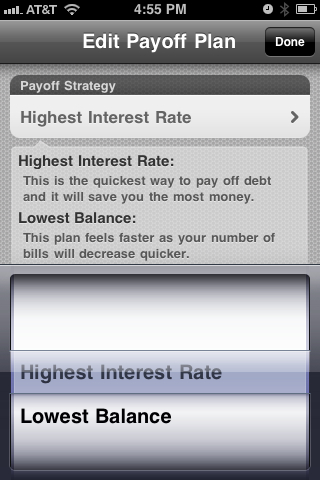
DebtMinder allows you to input multiple accounts of debt into the app and it will help calculate the best payment plan to reduce your debt as quickly as possible. You can also customize this plan by telling DebtMinder that you either want to focus on debt that has the highest interest rate or debt with the lowest balance. This is known as the debt-snowball method. You basically pay off the smallest debt first while paying the minimum payment on the larger debt. It is the quickest way to decrease your total number of bills. Once a payment plan is created your monthly minimum payment is calculated and you can begin paying off you bills.

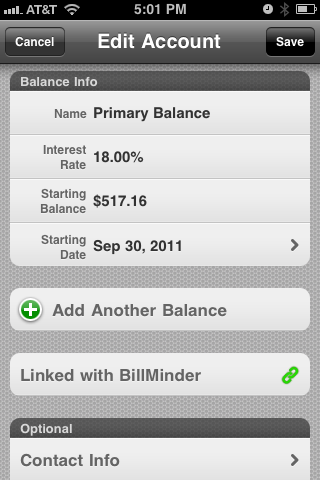
If you are a user of BillMinder then you will be able to pick up DebtMinder and feel as if you already know how to use the app. I was able to log in with my BillMinder credentials (new users will have to set up an account). As I added accounts to DebtMinder I had the option to link them with accounts that I had already set up in BillMinder. It was hard to appreciate this at first because it was so easy to set up, only two clicks. Once the account was linked and I added a payment to DebtMinder, I was able to launch BillMinder and see that the bill had already been paid. And not just on my phone, but on my iPad and on my wife’s phone as well because all devices are kept in sync under one account.

DebtMinder is my favorite kind of app for iOS because it is inexpensive, useful, and easy on the eyes. It will more than pay for itself when your credit card gets paid off ahead of schedule and unnecessary interest fees are avoided.

BillMinder is available in the iTunes App Store today for only $1.99

Access Extra Content and Perks

Founded in 2015, Club MacStories has delivered exclusive content every week for nearly a decade.

What started with weekly and monthly email newsletters has blossomed into a family of memberships designed for every MacStories fan.

Learn more here and from our Club FAQs.

Club MacStories: Weekly and monthly newsletters via email and the web that are brimming with apps, tips, automation workflows, longform writing, early access to the MacStories Unwind podcast, periodic giveaways, and more;

Club MacStories+: Everything that Club MacStories offers, plus an active Discord community, advanced search and custom RSS features for exploring the Club’s entire back catalog, bonus columns, and dozens of app discounts;

Club Premier: All of the above and AppStories+, an extended version of our flagship podcast that’s delivered early, ad-free, and in high-bitrate audio.

Learn more here and from our Club FAQs.


#MacStoriesDeals - Friday

Here are today’s @MacStoriesDeals on iOS, Mac, and Mac App Store apps that are on sale for a limited time, so get them before they end!

Read more

Access Extra Content and Perks

Founded in 2015, Club MacStories has delivered exclusive content every week for nearly a decade.

What started with weekly and monthly email newsletters has blossomed into a family of memberships designed for every MacStories fan.

Learn more here and from our Club FAQs.

Club MacStories: Weekly and monthly newsletters via email and the web that are brimming with apps, tips, automation workflows, longform writing, early access to the MacStories Unwind podcast, periodic giveaways, and more;

Club MacStories+: Everything that Club MacStories offers, plus an active Discord community, advanced search and custom RSS features for exploring the Club’s entire back catalog, bonus columns, and dozens of app discounts;

Club Premier: All of the above and AppStories+, an extended version of our flagship podcast that’s delivered early, ad-free, and in high-bitrate audio.

Learn more here and from our Club FAQs.


#MacStoriesDeals - Thursday

Here are today’s @MacStoriesDeals on iOS, Mac, and Mac App Store apps that are on sale for a limited time, so get them before they end!

Read more

Access Extra Content and Perks

Founded in 2015, Club MacStories has delivered exclusive content every week for nearly a decade.

What started with weekly and monthly email newsletters has blossomed into a family of memberships designed for every MacStories fan.

Learn more here and from our Club FAQs.

Club MacStories: Weekly and monthly newsletters via email and the web that are brimming with apps, tips, automation workflows, longform writing, early access to the MacStories Unwind podcast, periodic giveaways, and more;

Club MacStories+: Everything that Club MacStories offers, plus an active Discord community, advanced search and custom RSS features for exploring the Club’s entire back catalog, bonus columns, and dozens of app discounts;

Club Premier: All of the above and AppStories+, an extended version of our flagship podcast that’s delivered early, ad-free, and in high-bitrate audio.

Learn more here and from our Club FAQs.