

Today is the WWDC keynote, expect a lot of ‘can’t miss’ deals this week! We’ll keep updating this post throughout the day. Here are today’s @MacStoriesDeals on hardware, iOS, and Mac apps that are on sale for a limited time, so get them before they end!
Read more
Posts in iPhone
#MacStoriesDeals - WWDC Monday

Access Extra Content and Perks
Founded in 2015, Club MacStories has delivered exclusive content every week for nearly a decade.
What started with weekly and monthly email newsletters has blossomed into a family of memberships designed for every MacStories fan.
Club MacStories: Weekly and monthly newsletters via email and the web that are brimming with apps, tips, automation workflows, longform writing, early access to the MacStories Unwind podcast, periodic giveaways, and more;
Club MacStories+: Everything that Club MacStories offers, plus an active Discord community, advanced search and custom RSS features for exploring the Club’s entire back catalog, bonus columns, and dozens of app discounts;
Club Premier: All of the above and AppStories+, an extended version of our flagship podcast that’s delivered early, ad-free, and in high-bitrate audio.
Never Miss Cool Movies With Todo Movies
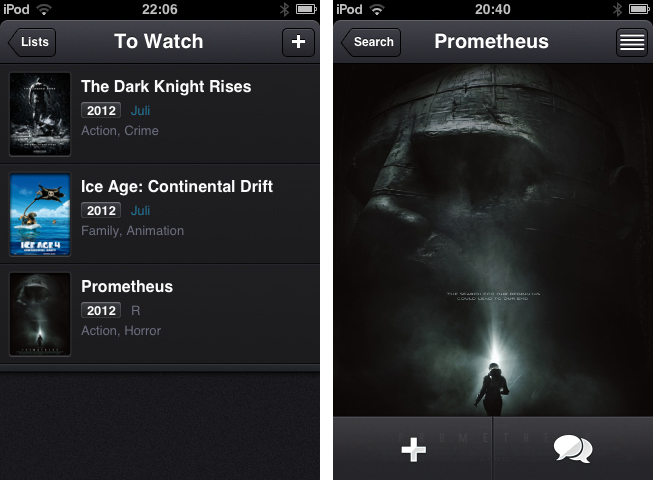
I suppose we all know that phenomenon: you’re watching a cool movie trailer and think “Boy, I just have to see this thing!” and then, several months later you realize that you forgot about it and it has already been released and everyone watched it in the cinema. To avoid that, I usually follow films or directors on Twitter or add them to my Facebook stream because those are the websites I visit every day. There are also some people who even set up reminders for release dates of things like books, music records or films. To outsource this reminding and give film lovers a companion to never forget any film you want to watch or miss a release date, Taphive introduced Todo Movies for iPhone.
The app just serves the purpose of searching for movies using a simple search through the TMDb movie database, and afterwards adds those films to a list containing all the movies you want to watch. The search works seamlessly, but there is no live search while typing and until you hit the “search” button, you get a “no results” below the entering panel, which is always a bit confusing.
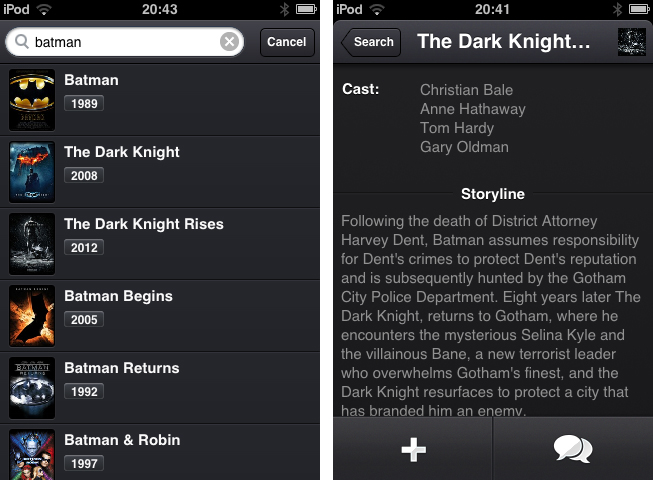
When you found a film you want to add to your list, tap on it to bring up the single movie window, which is almost completely filled up with a Retina-ready film poster, a move I really like, since this view transports the atmosphere of the respective film very well. From here you can either directly add it to your “To Watch”-list, or investigate its details a bit more by tapping the list button in the top right corner. If you do so, the screen flips and you can look at the film details like main actors, director, or a small summarization of its storyline.
The evolving lists of movies to watch and those you’ve already watched can then be sorted alphabetically, and after adding or release date. Optionally, you can let the app display the “unwatched” count as an icon badge using the apart from that nonexistent settings. If a movie you add is still about to be released in the future, you can let Todo Movies notify you using an iOS notification, when it’s finally out. The still awaited movies are also highlighted using a slight blue colored month info right besides the year they are released; this sets it apart from the otherwise monochrome UI.
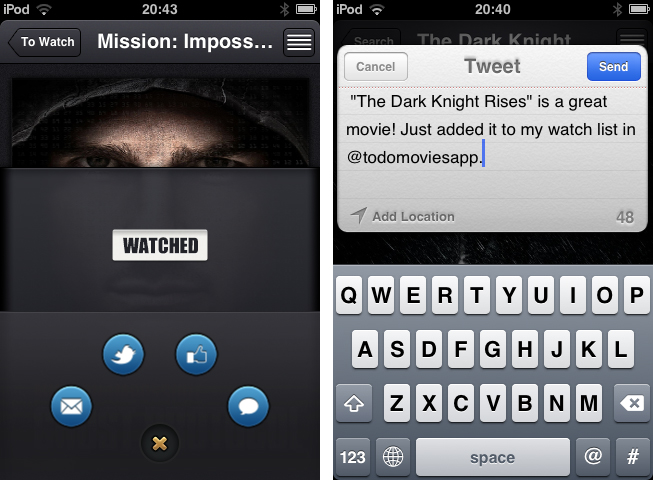
Which brings me to (at least to me) the coolest feature of Todo Movies: its UI. You’ve already seen some screenshots of it, and I have to say that it’s way better when you use it. I very rarely cannot say anything bad about an app’s design, but this time, I couldn’t find any styling flaw at all. The transitions between windows are smooth, and the buttons are perfectly combined in both look and colorization. And the highlight for all UI fanatics lies within the sharing options, which can be brought up by tapping the speech bulb button in the single movie window. I deliberately did not mention this until now, because it’s one of the coolest thing I’ve seen to date: the sharing buttons for Twitter, mail, Facebook and iMessage are arranged around a central dismiss. When you tap that “x” dismiss button, they smoothly start rotating and this way roll back into the center; afterwards, the buttons hide and up comes the main investigation window again.
This feature alone showed me that Todo Movies was worth of my time. Not just its UI, but also its feature set justifies the app’s price. The only feature besides the search confusion I mentioned above I could imagine the devs to add is a kind of a “hot” or “coming soon” page as a starting points for new users or less nerdy people who remember every trailer they saw. But otherwise, I recommend this app to every movie lover out there. It looks gorgeous, works flawlessly and works the way it’s supposed to do. You can purchase Todo Movies for just $0.99 on the App Store.
Access Extra Content and Perks
Founded in 2015, Club MacStories has delivered exclusive content every week for nearly a decade.
What started with weekly and monthly email newsletters has blossomed into a family of memberships designed for every MacStories fan.
Club MacStories: Weekly and monthly newsletters via email and the web that are brimming with apps, tips, automation workflows, longform writing, early access to the MacStories Unwind podcast, periodic giveaways, and more;
Club MacStories+: Everything that Club MacStories offers, plus an active Discord community, advanced search and custom RSS features for exploring the Club’s entire back catalog, bonus columns, and dozens of app discounts;
Club Premier: All of the above and AppStories+, an extended version of our flagship podcast that’s delivered early, ad-free, and in high-bitrate audio.
iOS 6 Confirmed: New Banners Up at Moscone West
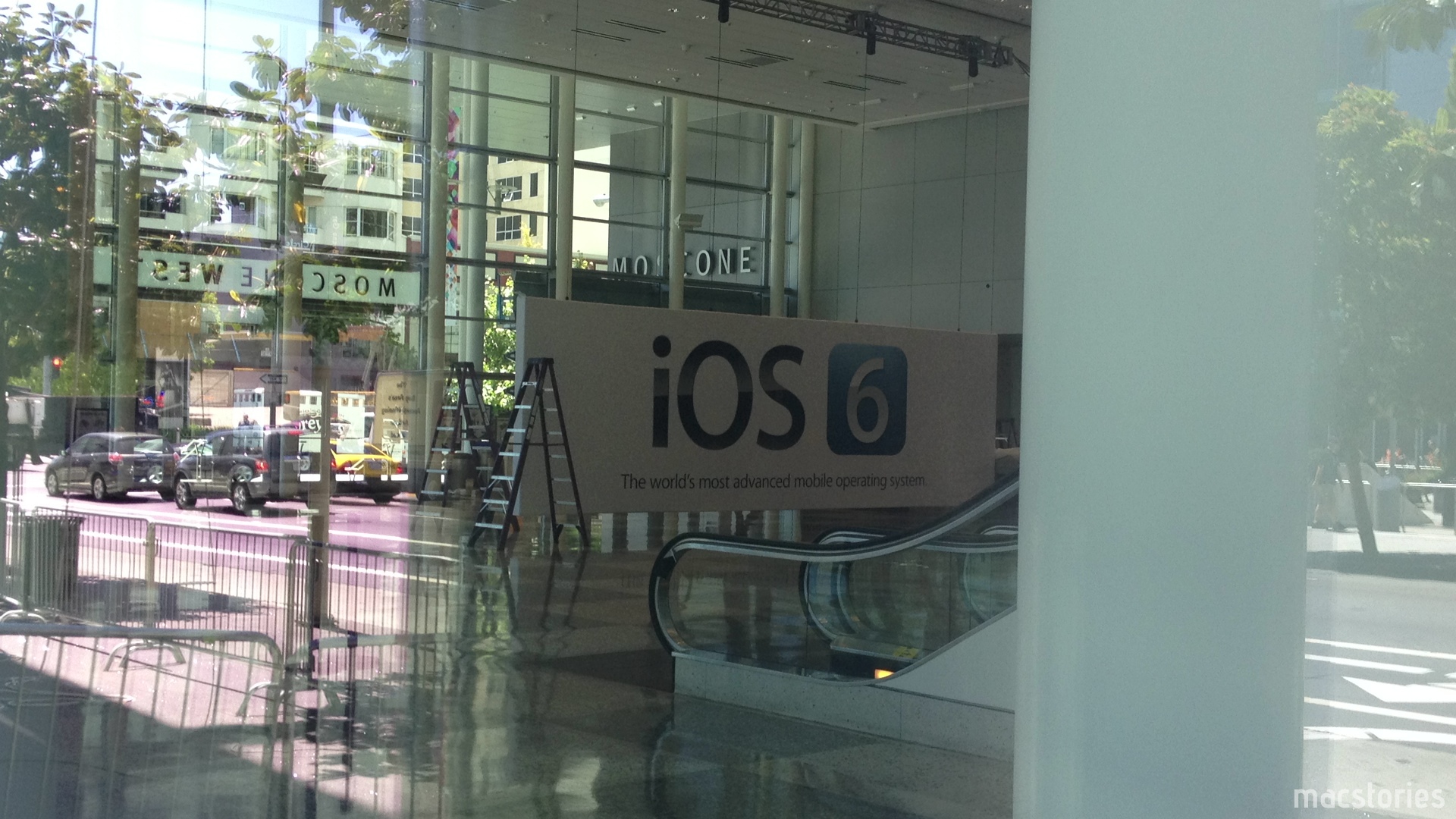
It’s been a couple days since we last checked in on the progress at Moscone West, and today it appears that new banners at WWDC are confirming expected discussion around iOS 6, Apple’s next iteration of their mobile OS. Banners in the halls of Moscone West are showing off a slick blue logo with a silver 6 inside, perhaps signifying that fresh coat of paint Rene Ritchie discussed as a possibility on iMore. We’re looking forward to Monday’s Keynote, and in the meantime we’ll continue updating our Moscone West 2012 post with great photographs as they come in.

The first floor layout of Moscone West is different from last year — in the photo above you can see the iOS 6 signage in comparison to last year’s open floor with rope lines. Banners have been hung on the 2nd floor of Moscone West, and there’s different banners for Mac Messages, Mac Notification Center, and for a Mac Game Center. WWDC 2012 is already shaping up to be a big event, and we’ll have more photos soon.
Past the break, we have a couple more photos for your viewing pleasure. Thanks again to @SteveStreza for the amazing pictures!
Access Extra Content and Perks
Founded in 2015, Club MacStories has delivered exclusive content every week for nearly a decade.
What started with weekly and monthly email newsletters has blossomed into a family of memberships designed for every MacStories fan.
Club MacStories: Weekly and monthly newsletters via email and the web that are brimming with apps, tips, automation workflows, longform writing, early access to the MacStories Unwind podcast, periodic giveaways, and more;
Club MacStories+: Everything that Club MacStories offers, plus an active Discord community, advanced search and custom RSS features for exploring the Club’s entire back catalog, bonus columns, and dozens of app discounts;
Club Premier: All of the above and AppStories+, an extended version of our flagship podcast that’s delivered early, ad-free, and in high-bitrate audio.
#MacStoriesDeals - Friday

Here are today’s @MacStoriesDeals on hardware, iOS, and Mac apps that are on sale for a limited time, so get them before they end!
Read more
Access Extra Content and Perks
Founded in 2015, Club MacStories has delivered exclusive content every week for nearly a decade.
What started with weekly and monthly email newsletters has blossomed into a family of memberships designed for every MacStories fan.
Club MacStories: Weekly and monthly newsletters via email and the web that are brimming with apps, tips, automation workflows, longform writing, early access to the MacStories Unwind podcast, periodic giveaways, and more;
Club MacStories+: Everything that Club MacStories offers, plus an active Discord community, advanced search and custom RSS features for exploring the Club’s entire back catalog, bonus columns, and dozens of app discounts;
Club Premier: All of the above and AppStories+, an extended version of our flagship podcast that’s delivered early, ad-free, and in high-bitrate audio.
Reviewed: The iPhone Half of Track 8’s Universal Update
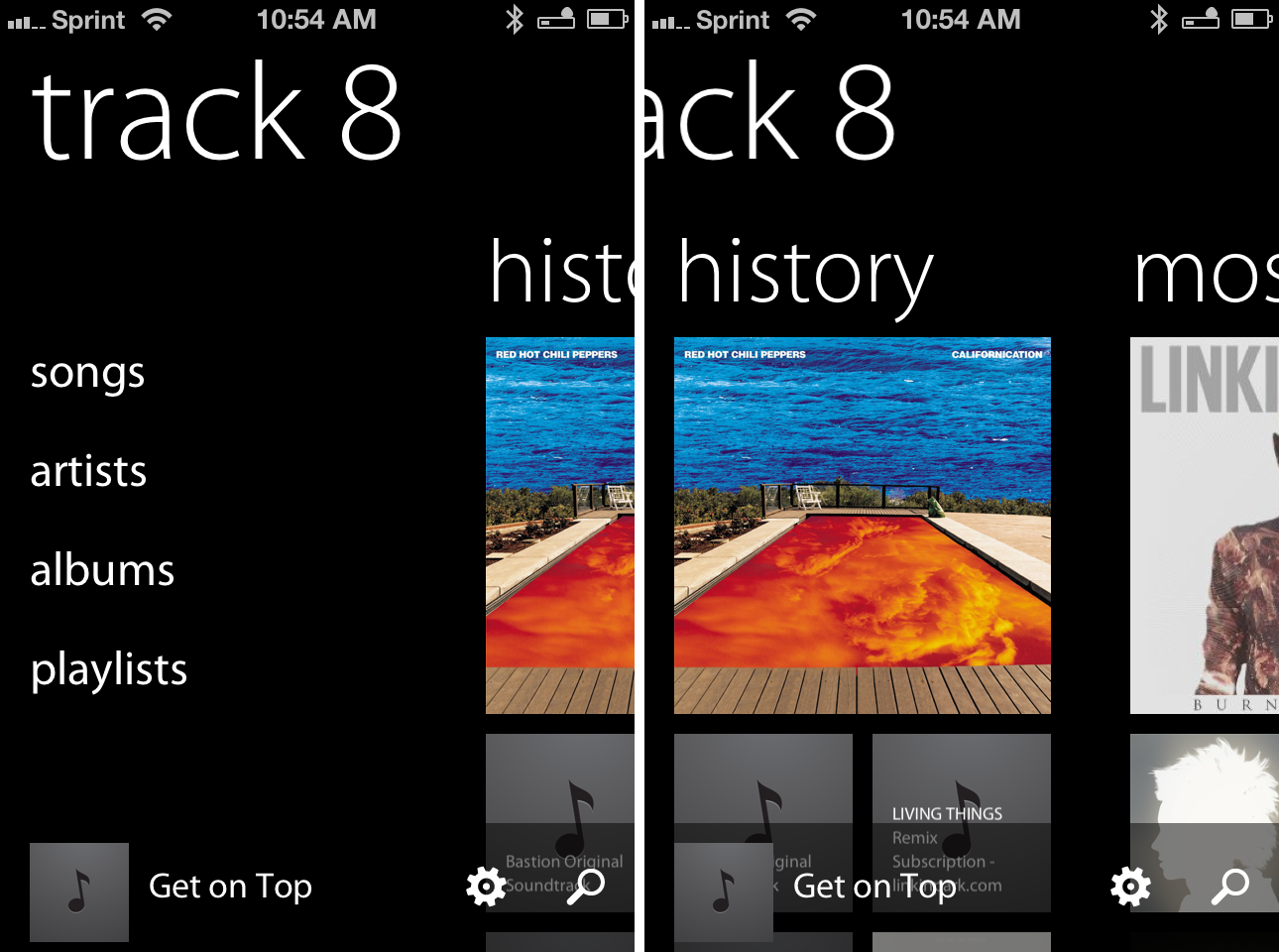
The Metro flavor — that recognizable blend of Swiss minimalism and Segoe typography — is still, by far, one of the most intriguing design languages to be employed. Perhaps Microsoft’s edgy futurist appeal will wear off as Windows 8 PCs and tablets normalize the trend of text driven interfaces, but the current novelty of Metro driven applications continues to leave us entranced and occasionally optimistic about the future of UI design. In stark contrast to skeuomorphic or icon driven designs of iOS and Android families, one has to wonder if Microsoft’s modern brainchild could find itself comfortably at home when integrated with other platforms and without clashing with the native’s traditional mechanisms of in-app navigation and interaction.
The now defunct Zune brand never made an appearance on iOS, and for good reason, but Ender Labs’ Track 8 trendy reimplementation of the Windows Phone 7 music player on the iPad had left us considering if both the aesthetic and function of a Metro designed application could be capitalized on iOS. Track 8 intentionally ignores the conventions of iOS, extending Microsoft’s interface onto the dimension of Apple’s touchscreen displays.
Originally conceived for the iPad, Track 8’s second version (yes, 2.0) delivers a few important enhancements. An AirPlay button is now built into the app, presenting itself only when an AirPlay device is available above the shuffle and continuous playback buttons on the Now Playing Screen. Per navigation, a navigational gripe is resolved thanks to the inclusion of a long press on the back button to return to the main menu. Additionally, artist backgrounds can be restricted to downloading only over Wi-Fi via a toggle in the settings. While all of these additions, especially the long press, greatly improve the Track 8 user experience, it is the app’s Universal signification that denotes the 2.0 convention and Track 8’s appearance on the iPhone.
Access Extra Content and Perks
Founded in 2015, Club MacStories has delivered exclusive content every week for nearly a decade.
What started with weekly and monthly email newsletters has blossomed into a family of memberships designed for every MacStories fan.
Club MacStories: Weekly and monthly newsletters via email and the web that are brimming with apps, tips, automation workflows, longform writing, early access to the MacStories Unwind podcast, periodic giveaways, and more;
Club MacStories+: Everything that Club MacStories offers, plus an active Discord community, advanced search and custom RSS features for exploring the Club’s entire back catalog, bonus columns, and dozens of app discounts;
Club Premier: All of the above and AppStories+, an extended version of our flagship podcast that’s delivered early, ad-free, and in high-bitrate audio.
Airfoil Speakers Touch is Back in the App Store, But…

Paul Kafasis on Apple’s takedown of Airfoil Speakers Touch and its reintroduction into the App Store:
We’re pleased that Airfoil Speakers Touch is once again available in the iOS App Store, enabling you to use Airfoil to send audio from your Mac or PC to Airfoil Speakers Touch running on your iPhone, iPod Touch, or iPad. However, in order to get Airfoil Speakers Touch back into the store as a receiver for Airfoil, we had to remove its ability to receive audio directly from iOS and iTunes via AirPlay. This was quite disappointing to us, as we’d provided a feature that thousands of users found quite useful.
Airfoil Speakers Touch was removed from the App Store on May 24th, specifically for its Enhanced Audio Receiving feature which turned your iPhone or iPod into an AirPlay receiver. For instance, you could stream audio from iTunes to an iOS device that was connected to your home audio equipment. The feature was sold as an in app purchase — Kafasis states that over 7,000 customers paid extra for the functionality.
We now know that Apple’s issue with Airfoil Speakers Touch was specifically related to its recently-added ability to receive audio directly from iOS devices and iTunes. This was not properly conveyed in our initial conversations prior to the removal of Airfoil Speakers Touch from the store, and Apple’s representatives apologized for the fact that the entire process was “poorly handled”.
Apple’s problem with Enhanced Audio Receiving stems from Rogue Amoeba’s use of AirPlay in the app — Apple hasn’t made available any APIs for iOS devices to act as AirPlay receivers. Rogue Amoeba made clear that they weren’t using any Private APIs in their implementation. As John Gruber speculated, perhaps it wasn’t the issue of an API, but rather that Apple simply didn’t want a high profile AirPlay Receiver in their App Store.
John Gruber:
I think the bottom line is that Apple is saying that apps are not allowed to act as AirPlay receivers on iOS, but there’s no App Store guideline that explicitly forbids that. So they’re citing App Store Review Guideline 2.5:
Apps that use non-public APIs will be rejected.
Kafasis specifies what guidelines Apple used to remove Airfoil Speakers Touch from the App Store:
Regardless, Apple is using the authority they provide themselves in the guidelines and program license agreement to remove apps they don’t like. Specifically, they cited a provision in the App Store Review Guidelines which allows them to reject apps “for any content or behavior [they] believe is over the line”. That’s certainly disappointing, and frustrating, but it’s the nature of the system Apple has created.
Kafasis is upset, and rightfully upset, this his customers paid for a feature that was swiftly taken away without good reason. It’s also frustrating for customers, who may have specifically downloaded the app to pay for and use this feature. Instances like this can have negative impacts on the reputation of the developer if customers are unaware that the removal of a feature they paid for was mandated by Apple. Kafasis writes that Apple licenses AirPlay to lots of vendors, and that Apple might not want their own products to compete with AirPlay enabled hardware sold in stores. Rogue Amoeba had no choice but to comply and do the best they can to provide the remainder of the app’s functionality for existing customers. As far as outcomes go, I think it was the best compromise, but certainly not ideal.
[via Rogue Amoeba, The Next Web]
Access Extra Content and Perks
Founded in 2015, Club MacStories has delivered exclusive content every week for nearly a decade.
What started with weekly and monthly email newsletters has blossomed into a family of memberships designed for every MacStories fan.
Club MacStories: Weekly and monthly newsletters via email and the web that are brimming with apps, tips, automation workflows, longform writing, early access to the MacStories Unwind podcast, periodic giveaways, and more;
Club MacStories+: Everything that Club MacStories offers, plus an active Discord community, advanced search and custom RSS features for exploring the Club’s entire back catalog, bonus columns, and dozens of app discounts;
Club Premier: All of the above and AppStories+, an extended version of our flagship podcast that’s delivered early, ad-free, and in high-bitrate audio.
Angry Birds Space Downloaded 100 Million Times in 76 Days

This morning, Rovio Entertainment (@RovioHQ) tweeted that their latest franchise hit, Angry Birds Space, has been downloaded 100 million times in just over a period of two months.
Angry Birds Space has reached 100 million downloads! rov.io/JLuwCY
— Rovio Entertainment (@RovioHQ) June 6, 2012
When we last heard from Rovio, Angry Birds Space was touted as the “fastest growing mobile game” after hitting 50 million downloads within the first 35 days, and 10 million downloads within the first 3 days. Comparatively, when Angry Birds first launched in December of 2009, it took until June, 2010, to reach 5 million downloads.
As the popularity of the iPhone and Angry Birds has exponentially increased, Angry Birds fans are more than happy to get a dose of the kid and adult friendly gameplay. Rovio recently reported that Angry Birds was downloaded one billion times in May, after reporting 648 billion downloads in December. Apple’s all time record charts noted Angry Birds as the top paid iPhone app, with an HD version on the iPad being the second top paid app.
When we looked at Angry Bird’s success last November, we charted its exponential growth and made note of its addictive gameplay. At the time, gamers were racking up more than 300 million minutes per day playing Angry Birds, putting in well over 200,000 years of pig crushing, crate smashing, and star collecting fun.
[Rovio via iDownloadBlog]
Access Extra Content and Perks
Founded in 2015, Club MacStories has delivered exclusive content every week for nearly a decade.
What started with weekly and monthly email newsletters has blossomed into a family of memberships designed for every MacStories fan.
Club MacStories: Weekly and monthly newsletters via email and the web that are brimming with apps, tips, automation workflows, longform writing, early access to the MacStories Unwind podcast, periodic giveaways, and more;
Club MacStories+: Everything that Club MacStories offers, plus an active Discord community, advanced search and custom RSS features for exploring the Club’s entire back catalog, bonus columns, and dozens of app discounts;
Club Premier: All of the above and AppStories+, an extended version of our flagship podcast that’s delivered early, ad-free, and in high-bitrate audio.
#MacStoriesDeals - Wednesday

Here are today’s @MacStoriesDeals on hardware, iOS, and Mac apps that are on sale for a limited time, so get them before they end!
Read more
Access Extra Content and Perks
Founded in 2015, Club MacStories has delivered exclusive content every week for nearly a decade.
What started with weekly and monthly email newsletters has blossomed into a family of memberships designed for every MacStories fan.
Club MacStories: Weekly and monthly newsletters via email and the web that are brimming with apps, tips, automation workflows, longform writing, early access to the MacStories Unwind podcast, periodic giveaways, and more;
Club MacStories+: Everything that Club MacStories offers, plus an active Discord community, advanced search and custom RSS features for exploring the Club’s entire back catalog, bonus columns, and dozens of app discounts;
Club Premier: All of the above and AppStories+, an extended version of our flagship podcast that’s delivered early, ad-free, and in high-bitrate audio.
#MacStoriesDeals - Tuesday

Here are today’s @MacStoriesDeals on hardware, iOS, and Mac apps that are on sale for a limited time, so get them before they end!
Read more
Access Extra Content and Perks
Founded in 2015, Club MacStories has delivered exclusive content every week for nearly a decade.
What started with weekly and monthly email newsletters has blossomed into a family of memberships designed for every MacStories fan.
Club MacStories: Weekly and monthly newsletters via email and the web that are brimming with apps, tips, automation workflows, longform writing, early access to the MacStories Unwind podcast, periodic giveaways, and more;
Club MacStories+: Everything that Club MacStories offers, plus an active Discord community, advanced search and custom RSS features for exploring the Club’s entire back catalog, bonus columns, and dozens of app discounts;
Club Premier: All of the above and AppStories+, an extended version of our flagship podcast that’s delivered early, ad-free, and in high-bitrate audio.