Posts in iPad

Bump Data Suggests 90% of iOS Devices Running 4.x

David Lieb, founder and CEO of iPhone app Bump yesterday posted some data on Quora to a question about what percentage of users of iOS devices were on 4.x, his answer revealed that 89.7% of Bump users were on the latest major iteration of iOS, 4.x.

Although Lieb didn’t note how big the sample size is, the latest known figure of Bump downloads was 15 million back from August last year. That’s a large sample size and one that includes users of iPhones, iPod Touch’s and iPads, a sample that would suggest the ~90% is a close approximation to the real percentage of iOS device users on the latest major iteration of iOS, version 4.

Ian Peters-Campbell of Loopt, another iOS app backed up Lieb’s data but said for his users take-up was even a little higher. Anyway you cut it such a high take up rate in about six months is impressive. It also highlights concerns over how fragmented Android is compared to iOS which back in December 2010 when Froyo (2.2) was the latest Android OS only had 43.4% take up, let alone Gingerbread (2.3) which as of today ReadWriteWeb says only has 0.4% take-up.

Lieb of Bump, posted a full breakdown of iterations and percentages of users, which is posted after the break. The key data is that 53% of users are on the very latest software update of 4.2.1.

Read more

Access Extra Content and Perks

Founded in 2015, Club MacStories has delivered exclusive content every week for nearly a decade.

What started with weekly and monthly email newsletters has blossomed into a family of memberships designed for every MacStories fan.

Learn more here and from our Club FAQs.

Club MacStories: Weekly and monthly newsletters via email and the web that are brimming with apps, tips, automation workflows, longform writing, early access to the MacStories Unwind podcast, periodic giveaways, and more;

Club MacStories+: Everything that Club MacStories offers, plus an active Discord community, advanced search and custom RSS features for exploring the Club’s entire back catalog, bonus columns, and dozens of app discounts;

Club Premier: All of the above and AppStories+, an extended version of our flagship podcast that’s delivered early, ad-free, and in high-bitrate audio.

Learn more here and from our Club FAQs.


Grand Central Coffee Shop in NYC Getting iPad Cash Register

Joe The Art of Coffee, in Grand Central Terminal (NYC), sells coffee like many other people but starting next week, coffee drinkers will be paying for it much differently. They’re installing an iPad Point-of-Sale device, or cash register, via ShopKeep.com.

ShopKeep.com is testing an iPad Point-of-Sale device designed for coffee shops, bakeries or specialty retail shop with less than 150 items. It prints receipts and opens the cash drawer like a standard register, except its form factor takes up very little space. The “register” also transmits sales to ShopKeep’s web-based BackOffice so that managers can track real-time sales and manage inventory, run reports and export their sales data. Read more

Access Extra Content and Perks

Founded in 2015, Club MacStories has delivered exclusive content every week for nearly a decade.

What started with weekly and monthly email newsletters has blossomed into a family of memberships designed for every MacStories fan.

Learn more here and from our Club FAQs.

Club MacStories: Weekly and monthly newsletters via email and the web that are brimming with apps, tips, automation workflows, longform writing, early access to the MacStories Unwind podcast, periodic giveaways, and more;

Club MacStories+: Everything that Club MacStories offers, plus an active Discord community, advanced search and custom RSS features for exploring the Club’s entire back catalog, bonus columns, and dozens of app discounts;

Club Premier: All of the above and AppStories+, an extended version of our flagship podcast that’s delivered early, ad-free, and in high-bitrate audio.

Learn more here and from our Club FAQs.


StudioDock: The Reason for Musicians To Buy An iPad

In the past few years, we have seen an “explosion” of iOS devices used for music creations, live performances and gear experimentation. From the most curious app to the complex setups DJs and musicians have found themselves playing with, iOS devices – and especially the iPad – have become the most desired gadgets by geeks obsessed with music. Most of the times because, well, thanks to apps and hardware compatibility they turned out to be pretty great instruments.

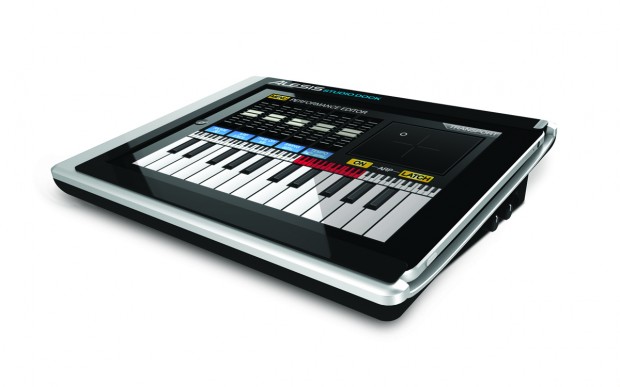
The Alesis StudioDock for iPad aims at taking this whole music experimentation thing to a new level. The StudioDock is both a dock station for the iPad and a protective case that covers the device’s bezel. But most of all, it’s a full-feature music stations with MIDI in/out ports, stereo outs, gain controls and XLR combo ins. The Alesis guys write on their official website:

The StudioDock is the first device that enables anyone with an iPad to create, produce, and perform music with virtually any pro audio gear or instruments. The StudioDock is a universal docking station specifically designed for the iPad, and it gives musicians, recording engineers, and music producers the connectivity they need to create and perform with iPad. Connect all your pro audio gear to virtually any app in the App Store with the StudioDock.

Connecting professional gear to the tablet does indeed sound like a great idea and something that, beyond music, podcasters might want to tinker with as well. Check out StudioDock’s website here; specs embedded after the break, courtesy of CrunchGear. Read more

Access Extra Content and Perks

Founded in 2015, Club MacStories has delivered exclusive content every week for nearly a decade.

What started with weekly and monthly email newsletters has blossomed into a family of memberships designed for every MacStories fan.

Learn more here and from our Club FAQs.

Club MacStories: Weekly and monthly newsletters via email and the web that are brimming with apps, tips, automation workflows, longform writing, early access to the MacStories Unwind podcast, periodic giveaways, and more;

Club MacStories+: Everything that Club MacStories offers, plus an active Discord community, advanced search and custom RSS features for exploring the Club’s entire back catalog, bonus columns, and dozens of app discounts;

Club Premier: All of the above and AppStories+, an extended version of our flagship podcast that’s delivered early, ad-free, and in high-bitrate audio.

Learn more here and from our Club FAQs.


Singaporean Schools add iPad to Teaching Resources

As a test pilot, a portion of the total population of Nanyang Girls High School in Singapore will use 150 iPads that the school has purchased at a cost of around US$100,000, the pilot including 140 students and 10 teachers aims to complement the schools more traditional teaching methods and textbooks.

The iPad will enable the students to connect to the internet with its vast array of educational resources, download books and course material while also allowing note taking or word processing. Chloe Chen, one of the lucky students to be a part of the pilot program said “It’s much more convenient, teachers can just tell us to go to a website, and we can immediately go and do our work.”

Read more

Access Extra Content and Perks

Founded in 2015, Club MacStories has delivered exclusive content every week for nearly a decade.

What started with weekly and monthly email newsletters has blossomed into a family of memberships designed for every MacStories fan.

Learn more here and from our Club FAQs.

Club MacStories: Weekly and monthly newsletters via email and the web that are brimming with apps, tips, automation workflows, longform writing, early access to the MacStories Unwind podcast, periodic giveaways, and more;

Club MacStories+: Everything that Club MacStories offers, plus an active Discord community, advanced search and custom RSS features for exploring the Club’s entire back catalog, bonus columns, and dozens of app discounts;

Club Premier: All of the above and AppStories+, an extended version of our flagship podcast that’s delivered early, ad-free, and in high-bitrate audio.

Learn more here and from our Club FAQs.


#MacStoriesDeals - Monday

Let’s hope Steve Job’s health improves quickly! Here’s today’s deals on iOS, Mac, and Mac App Store apps that are on sale for a limited time, so get ‘em while they’re hot! Read more

Access Extra Content and Perks

Founded in 2015, Club MacStories has delivered exclusive content every week for nearly a decade.

What started with weekly and monthly email newsletters has blossomed into a family of memberships designed for every MacStories fan.

Learn more here and from our Club FAQs.

Club MacStories: Weekly and monthly newsletters via email and the web that are brimming with apps, tips, automation workflows, longform writing, early access to the MacStories Unwind podcast, periodic giveaways, and more;

Club MacStories+: Everything that Club MacStories offers, plus an active Discord community, advanced search and custom RSS features for exploring the Club’s entire back catalog, bonus columns, and dozens of app discounts;

Club Premier: All of the above and AppStories+, an extended version of our flagship podcast that’s delivered early, ad-free, and in high-bitrate audio.

Learn more here and from our Club FAQs.


OMGuitar for iPad Was Meant for Auditions [Video]

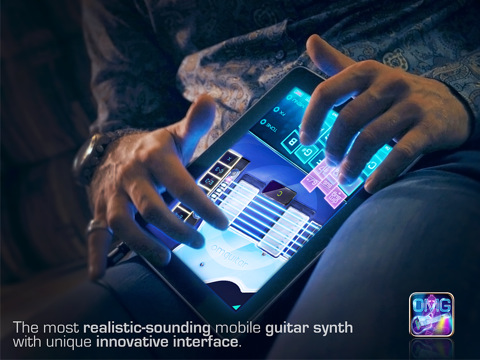
We don’t know whether Steve Jobs knew the iPad would turn out to be a popular music instrument or not, but it’s undeniable that more and more artists every week are coming out with videos showing their live performances entirely based on the tablet. Even the Gorillaz created an album using only iPad apps. In the video embedded after the break, you can take a look at the functionalities offered by a new music app for the iPad called “OMGuitar” that, according to the Amidio developers, is the most innovative and realistic “guitar synth” for iOS.

The app lets strum away on your iPad’s screen and captures the speed and “emotion” of your strumming. You can choose between 6 different guitar models (from the most classic one to the electric Les Paul) and play through an interface that’s divided in two parts: one for the notes and chords, one for the actual strumming. The developers write:

The strings themselves respond to the speed of strumming and the distance between themselves and the initial screen tap. The player is supposed to strum with one finger and place the second finger on the guitar at any time for muting all the strings. With such approach, many common guitar playing techniques can be easily accomplished.

OMGuitar employs an absolutely new way of choosing chords called CH#RD. More than 300 chords are basically at the fingertips. Only one finger is needed to play all the common chords, such as Minor, 7th, Major 7th, power chords, 6th chords, diminished or suspended. For more special chords, one more finger is needed. In total, there is access to 23 chord variations per every root note, which is more than enough for any song.

OMGuitar is available at $14.99 in the App Store. While we think you shouldn’t really try to go to an audition with an iPad as your main instrument, we’re still hoping in the future that won’t look weird. Perhaps in a few years. [Youtube via TUAW]
Read more

Access Extra Content and Perks

Founded in 2015, Club MacStories has delivered exclusive content every week for nearly a decade.

What started with weekly and monthly email newsletters has blossomed into a family of memberships designed for every MacStories fan.

Learn more here and from our Club FAQs.

Club MacStories: Weekly and monthly newsletters via email and the web that are brimming with apps, tips, automation workflows, longform writing, early access to the MacStories Unwind podcast, periodic giveaways, and more;

Club MacStories+: Everything that Club MacStories offers, plus an active Discord community, advanced search and custom RSS features for exploring the Club’s entire back catalog, bonus columns, and dozens of app discounts;

Club Premier: All of the above and AppStories+, an extended version of our flagship podcast that’s delivered early, ad-free, and in high-bitrate audio.

Learn more here and from our Club FAQs.


#MacStoriesDeals - Friday

Pew Pew Pew! Here’s today’s deals on iOS, Mac, and Mac App Store apps that are on sale for a limited time, so get ‘em while they’re hot! Read more

Access Extra Content and Perks

Founded in 2015, Club MacStories has delivered exclusive content every week for nearly a decade.

What started with weekly and monthly email newsletters has blossomed into a family of memberships designed for every MacStories fan.

Learn more here and from our Club FAQs.

Club MacStories: Weekly and monthly newsletters via email and the web that are brimming with apps, tips, automation workflows, longform writing, early access to the MacStories Unwind podcast, periodic giveaways, and more;

Club MacStories+: Everything that Club MacStories offers, plus an active Discord community, advanced search and custom RSS features for exploring the Club’s entire back catalog, bonus columns, and dozens of app discounts;

Club Premier: All of the above and AppStories+, an extended version of our flagship podcast that’s delivered early, ad-free, and in high-bitrate audio.

Learn more here and from our Club FAQs.


The Future: Thought-Controlled iPad

When I was a kid and I tried to imagine what “the future” would look like, I have to admit I could only think of flying cars, spacecrafts and thought-controlled objects. As I grew up and realized flying cars were a no-no and the year 2000 didn’t bring anything new except for a weird computer bug people were scared of, I lost my faith in space exploration (well, at least in the short term) but I kept hoping for thought-controlled gadgets. Because I knew manufacturers and scientists were playing around with the idea and a few prototypes had been demoed at, say, videogame-related conferences.

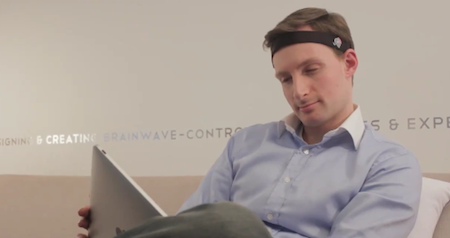
So what does this have to do with Apple? Fair enough, good question. At the latest CES, InteraXon (a Canadian company) has announced and demonstrated a headset that can connect to iPhones and iPads and allows you to control apps and games with your mind. There, I said it. Technically, this custom EEG headset pairs with a thought-controlling framework that has been added to the popular iPad game Zen Bound 2 game, letting users control the wooden shapes on screen with their brainwaves.

Now the real question is: are you willing to put a headset on to control stuff with your brain? Doesn’t it look a little bit, well, weird? The project is in its early stages, we have time to put some thought on it. Literally.

Video after the break. [via iSpazio]

Read more

Access Extra Content and Perks

Founded in 2015, Club MacStories has delivered exclusive content every week for nearly a decade.

What started with weekly and monthly email newsletters has blossomed into a family of memberships designed for every MacStories fan.

Learn more here and from our Club FAQs.

Club MacStories: Weekly and monthly newsletters via email and the web that are brimming with apps, tips, automation workflows, longform writing, early access to the MacStories Unwind podcast, periodic giveaways, and more;

Club MacStories+: Everything that Club MacStories offers, plus an active Discord community, advanced search and custom RSS features for exploring the Club’s entire back catalog, bonus columns, and dozens of app discounts;

Club Premier: All of the above and AppStories+, an extended version of our flagship podcast that’s delivered early, ad-free, and in high-bitrate audio.

Learn more here and from our Club FAQs.


Gameloft Brings Interactive World War II Archive To The iPad

With their latest release for the iPad, Gameloft has temporarily decided to put games on the shelves and focus on a more historic subject like World War II. And instead of re-creating the conflict through another first-person shooter videogame, Gameloft created a completely interactive and immersive 56-page book filled with photographs, maps and fac-simile documents.

The app, War in the Pacific, features a foreword by Senior Military Advisor Dale Dye and was curated by Richard Overy, Professor of History at the University of Exeter. As you can see in the promo video below, the app (which also happens to be a 463 MB download, not exactly “lightweight”) comes with original video footage from 1945 detailing the battles against the Japanese Empire and sports some neat multi-touch gestures to navigate between pages, move documents on screen and re-arrange content. There are also animated maps showing the most important events in the Pacific and, overall, the photo archive really looks impressive.

War in the Pacific is available exclusively for the iPad and will cost you $9.99. I wonder if in the future we’ll see, for example, schools adopt this kind of single-subject interactive publications as a way for kids to learn faster, in a new way. Read more

Access Extra Content and Perks

Founded in 2015, Club MacStories has delivered exclusive content every week for nearly a decade.

What started with weekly and monthly email newsletters has blossomed into a family of memberships designed for every MacStories fan.

Learn more here and from our Club FAQs.

Club MacStories: Weekly and monthly newsletters via email and the web that are brimming with apps, tips, automation workflows, longform writing, early access to the MacStories Unwind podcast, periodic giveaways, and more;

Club MacStories+: Everything that Club MacStories offers, plus an active Discord community, advanced search and custom RSS features for exploring the Club’s entire back catalog, bonus columns, and dozens of app discounts;

Club Premier: All of the above and AppStories+, an extended version of our flagship podcast that’s delivered early, ad-free, and in high-bitrate audio.

Learn more here and from our Club FAQs.