

Here are today’s @MacStoriesDeals on iOS, Mac, and Mac App Store apps that are on sale for a limited time, so get them before they end!
Posts in iPad
#MacStoriesDeals - Friday

Access Extra Content and Perks
Founded in 2015, Club MacStories has delivered exclusive content every week for nearly a decade.
What started with weekly and monthly email newsletters has blossomed into a family of memberships designed for every MacStories fan.
Club MacStories: Weekly and monthly newsletters via email and the web that are brimming with apps, tips, automation workflows, longform writing, early access to the MacStories Unwind podcast, periodic giveaways, and more;
Club MacStories+: Everything that Club MacStories offers, plus an active Discord community, advanced search and custom RSS features for exploring the Club’s entire back catalog, bonus columns, and dozens of app discounts;
Club Premier: All of the above and AppStories+, an extended version of our flagship podcast that’s delivered early, ad-free, and in high-bitrate audio.
#MacStoriesDeals - Thursday

Here are today’s @MacStoriesDeals on iOS, Mac, and Mac App Store apps that are on sale for a limited time, so get them before they end!
Access Extra Content and Perks
Founded in 2015, Club MacStories has delivered exclusive content every week for nearly a decade.
What started with weekly and monthly email newsletters has blossomed into a family of memberships designed for every MacStories fan.
Club MacStories: Weekly and monthly newsletters via email and the web that are brimming with apps, tips, automation workflows, longform writing, early access to the MacStories Unwind podcast, periodic giveaways, and more;
Club MacStories+: Everything that Club MacStories offers, plus an active Discord community, advanced search and custom RSS features for exploring the Club’s entire back catalog, bonus columns, and dozens of app discounts;
Club Premier: All of the above and AppStories+, an extended version of our flagship podcast that’s delivered early, ad-free, and in high-bitrate audio.
Pulse.me Saves Your Favorite Stories on iPad, iPhone, and Web
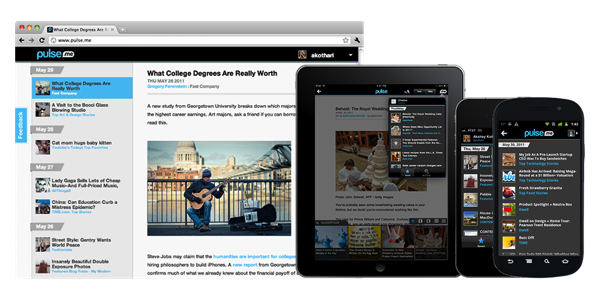
RSS users who live inside the Pulse ecosystem are getting a boost this afternoon in collecting articles to read later. Pulse has unveiled Pulse.me, which is a brand new web component that allows you to save a story from Pulse on your iPhone or iPad, then read it later at your office desk or during a coffee break. I love the idea of not extending the read-it-later schema off of Pulse: you simply have to star the article to continue reading it later.
Pulse.me integrates with your Pulse account or Facebook login, making sign-up relatively painless. Because stories are saved on the web, you can return to your reading list on your iPhone, your iPad, your Android smartphone or tablet, and even your desktop for a consistent experience. If you choose not to use Pulse, they’ve included Instapaper, Read It Later, Google Reader integration, and Evernote support so stories can be read in multiple places. These services work simultaneously with Pulse, meaning if you star an article for Pulse.me, it will star the article in your Google Reader account as well.
Pulse is a free download from the App Store for the iPhone and the iPad.
Access Extra Content and Perks
Founded in 2015, Club MacStories has delivered exclusive content every week for nearly a decade.
What started with weekly and monthly email newsletters has blossomed into a family of memberships designed for every MacStories fan.
Club MacStories: Weekly and monthly newsletters via email and the web that are brimming with apps, tips, automation workflows, longform writing, early access to the MacStories Unwind podcast, periodic giveaways, and more;
Club MacStories+: Everything that Club MacStories offers, plus an active Discord community, advanced search and custom RSS features for exploring the Club’s entire back catalog, bonus columns, and dozens of app discounts;
Club Premier: All of the above and AppStories+, an extended version of our flagship podcast that’s delivered early, ad-free, and in high-bitrate audio.
Tim Cook: Tablets To Outsell PCs Over The Next Several Years

In a report by Goldman Sachs analyst Bill Shope, Tim Cook speaks some pretty bold words about the future of the tablet market and the PC market. Speaking with Shope, he says “he sees no reason why the tablet market shouldn’t eclipse the PC market over the next several years”.
Shope notes that Apple, in the statement is more “overtly optimistic” on the long-term prospects of the platform than they have in the past. In the report itself, Shope suggests that Apple will sell 8.1 million iPads in the June quarter, compared to last year it would be 72% increase.
Apple executives were also touting the fact the iPhone is now officially available from 200 carriers worldwide, and that ten years since opening, its retail stores are doing well.
[Via BusinessInsider]
Access Extra Content and Perks
Founded in 2015, Club MacStories has delivered exclusive content every week for nearly a decade.
What started with weekly and monthly email newsletters has blossomed into a family of memberships designed for every MacStories fan.
Club MacStories: Weekly and monthly newsletters via email and the web that are brimming with apps, tips, automation workflows, longform writing, early access to the MacStories Unwind podcast, periodic giveaways, and more;
Club MacStories+: Everything that Club MacStories offers, plus an active Discord community, advanced search and custom RSS features for exploring the Club’s entire back catalog, bonus columns, and dozens of app discounts;
Club Premier: All of the above and AppStories+, an extended version of our flagship podcast that’s delivered early, ad-free, and in high-bitrate audio.
Notefile by Junecloud makes a Splash on your Dashboard, iOS
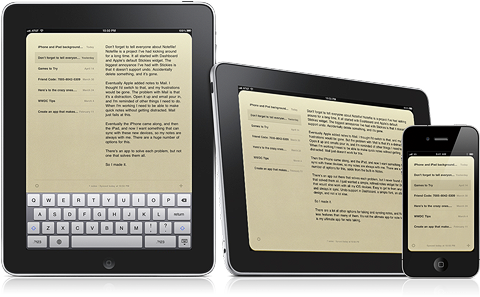
It’s not too often we see really nice Dashboard widgets and iOS apps working in sync, but if you’re familiar with Deliveries for the iPad and iPhone, you’re already well aware that Junecloud are pros at providing seamless syncing. Notefile is their latest endeavor, which was heavily inspired by the desire to sync notes outside of Mail’s notes between Mac and iOS, as well the lack of undo in the Stickies widget. Notefile could be considered the much needed upgrade to Apple’s own Notes, delivering a better default font choice and syncing capabilities with a free Dashboard widget. I personally like the developer’s yellow stylings over the bright white backgrounds many note apps use for their text fields, which is why I often return to Notes’ legal pad. With Notefile, you get a simple, yet seamless syncing experience between all of your Apple devices in a familiar interface. There are no subscription fees asides from the $4.99 entry price for the iOS app, which I’d pay for the gorgeous icon alone. Simplenote writers won’t find Notefile to be a compelling alternative, but Notes users wanting near instant sync for quickly sharing ideas between their Mac and iPhone will find this to be a reasonable upgrade.
Access Extra Content and Perks
Founded in 2015, Club MacStories has delivered exclusive content every week for nearly a decade.
What started with weekly and monthly email newsletters has blossomed into a family of memberships designed for every MacStories fan.
Club MacStories: Weekly and monthly newsletters via email and the web that are brimming with apps, tips, automation workflows, longform writing, early access to the MacStories Unwind podcast, periodic giveaways, and more;
Club MacStories+: Everything that Club MacStories offers, plus an active Discord community, advanced search and custom RSS features for exploring the Club’s entire back catalog, bonus columns, and dozens of app discounts;
Club Premier: All of the above and AppStories+, an extended version of our flagship podcast that’s delivered early, ad-free, and in high-bitrate audio.
Irish High School Letting Students Replace Textbooks With iPads
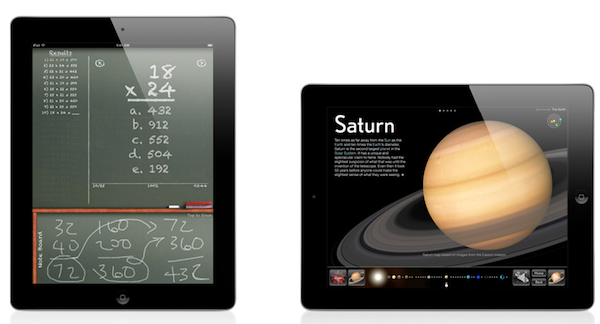
Starting this September, the St Coleman College in Claremorris, Ireland will give students the option of learning from iPads equipped with various apps and electronic versions of textbooks. The Irish Times reports that after several weeks of consultation with teachers and parents, there was 96% support for iPads being deployed to students.
As a result, 90 first year students will be given the option of using an iPad, with traditional textbooks still offered in case a student or parent prefers. In total the iPads, including apps, will cost the school around €700 each, but the school principle Jimmy Finn said that when spread over a three year period, the value for money could not be ignored.
The principle also noted, “It is a bit of a unique idea, but we have to continue to move with the times.” We also reported earlier this year on the $200,000 program in Auburne, Maine to give iPad 2’s to every kindgarten in the district. Similarly a Singaporean girls school started a trial with 150 iPads back in January.
[Via TUAW]
Access Extra Content and Perks
Founded in 2015, Club MacStories has delivered exclusive content every week for nearly a decade.
What started with weekly and monthly email newsletters has blossomed into a family of memberships designed for every MacStories fan.
Club MacStories: Weekly and monthly newsletters via email and the web that are brimming with apps, tips, automation workflows, longform writing, early access to the MacStories Unwind podcast, periodic giveaways, and more;
Club MacStories+: Everything that Club MacStories offers, plus an active Discord community, advanced search and custom RSS features for exploring the Club’s entire back catalog, bonus columns, and dozens of app discounts;
Club Premier: All of the above and AppStories+, an extended version of our flagship podcast that’s delivered early, ad-free, and in high-bitrate audio.
#MacStoriesDeals - Wednesday

Here are today’s @MacStoriesDeals on iOS, Mac, and Mac App Store apps that are on sale for a limited time, so get them before they end!
Access Extra Content and Perks
Founded in 2015, Club MacStories has delivered exclusive content every week for nearly a decade.
What started with weekly and monthly email newsletters has blossomed into a family of memberships designed for every MacStories fan.
Club MacStories: Weekly and monthly newsletters via email and the web that are brimming with apps, tips, automation workflows, longform writing, early access to the MacStories Unwind podcast, periodic giveaways, and more;
Club MacStories+: Everything that Club MacStories offers, plus an active Discord community, advanced search and custom RSS features for exploring the Club’s entire back catalog, bonus columns, and dozens of app discounts;
Club Premier: All of the above and AppStories+, an extended version of our flagship podcast that’s delivered early, ad-free, and in high-bitrate audio.
MindManager 9 for Mac Coming June 23, iOS Versions Due Mid-June

What is “Mind Mapping?” Well, if you want to take your analog thoughts and put them into the digital world, Wikipedia tells us that “a mind map is a diagram used to represent words, ideas, tasks, or other items linked to and arranged around a central key word or idea. Mind maps are used to generate, visualize, structure, and classify ideas, and as an aid to studying and organizing information, solving problems, making decisions, and writing.”
MindJet, who makes MindManager, one of the premiere apps in the market selling 1.8 million copies worldwide, is scheduled to ship MindManager 9 next month. It will cost $249 for new customers and $149 for current users wanting to upgrade. New features will include a presentation mode, “quick entry,” WYSIWYG priting, dynamic content like schedules and web links, offline import/export for iWork and Office, plus project management mode. For more info, read the Mac press release here. Read more
Access Extra Content and Perks
Founded in 2015, Club MacStories has delivered exclusive content every week for nearly a decade.
What started with weekly and monthly email newsletters has blossomed into a family of memberships designed for every MacStories fan.
Club MacStories: Weekly and monthly newsletters via email and the web that are brimming with apps, tips, automation workflows, longform writing, early access to the MacStories Unwind podcast, periodic giveaways, and more;
Club MacStories+: Everything that Club MacStories offers, plus an active Discord community, advanced search and custom RSS features for exploring the Club’s entire back catalog, bonus columns, and dozens of app discounts;
Club Premier: All of the above and AppStories+, an extended version of our flagship podcast that’s delivered early, ad-free, and in high-bitrate audio.
OmniOutliner for iPad Tutorial: Learning the Nuts & Bolts by Tracking Expenses
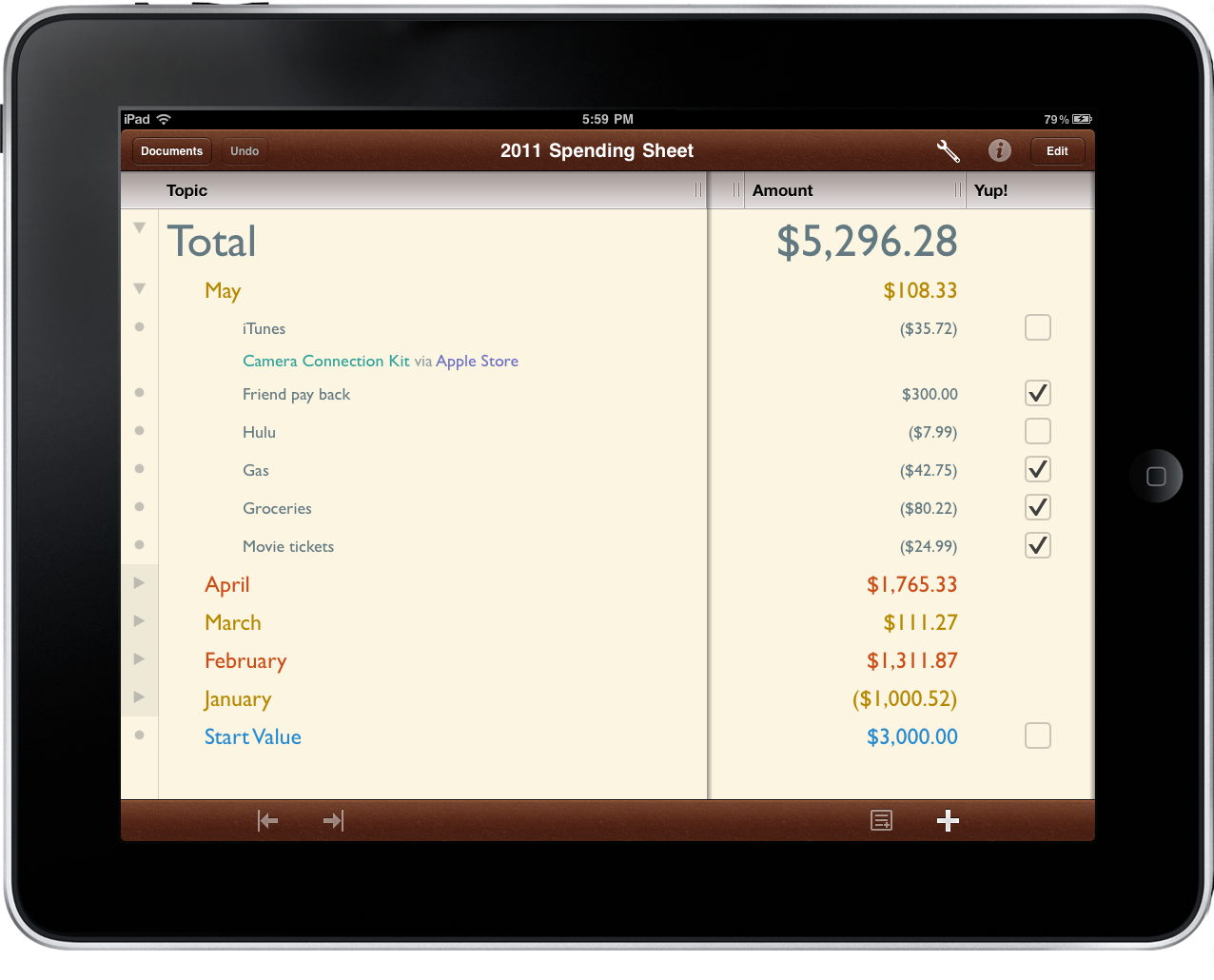
When The Omni Group brought OmniOutliner to the iPad, they didn’t just create an outlining app for text and field notes. While useful for preparing research, taking notes, and organizing ideas, OmniOutliner can adapt to a variety of needs and circumstances with relative ease. Combined with a personal desire for customization, OmniOutliner can be tailored to solve a variety of creative problems such as the one we’re looking at today.
The flexibility in OmniOutliner can be admired when we apply a real world scenario such as tracking your daily spending. Mint might be useful for telling you how you spend your money, but nothing beats your own checklist when it comes time to compare the month’s expenditures against a bank statement. Writing your purchases down enables you to catch maintenance charges, find fraudulent activity, and become better aware of your current financial status. With paper likely being a rarity in our lives thanks to the iPad, OmniOutliner fits the bill nicely.
The tutorial past the break will teach you how to modify a provided template to your liking; you’ll learn how styles work in OmniOutliner; we’ll cover date, number, and pop-up columns; and lastly we’ll put it all together to make something terrific. Even if you have zero interest in tracking your spending, this tutorial will help you learn quite a bit about how OmniOutliner’s features fit together quite beautifully.
Access Extra Content and Perks
Founded in 2015, Club MacStories has delivered exclusive content every week for nearly a decade.
What started with weekly and monthly email newsletters has blossomed into a family of memberships designed for every MacStories fan.
Club MacStories: Weekly and monthly newsletters via email and the web that are brimming with apps, tips, automation workflows, longform writing, early access to the MacStories Unwind podcast, periodic giveaways, and more;
Club MacStories+: Everything that Club MacStories offers, plus an active Discord community, advanced search and custom RSS features for exploring the Club’s entire back catalog, bonus columns, and dozens of app discounts;
Club Premier: All of the above and AppStories+, an extended version of our flagship podcast that’s delivered early, ad-free, and in high-bitrate audio.