Posts in iPad

3G iPad 2s Receive Regulatory Approval In China, First Hong Kong Apple Store Opening Soon

The Wall Street Journal is today reporting that the 3G models of the iPad 2 may eventually be launching in China after the Chinese ‘Telecommunication Equipment Certification Center’ approved the device. Although a specific launch date is not yet known and China Unicom declined to comment to the Wall Street Journal.

Based on the information contained in the Wall Street Journal report, the model (A1396), is the same as the US model that went on sale in March. Those in China have been able to purchase the WiFi models of the iPad 2 since it launched on May 6th but the 3G models were forced to go through additional regulatory approvals.

According to China’s Telecommunication Equipment Certification Center, a device by Apple with third-generation high-speed wireless data capabilities was issued the network access license needed for the company to begin official sales in China. The device, listed under model number “A1396,” is compatible with the 3G standard WCDMA, and would work with the cellular network operated by Apple’s local iPhone partner, China Unicom (Hong Kong) Ltd.

Interestingly, the 3G versions of the iPad 2 mysteriously appeared yesterday, and promptly disappeared, from the official Apple website. Penn Olson managed to take a screenshot of the page which details prices starting at 4,688 RMB for the 16 GB version, 5,488 RMB for the 32 GB version and 6,288 RMB for the 64 GB version - all of which had estimated shipping times of 2-3 weeks.

Meanwhile in Hong Kong, Apple has confirmed that they will be officially opening this quarter, with Engadget China claiming a September 24th date. The store is located in the International Finance Center’s IFC mall and is currently covered up in large, striking red banners with the slogan “The new center of Central”.

[Via MacRumors]
Access Extra Content and Perks

Founded in 2015, Club MacStories has delivered exclusive content every week for nearly a decade.

What started with weekly and monthly email newsletters has blossomed into a family of memberships designed for every MacStories fan.

Learn more here and from our Club FAQs.

Club MacStories: Weekly and monthly newsletters via email and the web that are brimming with apps, tips, automation workflows, longform writing, early access to the MacStories Unwind podcast, periodic giveaways, and more;

Club MacStories+: Everything that Club MacStories offers, plus an active Discord community, advanced search and custom RSS features for exploring the Club’s entire back catalog, bonus columns, and dozens of app discounts;

Club Premier: All of the above and AppStories+, an extended version of our flagship podcast that’s delivered early, ad-free, and in high-bitrate audio.

Learn more here and from our Club FAQs.


PDF Expert 3.0: Redesigned UI, Page Manager

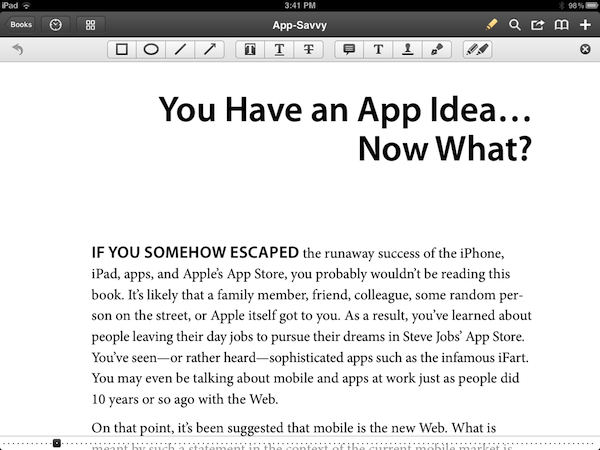
PDF Expert by Readdle is my favorite app to collect, read, and annotate PDF documents on the iPad, and thanks to a series of updates in the past months it’s also become a solid alternative to iBooks on the iPhone, not to mention support for signatures and text notes. With the major 3.0 update released today, free for existing iPad customers, Readdle has completely revamped the user interface of PDF Expert, adding a new toolbar for annotations, notes, drawing shapes on screen and highlighters, as well as a “page manager” to act on single pages within a document, copy them, export them, and move them with drag & drop.

The new toolbar in PDF Expert for iPad is easily dismissible with a tap on the “x” button, so you won’t have to look at it all the time while you’re reading a document. Similarly, a single tap on the edit icon in the upper toolbar (the one that contains navigation buttons, the new Recents menu, search, bookmarks, and sharing options) will display the annotation toolbar again. You can manually highlight text or use the automated tools for highlights, underlines and strikethroughs; you can add shapes, notes, your signatures, and choose from a variety of free-hand highlighters with different colors. Changes can be reverted at any time, and I haven’t noticed any visible slowdown when navigating annotated documents with hundreds of pages.

The new toolbar is clean and unobtrusive, but it gets better with the new Page Manager. With a tap on the pages button, you can switch to a bird’s eye view of all your document’s pages with live previews (that is, thumbnails include annotations and highlights). You can add a blank page between existing pages, select one and move it around – even select multiple ones, rearrange them, rotate them, email them, and extract them as a new document in PDF Expert’s main section. Live previews update fast on the iPad 2, and the “extract” function is undoubtedly useful if you need to focus on specific pages of a document.

PDF Expert 3.0 is a great update that improves both design and usability, whilst adding some other “little gems” you can check out in the app’s built-in update guide. PDF Expert for iPad is available at $9.99 on the App Store. Read more

Access Extra Content and Perks

Founded in 2015, Club MacStories has delivered exclusive content every week for nearly a decade.

What started with weekly and monthly email newsletters has blossomed into a family of memberships designed for every MacStories fan.

Learn more here and from our Club FAQs.

Club MacStories: Weekly and monthly newsletters via email and the web that are brimming with apps, tips, automation workflows, longform writing, early access to the MacStories Unwind podcast, periodic giveaways, and more;

Club MacStories+: Everything that Club MacStories offers, plus an active Discord community, advanced search and custom RSS features for exploring the Club’s entire back catalog, bonus columns, and dozens of app discounts;

Club Premier: All of the above and AppStories+, an extended version of our flagship podcast that’s delivered early, ad-free, and in high-bitrate audio.

Learn more here and from our Club FAQs.


Makayama Movie Mount for iPad 2

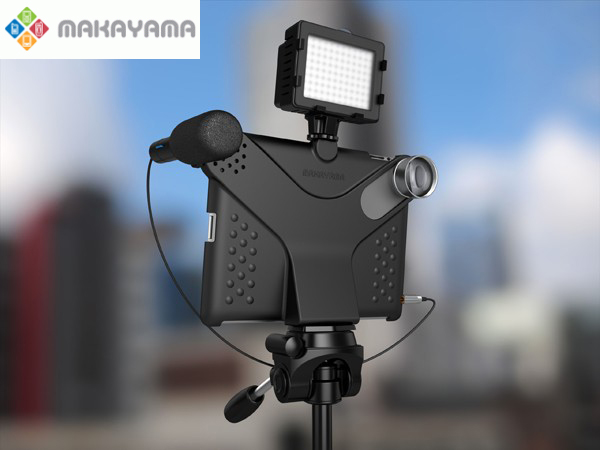
The iPhone’s built in camera is one of the most popular cameras in the world – ask Flickr. Many people were asking for a camera on the iPad 2, but it seems a very few use it because of its lackluster quality and awkwardness. Makayama, makers of mobile apps and software, has released the Movie Mount, an iPad 2 accessory that improves the way you can record video/pictures with the iPad 2.

The Movie Mount is a unique piece of hardware which allows the user to greatly improve video capture with Apple’s iPad 2. It has an arrangement of optional accessories that all snap onto the Movie Mount such as a tripod, tele and wide angle lenses, an optical viewfinder, a microphone and lights too. When outfitted with all Makayama’s accessories, it almost passes as a semi-pro setup. The Movie Mount also has a free iTunes app that will allow the iPad 2 to manually control video recording. You can check out the app right now, but it’s not necessary to use the Movie Mount and its accessories. Video demo after the break.

Read more

Access Extra Content and Perks

Founded in 2015, Club MacStories has delivered exclusive content every week for nearly a decade.

What started with weekly and monthly email newsletters has blossomed into a family of memberships designed for every MacStories fan.

Learn more here and from our Club FAQs.

Club MacStories: Weekly and monthly newsletters via email and the web that are brimming with apps, tips, automation workflows, longform writing, early access to the MacStories Unwind podcast, periodic giveaways, and more;

Club MacStories+: Everything that Club MacStories offers, plus an active Discord community, advanced search and custom RSS features for exploring the Club’s entire back catalog, bonus columns, and dozens of app discounts;

Club Premier: All of the above and AppStories+, an extended version of our flagship podcast that’s delivered early, ad-free, and in high-bitrate audio.

Learn more here and from our Club FAQs.


#MacStoriesDeals - HUGE Friday!

Labor Day deals are continuing! Here are today’s @MacStoriesDeals on iOS, Mac, and Mac App Store apps that are on sale for a limited time, so get them before they end!

Read more

Access Extra Content and Perks

Founded in 2015, Club MacStories has delivered exclusive content every week for nearly a decade.

What started with weekly and monthly email newsletters has blossomed into a family of memberships designed for every MacStories fan.

Learn more here and from our Club FAQs.

Club MacStories: Weekly and monthly newsletters via email and the web that are brimming with apps, tips, automation workflows, longform writing, early access to the MacStories Unwind podcast, periodic giveaways, and more;

Club MacStories+: Everything that Club MacStories offers, plus an active Discord community, advanced search and custom RSS features for exploring the Club’s entire back catalog, bonus columns, and dozens of app discounts;

Club Premier: All of the above and AppStories+, an extended version of our flagship podcast that’s delivered early, ad-free, and in high-bitrate audio.

Learn more here and from our Club FAQs.


#MacStoriesDeals - Thursday

Labor Day deals have started! Here are today’s @MacStoriesDeals on iOS, Mac, and Mac App Store apps that are on sale for a limited time, so get them before they end!

Read more

Access Extra Content and Perks

Founded in 2015, Club MacStories has delivered exclusive content every week for nearly a decade.

What started with weekly and monthly email newsletters has blossomed into a family of memberships designed for every MacStories fan.

Learn more here and from our Club FAQs.

Club MacStories: Weekly and monthly newsletters via email and the web that are brimming with apps, tips, automation workflows, longform writing, early access to the MacStories Unwind podcast, periodic giveaways, and more;

Club MacStories+: Everything that Club MacStories offers, plus an active Discord community, advanced search and custom RSS features for exploring the Club’s entire back catalog, bonus columns, and dozens of app discounts;

Club Premier: All of the above and AppStories+, an extended version of our flagship podcast that’s delivered early, ad-free, and in high-bitrate audio.

Learn more here and from our Club FAQs.


Parallels Desktop 7 For Mac Available This Week, Updated Parallels App For iOS

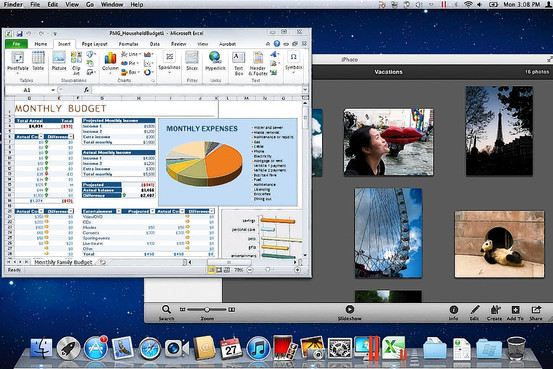
Earlier today Parallels Desktop 7 for Mac was unveiled, bringing more features and substantial speed improvements to the popular desktop virtualisation software. Headline features of the new version include greater Lion support such as Full Screen Mode and Mission Control, iSight/FaceTime Camera support and those speed improvements which include up to 60% faster resuming and 45% faster 3D graphics.

Mac Developers will now be able to emulate a copy of Lion in Parallels whilst on a Lion installation as per the new Lion license agreement. Installing Windows has also been simplified with a “Windows on Demand” service offering users the ability to instantly purchase and download Windows - particularly helpful for those with new Macs that no longer include DVD drives. Walt Mossberg reviewed the new Parallels on his Late-2010 MacBook Air and said it “ran Windows quickly and smoothly, and integrated well with some of Lion’s new features”.

Windows, and Windows programs, can be displayed in Lion’s new Launchpad feature, which mimics the main screen of an iPad. They also show up and behave like Mac programs in Lion’s new Mission Control feature, which shows all the programs running on the Mac in miniature. Windows programs can also run in Lion’s new full-screen mode.

Also revealed today was that the Parallels Mobile App is receiving a substantial update so that it can completely control a users Mac rather than just the virtualised environment as had been the case prior to this update. The app, available for the iPad, iPhone and iPod Touch, is on sale at a special introductory offer of $4.99 but the update is free to existing users.

Parallels Desktop 7 for Mac is available from today for those upgrading from Parallels 5 or 6 at a cost of $49.99 whilst it will be available generally on September 6th for $79.99. There is also a Student edition available for $39.99, a ‘Switch to Mac’ edition available for $99.99 (which comes with a number of Mac video tutorials) and there are also Enterprise volume licences available.

Jump the break for some promo videos of the new Parallels products.

[Via AllThingsD]

Read more

Access Extra Content and Perks

Founded in 2015, Club MacStories has delivered exclusive content every week for nearly a decade.

What started with weekly and monthly email newsletters has blossomed into a family of memberships designed for every MacStories fan.

Learn more here and from our Club FAQs.

Club MacStories: Weekly and monthly newsletters via email and the web that are brimming with apps, tips, automation workflows, longform writing, early access to the MacStories Unwind podcast, periodic giveaways, and more;

Club MacStories+: Everything that Club MacStories offers, plus an active Discord community, advanced search and custom RSS features for exploring the Club’s entire back catalog, bonus columns, and dozens of app discounts;

Club Premier: All of the above and AppStories+, an extended version of our flagship podcast that’s delivered early, ad-free, and in high-bitrate audio.

Learn more here and from our Club FAQs.


Apple Posts New iPad 2 Advert: “Learn”

Apple has today uploaded a new iPad advert to their YouTube Channel. Like previous iPad adverts, it has a central theme - in this case it is “Learn”, which is also the title of the advert. The entire advert is dedicated to showcasing some standout apps that help people learn. As usual there is nothing related to price or specification, just clips of people experiencing the iPad and the apps that make it great.  Some of those apps shown include the TED talks app, Chinagram, iBooks and GarageBand, but in total there are 10 that are shown.

Are you curious about new ideas, do you want to learn a new language, or just a new word? Maybe you want to know more about anatomy, or astronomy. You could master something new, or uncover a hidden talent. There’s never been a better time to learn.

Jump the break to see the advert for yourself and jump over to the Apple YouTube Channel to see more of the iPad adverts.
Read more

Access Extra Content and Perks

Founded in 2015, Club MacStories has delivered exclusive content every week for nearly a decade.

What started with weekly and monthly email newsletters has blossomed into a family of memberships designed for every MacStories fan.

Learn more here and from our Club FAQs.

Club MacStories: Weekly and monthly newsletters via email and the web that are brimming with apps, tips, automation workflows, longform writing, early access to the MacStories Unwind podcast, periodic giveaways, and more;

Club MacStories+: Everything that Club MacStories offers, plus an active Discord community, advanced search and custom RSS features for exploring the Club’s entire back catalog, bonus columns, and dozens of app discounts;

Club Premier: All of the above and AppStories+, an extended version of our flagship podcast that’s delivered early, ad-free, and in high-bitrate audio.

Learn more here and from our Club FAQs.


#MacStoriesDeals - Wednesday

Here are today’s @MacStoriesDeals on iOS, Mac, and Mac App Store apps that are on sale for a limited time, so get them before they end!

Read more

Access Extra Content and Perks

Founded in 2015, Club MacStories has delivered exclusive content every week for nearly a decade.

What started with weekly and monthly email newsletters has blossomed into a family of memberships designed for every MacStories fan.

Learn more here and from our Club FAQs.

Club MacStories: Weekly and monthly newsletters via email and the web that are brimming with apps, tips, automation workflows, longform writing, early access to the MacStories Unwind podcast, periodic giveaways, and more;

Club MacStories+: Everything that Club MacStories offers, plus an active Discord community, advanced search and custom RSS features for exploring the Club’s entire back catalog, bonus columns, and dozens of app discounts;

Club Premier: All of the above and AppStories+, an extended version of our flagship podcast that’s delivered early, ad-free, and in high-bitrate audio.

Learn more here and from our Club FAQs.


Help Fund A New Q&A Video Series With Startup and Solo iOS Developers

A few weeks ago Anthony Agius ran the ‘One More Thing’ conference in Melbourne, Australia. It was a conference in which a number of Australia’s top iOS developers came and gave speeches about their paths to App Store success to an audience of around 160 people. Some of the developers that appeared at the conference included Matt Comi of Big Bucket Software (The Incident, TV Forecast), Thomas Killen of Voxel Agents (Train Conductor), James Cuda of Savage Interactive (Procreate) and a number of others. Those speeches have now been posted online in full and for free, so if you’re a developer looking for inspiration or just interested be sure to check them out.

Agius hasn’t stopped there though, and has now decided to embark on a new project to make a 5-episode online TV series that features Q&A sessions with the speakers from the One More Thing conference. It is all inspired from a 60 minute Q&A session from the actual conference in which over 100 questions were submitted but time only allowed for 12 questions to be answered.

We want to develop an online TV show to support new startups and solo iOS developers. We will interview some amazing iOS developers about what it takes to do well in this industry, and some of the unexpected challenges that come up.

To make this a reality, Agius is appealing for donations to fund the project. To do it (as he says) to “the quality the community deserves” he is looking for $25,000 to cover all the costs from video editing, web design, motion graphics, flights, equipment hire and various other costs which he has roughly calculated. He is attempting to fund the project through ‘Pozible’, which if you are unfamiliar with is very similar to Kickstarter, and is offering various ‘rewards’ for funding the project which increase as the size of the donation increases - everything from a “twitter hug” to a name on the credits to a free Blu-Ray copy to adverts within the episodes.

So as you can see, it gets expensive to put on a high quality production! I don’t plan to make a profit off the show. Unless the project exceeds the funding target, I won’t make a cent. All raised funds will be put into the development of the show and promoting it. I just want to cover the costs to get it made, enjoy the experience, produce a show I can be proud of and create a valuable information source for those wanting to be indie iOS developers.

Below the break is a video of Agius explaining the project and you can read even more about the project on the Pozible project page, which is where you can also go to help contribute to the project. Video of the speeches from the ‘One More Thing’ conference can be found on Vimeo and you can follow Anthony Agius who co-founded MacTalk Australia on Twitter.

Read more

Access Extra Content and Perks

Founded in 2015, Club MacStories has delivered exclusive content every week for nearly a decade.

What started with weekly and monthly email newsletters has blossomed into a family of memberships designed for every MacStories fan.

Learn more here and from our Club FAQs.

Club MacStories: Weekly and monthly newsletters via email and the web that are brimming with apps, tips, automation workflows, longform writing, early access to the MacStories Unwind podcast, periodic giveaways, and more;

Club MacStories+: Everything that Club MacStories offers, plus an active Discord community, advanced search and custom RSS features for exploring the Club’s entire back catalog, bonus columns, and dozens of app discounts;

Club Premier: All of the above and AppStories+, an extended version of our flagship podcast that’s delivered early, ad-free, and in high-bitrate audio.

Learn more here and from our Club FAQs.