

The photographs you’ve dumped onto your iPad via the Camera Connection Kit are already pretty swell, but what if you had an app that took an ordinary shot and turned it into something seriously beautiful? With TouchUp by RogueSheep, you can quickly swipe over your photographs in an elegant and friendly interface that encourages creativity. Example photos are included to get you familiar with what’s possible with TouchUp, and we’ll be taking a look at one of these pre-included items to help you get started.
Posts in giveaway
TouchUp for iPad Gracefully Adds Effects to your Photos: Review & Giveaway

Access Extra Content and Perks
Founded in 2015, Club MacStories has delivered exclusive content every week for nearly a decade.
What started with weekly and monthly email newsletters has blossomed into a family of memberships designed for every MacStories fan.
Club MacStories: Weekly and monthly newsletters via email and the web that are brimming with apps, tips, automation workflows, longform writing, early access to the MacStories Unwind podcast, periodic giveaways, and more;
Club MacStories+: Everything that Club MacStories offers, plus an active Discord community, advanced search and custom RSS features for exploring the Club’s entire back catalog, bonus columns, and dozens of app discounts;
Club Premier: All of the above and AppStories+, an extended version of our flagship podcast that’s delivered early, ad-free, and in high-bitrate audio.
Giveaway: Transfer Files, Manage Computers, and Log In with LogMeIn Ignition
LogMeIn Ignition for the iPad and iPhone has long been my favorite choice as the app that I use to remotely connect to my desktop and laptop computers when I’m on campus or away from my office. What I really appreciate about LogMeIn Ignition is that setup is super easy (just like with all LogMeIn products), requiring nothing more than a download of their client software that gives you always on, always secure access to your Desktop screen.
Recently, LogMeIn updated their iOS app with the ability to transfer files between machines running LogMeIn’s desktop client, and to your iPad so you can cache files locally if you forgot to push that business report to Dropbox. While we’re impressed with the spaces-like-ability to remotely manage so many machines at once all while transferring files, I’m even more impressed with just how good LogMeIn’s on-screen controls are. Unlike other apps that require lots of fidgeting with touches, taps, and scrolls, I feel LogMeIn has done the best in creating the most user-friendly experience. As the mouse cursor moves in tandem with your finger, you can make taps, double-taps, and pinch actions anywhere on the screen, and LogMeIn will intuitively perform click and right-click actions while zooming windows into focus. Performance remains buttery smooth as well (especially over WiFi), thanks to the ability to fine-tune how the desktop is presented on your 1024x768 display. If you’re helping a customer via one of LogMeIn’s Pro² account (or simply helping a friend with a free account), you can retain the desktop’s screen resolution and simultaneously remove effects and wallpaper; the configuration options are smart, friendly, and unobtrusive.
LogMeIn Ignition doesn’t require a subscription to use for personal use, and only costs $29.99 as a universal app in the App Store. Best experienced on the iPad with the great real estate it offers, you’ll have immediate access to your Windows PCs or Macs on the road at any time. LogMeIn has given us three copies of the app to give away to our readers, which we are incredibly excited to share with you. You’ll find all the rules and details you need after the break.
Access Extra Content and Perks
Founded in 2015, Club MacStories has delivered exclusive content every week for nearly a decade.
What started with weekly and monthly email newsletters has blossomed into a family of memberships designed for every MacStories fan.
Club MacStories: Weekly and monthly newsletters via email and the web that are brimming with apps, tips, automation workflows, longform writing, early access to the MacStories Unwind podcast, periodic giveaways, and more;
Club MacStories+: Everything that Club MacStories offers, plus an active Discord community, advanced search and custom RSS features for exploring the Club’s entire back catalog, bonus columns, and dozens of app discounts;
Club Premier: All of the above and AppStories+, an extended version of our flagship podcast that’s delivered early, ad-free, and in high-bitrate audio.
Kalimat, The Refreshed Word Game We’re Giving Away
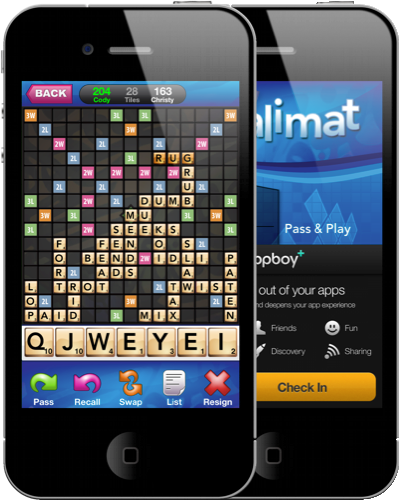
Do we need another Words with Friends or Scrabble? I don’t know about you, but if I have a chance to unhinge the competition because I’m smart and fast, or if I have the opportunity to find the hidden Ali Baba, be warned that I’m going to juggle some really long words if I can. Sure, I might add those two letters to your eight as a cheap way to get some bonus points, but think about it! Corners are often havens for power-plays. Kalimat changes pace from traditional word games by offering some original gameplay in the form of Remix mode and Jeopardy-style rewards where you could land on those ever useful bonus points (which could change the tide of the game). Don’t get too comfortable: Remix mode prevents your opponent from checking answers on Google (Boo!) by rewarding players for thinking on your toes. The faster you get a word out, the more you’ll be rewarded. With OpenFeint integration it’s really easy to create an anonymous online identity so you can get paired with new players wanting to duel you for word cred (read up on those dictionaries), and you can trash talk or make friends with the built in chat tool. Available for $2.99 in the App Store, we’re giving away five copies of Kalimat to our lucky readers looking to stretch their brains over the latest word craze. Check past the break for the rules.
Read more
Access Extra Content and Perks
Founded in 2015, Club MacStories has delivered exclusive content every week for nearly a decade.
What started with weekly and monthly email newsletters has blossomed into a family of memberships designed for every MacStories fan.
Club MacStories: Weekly and monthly newsletters via email and the web that are brimming with apps, tips, automation workflows, longform writing, early access to the MacStories Unwind podcast, periodic giveaways, and more;
Club MacStories+: Everything that Club MacStories offers, plus an active Discord community, advanced search and custom RSS features for exploring the Club’s entire back catalog, bonus columns, and dozens of app discounts;
Club Premier: All of the above and AppStories+, an extended version of our flagship podcast that’s delivered early, ad-free, and in high-bitrate audio.
Radium Revisited: Review & Giveaway
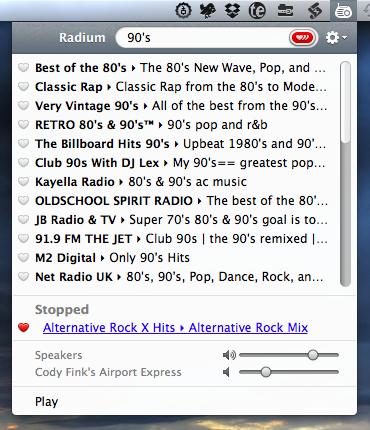
If you listen to the B&B Podcast, Ben Brooks & Shawn Blanc arrived at a topic that would make for a good ice breaker over a cup of Caribou Coffee. If MacBooks weren’t yet on the table, the question of, “What are your five quintessential Mac Apps,” would quickly lead to a scurry of charging cables and open lids. If you asked me, I’d have a difficult time choosing three of the four (if the fifth includes OS X), but I’d have no problem in preceding that answer with Radium for the Mac.
You might ask me of what value Radium delivers that it can potentially keep FastScripts, TextMate, TextExpander, or some other key productivity app off of my MacBook. And the answer isn’t that these other apps aren’t as good, but rather that Radium sort of defines everything I grew up with in music. There are a lot of trends when it comes to curated online playlists, but nothing can top a good radio station playing all of my favorite singles. Package all the music I grew up into a delightful app that fills the room with great tunes, and Radium defines my sort of superhero theme songs. It’s the one app that will always start with my Mac and goes to sleep with it.
Access Extra Content and Perks
Founded in 2015, Club MacStories has delivered exclusive content every week for nearly a decade.
What started with weekly and monthly email newsletters has blossomed into a family of memberships designed for every MacStories fan.
Club MacStories: Weekly and monthly newsletters via email and the web that are brimming with apps, tips, automation workflows, longform writing, early access to the MacStories Unwind podcast, periodic giveaways, and more;
Club MacStories+: Everything that Club MacStories offers, plus an active Discord community, advanced search and custom RSS features for exploring the Club’s entire back catalog, bonus columns, and dozens of app discounts;
Club Premier: All of the above and AppStories+, an extended version of our flagship podcast that’s delivered early, ad-free, and in high-bitrate audio.
AppSumo: Circus Ponies NoteBook Giveaway
One of the greatest things about owning a Mac is having access to some really splendid, nay, spectacular software that can really do wonders for your workflow. Students in particular have it incredibly easy, especially if they are utilizing the application I’m going to gawk about today. You may have heard about Circus Ponies NoteBook through one of my favorite podcasts, the Mac Geek Gab, and today AppSumo is giving anyone who signs up with their email one hell of a discount at 50%. This isn’t cheap software: NoteBook 3.0 is some of the most powerful note taking software you can download for your Mac, and what’s regularly $49.95 for a regular license is half off for $25 for the next couple of days.
Now, you could get by with a combination of free applications, burying word documents in Dropbox, or maybe you’re just stuck in plain text. But until you’ve tried NoteBook, let’s wash away these perceptions of what a great notes application really is. Imagine having a table of contents that’s focused on search, organizes your topics, indexes everything you write, dates it, stamps it, you can sticky note it, you can add documents, create to do lists, and organize just about anything on styled paper, and that isn’t even half of it. I’d say it’s kind of like the Mac’s own version of Microsoft OneNote, but organized in such a way that it works more like an outlining tool, and we can combine that with files, graphs, and all of kinds of starting templates to really create the perfect set of notes. This is one information silo you shouldn’t be afraid of, and past the break we’re going hands on to see everything that you can do with NoteBook, and how you could want one of ten copies.
Access Extra Content and Perks
Founded in 2015, Club MacStories has delivered exclusive content every week for nearly a decade.
What started with weekly and monthly email newsletters has blossomed into a family of memberships designed for every MacStories fan.
Club MacStories: Weekly and monthly newsletters via email and the web that are brimming with apps, tips, automation workflows, longform writing, early access to the MacStories Unwind podcast, periodic giveaways, and more;
Club MacStories+: Everything that Club MacStories offers, plus an active Discord community, advanced search and custom RSS features for exploring the Club’s entire back catalog, bonus columns, and dozens of app discounts;
Club Premier: All of the above and AppStories+, an extended version of our flagship podcast that’s delivered early, ad-free, and in high-bitrate audio.
Giveaway: Remix the Beat with djay for iPhone & iPod touch!
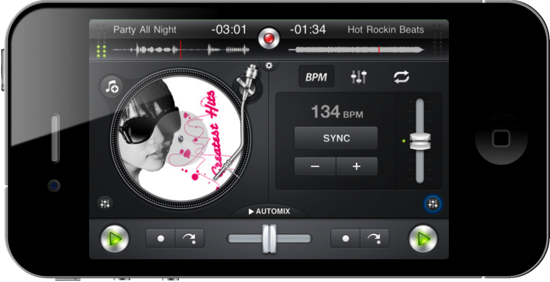
Let’s cut to the chase: djay is polished, good-looking, and a downright handsome virtual mixer that’ll have you scratching virtual vinyls like it was made all tiny for your thumbs and stuff. You’d think djay’s miniature client for the iPhone & iPod touch would be too small to get a proper remix of your favorite rap attack and guitar jam, but that little iPhone can instantly become the party superhero when equipped with an amateur DJ such as yourself and some stereo output to the nearest boom box. Choose any two tracks from your iPod’s library, adjust the equalizer to your liking, pump the gain, and position the needles to start laying down Scratch n’ Sniff quality beats. It’ll take some practice to get good, but all of the tools are available with a quick tap to help you combine tracks, and there’s even an automixer if you want to let djay do some the hard stuff. I couldn’t resist buying my own copy of djay for $0.99 in the App Store, currently on sale from $4.99. That’s a steal, but you can risk it all on one of two copies we’re giving away past the break.
Access Extra Content and Perks
Founded in 2015, Club MacStories has delivered exclusive content every week for nearly a decade.
What started with weekly and monthly email newsletters has blossomed into a family of memberships designed for every MacStories fan.
Club MacStories: Weekly and monthly newsletters via email and the web that are brimming with apps, tips, automation workflows, longform writing, early access to the MacStories Unwind podcast, periodic giveaways, and more;
Club MacStories+: Everything that Club MacStories offers, plus an active Discord community, advanced search and custom RSS features for exploring the Club’s entire back catalog, bonus columns, and dozens of app discounts;
Club Premier: All of the above and AppStories+, an extended version of our flagship podcast that’s delivered early, ad-free, and in high-bitrate audio.
Writings 1.2 Adds Workspaces and Custom Keyboard [Giveaway]
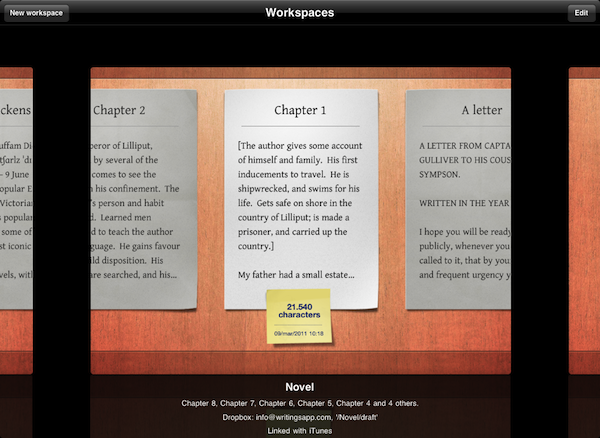
Since I reviewed the first version of Writings for iPad back in December, I haven’t switched to any other text editor for iOS. I don’t write much on my iPhone, so an iPad application is all I’m looking for when it comes to writing long pieces that will eventually end up on my Mac or into an app like Blogsy. Writings, beautiful user interface aside, has the features I need from an iPad text editor: Dropbox support with plain text editing so I can keep writing on my Mac (or anywhere) if I want to; unobtrusive word counter; a readable default font; a handy margin feature that won’t scroll the document when I’m holding the iPad or resting my thumbs at its sides.
Writings 1.2, released today in the App Store, builds on the excellent feature set of versions 1.0 and 1.1 (the latter brought a list view to easily navigate between dozen of documents) by introducing two new functionalities that I’ve been testing in the beta and greatly improved my workflow: Writings 1.2 adds support for Workspaces – you can decide to sync certain documents to different Dropbox folders, even on different accounts. Whilst the feature sounded a little to complex to me at first, I’ve seen that being able to create a “MacStories” workspace alongside a “Personal” one with notes syncing to multiple Dropbox folders at once helps me getting my notes and articles better organized. You can create as many workspaces as you want, and each one will retain its specific settings. On top of this, you can now manually trigger sync within a document without going back to the main screen.
Last, Writings 1.2 comes with an optional extra row of most used punctuation keys above the standard keyboard. This extra row sure makes the keyboard bigger and will let you see less text on screen, but it can dramatically speed up your typing if you think the iOS keyboard could use some customization options for writers. The tab key and quick “-” access sure help me get my writing done quicker.
Writings 1.2 is still propagating in iTunes and it’s available at $4.99. We have 5 codes to give away thanks to the Ice Cream Studios developers, so follow along past the break for a chance to win a copy of Writings 1.2 for iPad.
Access Extra Content and Perks
Founded in 2015, Club MacStories has delivered exclusive content every week for nearly a decade.
What started with weekly and monthly email newsletters has blossomed into a family of memberships designed for every MacStories fan.
Club MacStories: Weekly and monthly newsletters via email and the web that are brimming with apps, tips, automation workflows, longform writing, early access to the MacStories Unwind podcast, periodic giveaways, and more;
Club MacStories+: Everything that Club MacStories offers, plus an active Discord community, advanced search and custom RSS features for exploring the Club’s entire back catalog, bonus columns, and dozens of app discounts;
Club Premier: All of the above and AppStories+, an extended version of our flagship podcast that’s delivered early, ad-free, and in high-bitrate audio.
Your Twitter Stream on Your Desk: The Trickle and Piolo Giveaway

Your iPhone provides ample opportunity for information feedback alongside your Mac, which is why the makers of Twitter app Trickle and the Piolo stand for your iPhone have joined forces to prop your Twitter stream underneath or next to your workhorse Macintosh. While Trickle streams Twitter at a readable pace in high-contrast glory, Piolo gives your iPhone the leverage it needs to reveal all sorts of juicy details without breaking your neck. Trickle gives you everything you need and nothing more, provided you want a miniature picture frame solely to display tweets from the smart, funny, and sometimes bullheaded people you find yourself enlightened by on Twitter. Piolo is a sturdy kickstand that can be easily carried with the iPhone 4 in a bag or purse, taking up zero room with its simple design and clever implementation. Together, you have yourself a the perfect combination of form and function: simplicity in Twitter at its finest, sans all the extra UI or lost desktop space. We’re going to give away ten (count ‘em) pairs of Trickle and Piolo to our readers, and all you have to do is follow the rules post break.
Read more
Access Extra Content and Perks
Founded in 2015, Club MacStories has delivered exclusive content every week for nearly a decade.
What started with weekly and monthly email newsletters has blossomed into a family of memberships designed for every MacStories fan.
Club MacStories: Weekly and monthly newsletters via email and the web that are brimming with apps, tips, automation workflows, longform writing, early access to the MacStories Unwind podcast, periodic giveaways, and more;
Club MacStories+: Everything that Club MacStories offers, plus an active Discord community, advanced search and custom RSS features for exploring the Club’s entire back catalog, bonus columns, and dozens of app discounts;
Club Premier: All of the above and AppStories+, an extended version of our flagship podcast that’s delivered early, ad-free, and in high-bitrate audio.
Giveaway: Be Distraction Free With Byword for Mac

You wouldn’t want your fingers to glide across the keyboard to type in just any regular text-editor. Ladies and gentlemen, you deserve nothing but class and a distraction free environment that helps you focus on the text and nothing more, or nothing less. Byword for the Mac from the folks @metaclassy is a bite-sized text editor that packs a big punch in the downright-beautiful department. In your choice of a shell white for an afternoon scrawl or an alternate dark theme for evening pondering, Byword contains five typography presets for plain or rich text editing that when combined with contextual formatting presets create a pleasurable typing experience for your sensitive neural inputs. Out of love for writing, Byword helps improve text legibility by implementing text substitutions for Smart Quotes, Smart Dashes, and a user friendly interface that simply disappears as your fingers strike the keys. Reviewed at the onset of March and now at version 1.1 in the App Store, Byword is available for a small expense of $4.99.
We’re giving away five copies of Byword to our MacStorian authors who frequent our site for the latest in Mac apps, and we’d be remiss if we didn’t offer you the opportunity to put away your thoughts in this beautiful text writer. The giveaway rules can be had after the break.
Access Extra Content and Perks
Founded in 2015, Club MacStories has delivered exclusive content every week for nearly a decade.
What started with weekly and monthly email newsletters has blossomed into a family of memberships designed for every MacStories fan.
Club MacStories: Weekly and monthly newsletters via email and the web that are brimming with apps, tips, automation workflows, longform writing, early access to the MacStories Unwind podcast, periodic giveaways, and more;
Club MacStories+: Everything that Club MacStories offers, plus an active Discord community, advanced search and custom RSS features for exploring the Club’s entire back catalog, bonus columns, and dozens of app discounts;
Club Premier: All of the above and AppStories+, an extended version of our flagship podcast that’s delivered early, ad-free, and in high-bitrate audio.