Posts in Featured

Apple Store 2.0 Goes Live: Interactive iPads and More [Updated]

Following the wild speculation and rumors from the last week as to whether Apple was planning a special event to celebrate the 10th anniversary of Retail, the so-called Apple Store 2.0 experience has launched in Australia (it’s already Sunday morning there and Apple Stores are open), featuring what was previously reported: iPads are used to display product information and prices, compare features between different products and ask for a specialist’s help. As you can see from the photo above, it appears the new store-specific application (we don’t know yet if it’s a native app, a web app, or something else) is used to lists features, compare, call for support and introduce new users to the Mac platform.

Website Mac Prices Australia has posted photos from the updated Apple retail experience:

Retail stores around Australia have launched ‘Retail 2.0′ to mark the 10th anniversary of Apple Retail stores. We knew this was coming but what exactly has happened?

iPads display product prices & information for products.

iPads display product features, prices and lets you compare between models.

Use the iPad to ask a specialist to to come to you.

Apple store staff appear to be wearing party hats.

We’ll update this post with more information as they become available. If you live in Australia and have photos to send, our [email protected] inbox is waiting for your pictures.

Update: more photos from the Sydney Apple Store below.

Read more

Access Extra Content and Perks

Founded in 2015, Club MacStories has delivered exclusive content every week for nearly a decade.

What started with weekly and monthly email newsletters has blossomed into a family of memberships designed for every MacStories fan.

Learn more here and from our Club FAQs.

Club MacStories: Weekly and monthly newsletters via email and the web that are brimming with apps, tips, automation workflows, longform writing, early access to the MacStories Unwind podcast, periodic giveaways, and more;

Club MacStories+: Everything that Club MacStories offers, plus an active Discord community, advanced search and custom RSS features for exploring the Club’s entire back catalog, bonus columns, and dozens of app discounts;

Club Premier: All of the above and AppStories+, an extended version of our flagship podcast that’s delivered early, ad-free, and in high-bitrate audio.

Learn more here and from our Club FAQs.


Mozilla Releases Firefox 5.0 Beta

A few days later than originally expected, Mozilla updated the beta channel earlier today to include the first public beta of the next major version of Firefox, dubbed Firefox 5.0. Available for Mac, Windows and Linux PCs, the new Firefox comes with performance and stability enhancements, as well as support for new CSS animation standards. A detailed list of changes is provided in the Beta channel release notes:

  • Added support for CSS animations
  • Added support for switching Firefox development channels
  • The Do-Not-Track header preference has been moved to increase discoverability
  • Improved canvas, JavaScript, memory, and networking performance
  • Improved standards support for HTML5, XHR, MathML, SMIL, and canvas
  • Improved spell checking for some locales
  • Improved desktop environment integration for Linux users

More importantly, the new beta allows users to quickly switch between Aurora, Beta and Stable channels from the About menu of Firefox to “test features at various levels of development, quality and polish.” No visible interface changes made their way into the 5.0 beta, though from a first series of tests the speed and memory optimizations when dealing with dozens of open tabs seem remarkable. Aurora, the new release channel launched by Mozilla a few weeks ago, aims at following the path traced by Google Chrome with the Canary builds in offering users a way to get access to early builds a step above the so-called “nightly” builds. Today’s beta release marks the debut of Firefox 5. in the public beta channel.

Firefox 5.0 beta can be downloaded here. Read more

Access Extra Content and Perks

Founded in 2015, Club MacStories has delivered exclusive content every week for nearly a decade.

What started with weekly and monthly email newsletters has blossomed into a family of memberships designed for every MacStories fan.

Learn more here and from our Club FAQs.

Club MacStories: Weekly and monthly newsletters via email and the web that are brimming with apps, tips, automation workflows, longform writing, early access to the MacStories Unwind podcast, periodic giveaways, and more;

Club MacStories+: Everything that Club MacStories offers, plus an active Discord community, advanced search and custom RSS features for exploring the Club’s entire back catalog, bonus columns, and dozens of app discounts;

Club Premier: All of the above and AppStories+, an extended version of our flagship podcast that’s delivered early, ad-free, and in high-bitrate audio.

Learn more here and from our Club FAQs.


Tweed for iPad Filters Your Timeline, Integrates with Instapaper

Released earlier today at $2.99 in the App Store, Tweed is a Twitter client for iPad aimed at presenting you links from your Twitter timeline. Instead of visualizing all tweets from people you follow, mentions and direct messages as most Twitter clients do, Tweed filters links out of your timeline, enabling you to “drag them” onto a stack on the right that will generate previews for the selected webpages. As you log in with your Twitter credentials, Tweed will display tweets that contain links in a narrow sidebar on the left; if you place your finger on a tweet, you’ll be able to move in on the right, and go back to the timeline. The more tweets you save in the right panel, the more pages Tweed will stack on top of each other, letting you tap on them to read the original article. Very simple. When in web view mode, you can check out the normal page or switch to text-only mode. When you’re done reading, you can tap on the tweet bubble and flick it to delete it from the stack.

One cool feature I’ve noticed in Tweed is direct Instapaper integration. Tweed comes with a Read Later tab, but unlike other apps that support Instapaper and also have their own reading queue, Tweed’s reading list mirrors every link to Instapaper – if you save 5 articles in there, those 5 articles will be immediately sent to Instapaper. If you can’t find enough reading material in your timeline, Tweed’s developers have baked some curated Twitter lists into the app showcasing relevant Apple and tech news, world news, and so forth. The selection is pretty good, although limited for now given the early nature of the app.

Tweed won’t replace your default Twitter client, but it may come in handy if you’re looking for a way to turn your timeline into a list of links you’re likely interested in. You can download Tweed at $2.99 from the App Store.

Access Extra Content and Perks

Founded in 2015, Club MacStories has delivered exclusive content every week for nearly a decade.

What started with weekly and monthly email newsletters has blossomed into a family of memberships designed for every MacStories fan.

Learn more here and from our Club FAQs.

Club MacStories: Weekly and monthly newsletters via email and the web that are brimming with apps, tips, automation workflows, longform writing, early access to the MacStories Unwind podcast, periodic giveaways, and more;

Club MacStories+: Everything that Club MacStories offers, plus an active Discord community, advanced search and custom RSS features for exploring the Club’s entire back catalog, bonus columns, and dozens of app discounts;

Club Premier: All of the above and AppStories+, an extended version of our flagship podcast that’s delivered early, ad-free, and in high-bitrate audio.

Learn more here and from our Club FAQs.


Google Completely Revamps Maps on Mobile Browsers

Announced a few minutes ago on the official Google Mobile Blog, the Maps web app for iOS and Android devices has gone under a major update that enables new features and menus when viewed on mobile browsers. As Google reports, 40% of Maps usage happens on mobile browsers, and that’s why the company decided to update the maps.google.com website to offer a more consistent experience across smartphones and tablets. The changes, however, are exclusive to the web app and we can’t see anything new on the native Maps app for iOS, which uses Google’s backend but is developed by Apple.

The new Maps website displays a bar on top to get your current location, enable and disable layers like satellite, labels, traffic and points of interest, and another button to get directions to a specific location or learn more about places that support additional information and photos (like restaurants). Provided you give Safari access to your location, you can easily get directions as you would on a desktop browser, sign out of your Google account and access the “My Maps” interface from Google.

Now, when you visit maps.google.com on your phone or tablet’s browser and opt-in to share your location, you can use many of the same Google Maps features you’re used to from the desktop.

The new features include:

  • See your current location
  • Search for what’s nearby with suggest and auto complete
  • Have clickable icons of popular businesses and transit stations
  • Get driving, transit, biking, and walking directions
  • Turn on satellite, transit, traffic, biking, and other layers
  • View Place pages with photos, ratings, hours, and more
  • When signed into your Google account, access your starred locations and My Maps

You can try new Maps mobile website by heading over to maps.google.com on your iOS or Android device. Check out more screenshots below. Read more

Access Extra Content and Perks

Founded in 2015, Club MacStories has delivered exclusive content every week for nearly a decade.

What started with weekly and monthly email newsletters has blossomed into a family of memberships designed for every MacStories fan.

Learn more here and from our Club FAQs.

Club MacStories: Weekly and monthly newsletters via email and the web that are brimming with apps, tips, automation workflows, longform writing, early access to the MacStories Unwind podcast, periodic giveaways, and more;

Club MacStories+: Everything that Club MacStories offers, plus an active Discord community, advanced search and custom RSS features for exploring the Club’s entire back catalog, bonus columns, and dozens of app discounts;

Club Premier: All of the above and AppStories+, an extended version of our flagship podcast that’s delivered early, ad-free, and in high-bitrate audio.

Learn more here and from our Club FAQs.


A Fantastical Giveaway

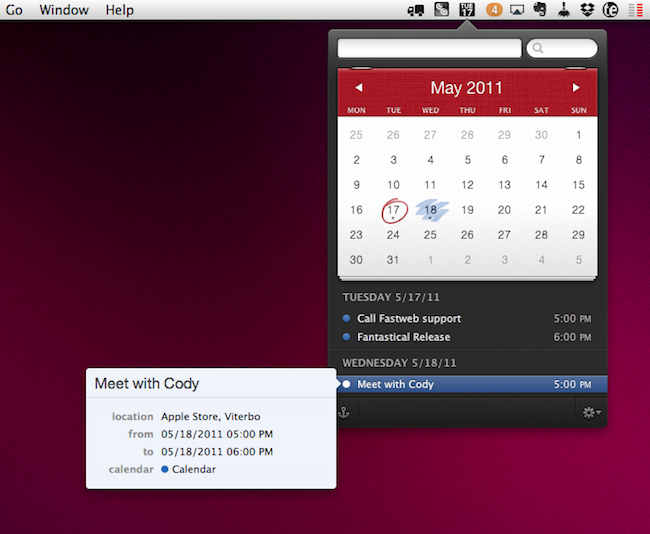
Your calendar application might be great at mitigating and managing various calendars, but entering new dates and creating events at a moment’s notice should be practical and easy. Digitally, it’s often difficult to remove the abstraction of pull down menus, date pickers, alarms, and event notes when you simply want to note a few meetings and your kid’s soccer game. I don’t like to fidget with my calendar software, and I don’t need it open all day. Fantastical does a couple of great things, such as allowing me to remove iCal from my Object Dock so I can quickly glance at the date, and it makes entering events painless since input is derived from plain English. Just tell Fantastical that you’ll be attending a two hour meeting at four o’clock on Sunday, and without any menu-selecting Fantastical will schedule that all important briefing. The interface is terrific, sporting an iOS-like popover with a fine attention to showing you matters most without cluttering your desktop. Fantastical is always ready when I need it to be, and I don’t need to open some gargantuan calendar app just to enter a few events. Between this and the recent OmniFocus update (a quick plug since these two apps work excellently in conjunction), you’ve got yourself a slick app handcrafted to help you schedule and manage your various activities. Fantastical is currently $14.99 on the Mac App Store, but we’re going to be giving away two copies to a couple of lucky calendar-needy MacStorians past the break.

Read more

Access Extra Content and Perks

Founded in 2015, Club MacStories has delivered exclusive content every week for nearly a decade.

What started with weekly and monthly email newsletters has blossomed into a family of memberships designed for every MacStories fan.

Learn more here and from our Club FAQs.

Club MacStories: Weekly and monthly newsletters via email and the web that are brimming with apps, tips, automation workflows, longform writing, early access to the MacStories Unwind podcast, periodic giveaways, and more;

Club MacStories+: Everything that Club MacStories offers, plus an active Discord community, advanced search and custom RSS features for exploring the Club’s entire back catalog, bonus columns, and dozens of app discounts;

Club Premier: All of the above and AppStories+, an extended version of our flagship podcast that’s delivered early, ad-free, and in high-bitrate audio.

Learn more here and from our Club FAQs.


DropDAV 2.0 Launches, Goes Paid at $5 Per Month

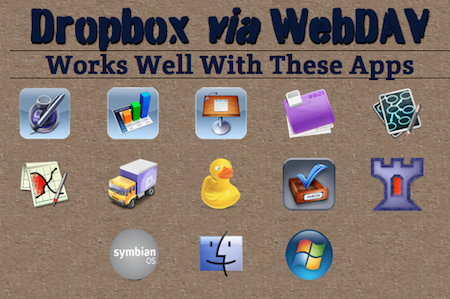
If you’re a heavy user of the iWork suite for iPad or the recently released OmniOutliner and have been looking for a way to easily keep documents in “sync” across machines, you’ve probably already heard of DropDAV. By providing a WebDAV interface to your existing Dropbox account, DropDAV allows you to export documents using iOS apps’ “save to WebDAV” function, and have your docs conveniently saved on the desktop. Because DropDAV simply gives Dropbox the capability of becoming a WeDAV server, you’re not really “syncing” documents when you use Pages or Number for iPad –rather, as these apps already use WebDAV, you’re given the option to at least save to Dropbox. That’s something.

The first version of DropDAV, launched a few months ago, became so popular that the developers had to rethink the service from the ground-up and rewrite the whole engine to support the latest WebDAV standards, offer more speed and reliability, and find a pricing model that would keep operations going. DropDAV 1.0, in fact, was free if you were connecting to a free 2 GB Dropbox account, and asked you to pay only if you had a paid Dropbox account. With version 2.0, officially announced two days ago, gone is the freemium model and the differentiation between free and paid Dropbox accounts: DropDAV now has a 14-day free trial, and after that it’s $5 per month. Simple. The developers explain they’ve completely rebuilt DropDAV to be faster, more compliant to standards and less prone to server-side errors; by integrating with the powerful Dropbox API, DropDAV still allows you to virtually export to WebDAV from any app that supports the protocol, and have documents actually offloaded to Dropbox. It works really, really well and, from what I can tell after a quick test (I’m a subscriber), it’s seriously faster and improved. From a technical standpoint, the devs write:

We identified inconsistencies in the way PHP and the OAuth Pear plugin worked with UTF-8 strings. We created a taxonomy of WebDAV clients, sorting out which ones behaved similarly. We integrated in support for WebDAV locking to comply with the Class 2 specifications.

In the end, we bridged our legacy implementations of WebDAV’s hairier functions (written in PHP) with the native UTF-8 support and better Dropbox client in Python. We settled on an implementation that includes extensible request parsing in PHP, communication with Dropbox in Python, then extensible response formatting back in PHP. It’s a lot cleaner than it sounds, and it works really, really well for the entire UTF-8 character set and XML Special characters.

Class 2 support is still a work in progress. In truth, it’s somewhat of a hack in that Dropbox doesn’t support locking, so we could only create the illusion of locking for our WebDAV clients. We think we’ve done that well enough to roll out and will continue improving it to eventually pass the Litmus test in the coming weeks.

If you haven’t checked out DropDAV already, here’s your chance to start a free trial and connect the service to your Dropbox. It works great with the iWork suite, The Omni Group’s apps and a variety of file managers for OS X and iOS (such as iFiles), and it’s probably the best shot you have if you don’t want to go insane with Pages and exporting files in iTunes.

Access Extra Content and Perks

Founded in 2015, Club MacStories has delivered exclusive content every week for nearly a decade.

What started with weekly and monthly email newsletters has blossomed into a family of memberships designed for every MacStories fan.

Learn more here and from our Club FAQs.

Club MacStories: Weekly and monthly newsletters via email and the web that are brimming with apps, tips, automation workflows, longform writing, early access to the MacStories Unwind podcast, periodic giveaways, and more;

Club MacStories+: Everything that Club MacStories offers, plus an active Discord community, advanced search and custom RSS features for exploring the Club’s entire back catalog, bonus columns, and dozens of app discounts;

Club Premier: All of the above and AppStories+, an extended version of our flagship podcast that’s delivered early, ad-free, and in high-bitrate audio.

Learn more here and from our Club FAQs.


Could Aperture Be Coming to iOS?

This would be a photographers dream come true wouldn’t it? Even if you prefer Adobe’s Lightroom to Apple’s Aperture, I’d love to have the iPad play a larger role in field editing for photographers. The Photos app included on the iPad isn’t exactly prime for professional work (it’s great for displaying and browsing the end result), but Aperture on the iPad would give photographers an intuitive touch interface to edit photos in a library that’s perhaps separate from Photo’s library. Patently Apple reports that Aperture could well be on its way towards touchscreen devices such as the iPad (and maybe that touchscreen iMac we’ve heard about).

It’s the latter that’s interesting in light of Apple’s latest patent revelation that Aperture is coming to touch displays including handhelds like the iPad. It may even come to future desktops and laptops that offer touch displays, according to Apple. An advanced graphics pen would be great for fast photo touch-ups and appreciated by photographers using Aperture on-the-go.

The patent covers various means of interacting with Aperture, from touch input to pen input, and the descriptions of various GUI elements that can provide authors with an easy toolset at the ready for image editing. The authors are intrigued with the idea that Apple may be moving towards various forms of alternate input, such a smart light pen, that could aid future Apple device owners in precision editing.

[via Patently Apple]

Access Extra Content and Perks

Founded in 2015, Club MacStories has delivered exclusive content every week for nearly a decade.

What started with weekly and monthly email newsletters has blossomed into a family of memberships designed for every MacStories fan.

Learn more here and from our Club FAQs.

Club MacStories: Weekly and monthly newsletters via email and the web that are brimming with apps, tips, automation workflows, longform writing, early access to the MacStories Unwind podcast, periodic giveaways, and more;

Club MacStories+: Everything that Club MacStories offers, plus an active Discord community, advanced search and custom RSS features for exploring the Club’s entire back catalog, bonus columns, and dozens of app discounts;

Club Premier: All of the above and AppStories+, an extended version of our flagship podcast that’s delivered early, ad-free, and in high-bitrate audio.

Learn more here and from our Club FAQs.


ForeverSave 2 Review: Universal Auto-Save And Versioning On Your Mac

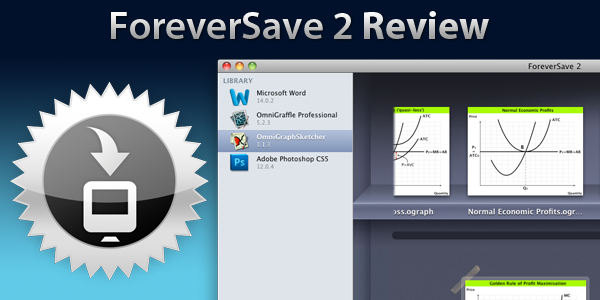
Everybody dreads it, the moment you realize that the document you had been working on for an hour is lost, all because you hadn’t saved it and there had been a power outage or the program crashed! It seems absurd that, in 2011, so few apps have implemented an auto-save feature that saves your document periodically as you work on it. A few apps do have an auto-save feature, including the Microsoft Office suite (saving me more than a few times) – but the vast majority don’t.

For those applications that don’t feature auto-saving there may be a reasonable solution that requires very little hassle from you. Tool Force bills their recently released version 2 of ForeverSave as enabling “universal auto-save and backup versioning for all documents”. I gave the application a go for the past week so jump the break for a full review and see whether it pans out as a feasible solution.

Read more

Access Extra Content and Perks

Founded in 2015, Club MacStories has delivered exclusive content every week for nearly a decade.

What started with weekly and monthly email newsletters has blossomed into a family of memberships designed for every MacStories fan.

Learn more here and from our Club FAQs.

Club MacStories: Weekly and monthly newsletters via email and the web that are brimming with apps, tips, automation workflows, longform writing, early access to the MacStories Unwind podcast, periodic giveaways, and more;

Club MacStories+: Everything that Club MacStories offers, plus an active Discord community, advanced search and custom RSS features for exploring the Club’s entire back catalog, bonus columns, and dozens of app discounts;

Club Premier: All of the above and AppStories+, an extended version of our flagship podcast that’s delivered early, ad-free, and in high-bitrate audio.

Learn more here and from our Club FAQs.


Patent Reveals How Apple’s New Music Service Could Work

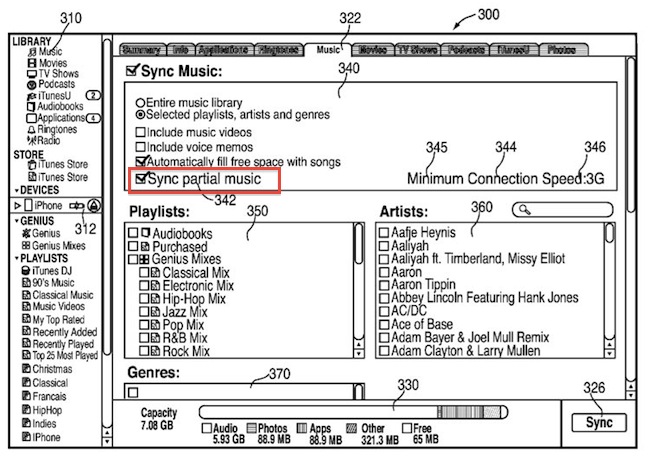
A new patent application published by the U.S. Patent and Trademark Office this week and discovered by AppleInsider today seems to provide some details about Apple’s rumored cloud-based music service, and how iTunes on the desktop and mobile devices like an iPhone could manage to improve streaming quality and speed by locally syncing snippets of songs. The patent, entitled ”Local Storage of a Portion of Streamed Media Items”, notes how most streaming services allow users to access an online library of music and cache contents locally on device to enable playback when an Internet connection is not available. This happens in popular service Spotify, which enables users to keep a local cache of albums and songs so they won’t be forced to always be connected to the Internet to listen to music. Whilst Spotify’s cache action has to be triggered manually by the user, other cloud music services automatically cache a song in the background once a user starts listening to it. Apple’s proposed solution is different, and it involves a new menu in iTunes (for the desktop) that syncs via USB “partial music” to an iOS device – that is, small snippets of a song, with the remaining parts available online.

Unlike cache, partial local sync has the advantage of letting users start listening to music immediately without waiting times. Because cache in other services is still obtained with an Internet connection, users have to wait for the caching process to finish before they can start playback. And if the song is not cached, users have to wait for the remote server to begin streaming – when quickly jumping between artists and songs (as most users do on iPods and iPhones), having to wait a few seconds for streaming to begin can be annoying. Assuming a user is syncing music that’s available both locally (on a Mac or PC) and in the cloud (the music service), Apple’s proposed solution skips cache and waiting times entirely by saving locally a first snippet of a song, and then fetching the rest remotely. This way, iTunes doesn’t have to sync full content (thus cutting syncing times) and a mobile device doesn’t have to stream the first seconds of a song. The benefit for users is that playback will start immediately regardless of how fast they’ll switch between songs; the obvious downside is that something will still have to be synced locally. AppleInsider also posts more details from the patent:

The application suggests that the remotely stored content could be a user’s own library, which they have streamed from a home computer or a remote server. Or, it could be streamed from a large “content source,” such as the iTunes Music Store. The described system would also utilize authentication methods, such as with an iTunes account username and password, to ensure that the user has purchased the items and has the right to stream them.

If this patent is of any indication, it could lend some credence to the reports that claimed Apple’s cloud music service was being set up in a way that users could both stream their own music libraries (by uploading them first) and music they didn’t purchase, with a subscription model similar to Spotify. The method described above would clearly require an update to the iTunes application, and it’s unclear whether Apple could also provide a way to “always stream”, avoiding partial sync and relying exclusively on a remote connection. Apple is expected to unveil iOS 5 with new cloud-based features at the WWDC, which kicks off in San Francisco on June 6.

Access Extra Content and Perks

Founded in 2015, Club MacStories has delivered exclusive content every week for nearly a decade.

What started with weekly and monthly email newsletters has blossomed into a family of memberships designed for every MacStories fan.

Learn more here and from our Club FAQs.

Club MacStories: Weekly and monthly newsletters via email and the web that are brimming with apps, tips, automation workflows, longform writing, early access to the MacStories Unwind podcast, periodic giveaways, and more;

Club MacStories+: Everything that Club MacStories offers, plus an active Discord community, advanced search and custom RSS features for exploring the Club’s entire back catalog, bonus columns, and dozens of app discounts;

Club Premier: All of the above and AppStories+, an extended version of our flagship podcast that’s delivered early, ad-free, and in high-bitrate audio.

Learn more here and from our Club FAQs.