

Here are today’s @MacStoriesDeals on iOS, Mac, and Mac App Store apps that are on sale for a limited time, so get them before they end!
Posts in Featured
#MacStoriesDeals - Thursday

Access Extra Content and Perks
Founded in 2015, Club MacStories has delivered exclusive content every week for nearly a decade.
What started with weekly and monthly email newsletters has blossomed into a family of memberships designed for every MacStories fan.
Club MacStories: Weekly and monthly newsletters via email and the web that are brimming with apps, tips, automation workflows, longform writing, early access to the MacStories Unwind podcast, periodic giveaways, and more;
Club MacStories+: Everything that Club MacStories offers, plus an active Discord community, advanced search and custom RSS features for exploring the Club’s entire back catalog, bonus columns, and dozens of app discounts;
Club Premier: All of the above and AppStories+, an extended version of our flagship podcast that’s delivered early, ad-free, and in high-bitrate audio.
iBooks Textbooks Commentary
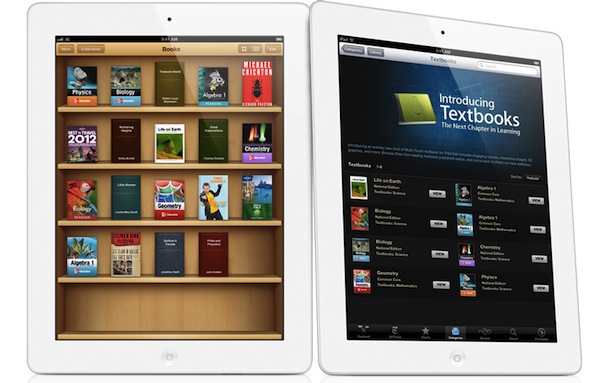
Following the announcements Apple made this morning about iBooks 2.0, textbooks and iTunes U, some interesting discussions have surfaced online in regards to Apple’s willingness to improve the education system – and reinvent textbooks – using iBooks and the iPad. Being based in Italy, I can’t comment specifically on the U.S. school system and what these new products mean for students, school districts and educational institutions, but I do have a few ideas and links to share.
iBooks has turned into a platform. No more just an e-Reader, with the addition of textbooks and books created through iBooks Author Apple seems to be betting on iBooks as a platform that stands on its own, just like iTunes and the App Store. You could argue that this was already clear from the start with the dedicated iBooks app and iBookstore within iOS, but it’s even more relevant now because of one key factor: content creation. Provided you have an iBookstore account, you can now create content-rich books on your Mac and sell them through the iBookstore. You can also export them locally, and preview them on your iPad. I have no idea how smaller, independent publishers and authors will respond to iBooks Author in the long term, but as far as creating content goes, Apple’s latest desktop app looks fantastic. The double nature of this announcement (rich textbooks, books by authors) combined with the existing features of iBooks has a real chance of creating “an iBooks ecosystem”.
Software sells the hardware. Obvious consequence: books created with iBooks Author (packages, not the actual content) can only be sold through the iBookstore. Now, assuming authors like the functionalities and workflow enabled by iBooks Author and assuming they also like money, if this initiative proves successful in the long term, what devices are authors going to recommend?
…It depends. iBooks Author looks like a great eBook creation app, but some authors are skeptical. We will have to wait and see if authors will adopt the software, if Apple will provide continued support with updates and, ultimately, if iBooks Author can be used effectively for all kinds of eBooks, not just those heavy on media and fancy effects. For instance, it doesn’t look like EPUB is supported right now as the format seems to be different. Ben Brooks is right: Apple seems to be targeting Kindle Singles directly with iBooks Author.
Rich content made simple. iBooks Author simplifies the process of creating content-rich books with drag & drop, pop-out menus, auto-align controls, and more. From iBooks Author’s Help section:
- Gallery: Add a sequence of images your readers can swipe through, each with its own custom caption.
- Media: Add a movie or audio file readers can play.
- Review: Add a sequence of interactive multiple-choice or drag-to-target questions.
- Keynote: Add a Keynote presentation (exported as HTML).
- Interactive image: Use labels (sometimes called callouts), panning, and zooming to provide detailed information about specific parts of a graphic.
- 3D: Add a 3D COLLADA (.dae) file readers can rotate.
- HTML: Add a Dashboard widget (.wdgt).
By using web technologies, desktop-class content creation software and an iWork-like interface, with iBooks Author Apple is offering what Xcode is to the App Store. For free.
Accessibility. iBooks Author fully takes advantage of VoiceOver and other Accessibility technologies to let people with disabilities read and experience books. Apple takes Accessibility seriously, and it shows.
Other uses for iBooks Author? I haven’t played with it yet, but I wouldn’t be surprised to see iBooks Author being used for other purposes.
iBooks Textbooks remind me of Push Pop Press. And guess what, the folks behind PPP (acquired by Facebook earlier this year – coincidence?) sound pretty pissed off.
Prices. iPads are expensive! But so were PCs and Macs. As Stephen Hackett correctly points out, Apple doesn’t disclose educational pricing, and several schools already have leased Macs in the classrooms. Will Apple provide a 1-1 “switching program” for schools that don’t need Macs anymore? And what will base pricing of leased iPads look like? The Verge spoke to Apple’s Phil Schiller, who told them “he thinks the numbers work out favorably for school districts if you weigh the costs of textbooks and classroom computers against iBooks content and iPads”. Joshua Schnell has a slightly different take and suggests that iPads may only end up being used in ”rich white kid schools”. I think we don’t have enough details to speculate on Apple’s educational pricing right now (as usual, a Volume Purchase Program for apps and books is available). The only data point we have is that iBooks Textbooks will be cheaper than physical textbooks…if publishers don’t change their minds.
Yes, physical books are more “durable” if you drop them. But what do you use today, an encyclopedia with a typewriter or a PC? Time to move on.
Other devices. I’m hearing reports of iBooks 2.0 and iTunes U not running smoothly on the original iPad and older iPhones, confirming my theory that textbooks seem to be heavily targeting the speedy A5 processor of the iPad 2 (I have no idea why would iTunes U and regular books run slower on older-gen devices though). Let’s not forget that an A6-enabled iPad 3 is rumored to land soon, and Apple may keep the iPad 2 around at a lower price.
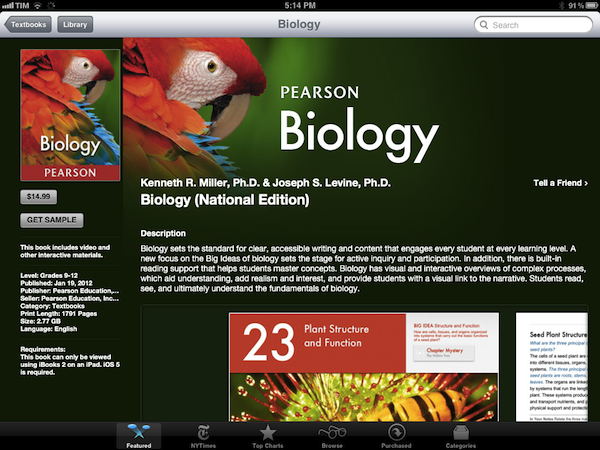
Digital books are still heavy. Pearson’s Biology textbook is a 2.77 GB download. We complained about iPad magazines and their absurd download sizes, but it looks like there isn’t much you can do about heavy content like images and video. When I was a kid, I often needed a bigger backpack for textbooks. Now kids will need bigger flash memory.
It’s up to schools and teachers. Pricing issue aside (and that is a huge “aside” for now), schools and teachers will obviously have to learn how to deploy and manage iPads, as well as integrate textbooks and new learning experiences into their curricula. In the current scenario, it’s very likely that kids already know how to use iPads, and their teachers will have to play catch up. On the technical side, I’d suggest schools to look for inspiration in Fraser Speirs’ experiences.
Apple doesn’t want to fix textbooks. They want to improve learning. The underlying message of today’s announcements isn’t strictly about textbooks – surely they play a big role in education, but the scope of Apple’s mission is much broader. Apple wants to re-imagine learning and improve current standards with new technologies: content management systems for classes are nothing new, but iTunes U takes it to a whole new level with a beautiful, always-connected, interactive application. There are big corporations that control the education/textbook market and who knows if they’re really willing to give Apple the leading role in this game with distribution, standardization of technologies and guidance. As Dan Frommer notes, change is not going to happen overnight but you can’t believe in paper textbooks as “the future”.
Apple’s revamped education strategy will be interesting to follow.
Access Extra Content and Perks
Founded in 2015, Club MacStories has delivered exclusive content every week for nearly a decade.
What started with weekly and monthly email newsletters has blossomed into a family of memberships designed for every MacStories fan.
Club MacStories: Weekly and monthly newsletters via email and the web that are brimming with apps, tips, automation workflows, longform writing, early access to the MacStories Unwind podcast, periodic giveaways, and more;
Club MacStories+: Everything that Club MacStories offers, plus an active Discord community, advanced search and custom RSS features for exploring the Club’s entire back catalog, bonus columns, and dozens of app discounts;
Club Premier: All of the above and AppStories+, an extended version of our flagship podcast that’s delivered early, ad-free, and in high-bitrate audio.
Apple Releases An iTunes U App
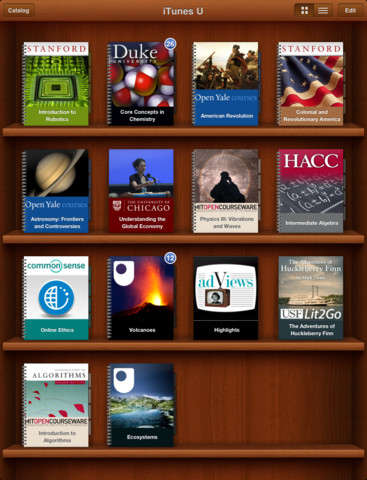
Apple has just announced and released the iTunes U App for iPhone and iPad. It’s a new app that lets teachers manage their iTunes U course and an app that helps students track all the content, assignments and messages from the courses that they study. iTunes U gives teachers the ability to customise their topics that they teach, give students information about office hours, post messages to their class and give students assignments.
The all-new iTunes U app enables students anywhere to tap into entire courses from the world’s most prestigious universities. -Eddy Cue
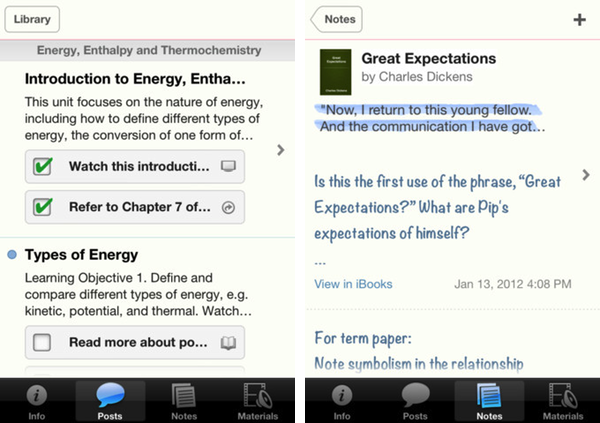
Effectively this new iTunes U app is similar to the various content management systems that are available for universities and other educational institutions. It’s fully featured with all the various video lectures, documents, apps and books available from within the app along with messages from teachers, the syllabus and even iBooks integration. In effect, it could be a great companion for any teacher or student. Over 100 courses have currently been created with the new iTunes U app from various universities and colleges across the US and further to that iTunes U is now available for K-12 institutions as well.
With the iTunes U app for iPad, iPhone and iPod touch, those barriers no longer exist. Students anywhere can take an entire course with complete access to all course materials right at their fingertips. With the iTunes U app, students are able to access new books right from within the app, and any notes taken in iBooks® are consolidated for easy reviewing.
Jump the break to view Apple’s press release on iTunes U for iOS. iTunes U for iOS is available here.
Access Extra Content and Perks
Founded in 2015, Club MacStories has delivered exclusive content every week for nearly a decade.
What started with weekly and monthly email newsletters has blossomed into a family of memberships designed for every MacStories fan.
Club MacStories: Weekly and monthly newsletters via email and the web that are brimming with apps, tips, automation workflows, longform writing, early access to the MacStories Unwind podcast, periodic giveaways, and more;
Club MacStories+: Everything that Club MacStories offers, plus an active Discord community, advanced search and custom RSS features for exploring the Club’s entire back catalog, bonus columns, and dozens of app discounts;
Club Premier: All of the above and AppStories+, an extended version of our flagship podcast that’s delivered early, ad-free, and in high-bitrate audio.
iBooks 2.0 Now Available
Following the announcement at the media event in New York City, Apple just released a major new version of iBooks, iBooks 2.0. As we detailed in our overview, iBooks 2.0 is mainly focused on enabling textbook support - Apple has cut deals with a series of publishers to bring iBookstore-based textbooks to the United States, and iBooks 2.0 brings full support for books created through the new Mac app, also coming today, iBooks Author.
From the changelog:
- Experience gorgeous Multi-Touch textbooks designed for iPad
- iBooks textbooks are filled with interactive features, diagrams, photos, and videos
- Tap to dive into images with interactive captions, rotate 3D objects, swipe through image galleries, watch videos in full screen, and more
- Use a finger as a highlighter when swiping over text in a textbook
- Take advantage of Study Cards to help you memorize important highlights, notes, and glossary terms
- Tap glossary terms to see definitions of key topics and concepts without leaving the page
It doesn’t look like iBooks’ original book and PDF reading functionalities have gone through any changes in this version. Textbooks downloaded from the iBookstore are placed in the same “Books” collection as regular titles; upon downloading a textbook on iBooks 1.5, the app will ask you to update to the latest version. Read more
Access Extra Content and Perks
Founded in 2015, Club MacStories has delivered exclusive content every week for nearly a decade.
What started with weekly and monthly email newsletters has blossomed into a family of memberships designed for every MacStories fan.
Club MacStories: Weekly and monthly newsletters via email and the web that are brimming with apps, tips, automation workflows, longform writing, early access to the MacStories Unwind podcast, periodic giveaways, and more;
Club MacStories+: Everything that Club MacStories offers, plus an active Discord community, advanced search and custom RSS features for exploring the Club’s entire back catalog, bonus columns, and dozens of app discounts;
Club Premier: All of the above and AppStories+, an extended version of our flagship podcast that’s delivered early, ad-free, and in high-bitrate audio.
Apple Announces “iBooks Author” Mac App, Available For Free Today
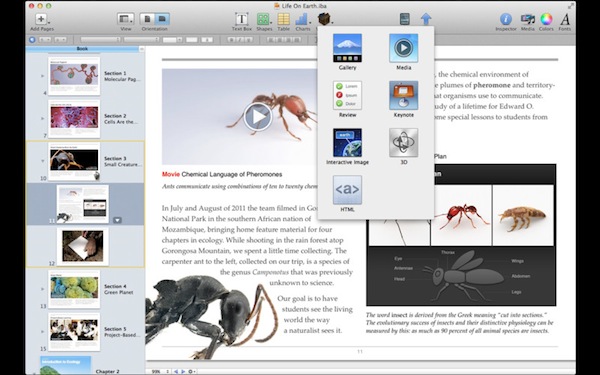
At its education media event in New York, Apple’s Phil Schiller just announced iBooks Author, a new Mac app for authoring books. From an intuitive interface that takes advantage of the desktop’s real screen estate, authors will be able to create and manage interactive books to use in the new iBooks 2, also announced and released today.
iBooks Author falls in line with previous speculation on a “GarageBand for eBooks”, and we’ll update this story with more details as we get them. From a demo offered on stage at the Guggenheim Museum, iBooks Author looked fairly impressive. Described by attendees as a “WYSIWYG application for building eBooks”, iBooks Author comes with a template chooser that makes it easy to get started on a new book project. Authors will then get access to a variety of tools in an interface that resembles Pages and Keynote with various controls to manage media, lay out text with drag & drop controls, and more. The automatic lay out of text seemed especially reliable from the first demo, with Apple noting that the experience they formed in making interactive animations in Keynote served as a foundation for making beautiful, interactive books without programming. Those in audience noted a few similarities to Push Pop Press’ one and only eBook experiment, released earlier this year on the iPad.
Now anyone can create stunning iBooks textbooks, cookbooks, history books, picture books, and more for iPad. All you need is an idea and a Mac. Start with one of the Apple-designed templates that feature a wide variety of page layouts. Add your own text and images with drag-and-drop ease. Use Multi-Touch widgets to include interactive photo galleries, movies, Keynote presentations, 3D objects, and more. Preview your book on your iPad at any time. Then submit your finished work to the iBookstore with a few simple steps. And before you know it, you’re a published author.
iBooks Author is rich on content. Authors can drag & drop Keynote presentations onto the main window and have the animation load inline, or embed web content via HTML5 and JavaScript. With glossaries, images, video and an overall focus on clean, easy-to-use management of interactive content, Apple described iBooks Author as a “miracle” compared to old eBook authoring tools. iBooks Author even iBookstore support built-in, and a preview function to quickly send a work-in-progress file to an iPad for instant preview. Read more
Access Extra Content and Perks
Founded in 2015, Club MacStories has delivered exclusive content every week for nearly a decade.
What started with weekly and monthly email newsletters has blossomed into a family of memberships designed for every MacStories fan.
Club MacStories: Weekly and monthly newsletters via email and the web that are brimming with apps, tips, automation workflows, longform writing, early access to the MacStories Unwind podcast, periodic giveaways, and more;
Club MacStories+: Everything that Club MacStories offers, plus an active Discord community, advanced search and custom RSS features for exploring the Club’s entire back catalog, bonus columns, and dozens of app discounts;
Club Premier: All of the above and AppStories+, an extended version of our flagship podcast that’s delivered early, ad-free, and in high-bitrate audio.
Apple Unveils iBooks 2.0 and iBooks Textbooks
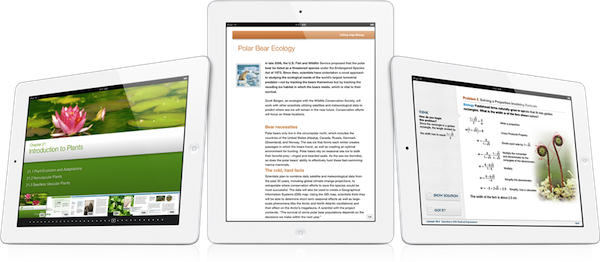
Apple has just announced iBooks 2 at its education themed event in New York. It’s the next evolution of eBooks for the iPad that Phil Schiller calls “amazing — graphic, fun, engaging”. Apple also announced iBooks Textbooks, a new initiative to bring digital textbooks to students thanks to content deals with publishers, starting with the United States.
The new iBooks will support multitouch gestures to move throughout an iBook which can be full of “rich, engaging interactive experiences” — even featuring 3D models so a student can see, for example, inside a cell. In the demo iBook, switching the iPad to portrait re-orientated the content so that the student could focus on reading the text. That way, books can have two completely different experiences, simply by re-orientating the iPad.
As you can see, authors have total freedom in terms of laying out text and graphics.
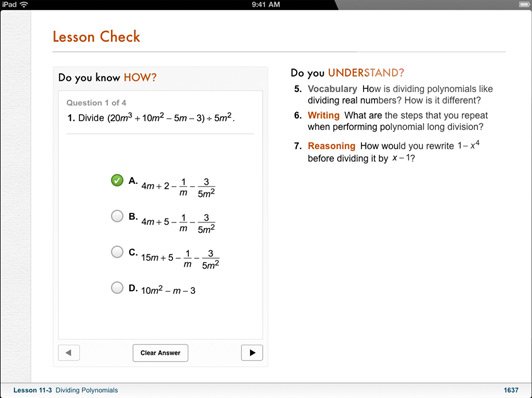
The iBooks can also bring up definitions that can include images; there is search within the book, links between pages, pages can have slideshows and more. As for those end of chapter review questions that are so common in textbooks, iBooks can now feature ”visual, interactive Q&A sections” that are much more engaging than the typical, long list of unengaging questions.
Note Taking
Another super critical study tool is highlighting and notetaking — your finger is always a highlighter. You just swipe. You can change the color. If you want to leave a note just tap.
With iBooks 2.0, Apple has brought a range of note taking features to help students with their study routine. There is everything from the traditional highlighting (just drag your finger over the desired text) to adding notes by tapping and then typing. An awesome feature here is that iBooks automatically takes all of your notes and highlights, chucks in any glossary terms and creates some study cards for revision.
I don’t think there’s ever been a textbook that made it this easy to be a good student.

Textbook Section in the iBookstore
These new textbook iBooks are now all available in a new ‘Textbook’ section that is on the iBookstore - all collated in one section. As is standard with iBooks, you can even get a free sample to see what the textbook is like.
These are stunning books. They take full advantage of what can be created.
Apple has worked with some partners and has brought some high school textbooks to the iBookstore and they’ll be available for $14.99 or less. Some of the publishers that have begun creating textbook iBooks includes Pearson, McGrawHill and Houghton Mifflin Harcourt - the three publishers that make 90% of textbooks. DK Publishing is also on board with four iBooks – they’re publishers of educational books for younger children. Finally, the E.O. Wilson Foundation is also on board, bringing the book ‘Life on Earth’ exclusively to the iBookstore - the first two chapters are available for free with the rest coming as they are completed for a “reasonable price”.
Of course, the authors can make these books and keep them up to date. But what’s most exciting is that it’s their book, for students. They keep it.
iBooks 2.0 will be available as a free update to the iBooks app today. Jump the break for Apple’s full Press Release.
Access Extra Content and Perks
Founded in 2015, Club MacStories has delivered exclusive content every week for nearly a decade.
What started with weekly and monthly email newsletters has blossomed into a family of memberships designed for every MacStories fan.
Club MacStories: Weekly and monthly newsletters via email and the web that are brimming with apps, tips, automation workflows, longform writing, early access to the MacStories Unwind podcast, periodic giveaways, and more;
Club MacStories+: Everything that Club MacStories offers, plus an active Discord community, advanced search and custom RSS features for exploring the Club’s entire back catalog, bonus columns, and dozens of app discounts;
Club Premier: All of the above and AppStories+, an extended version of our flagship podcast that’s delivered early, ad-free, and in high-bitrate audio.
New Twitter Clients
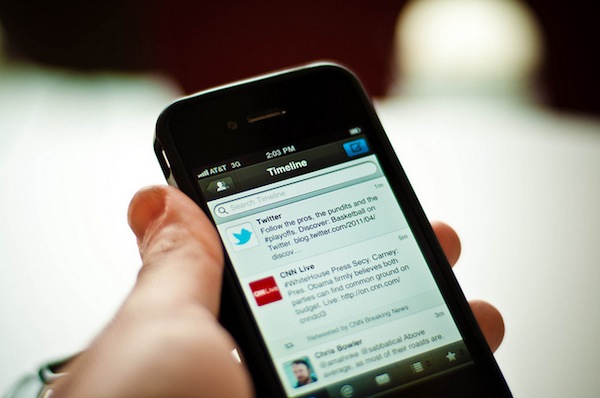
Justin Williams writes about the current state of Twitter clients for iOS:
What iOS needs is the Twitter equivalent to Adium: a well maintained, open source Twitter client that is targeted at the most hardcore and passionate users of both Twitter and the iOS platform.
That, of course, is easier typed than done. Many open source projects fail because of lack of vision or direction. Others fail because they are just badly engineered software that aims to shove every pet feature into a unified product. Projects like Adium succeed because there is an established hierarchy of managers, developers and contributors. Each release has a focus and direction much like a commercially produced project.
My first Twitter client was Twittelator Pro by Andrew Stone, which I installed soon after I got my first iPhone in 2008. After that, I switched to Twitterrific, which I kept until Tweetie came out. For a few months I bounced back and forth between Tweetie, Twitterrific and Birdfeed but, eventually, I settled with Tweetie 2. I loved Tweetie 2. It was the perfect Twitter client for my needs, it was fast and Loren was (is) a great guy. But then Twitter bought the app, started doing all kinds of crazy things to it, and the excitement wore off. I went back to Twitterrific, but it wasn’t the same – I had become very accustomed to Tweetie (now Twitter for iPhone) and the simplicity of Twitterrific was disorienting. Like Justin, I’ve always had a problem with inline DMs in Twitterrific.
Throughout 2010 and 2011 there’s also been a period when I went back to trying every Twitter client out there, including Twittelator Pro (again), but also Echofon, Tweetings, HootSuite, Osfoora, TweetList and TweetLogix. I was addicted to trying Twitter clients until Tweetbot came out and, as I wrote in my review, proved to be a Twitter app for iPhone I could once again fall in love with. I’ve been using Tweetbot for iPhone ever since, and the app keeps getting better on each release. Personally, I don’t agree with Justin’s point that Tweetbot is ”the best designed Android app available for iOS”, but this isn’t the main problem.
The real issue is that these days iOS Twitter nerds are left with Tweetbot and nothing else. Twitterrific clearly isn’t targeting power users – maybe a better expression would be “users that don’t just casually check on Twitter” – and Twitter for iPhone, well, let’s just say it’s not exactly focused on Twitter geeks anymore. How about the other clients? I see very few innovators around, and the only third-party app I’m excited about (again, except Tweetbot, which I use every day) is Twittelator Neue – Stone’s app has a good chance to reinvent a few things especially if it ever comes to the iPad. But looking at the whole Twitter software landscape today, it’s clear to me there isn’t the kind of verve and anticipation for new clients that we experienced three years ago, with developers constantly updating their clients, one-upping competitors in terms of features, and teasing new products that (sadly) never came to be.
In a scenario where the less popular Twitter clients are either a) maintained through bug fix releases or b) updated with minor features every once in a while, lacking major additions like iPad and Mac counterparts, I see a glimmer of hope in Tweetbot – Tapbots are always up to some great stuff – and services like Tweet Marker: available for free to developers to implement in their apps, Tweet Marker is the first step towards that kind of client-side unification whose lack made switching Twitter clients on a daily (or even hourly) basis so painful in 2009. Check out the apps that already support Tweet Marker, and note how they’re the same names that I’ve mentioned above.
Building an Adium-like model for the ultimate Twitter client might be a viable plan, albeit an elaborate one considering all the technical complexities and frequent changes behind the Twitter API. An ideal modern Twitter client for power users should have delightful and powerful iOS apps and an outstanding Mac client that makes it extremely easy to switch environments without user fatigue; you have to make sure the apps are always brought up to date with the latest Twitter features from Twitter itself and iOS 5 (I’m fairly sure the technologies and APIs behind AIM aren’t updated nearly as often as Apple releases new iOS betas), and when everything’s distributed for free you have to make sure you’ve got a dedicated, kick-ass team of contributors and leaders, or things start to get messy (and slow) because of updates, user support, feature request, and so forth.
So here’s another possible scenario. Let’s continue to diversify the offer of available Twitter clients, and settle with one app for power users. Justin doesn’t like Tweetbot, but perhaps one year from now Tweetbot will be available on more platforms with changes and tweaks that everyone will like and use on a daily basis, even Justin. Around that Twitter client for power users, I imagine a flourishing ecosystem of innovative Twitter apps that don’t simply focus on building an alternative to Tweetbot – a daunting task at this point – but provide a unique experience that can live alongside the main, full-featured client. I’m thinking Tweet Library, also by Tweet Marker’s Manton Reece: instead of just focusing on being the perfect regular client, Tweet Library’s built-in client is functional to the app’s real feature: curating tweets and archiving them. This is the path I believe developers should strongly consider for building Twitter-connected apps: focus on APIs, services and interactions with other software. Where’s the Twitter app that integrates with Evernote and lets you annotate tweets? Where is the app to run, manage and archive online polls exclusively via Twitter? Where’s the service that lets you use your custom vanity URL and get beautiful, real-time, reliable click analytics instead of the ugly mess that’s HootSuite?
You see where I’m getting at – I believe developers are (obviously) completely free of investing their time and resources into competing with Tweetbot, but on the other hand I don’t think focusing on other aspects of Twitter means admitting defeat. It’s easy to say “Tweetbot won” or “Twitterrific is the best” when, really, the story is much more complex than that and also goes back to a company that has shown a “peculiar” approach to guiding its own third-party developers.
Will we ever go back to the Birdfeed and Tweetie era? I don’t think so. Twitter is now integrated in iOS 5 and seeing massive growth because of it, thus justifying the prospect of creating an app “for power users” even less. Yet I can’t help but think about a time, not too distant from now, when the power users will finally settle on a single solution for their power-hungry needs, and let other developers innovate atop of the Twitter platform in disruptive new ways. The ideas, devices, APIs and users are waiting.
[Photo by Jorge Quinteros]
Access Extra Content and Perks
Founded in 2015, Club MacStories has delivered exclusive content every week for nearly a decade.
What started with weekly and monthly email newsletters has blossomed into a family of memberships designed for every MacStories fan.
Club MacStories: Weekly and monthly newsletters via email and the web that are brimming with apps, tips, automation workflows, longform writing, early access to the MacStories Unwind podcast, periodic giveaways, and more;
Club MacStories+: Everything that Club MacStories offers, plus an active Discord community, advanced search and custom RSS features for exploring the Club’s entire back catalog, bonus columns, and dozens of app discounts;
Club Premier: All of the above and AppStories+, an extended version of our flagship podcast that’s delivered early, ad-free, and in high-bitrate audio.
Apple’s Education Event To Focus on iPad, K-12, “Teaching Tools” for Self-Publishers
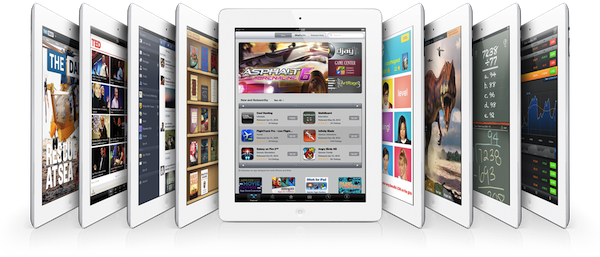
Less than 24 hours away from Apple’s “education announcement” in New York City, Bloomberg weighs in reporting that the event, set to begin at 10 AM EST at the Guggenheim Museum, will be focused on iPad, digital textbooks for students from kindergarten to 12th grade (K-12) and self-publishers. Initially rumored to be about “textbooks” as suggested by Steve Jobs in the authorized biography by Walter Isaacson, speculation leading up to the even has seen different sources claiming Apple will have a broader set of announcements with textbooks, but also a strong iPad presence and new tools to create eBooks on the desktop. Specifically, Ars Technica referred to these tools as GarageBand for eBooks.
Bloomberg now claims Apple’s educational plans will be primarily focused on showing the potential of digital textbooks and iPads in schools:
The plans, to be unveiled by Apple Internet software chief Eddy Cue, are aimed at broadening the educational materials available for the iPad, especially for students in kindergarten to 12th grade, the people said. By setting its sights on the $10 billion-a-year textbook industry, Apple is using the tablet to encourage students to shun costly tomes that weigh down backpacks in favor of less-expensive, interactive digital books that can be updated anywhere via the Web.
According to Bloomberg, there will be announcements for both publishers and authors. Authors will be able to create new digital editions of their works using a modified version of ePub, a file format that is already used in the publishing industry. Bigger publishers will be able to create digital textbooks with embedded graphics and video, suggesting that rumors of a simple interface similar to GarageBand for managing media and content within an eBook might be correct after all. It is unclear whether Apple is preparing one or more “digital tools” for independent authors and large publishing companies, although Bloomberg noted:
Apple also wants to empower “self-publishers” to create new kinds of teaching tools, said the people. Teachers could use it to design materials for that week’s lesson. Scientists, historians and other authors could publish professional-looking content without a deal with a publisher.
If true, this would suggest the company has created an improved eBook creation tool atop of the ePub standard with different options for independent authors and publishers to distribute their creations digitally through iTunes, or, for instance, locally in a classroom. Teachers willing to collaborate with students on a week’s lesson clearly wouldn’t need the App Store or the iBookstore for distribution, which may lead to some interesting speculation about “textbook sharing” and a possible iCloud implementation, too.
Highly anticipated then quickly dismissed as “over-hyped”, Apple’s education event is shaping up to be an interesting milestone for the company in the field of education. The iPad has become Apple’s second best-selling device behind the iPhone, with the company expected to report record sales for the holiday quarter next week. In spite of the iPad and iTunes offering a variety of educational content in the form of apps, eBooks and iTunes U content, in two years of iPad Apple has yet to officially commit to education and schools as a viable market for the device. Schools and universities have adopted iPads with independent programs and initiatives; now Apple has a chance to unify its educational offerings with publishers deals, a clear policy for independent authors, new tools for eBook creation, and perhaps simpler distribution methods that don’t require iTunes in the classroom and will allow for educational discounts on volume purchases (which Apple is already doing).
We’ll be covering the news from tomorrow’s Apple event starting at 10 AM EST (7 AM Pacific time) here on MacStories.
Access Extra Content and Perks
Founded in 2015, Club MacStories has delivered exclusive content every week for nearly a decade.
What started with weekly and monthly email newsletters has blossomed into a family of memberships designed for every MacStories fan.
Club MacStories: Weekly and monthly newsletters via email and the web that are brimming with apps, tips, automation workflows, longform writing, early access to the MacStories Unwind podcast, periodic giveaways, and more;
Club MacStories+: Everything that Club MacStories offers, plus an active Discord community, advanced search and custom RSS features for exploring the Club’s entire back catalog, bonus columns, and dozens of app discounts;
Club Premier: All of the above and AppStories+, an extended version of our flagship podcast that’s delivered early, ad-free, and in high-bitrate audio.
#MacStoriesDeals - Tuesday

Here are today’s @MacStoriesDeals on iOS, Mac, and Mac App Store apps that are on sale for a limited time, so get them before they end!
Access Extra Content and Perks
Founded in 2015, Club MacStories has delivered exclusive content every week for nearly a decade.
What started with weekly and monthly email newsletters has blossomed into a family of memberships designed for every MacStories fan.
Club MacStories: Weekly and monthly newsletters via email and the web that are brimming with apps, tips, automation workflows, longform writing, early access to the MacStories Unwind podcast, periodic giveaways, and more;
Club MacStories+: Everything that Club MacStories offers, plus an active Discord community, advanced search and custom RSS features for exploring the Club’s entire back catalog, bonus columns, and dozens of app discounts;
Club Premier: All of the above and AppStories+, an extended version of our flagship podcast that’s delivered early, ad-free, and in high-bitrate audio.