Posts in Featured

Apple Posts Initial WWDC 2012 Schedule, Releases Official App

With less than two weeks to go until WWDC 2012 kicks off, Apple has this morning released the conference schedule as well as the official iOS app and some guides for the conference goers. Developers who were lucky enough to snag tickets to WWDC ‘12 can access the schedule here. There are over 100 sessions and labs that have been categorised into six technical tracks covering:

  • Essentials
  • App Services
  • Developer Tools
  • Graphics, Media and Games
  • Safari and Web
  • Core OS

One interesting change is that the Apple Design Awards will this year be held on Monday at 3:45 PM - usually the event was held later in the event and during the evening.

The official WWDC app is also live now, featuring a detailed schedule, daily news and photos, a map of Moscone West and the ability to plan your week by favoriting sessions and detecting session conflicts. For those who might be new to the WWDC experience, Apple has also created a handy ‘Attendee Guide’ for WWDC that you can access here - it’s nothing huge but does have handy links to other resources that will likely be useful to new attendees. Lastly, there is guide to the WWDC labs including what they will cover, when and where they run and which require a reservation.

Access Extra Content and Perks

Founded in 2015, Club MacStories has delivered exclusive content every week for nearly a decade.

What started with weekly and monthly email newsletters has blossomed into a family of memberships designed for every MacStories fan.

Learn more here and from our Club FAQs.

Club MacStories: Weekly and monthly newsletters via email and the web that are brimming with apps, tips, automation workflows, longform writing, early access to the MacStories Unwind podcast, periodic giveaways, and more;

Club MacStories+: Everything that Club MacStories offers, plus an active Discord community, advanced search and custom RSS features for exploring the Club’s entire back catalog, bonus columns, and dozens of app discounts;

Club Premier: All of the above and AppStories+, an extended version of our flagship podcast that’s delivered early, ad-free, and in high-bitrate audio.

Learn more here and from our Club FAQs.


Espionage 3: Effortless Encryption for your Mac

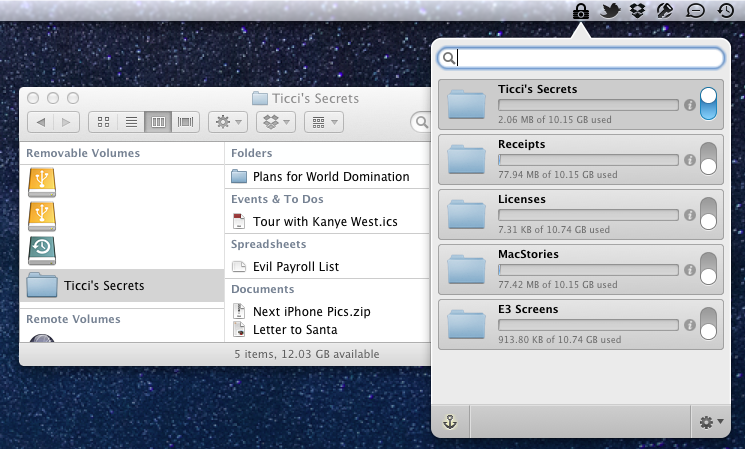
Tao Effect’s Espionage has always taken a novel approach to encrypting data on OS X. In contrast to applications like TrueCrypt or Knox that protect data in individually encrypted virtual disks or vaults, Espionage does its best to mask encrypted disks from the end user. Rather than interfacing with virtual disks that are individually encrypted, Espionage uses the folders you want to protect as a reference point and applies a 1Password approach to the protected folders on your system. Espionage solves two problems: it centralizes all of your protected data and makes that data easy to access through a single master password. Espionage’s approach to securing your data means that you can interface with folders on OS X as if they were regular folders — tasks like mounting and unmounting encrypted volumes are taken care of for you in the background through a streamlined interface. Protecting your data shouldn’t have to come at the cost of convenience.

Read more

Access Extra Content and Perks

Founded in 2015, Club MacStories has delivered exclusive content every week for nearly a decade.

What started with weekly and monthly email newsletters has blossomed into a family of memberships designed for every MacStories fan.

Learn more here and from our Club FAQs.

Club MacStories: Weekly and monthly newsletters via email and the web that are brimming with apps, tips, automation workflows, longform writing, early access to the MacStories Unwind podcast, periodic giveaways, and more;

Club MacStories+: Everything that Club MacStories offers, plus an active Discord community, advanced search and custom RSS features for exploring the Club’s entire back catalog, bonus columns, and dozens of app discounts;

Club Premier: All of the above and AppStories+, an extended version of our flagship podcast that’s delivered early, ad-free, and in high-bitrate audio.

Learn more here and from our Club FAQs.


Tweetbot 2.4 Brings New Search View, Keyword Mute Filters, Refinements

Following updates focused on iCloud sync and gestures, Tweetbot 2.4, released today on the App Store (iPhone, iPad), brings an updated search view with additional location features, relocated Trends and People categories, and various improvements that make the client’s search functionality more powerful and intuitive.

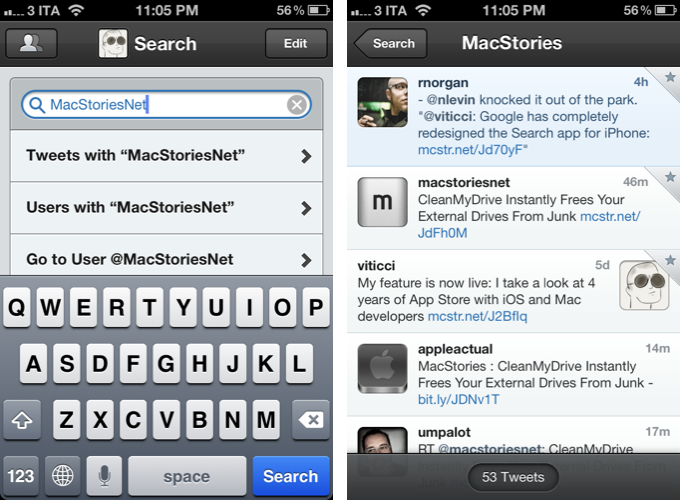
The new Search tab unifies Trends, People, and Top Tweets under a Browse section, with Saved Searches and the classic search box still available at the top of the screen. The dedicated Top Tweets option is quite enjoyable – I have indeed found myself browsing such flow of status updates on a couple of times for the occasional laugh or remarkably snarky tweet. Top tweets now also show up in regular search results, and they are marked by a silver star indicator.

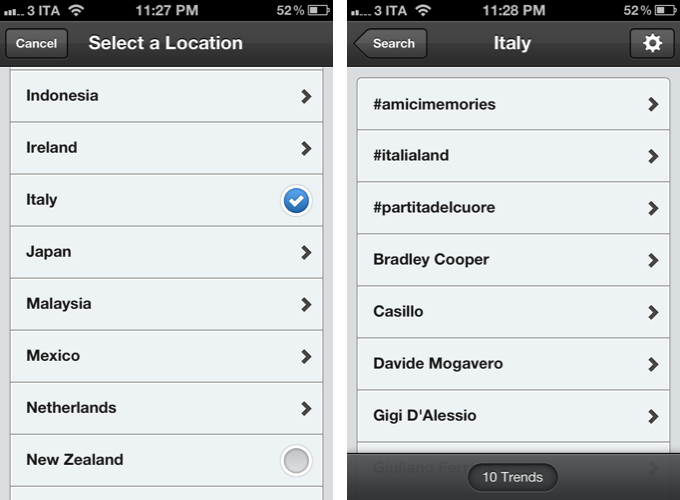
Trends, on the other hand, can be changed to another location directly from the search view of Tweetbot 2.4 – I don’t use Trends, but I assume the option will come in handy for those who, for some reason, like to check the recurring #Buongiorno trend in Italy.

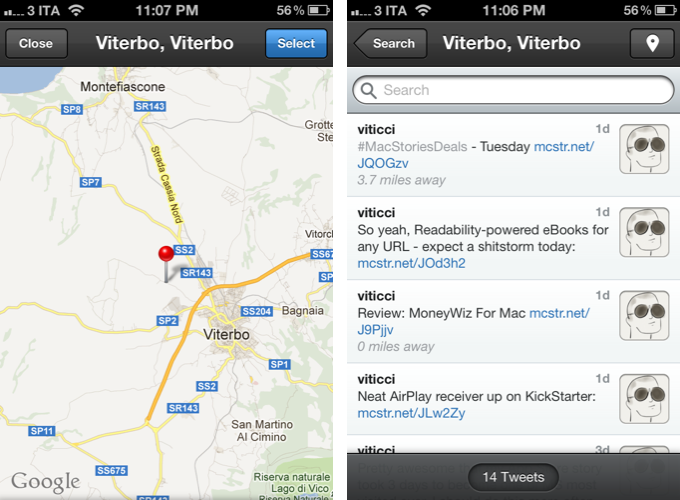
The big addition in Tweetbot’s new search interface is support for nearby tweets. Here, you can view nearby tweets with the ability to change your location (just tap on the embedded Google Map), and you can perform location-based keyword searches for tweets containing specific words that also happen to be located near you. Unfortunately, Viterbo resembles a ghost town when it comes to looking for fellow local MacStories readers. I asked Tapbots, and they confirmed my town’s insistence of loading @viticci as the only local MacStories tweeter isn’t an app’s bug.

There are two more little touches I like in Tweetbot 2.4: you can double-tap the search tab to open search with the keyboard, and the search box has been optimized to let you easily jump to tweets, users, or a specific @user without additional taps.

Keyword Mute Filters

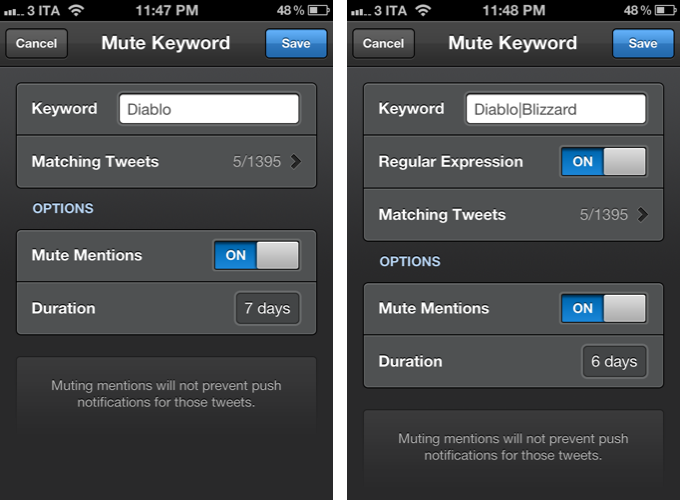
Tweetbot has been offering advanced mute filtering options for quite some time now. Version 2.4 now allows you to block specific keywords – not just users or clients – and there’s even support for regular expression if you really want to make sure you’re not reading about the latest spoilers in Game Of Thrones. Mentions can be muted as well.

Miscellaneous

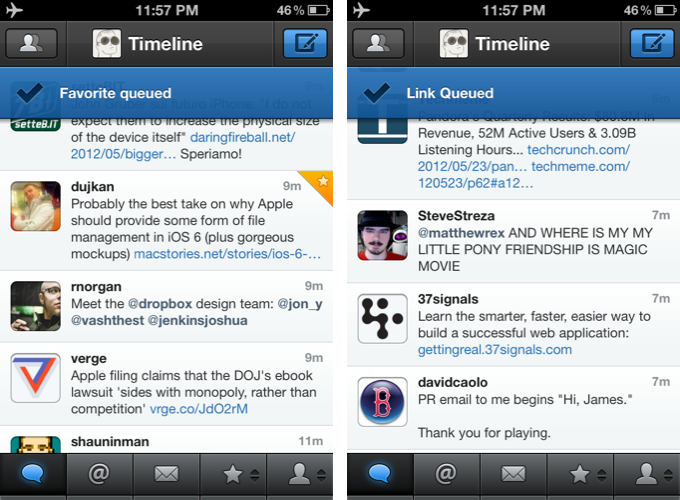
There are plenty of other refinements in Tweetbot 2.4. Offline support, for instance, will ensure tweets marked as favorite or sent to a Read Later service when no Internet connection is available will get “queued”, then sent/favorited as soon as you come back online. Sure enough, while browsing my timeline in Airplane mode, I fave’d a couple of tweets, sent some links to Pocket, and Tweetbot queued them. When I turned WiFi back on, the app refreshed, the tweets were marked as favorites in my account, and they appeared in my Pocket.

On the iPad, web and map views can now be dismissed with a two-finger swipe down gesture, which I found incredibly convenient and faster than reaching out for the Close button in the upper left corner. Also on the iPad, list views show one line of a list or profile description, and when viewing an image in full-screen, you can hold down for options.

Additionally, aside from the usual bug fixes, you can now swipe to the right on profile views to go back; items sent to Pinboard are marked as unread; and last, the compose screen comes with basic smart quote support (for quotes, em dash, and ellipsis).

With powerful new features and UI refinements added to an existing set of great functionalities, Tweetbot 2.4 retains familiarity while striving to remain the best third-party Twitter app for iOS. Get it from the App Store today.

Access Extra Content and Perks

Founded in 2015, Club MacStories has delivered exclusive content every week for nearly a decade.

What started with weekly and monthly email newsletters has blossomed into a family of memberships designed for every MacStories fan.

Learn more here and from our Club FAQs.

Club MacStories: Weekly and monthly newsletters via email and the web that are brimming with apps, tips, automation workflows, longform writing, early access to the MacStories Unwind podcast, periodic giveaways, and more;

Club MacStories+: Everything that Club MacStories offers, plus an active Discord community, advanced search and custom RSS features for exploring the Club’s entire back catalog, bonus columns, and dozens of app discounts;

Club Premier: All of the above and AppStories+, an extended version of our flagship podcast that’s delivered early, ad-free, and in high-bitrate audio.

Learn more here and from our Club FAQs.


CleanMyDrive Instantly Frees Your External Drives From Junk

I am a huge fan of MacPaw products. The company’s care for consistent UI design combined with huge functionality is well-known all over the Macintosh community, and I use their apps pretty frequently. In fact, Gemini was the topic of my first MacStories post.

MacPaw remained makers of desktop software only, even after the iPhone came out; this is a move I personally like a lot, as you find less well-designed Mac apps than iOS utilities nowadays, and it feels good to see some guys focusing on the desktop business. MacPaw’s newest product, CleanMyDrive, is a stripped-down, menubar version of their first and most popular app CleanMyMac, and it fulfills the task of silently freeing your external HDD and flash drives from unwanted junk data or duplicates.

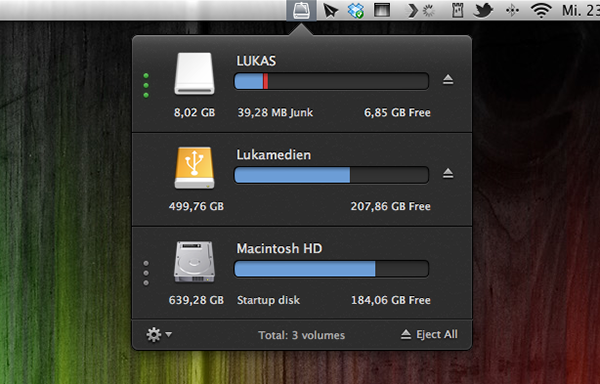
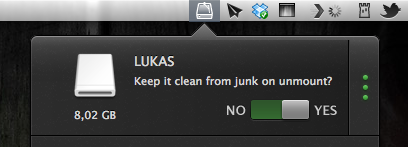
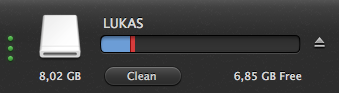
After installing the app, CleanMyDrives sits behind a nicely crafted hard disk icon in the menu bar. Click on it, and a dropdown window appears; from there, you can control the app’s features. The biggest advantage of making CleanMyDrive a menubar utility is that it’s invisible until you really need it. Now, every time you connect an external drive to your Mac CleanMyDrive will check its capacity and data — when it recognizes new ones, you’ll be asked whether it should check them as well in the future or not. The amount of used and free space is shown in a horizontal bar using blue and white parts.

If CleanMyDrive finds junk files on one drive (things like DS_Store, Thumbs.db, Spotlight, hidden trashes and so on), it displays their portion in red (plus the exact size in MB on hover), and you can delete them instantly. If you’re lazy and don’t want to manually delete the found junk on your drives all the time, CleanMyDrive can automatically delete junk every time you eject a drive, too.

After testing the app with my USB drives, I can say that it did not delete any of my files and folders, but still freed some space – likely related to “junk” accumulated over time.

Because the app is focused on smaller drives, CleanMyDrive firstly only scans external drives with 64 GB of storage or less. However, you can change that in the preferences to any size limitation you like and even disable it completely to also include large external HDDs. However, CleanMyDrive can’t check your internal drive for junk. One could already have guessed so from the app’s name, but as the internal drive’s storage is nevertheless shown in the app’s window, I tried to scan it as well. At this point, the developers allowed themselves some advertising for their other product: the app brazenly recommended me to scan my internal drive with CleanMyMac.

For cleaning my external drives, I’ll definitely stick with CleanMyDrive; this almost instant decision was mainly made due to the app’s fantastic and — yes, that’s the way I felt about it — cute design. The UI is clutter-free, simple, and it makes intelligent use of sliding effects and hover controls; it’s fun to use. The app’s small preference window plus the rotating cog wheel to open it up — little details, something I like very much — rounded up my impression of it as a cute little companion to ease up your workflow.

CleanMyDrive can be a very useful utility, especially when you’re using (maybe even several) external drives. Plus, its unobtrusiveness and pleasant user experience make for a very useful package which comes for free for a limited time. So don’t hesitate and grab CleanMyDrive on the Mac App Store while it’s hot.

Access Extra Content and Perks

Founded in 2015, Club MacStories has delivered exclusive content every week for nearly a decade.

What started with weekly and monthly email newsletters has blossomed into a family of memberships designed for every MacStories fan.

Learn more here and from our Club FAQs.

Club MacStories: Weekly and monthly newsletters via email and the web that are brimming with apps, tips, automation workflows, longform writing, early access to the MacStories Unwind podcast, periodic giveaways, and more;

Club MacStories+: Everything that Club MacStories offers, plus an active Discord community, advanced search and custom RSS features for exploring the Club’s entire back catalog, bonus columns, and dozens of app discounts;

Club Premier: All of the above and AppStories+, an extended version of our flagship podcast that’s delivered early, ad-free, and in high-bitrate audio.

Learn more here and from our Club FAQs.


#MacStoriesDeals - Wednesday

Here are today’s @MacStoriesDeals on hardware, iOS, and Mac apps that are on sale for a limited time, so get them before they end!
Read more

Access Extra Content and Perks

Founded in 2015, Club MacStories has delivered exclusive content every week for nearly a decade.

What started with weekly and monthly email newsletters has blossomed into a family of memberships designed for every MacStories fan.

Learn more here and from our Club FAQs.

Club MacStories: Weekly and monthly newsletters via email and the web that are brimming with apps, tips, automation workflows, longform writing, early access to the MacStories Unwind podcast, periodic giveaways, and more;

Club MacStories+: Everything that Club MacStories offers, plus an active Discord community, advanced search and custom RSS features for exploring the Club’s entire back catalog, bonus columns, and dozens of app discounts;

Club Premier: All of the above and AppStories+, an extended version of our flagship podcast that’s delivered early, ad-free, and in high-bitrate audio.

Learn more here and from our Club FAQs.


iOS 6 and Files.app

Rene Ritchie thinks Apple should provide direct document access with iOS 6 through a dedicated Files.app:

A unified document repository, modeled after the existing unified image repository, rounded out with more consistent attachment options, could be the best of all worlds. Users wouldn’t have to remember which folder a document was in, nor which app. They wouldn’t have to jump around to edit or share. Users could simply open any app capable of editing or sharing a certain type of app and go to work.

I agree with the notion that the current Open In, app-based document transfer model of iOS is broken. The simplicity brought by iOS freed average users from the complexities of the filesystem; people who like to get their daily work done with iOS devices, however, miss a unified document filing system. Paradoxically, the “simple” iOS, with its “Open In” menu and multiple copies of the same document, requires people to manually manage more.

In February, I envisioned something similar to Rene’s proposed Files.app solution:

So, I had an idea. I think the same iTunes File Sharing feature would work a lot better as a dedicated, native iCloud app for iOS devices (and maybe the Mac too). After all, if Apple is providing an iTunes-based file management utility for Mac users, why couldn’t they build an app that enabled any third-party iOS app to save and import files from iCloud? This app would be built into the system and allow users to simply collect documents, like iTunes File Sharing. Developers could easily add options to their apps to import files from “iCloud File Sharing” and export files to it. Users would have the same feature set of the existing iTunes File Sharing, only with an interface they are already familiar with, because iCloud File Sharing would resemble the existing file management workflow of iWork for iOS or iCloud.com. The only difference is that it would be integrated on a system level, work with any iOS app, and basically be an extension of the “Open In” menu that already allows apps to communicate with each other through supported file types.

After having tried the latest developer releases of Mountain Lion and putting some more thought on the matter, though, I am not so sure about the centralized repository system anymore. Namely, I am not convinced it should be a separate app.

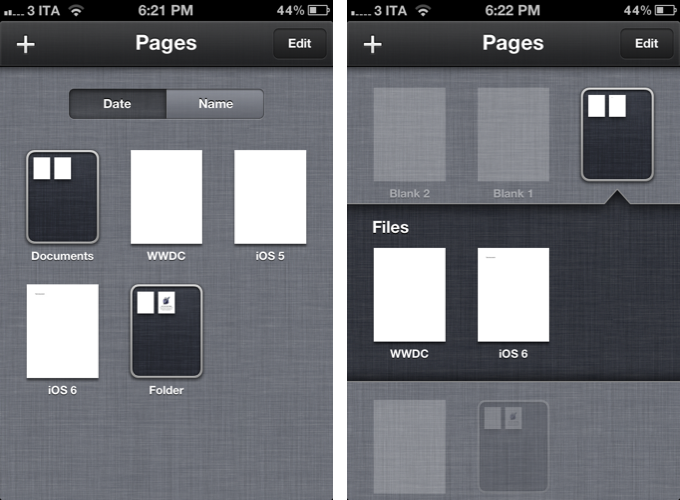
Rene rightfully compares the possible Files.app to the existing Photos.app for iOS. Files could present document folders the same way Photos displays image albums, and it could have the same systemwide hooks to let other apps access documents from the unified repository. However, there is a difference worth noting: Photos.app gets its contents from a primary, hardware-based component of iOS – the camera. A user takes a picture, it goes into Photos. Same for videos and screenshots – the interaction is simple.

What is a file, though? Is it a text document? RTF or .txt? If so, does Files.app come with preview capabilities for those file types? Or is it about PDFs, .zip archives, folders, and .cbr files? And how do you get documents into Files.app?

Even by only slightly mimicking the Finder, Files.app could reset the past five years of “simple” iOS interactions in one big fell swoop. Photos itself, which is extremely straightforward, is criticized for its file management features. Now imagine that applied to the general concept of “files” with folders, views, sorting options, settings, and previews.

Today, I think what I wrote back in September could make for a better solution: inter-app communication.

Why can’t Apple build an invisible layer that lets Elements edit a text document from Evernote and Pages access the same file?

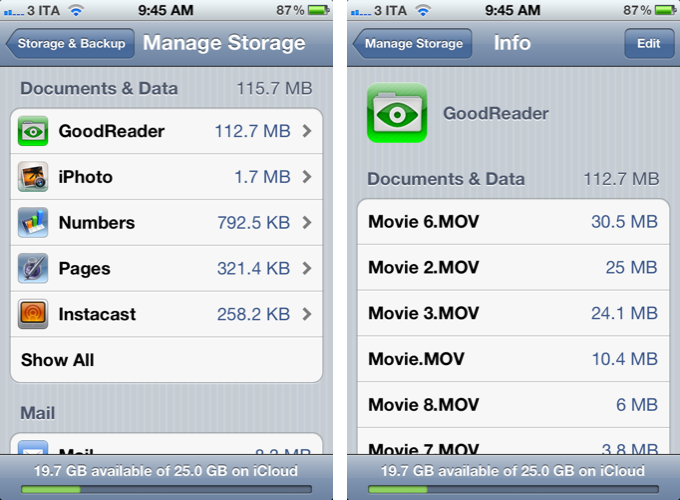
It turns out, a possible implementation of such layer already exists, but iOS won’t let apps communicate with it. Enter iCloud Documents & Data:

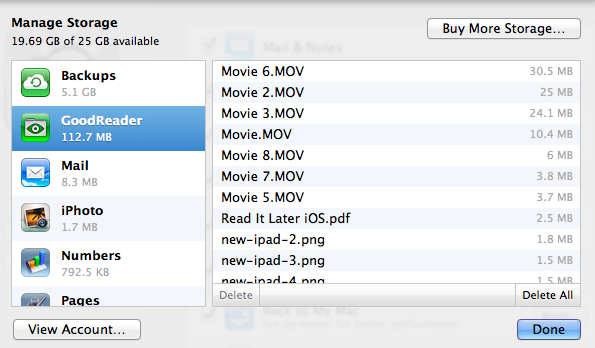
The same interface is available on OS X:

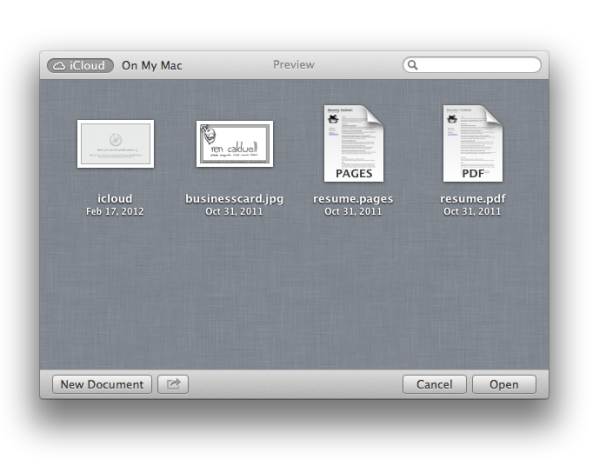
And in Mountain Lion, the standard file-saving dialog has been enhanced with the addition of an iCloud option (image via Macworld):

The design is slightly different since the first Mountain Lion Developer Preview that Macworld reviewed, but the concept has stayed the same throughout betas: Apple apps like TextEdit and Preview can “hold” documents into a special iCloud folder (located under Library/Mobile Documents/appname/Documents on OS X); these documents also show up on iOS under Documents & Data; currently, they are not available on iCloud.com, nor is Mountain Lion’s file-saving UI allowing, say, Preview to easily grab a file from TextEdit’s own iCloud “folder”. However, on Mountain Lion, Apple says that you can get your “existing documents” into iCloud by dragging them from the Finder or “other apps”.

If the system Apple has been putting in place is of any indication, I think enhancing the app-based model with better communication would actually outmatch the possible benefits of a separate Files.app. Documents & Data could become a document picker developers can enable in their apps with an API; because apps register file types they support, Apple wouldn’t have to worry about creating a Files.app capable of previewing every single format out there. GoodReader could open a PDF from Pages’ iCloud, and Pages could later access that same PDF with the changes made by GoodReader.

I am arguing that apps should become their own centralized locations that other apps can access and interact with – without creating duplicate files. Apple can’t provide the basic preview/edit functionalities of Photos for every possible format supported by Files.app, but 600,000 App Store apps might have the solution for that. Rather than creating an additional layer of management – disconnected from apps – iOS 6 could turn the interface already in place into a document picker that gives files their proper meaning: the app they belong to. Only with the addition of inter-app access and “universal save” to avoid duplicates.

Making changes to a single file with a variety of apps is something we do every day on our Macs. On OS X, there’s the Finder that acts as a glue between apps and files. By design, the technical constraints of iOS have turned non-destructive editing into a clunky and confusing experience, as we’ve seen with iPhoto. I am arguing that instead of building a “Files.app” or “Finder for iOS”, Apple could leverage the existing iCloud Documents & Data UI, and rework the iOS architecture to allow for changes to the same document from multiple apps.

The centralized Files.app idea is certainly appealing, but Apple has heavily invested in the app metaphor for the past years, and rather than replacing it with a new layer, I wouldn’t mind seeing it get smarter.

Access Extra Content and Perks

Founded in 2015, Club MacStories has delivered exclusive content every week for nearly a decade.

What started with weekly and monthly email newsletters has blossomed into a family of memberships designed for every MacStories fan.

Learn more here and from our Club FAQs.

Club MacStories: Weekly and monthly newsletters via email and the web that are brimming with apps, tips, automation workflows, longform writing, early access to the MacStories Unwind podcast, periodic giveaways, and more;

Club MacStories+: Everything that Club MacStories offers, plus an active Discord community, advanced search and custom RSS features for exploring the Club’s entire back catalog, bonus columns, and dozens of app discounts;

Club Premier: All of the above and AppStories+, an extended version of our flagship podcast that’s delivered early, ad-free, and in high-bitrate audio.

Learn more here and from our Club FAQs.


Google Launches Complete Redesign of Search iPhone App

Today, Google launched a major redesign of its official Search app for iPhone, which reaches version 2.0 and is now available on the App Store.

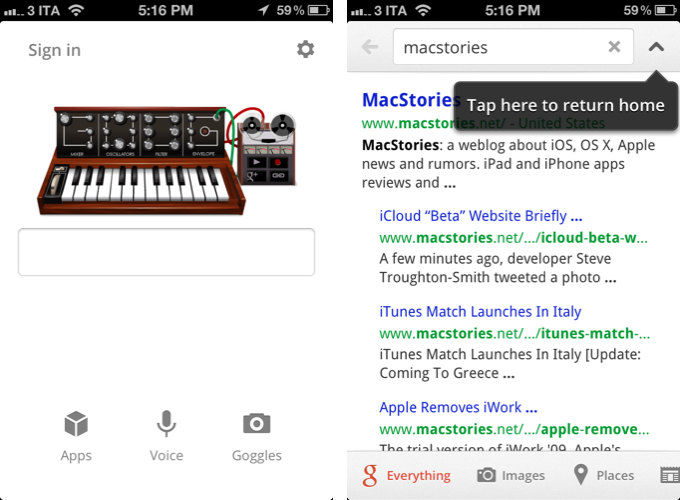
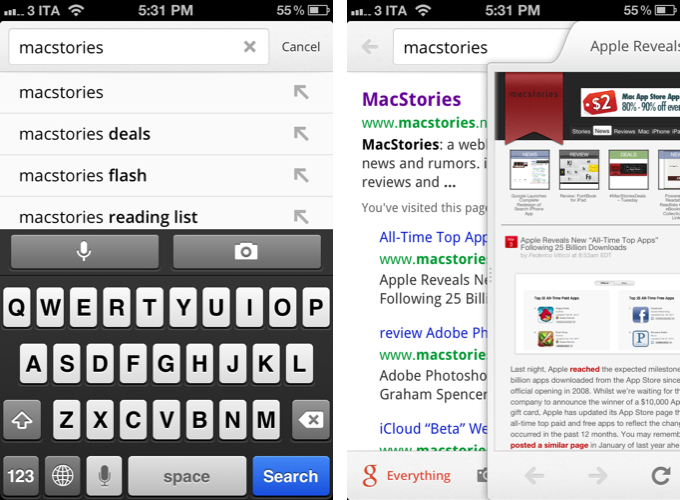
Inspired by the iPad update that was released last year, the new Google Search app for iPhone brings a completely redesigned start screen with options to sign in, search, and access Google apps. A shortcut for settings is available at the top alongside an icon to switch between search results and the search field at any time.

Searches can be performed by typing, or through two new shortcuts for voice and Goggles. These functionalities were already in place, but Google says they are now faster and more accessible thanks to the new interface. Similarly, the standard search results have gone through a major overhaul as well: as you scroll, controls are hidden and results are displayed in full-screen; like on the iPad, results open in a separate panel that you can dismiss at any time with a a single swipe. You can share results via email, open a webpage in Safari, and even search for specific text inside a page. Along the bottom, new tabs for Images, Places, News, and more allow you to easily switch between different types of Google results.

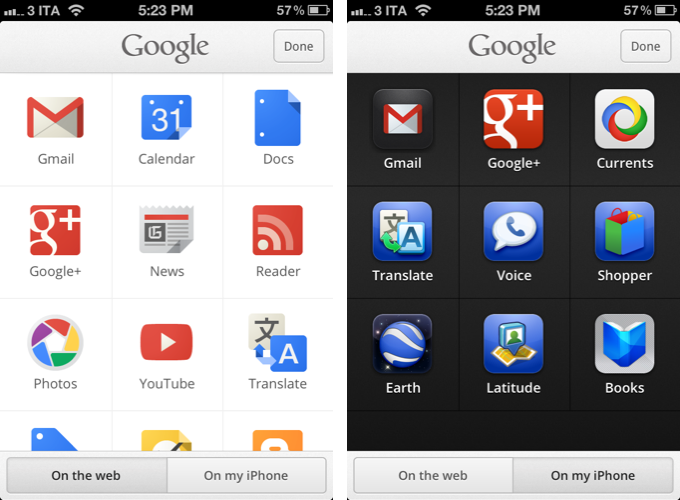
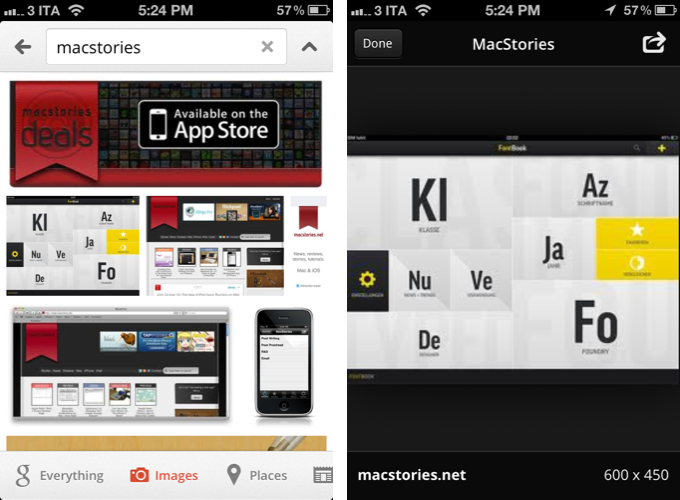
Furthermore, Google has redesigned image results to be displayed in full-screen, and a new Apps tab in the main screen allows you to load Google apps “on the web” or “from your iPhone”. As a side note, the app has also received a slightly redesigned icon, and both the iPhone and iPad version of Search can now save images to the Camera Roll.

Google Search 2.0 is now available on the App Store.

Access Extra Content and Perks

Founded in 2015, Club MacStories has delivered exclusive content every week for nearly a decade.

What started with weekly and monthly email newsletters has blossomed into a family of memberships designed for every MacStories fan.

Learn more here and from our Club FAQs.

Club MacStories: Weekly and monthly newsletters via email and the web that are brimming with apps, tips, automation workflows, longform writing, early access to the MacStories Unwind podcast, periodic giveaways, and more;

Club MacStories+: Everything that Club MacStories offers, plus an active Discord community, advanced search and custom RSS features for exploring the Club’s entire back catalog, bonus columns, and dozens of app discounts;

Club Premier: All of the above and AppStories+, an extended version of our flagship podcast that’s delivered early, ad-free, and in high-bitrate audio.

Learn more here and from our Club FAQs.


Review: FontBook for iPad

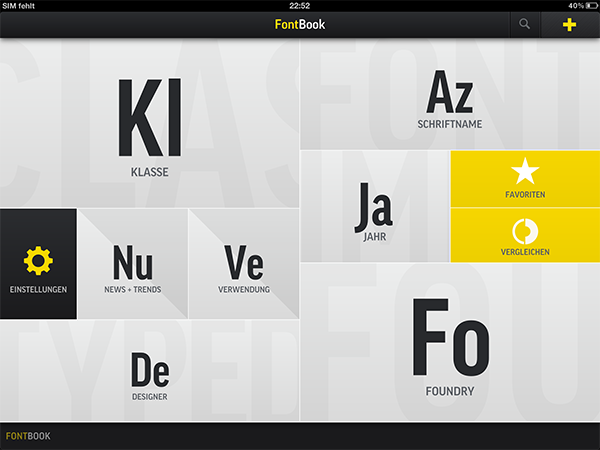
I’m a typography addict. Since I watched Gary Hustwit’s “Helvetica” documentary film, I constantly follow several type foundries and blogs (of which I consider I Love Typography and Typedia the top-notch sites) to keep myself updated on the latest news and typefaces. Hence after I saw the introduction of FontBook by FontShop (which was recently updated to version 2.1 with a Retina-optimized UI), the app was an instant-buy for me. Finally I can discover new typefaces, designers, and foundries wherever I go, offline, just with my iPad.

I usually discuss an app’s design separately at the end of a post, but FontBook has to be an exception from that, since the app itself is showing perfect use of digital typography and content curation — in no other area of design, content and design are connected as closely as in typography. FontBook is developed by a 10 person team at FontShop, one of the largest and the longstanding typeface resellers on the Internet, founded by renowned Erik Spiekermann in 1989, so it is no real surprise that it executes this need for exact design with pure perfection. Read more

Access Extra Content and Perks

Founded in 2015, Club MacStories has delivered exclusive content every week for nearly a decade.

What started with weekly and monthly email newsletters has blossomed into a family of memberships designed for every MacStories fan.

Learn more here and from our Club FAQs.

Club MacStories: Weekly and monthly newsletters via email and the web that are brimming with apps, tips, automation workflows, longform writing, early access to the MacStories Unwind podcast, periodic giveaways, and more;

Club MacStories+: Everything that Club MacStories offers, plus an active Discord community, advanced search and custom RSS features for exploring the Club’s entire back catalog, bonus columns, and dozens of app discounts;

Club Premier: All of the above and AppStories+, an extended version of our flagship podcast that’s delivered early, ad-free, and in high-bitrate audio.

Learn more here and from our Club FAQs.


Powered By Readability, Readlists Creates eBooks For Collections Of Links

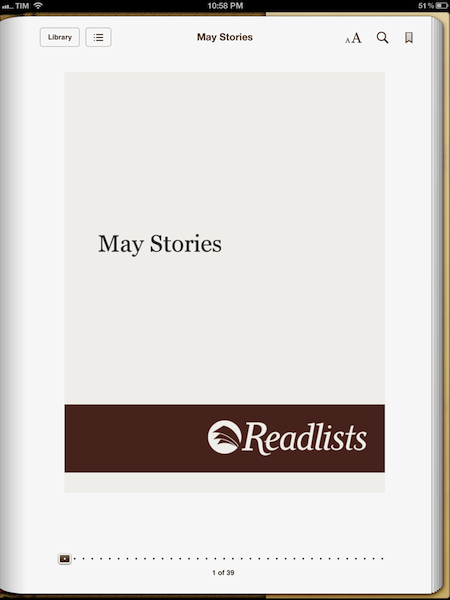
In my original review of Readability for iOS, I praised the app’s focus on clean design, beautiful typography, and focus on building a different system to support web publishers as unique aspects of what could have been easily dismissed as “yet another read later” app. In particular, I wrote how, ultimately, “it comes down to habits, curiosity, and willingness to try out a new service that offers a slightly different take on saving web articles for later”.

Ever since my review, I have switched to Pocket as my personal go-to read later web service and app on iOS, as I thoroughly enjoy Pocket’s wide-ranging approach to saving everything for later, rather than just articles. Today, however, Readability is announcing a new service called Readlists, which might give many a reason to use multiple “read-later” services in tandem – and that’s because Readlists leverages Readability’s existing platform and engine to target a different segment of web reading: collecting multiple links together. Read more

Access Extra Content and Perks

Founded in 2015, Club MacStories has delivered exclusive content every week for nearly a decade.

What started with weekly and monthly email newsletters has blossomed into a family of memberships designed for every MacStories fan.

Learn more here and from our Club FAQs.

Club MacStories: Weekly and monthly newsletters via email and the web that are brimming with apps, tips, automation workflows, longform writing, early access to the MacStories Unwind podcast, periodic giveaways, and more;

Club MacStories+: Everything that Club MacStories offers, plus an active Discord community, advanced search and custom RSS features for exploring the Club’s entire back catalog, bonus columns, and dozens of app discounts;

Club Premier: All of the above and AppStories+, an extended version of our flagship podcast that’s delivered early, ad-free, and in high-bitrate audio.

Learn more here and from our Club FAQs.