
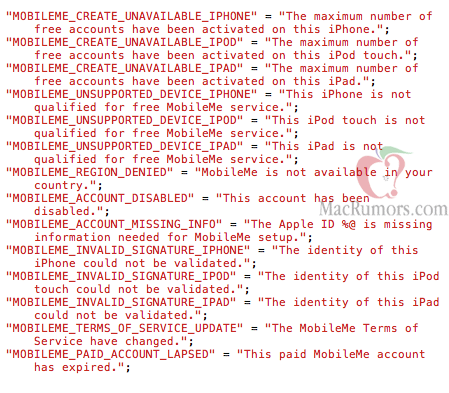
When Apple released the first GM seed of iOS 4.2 to developers, we noticed that they implemented the possibility to create a free Apple ID inside the MobileMe settings page and even sign in to MobileMe using an Apple ID. The functionality wasn’t working back then and it still returns an error today, and we speculated Apple might be taking the necessary measures to open up MobileMe’s services to a wider audience already using an Apple ID. As noted by MacRumors last night, though, it looks like that was the first move to make MobileMe free to some iOS users, or at least some specific sections of MobileMe. Read more
Posts in Featured
Some MobileMe Features Going Free with iOS 4.2?

Access Extra Content and Perks
Founded in 2015, Club MacStories has delivered exclusive content every week for nearly a decade.
What started with weekly and monthly email newsletters has blossomed into a family of memberships designed for every MacStories fan.
Club MacStories: Weekly and monthly newsletters via email and the web that are brimming with apps, tips, automation workflows, longform writing, early access to the MacStories Unwind podcast, periodic giveaways, and more;
Club MacStories+: Everything that Club MacStories offers, plus an active Discord community, advanced search and custom RSS features for exploring the Club’s entire back catalog, bonus columns, and dozens of app discounts;
Club Premier: All of the above and AppStories+, an extended version of our flagship podcast that’s delivered early, ad-free, and in high-bitrate audio.
Apple Posts “iAd Highlight Video” Ahead Of European Launch
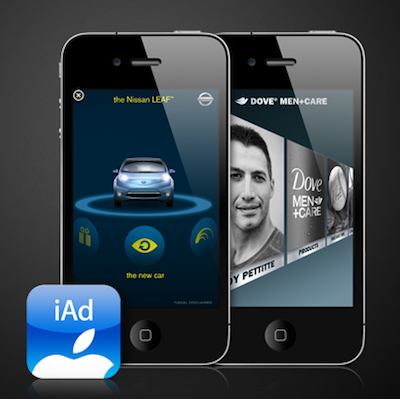
Earlier today Apple posted a video on advertising.apple.com to showcase the various iAd campaigns the company has launched up until today in the U.S. The video features brands such as AT&T, Nissan and JCPenney.
Apple announced yesterday iAds are coming to European countries in December. The first companies that will launch iAd campaigns in Europe are L’Orèal, Renault, Luis Vuitton, Nespresso and Perrier & Unilever. Despite some initial concerns of excessive control and a cancelled Adidas campaign, Apple has already signed on over half of the top 25 US advertisers. Read more
Access Extra Content and Perks
Founded in 2015, Club MacStories has delivered exclusive content every week for nearly a decade.
What started with weekly and monthly email newsletters has blossomed into a family of memberships designed for every MacStories fan.
Club MacStories: Weekly and monthly newsletters via email and the web that are brimming with apps, tips, automation workflows, longform writing, early access to the MacStories Unwind podcast, periodic giveaways, and more;
Club MacStories+: Everything that Club MacStories offers, plus an active Discord community, advanced search and custom RSS features for exploring the Club’s entire back catalog, bonus columns, and dozens of app discounts;
Club Premier: All of the above and AppStories+, an extended version of our flagship podcast that’s delivered early, ad-free, and in high-bitrate audio.
What I Really Want From The iPad 2

Today’s another “iPad 2” rumors day. With speculations of “iPad 2” parts suppliers revealed and blogs wondering whether the second version of Apple’s tablet will carry 3 additional USB ports, a second multi-touch screen and Steve Jobs’ fingerprints embedded in the device’s chassis, I thought I might just write what I really want from the “iPad 2”.
I want iteration. I want the same refining process Apple adopted with the iPhone. We know that Steve Jobs probably already had an “iPad 2” running Apple’s cloud service in the backstage of the iPad announcement in January, and I’m pretty sure even more units of the new model are connected right now to some WiFi router at Cupertino. Heck, maybe they even have an iPad 3 prototype hidden under some black cloth in their secret labs. But I just want to explain why I don’t want and need any of the features mentioned in the rumors, and why I don’t believe that stuff won’t happen anyway. Read more
Access Extra Content and Perks
Founded in 2015, Club MacStories has delivered exclusive content every week for nearly a decade.
What started with weekly and monthly email newsletters has blossomed into a family of memberships designed for every MacStories fan.
Club MacStories: Weekly and monthly newsletters via email and the web that are brimming with apps, tips, automation workflows, longform writing, early access to the MacStories Unwind podcast, periodic giveaways, and more;
Club MacStories+: Everything that Club MacStories offers, plus an active Discord community, advanced search and custom RSS features for exploring the Club’s entire back catalog, bonus columns, and dozens of app discounts;
Club Premier: All of the above and AppStories+, an extended version of our flagship podcast that’s delivered early, ad-free, and in high-bitrate audio.
Printopia: Finally An App That Lets Me Enable AirPrint On OS X
Since Apple removed AirPrint support from OS X 10.6.5 (we’re referring to support for shared printers, which was enabled in earlier 10.6.5 beta versions), many tweaks and apps to re-activate the functionality have surfaced on the internet. We’ve covered some of them, such as the AirPrint Hacktivator, but in my personal experience I’ve found these hacks to be unreliable at best. I’ve tried many of them, and I don’t know why – after some time they just stop working for me. Perhaps my local network isn’t stable enough, perhaps I have issues with 10.6.5. I don’t know. But thing is, these apps and tweaks stop working after a couple of print sessions.
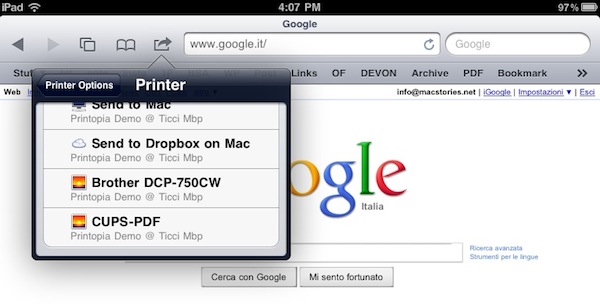
Yesterday I found out about this new app for Mac, Printopia, which the Ecamm developers tout as the simplest way to enable AirPrint for every printer you have configured on your Mac, together with the possibility to print from an iOS device to a local directory on your Mac and Dropbox. Read more
Access Extra Content and Perks
Founded in 2015, Club MacStories has delivered exclusive content every week for nearly a decade.
What started with weekly and monthly email newsletters has blossomed into a family of memberships designed for every MacStories fan.
Club MacStories: Weekly and monthly newsletters via email and the web that are brimming with apps, tips, automation workflows, longform writing, early access to the MacStories Unwind podcast, periodic giveaways, and more;
Club MacStories+: Everything that Club MacStories offers, plus an active Discord community, advanced search and custom RSS features for exploring the Club’s entire back catalog, bonus columns, and dozens of app discounts;
Club Premier: All of the above and AppStories+, an extended version of our flagship podcast that’s delivered early, ad-free, and in high-bitrate audio.
The Feed, Immersive RSS App for iPad
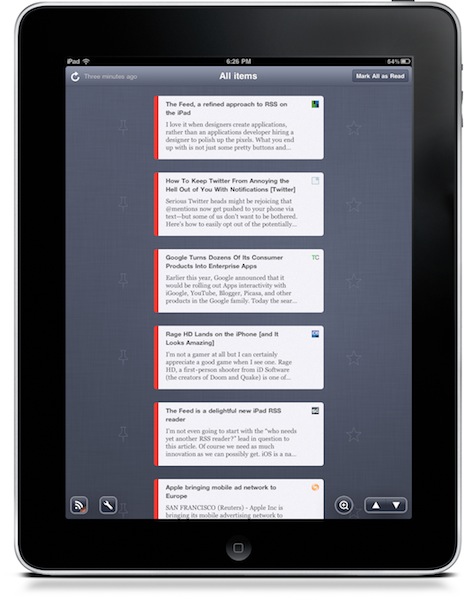
At this point, I guess you know I’m a huge Reeder fan. I use the app on my iPad on a daily basis, I fire up the iPhone version when I’m on the go and I was lucky enough to be accepted into the private Reeder for Mac alpha. Reeder has become my RSS app of choice, and I haven’t been able to switch to any other alternative since I tried the iPhone client last year. Yes, it’s that good. But that doesn’t mean I haven’t tried companion apps to Reeder.
Reeder is meant for RSS power consumption. Being based on folders and feeds navigation, Reeder isn’t meant for those people who want to sit down, pull out the iPad and start reading immediately. You have to do something to find your way through the feeds waiting for you in Google Reader. And that’s ok for me: Reeder is great Google Reader client. But what if we had the chance to have an Instapaper for Google Reader? An app that allows you to lean back, and just read? No folders, no menus, no navigation - just a flow of articles and text. Read more
Access Extra Content and Perks
Founded in 2015, Club MacStories has delivered exclusive content every week for nearly a decade.
What started with weekly and monthly email newsletters has blossomed into a family of memberships designed for every MacStories fan.
Club MacStories: Weekly and monthly newsletters via email and the web that are brimming with apps, tips, automation workflows, longform writing, early access to the MacStories Unwind podcast, periodic giveaways, and more;
Club MacStories+: Everything that Club MacStories offers, plus an active Discord community, advanced search and custom RSS features for exploring the Club’s entire back catalog, bonus columns, and dozens of app discounts;
Club Premier: All of the above and AppStories+, an extended version of our flagship podcast that’s delivered early, ad-free, and in high-bitrate audio.
Apple Releases Safari 5.0.3
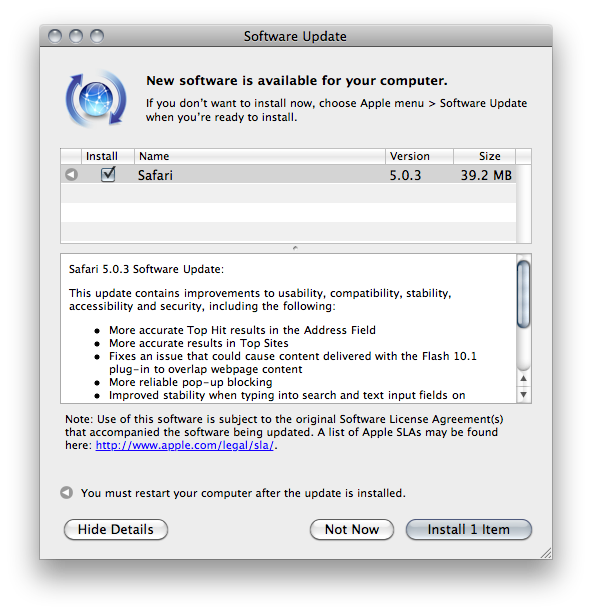
A few minutes ago Apple released an update to Safari, which reaches version 5.0.3. It’s available now in Software Update, or via direct download on Apple’s website.
Apple also released Safari 4.1.3 for Tiger users. Safari 5.0.3 comes with a variety of fixes and overall performance improvements. Specifically, the update addresses issues with search and text input fields on Netflix and Facebook, improves stability of Javascript-intensive extensions and introduces more reliable pop-up blocking.
Check out the full changelog below. Read more
Access Extra Content and Perks
Founded in 2015, Club MacStories has delivered exclusive content every week for nearly a decade.
What started with weekly and monthly email newsletters has blossomed into a family of memberships designed for every MacStories fan.
Club MacStories: Weekly and monthly newsletters via email and the web that are brimming with apps, tips, automation workflows, longform writing, early access to the MacStories Unwind podcast, periodic giveaways, and more;
Club MacStories+: Everything that Club MacStories offers, plus an active Discord community, advanced search and custom RSS features for exploring the Club’s entire back catalog, bonus columns, and dozens of app discounts;
Club Premier: All of the above and AppStories+, an extended version of our flagship podcast that’s delivered early, ad-free, and in high-bitrate audio.
Yahoo’s iPad-optimized Homepage Doesn’t Look Bad
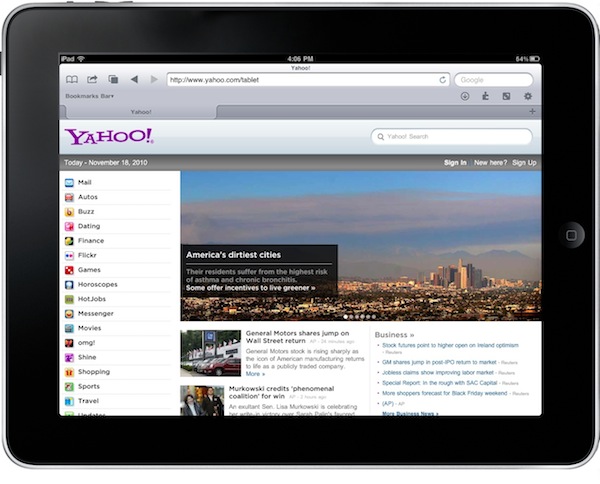
Oh, Yahoo. What are you, exactly? What have you become? No one really knows for sure. Are you “the guys behind Flickr”? Are you a news website? A mail platform? Many say Yahoo! lacks an identity. Maybe they do.
But anyway, the iPad-optimized homepage they recently launched isn’t that bad. Available at yahoo.com/tablet, it displays Yahoo’s sites in a sidebar and featured articles to flick through with your fingers on top.
Not bad at all.
Access Extra Content and Perks
Founded in 2015, Club MacStories has delivered exclusive content every week for nearly a decade.
What started with weekly and monthly email newsletters has blossomed into a family of memberships designed for every MacStories fan.
Club MacStories: Weekly and monthly newsletters via email and the web that are brimming with apps, tips, automation workflows, longform writing, early access to the MacStories Unwind podcast, periodic giveaways, and more;
Club MacStories+: Everything that Club MacStories offers, plus an active Discord community, advanced search and custom RSS features for exploring the Club’s entire back catalog, bonus columns, and dozens of app discounts;
Club Premier: All of the above and AppStories+, an extended version of our flagship podcast that’s delivered early, ad-free, and in high-bitrate audio.
Twitter for iPad: Bitter Sweet Imperfection
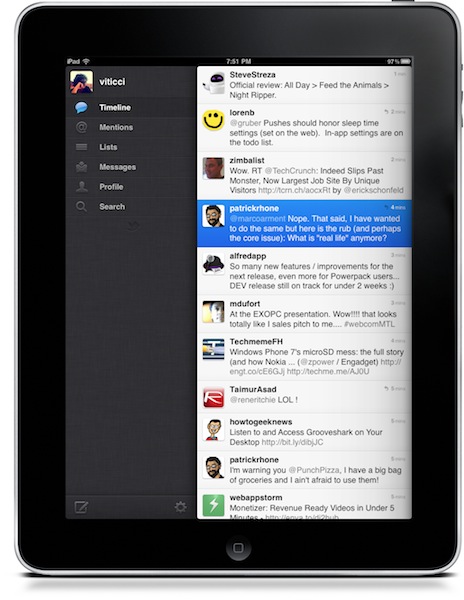
Twitter released an update to their official iOS app last night. The update includes the much talked push notifications for messages and mentions which, especially on the iPhone, really help in keeping track of what’s happening on Twitter when you’re not in front of your computer. I want to focus on the iPad version, though.
People went hard on criticizing Twitter for iPad when it first came out. Admittedly, it wasn’t the easiest “upgrade” to perform: until two months ago, users were accustomed to Osfoora HD and Twitterrific, two great clients that I still keep on my iPad because I don’t mind using them every once in a while. They’re beautiful and powerful pieces of software. Twitterrific has a huge userbase, but it doesn’t differ much from the iPhone version nor does it try to walk away from the standard established by Apple in Mail.app (sidebar in landscape mode, popover in portrait) being incorrectly used in thousands of other apps. I like Twitterrific, but it doesn’t give me the sense of trying something new, something revolutionary. Apps like Twitter for iPad, Aweditorium and Flipboard do. They bring a new, fresh experience to a new kind of device that seven months after its release still manages to surprise me. Read more
Access Extra Content and Perks
Founded in 2015, Club MacStories has delivered exclusive content every week for nearly a decade.
What started with weekly and monthly email newsletters has blossomed into a family of memberships designed for every MacStories fan.
Club MacStories: Weekly and monthly newsletters via email and the web that are brimming with apps, tips, automation workflows, longform writing, early access to the MacStories Unwind podcast, periodic giveaways, and more;
Club MacStories+: Everything that Club MacStories offers, plus an active Discord community, advanced search and custom RSS features for exploring the Club’s entire back catalog, bonus columns, and dozens of app discounts;
Club Premier: All of the above and AppStories+, an extended version of our flagship podcast that’s delivered early, ad-free, and in high-bitrate audio.
gDocuments: Open and Create Google Docs On Your iPhone and iPad
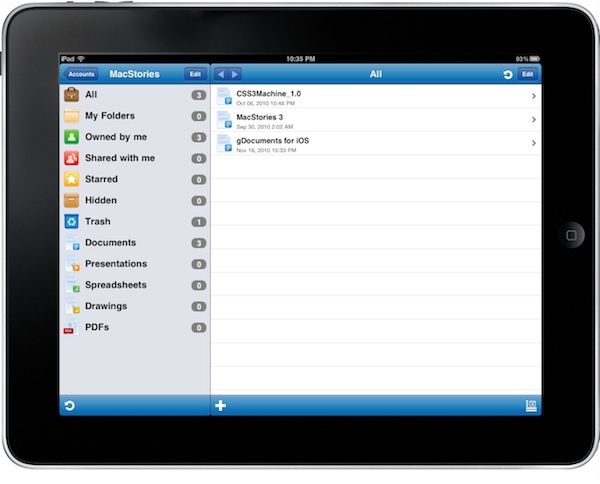
The Imagam developers are the guys behind iFiles, one of my favorite apps for iPhone and iPad I use on a daily basis to create and move files between my iOS devices, the internet and my computer. In case you haven’t tried it yet, you can find out more about iFiles here. gDocuments is a new universal app by Imagam that allows you to check on your Google Docs, but unlike many other Google Docs client currently available in the App Store this one comes with write capabilities, a neat interface and the feature set you’d expect from the folks who created iFiles. Read more
Access Extra Content and Perks
Founded in 2015, Club MacStories has delivered exclusive content every week for nearly a decade.
What started with weekly and monthly email newsletters has blossomed into a family of memberships designed for every MacStories fan.
Club MacStories: Weekly and monthly newsletters via email and the web that are brimming with apps, tips, automation workflows, longform writing, early access to the MacStories Unwind podcast, periodic giveaways, and more;
Club MacStories+: Everything that Club MacStories offers, plus an active Discord community, advanced search and custom RSS features for exploring the Club’s entire back catalog, bonus columns, and dozens of app discounts;
Club Premier: All of the above and AppStories+, an extended version of our flagship podcast that’s delivered early, ad-free, and in high-bitrate audio.